class: title, self-paced Introduction to Kubernetes<br/> <!-- .nav[*Self-paced version*] --> .debug[ ``` ``` These slides have been built from commit: 00d7d7f [shared/title.md](https://git.verleun.org/training/containers.git/tree/main/slides/shared/title.md)] --- name: toc-part-1 ## Part 1 - [Introductions](#toc-introductions) .debug[(auto-generated TOC)] --- name: toc-part-2 ## Part 2 - [Kubernetes concepts](#toc-kubernetes-concepts) - [Declarative vs imperative](#toc-declarative-vs-imperative) - [First contact with `kubectl`](#toc-first-contact-with-kubectl) .debug[(auto-generated TOC)] --- name: toc-part-3 ## Part 3 - [Running our first containers on Kubernetes](#toc-running-our-first-containers-on-kubernetes) - [Labels and annotations](#toc-labels-and-annotations) .debug[(auto-generated TOC)] --- name: toc-part-4 ## Part 4 - [Exposing containers](#toc-exposing-containers) - [Clone repo with training material](#toc-clone-repo-with-training-material) - [Running our application on Kubernetes](#toc-running-our-application-on-kubernetes) - [Deploying a sample application](#toc-deploying-a-sample-application) - [Scaling our demo app](#toc-scaling-our-demo-app) .debug[(auto-generated TOC)] --- name: toc-part-5 ## Part 5 - [Deployment types](#toc-deployment-types) - [Volumes](#toc-volumes) .debug[(auto-generated TOC)] --- name: toc-part-6 ## Part 6 - [Accessing logs from the CLI](#toc-accessing-logs-from-the-cli) - [Namespaces](#toc-namespaces) - [Next steps](#toc-next-steps) - [Links and resources](#toc-links-and-resources) .debug[(auto-generated TOC)] .debug[[shared/toc.md](https://git.verleun.org/training/containers.git/tree/main/slides/shared/toc.md)] --- class: pic .interstitial[] --- name: toc-introductions class: title Introductions .nav[ [Previous part](#toc-) | [Back to table of contents](#toc-part-1) | [Next part](#toc-kubernetes-concepts) ] .debug[(automatically generated title slide)] --- # Introductions - Let's do a quick intro. - I am: - 👨🏽🦲 Marco Verleun, container adept. - Who are you and what do you want to learn? <!-- ⚠️ This slide should be customized by the tutorial instructor(s). --> <!-- - Hello! We are: - 👷🏻♀️ AJ ([@s0ulshake], [EphemeraSearch], [Quantgene]) - 🚁 Alexandre ([@alexbuisine], Enix SAS) - 🐳 Jérôme ([@jpetazzo], Ardan Labs) - 🐳 Jérôme ([@jpetazzo], Enix SAS) - 🐳 Jérôme ([@jpetazzo], Tiny Shell Script LLC) --> <!-- - The training will run for 4 hours, with a 10 minutes break every hour (the middle break will be a bit longer) --> <!-- - The workshop will run from XXX to YYY - There will be a lunch break at ZZZ (And coffee breaks!) --> <!-- - Feel free to interrupt for questions at any time - *Especially when you see full screen container pictures!* - Live feedback, questions, help: --> <!-- - You ~~should~~ must ask questions! Lots of questions! (especially when you see full screen container pictures) - Use to ask questions, get help, etc. --> <!-- [@alexbuisine]: <https://twitter.com/alexbuisine> [EphemeraSearch]: <https://ephemerasearch.com/> [@jpetazzo]: <https://twitter.com/jpetazzo> [@s0ulshake]: <https://twitter.com/s0ulshake> [Quantgene]: <https://www.quantgene.com/> --> .debug[[logistics-v2.md](https://git.verleun.org/training/containers.git/tree/main/slides/logistics-v2.md)] --- ## Exercises - There is a series of exercises - To make the most out of the training, please try the exercises! (it will help to practice and memorize the content of the day) - There are git repo's that you have to clone to download content. More on this later. .debug[[logistics-v2.md](https://git.verleun.org/training/containers.git/tree/main/slides/logistics-v2.md)] --- class: in-person ## Where are we going to run our containers? .debug[[shared/connecting-v2.md](https://git.verleun.org/training/containers.git/tree/main/slides/shared/connecting-v2.md)] --- class: in-person, pic  .debug[[shared/connecting-v2.md](https://git.verleun.org/training/containers.git/tree/main/slides/shared/connecting-v2.md)] --- class: in-person ## You get a cluster of cloud VMs - Each person gets a private cluster of cloud VMs (not shared with anybody else) - They'll remain up for the duration of the workshop - You should have a (virtual) little card with login+password+IP addresses - You can automatically SSH from one VM to another - The nodes have aliases: `node1`, `node2`, etc. .debug[[shared/connecting-v2.md](https://git.verleun.org/training/containers.git/tree/main/slides/shared/connecting-v2.md)] --- class: in-person ## Connecting to our lab environment ### `webssh` - Open http://A.B.C.D:1080 in your browser and you should see a login screen - Enter the username and password and click `connect` - You are now logged in to `node1` of your cluster - Refresh the page if the session times out .debug[[shared/connecting-v2.md](https://git.verleun.org/training/containers.git/tree/main/slides/shared/connecting-v2.md)] --- class: in-person ## Connecting to our lab environment from the CLI .lab[ - Log into the first VM (`node1`) with your SSH client: ```bash ssh `user`@`A.B.C.D` ``` (Replace `user` and `A.B.C.D` with the user and IP address provided to you) <!-- ```bash for N in $(awk '/\Wnode/{print $2}' /etc/hosts); do ssh -o StrictHostKeyChecking=no $N true done ``` ```bash ### FIXME find a way to reset the cluster, maybe? ``` --> ] You should see a prompt looking like this: ```bash [A.B.C.D] (...) user@node1 ~ $ ``` If anything goes wrong — ask for help! .debug[[shared/connecting-v2.md](https://git.verleun.org/training/containers.git/tree/main/slides/shared/connecting-v2.md)] --- class: in-person ## `tailhist` - The shell history of the instructor is available online in real time - Note the IP address of the instructor's virtual machine (A.B.C.D) - Open http://A.B.C.D:1088 in your browser and you should see the history - The history is updated in real time (using a WebSocket connection) - It should be green when the WebSocket is connected (if it turns red, reloading the page should fix it) .debug[[shared/connecting-v2.md](https://git.verleun.org/training/containers.git/tree/main/slides/shared/connecting-v2.md)] --- ## Doing or re-doing the workshop on your own? - Use something like [Play-With-Docker](http://play-with-docker.com/) or [Play-With-Kubernetes](https://training.play-with-kubernetes.com/) Zero setup effort; but environment are short-lived and might have limited resources - Create your own cluster (local or cloud VMs) Small setup effort; small cost; flexible environments - Create a bunch of clusters for you and your friends ([instructions](https://github.com/jpetazzo/container.training/tree/master/prepare-vms)) Bigger setup effort; ideal for group training <!-- ## For a consistent Kubernetes experience ... - If you are using your own Kubernetes cluster, you can use [jpetazzo/shpod](https://github.com/jpetazzo/shpod) - `shpod` provides a shell running in a pod on your own cluster - It comes with many tools pre-installed (helm, stern...) - These tools are used in many demos and exercises in these slides - `shpod` also gives you completion and a fancy prompt - It can also be used as an SSH server if needed --> .debug[[shared/connecting-v2.md](https://git.verleun.org/training/containers.git/tree/main/slides/shared/connecting-v2.md)] --- class: self-paced ## Get your own Docker nodes - If you already have some Docker nodes: great! - If not: let's get some thanks to Play-With-Docker .lab[ - Go to http://www.play-with-docker.com/ - Log in - Create your first node <!-- ```open http://www.play-with-docker.com/``` --> ] You will need a Docker ID to use Play-With-Docker. (Creating a Docker ID is free.) .debug[[shared/connecting-v2.md](https://git.verleun.org/training/containers.git/tree/main/slides/shared/connecting-v2.md)] --- ## We will (mostly) interact with node1 only *These remarks apply only when using multiple nodes, of course.* - Unless instructed, **all commands must be run from the first VM, `node1`** - We will only check out/copy the code on `node1` - During normal operations, we do not need access to the other nodes - If we had to troubleshoot issues, we would use a combination of: - SSH (to access system logs, daemon status...) - Docker API (to check running containers and container engine status) <!-- ## Terminals Once in a while, the instructions will say: <br/>"Open a new terminal." There are multiple ways to do this: - create a new window or tab on your machine, and SSH into the VM; - use screen or tmux on the VM and open a new window from there. You are welcome to use the method that you feel the most comfortable with. --> <!-- ## Tmux cheat sheet [Tmux](https://en.wikipedia.org/wiki/Tmux) is a terminal multiplexer like `screen`. *You don't have to use it or even know about it to follow along. <br/> But some of us like to use it to switch between terminals. <br/> It has been preinstalled on your workshop nodes.* - Ctrl-b c → creates a new window - Ctrl-b n → go to next window - Ctrl-b p → go to previous window - Ctrl-b " → split window top/bottom - Ctrl-b % → split window left/right - Ctrl-b Alt-1 → rearrange windows in columns - Ctrl-b Alt-2 → rearrange windows in rows - Ctrl-b arrows → navigate to other windows - Ctrl-b , → rename window - Ctrl-b d → detach session - tmux attach → re-attach to session --> .debug[[shared/connecting-v2.md](https://git.verleun.org/training/containers.git/tree/main/slides/shared/connecting-v2.md)] --- ## A brief introduction - This was initially written to support in-person, instructor-led workshops and tutorials - These materials are maintained by [Jérôme Petazzoni](https://twitter.com/jpetazzo) and [multiple contributors](https://github.com/jpetazzo/container.training/graphs/contributors) - You can also follow along on your own, at your own pace - We included as much information as possible in these slides - We recommend having a mentor to help you ... - ... Or be comfortable spending some time reading the Docker [documentation](https://docs.docker.com/) ... - ... And looking for answers in the [Docker forums](https://forums.docker.com), [StackOverflow](http://stackoverflow.com/questions/tagged/docker), and other outlets .debug[[containers/intro.md](https://git.verleun.org/training/containers.git/tree/main/slides/containers/intro.md)] --- class: self-paced ## Hands on, you shall practice - Nobody ever became a Jedi by spending their lives reading Wookiepedia - Likewise, it will take more than merely *reading* these slides to make you an expert - These slides include *tons* of demos, exercises, and examples - They assume that you have access to a machine running Docker - If you are attending a workshop or tutorial: <br/>you will be given specific instructions to access a cloud VM - If you are doing this on your own: <br/>we will tell you how to install Docker or access a Docker environment .debug[[containers/intro.md](https://git.verleun.org/training/containers.git/tree/main/slides/containers/intro.md)] --- ## A brief introduction - This was initially written by [Jérôme Petazzoni](https://twitter.com/jpetazzo) to support in-person, instructor-led workshops and tutorials - Credit is also due to [multiple contributors](https://github.com/jpetazzo/container.training/graphs/contributors) — thank you! - You can also follow along on your own, at your own pace - We included as much information as possible in these slides - We recommend having a mentor to help you ... - ... Or be comfortable spending some time reading the Kubernetes [documentation](https://kubernetes.io/docs/) ... - ... And looking for answers on [StackOverflow](http://stackoverflow.com/questions/tagged/kubernetes) and other outlets .debug[[k8s/intro.md](https://git.verleun.org/training/containers.git/tree/main/slides/k8s/intro.md)] --- class: self-paced ## Hands on, you shall practice - Nobody ever became a Jedi by spending their lives reading Wookiepedia - Likewise, it will take more than merely *reading* these slides to make you an expert - These slides include *tons* of demos, exercises, and examples - They assume that you have access to a Kubernetes cluster - If you are attending a workshop or tutorial: <br/>you will be given specific instructions to access your cluster - If you are doing this on your own: <br/>the first chapter will give you various options to get your own cluster .debug[[k8s/intro.md](https://git.verleun.org/training/containers.git/tree/main/slides/k8s/intro.md)] --- ## Accessing these slides now - We recommend that you open these slides in your browser: https://training.verleun.org/ - Use arrows to move to next/previous slide (up, down, left, right, page up, page down) - Type a slide number + ENTER to go to that slide - The slide number is also visible in the URL bar (e.g. .../#123 for slide 123) .debug[[shared/about-slides-v2.md](https://git.verleun.org/training/containers.git/tree/main/slides/shared/about-slides-v2.md)] --- ## These slides are open source - You are welcome to use, re-use, share these slides - These slides are written in Markdown - The sources of many slides are available in a public GitHub repository: https://github.com/jpetazzo/container.training .debug[[shared/about-slides-v2.md](https://git.verleun.org/training/containers.git/tree/main/slides/shared/about-slides-v2.md)] --- class: pic .interstitial[] --- name: toc-kubernetes-concepts class: title Kubernetes concepts .nav[ [Previous part](#toc-introductions) | [Back to table of contents](#toc-part-2) | [Next part](#toc-declarative-vs-imperative) ] .debug[(automatically generated title slide)] --- # Kubernetes concepts - Kubernetes is a container management system - It runs and manages containerized applications on a cluster -- - What does that really mean? .debug[[custom/concepts-k8s.md](https://git.verleun.org/training/containers.git/tree/main/slides/custom/concepts-k8s.md)] --- ## What can we do with Kubernetes? - Let's imagine that we have a 3-tier e-commerce app: - web frontend - API backend - database (that we will keep out of Kubernetes for now) - We have built images for our frontend and backend components (e.g. with Dockerfiles and `docker build`) - We are running them successfully with a local environment (e.g. with Docker Compose) - Let's see how we would deploy our app on Kubernetes! .debug[[custom/concepts-k8s.md](https://git.verleun.org/training/containers.git/tree/main/slides/custom/concepts-k8s.md)] --- ## Basic things we can ask Kubernetes to do -- - Start 5 containers using image `atseashop/api:v1.3` -- - Place an internal load balancer in front of these containers -- - Start 10 containers using image `atseashop/webfront:v1.3` -- - Place a public load balancer in front of these containers -- - It's Black Friday (or Christmas), traffic spikes, grow our cluster and add containers -- - New release! Replace my containers with the new image `atseashop/webfront:v1.4` -- - Keep processing requests during the upgrade; update my containers one at a time .debug[[custom/concepts-k8s.md](https://git.verleun.org/training/containers.git/tree/main/slides/custom/concepts-k8s.md)] --- ## Other things that Kubernetes can do for us - Autoscaling (straightforward on CPU; more complex on other metrics) - Resource management and scheduling (reserve CPU/RAM for containers; placement constraints) - Advanced rollout patterns (blue/green deployment, canary deployment) .debug[[custom/concepts-k8s.md](https://git.verleun.org/training/containers.git/tree/main/slides/custom/concepts-k8s.md)] --- ## More things that Kubernetes can do for us - Batch jobs (one-off; parallel; also cron-style periodic execution) - Fine-grained access control (defining *what* can be done by *whom* on *which* resources) - Stateful services (databases, message queues, etc.) - Automating complex tasks with *operators* (e.g. database replication, failover, etc.) .debug[[custom/concepts-k8s.md](https://git.verleun.org/training/containers.git/tree/main/slides/custom/concepts-k8s.md)] --- ## Kubernetes architecture .debug[[custom/concepts-k8s.md](https://git.verleun.org/training/containers.git/tree/main/slides/custom/concepts-k8s.md)] --- class: pic  .debug[[custom/concepts-k8s.md](https://git.verleun.org/training/containers.git/tree/main/slides/custom/concepts-k8s.md)] --- ## Kubernetes architecture - Ha ha ha ha - OK, I was trying to scare you, it's much simpler than that ❤️ .debug[[custom/concepts-k8s.md](https://git.verleun.org/training/containers.git/tree/main/slides/custom/concepts-k8s.md)] --- class: pic  .debug[[custom/concepts-k8s.md](https://git.verleun.org/training/containers.git/tree/main/slides/custom/concepts-k8s.md)] --- ## Credits - The first schema is a Kubernetes cluster with storage backed by multi-path iSCSI (Courtesy of [Yongbok Kim](https://www.yongbok.net/blog/)) - The second one is a simplified representation of a Kubernetes cluster (Courtesy of [Imesh Gunaratne](https://medium.com/containermind/a-reference-architecture-for-deploying-wso2-middleware-on-kubernetes-d4dee7601e8e)) .debug[[custom/concepts-k8s.md](https://git.verleun.org/training/containers.git/tree/main/slides/custom/concepts-k8s.md)] --- ## Kubernetes architecture: the nodes - The nodes executing our containers run a collection of services: - a container Engine (typically Docker) - kubelet (the "node agent") - kube-proxy (a necessary but not sufficient network component) - Nodes were formerly called "minions" (You might see that word in older articles or documentation) .debug[[custom/concepts-k8s.md](https://git.verleun.org/training/containers.git/tree/main/slides/custom/concepts-k8s.md)] --- ## Kubernetes architecture: the control plane - The Kubernetes logic (its "brains") is a collection of services: - the API server (our point of entry to everything!) - core services like the scheduler and controller manager - `etcd` (a highly available key/value store; the "database" of Kubernetes) - Together, these services form the control plane of our cluster - The control plane used to be called the "master" .debug[[custom/concepts-k8s.md](https://git.verleun.org/training/containers.git/tree/main/slides/custom/concepts-k8s.md)] --- class: pic  .debug[[custom/concepts-k8s.md](https://git.verleun.org/training/containers.git/tree/main/slides/custom/concepts-k8s.md)] --- class: extra-details ## Running the control plane on special nodes - It is common to reserve a dedicated node for the control plane (Except for single-node development clusters, like when using minikube) - This node is then called a "master" (Yes, this is ambiguous: is the "master" a node, or the whole control plane?) - Normal applications are restricted from running on this node (By using a mechanism called ["taints"](https://kubernetes.io/docs/concepts/configuration/taint-and-toleration/)) - When high availability is required, each service of the control plane must be resilient - The control plane is then replicated on multiple nodes (This is sometimes called a "multi-master" setup) .debug[[custom/concepts-k8s.md](https://git.verleun.org/training/containers.git/tree/main/slides/custom/concepts-k8s.md)] --- class: extra-details ## Running the control plane outside containers - The services of the control plane can run in or out of containers - For instance: since `etcd` is a critical service, some people deploy it directly on a dedicated cluster (without containers) (This is illustrated on the first "super complicated" schema) - In some hosted Kubernetes offerings (e.g. AKS, GKE, EKS), the control plane is invisible (We only "see" a Kubernetes API endpoint) - In that case, there is no "master node" *For this reason, it is more accurate to say "control plane" rather than "master."* .debug[[custom/concepts-k8s.md](https://git.verleun.org/training/containers.git/tree/main/slides/custom/concepts-k8s.md)] --- class: pic  .debug[[custom/concepts-k8s.md](https://git.verleun.org/training/containers.git/tree/main/slides/custom/concepts-k8s.md)] --- class: pic  .debug[[custom/concepts-k8s.md](https://git.verleun.org/training/containers.git/tree/main/slides/custom/concepts-k8s.md)] --- class: pic  .debug[[custom/concepts-k8s.md](https://git.verleun.org/training/containers.git/tree/main/slides/custom/concepts-k8s.md)] --- class: pic  .debug[[custom/concepts-k8s.md](https://git.verleun.org/training/containers.git/tree/main/slides/custom/concepts-k8s.md)] --- class: pic  .debug[[custom/concepts-k8s.md](https://git.verleun.org/training/containers.git/tree/main/slides/custom/concepts-k8s.md)] --- class: pic  .debug[[custom/concepts-k8s.md](https://git.verleun.org/training/containers.git/tree/main/slides/custom/concepts-k8s.md)] --- class: pic  .debug[[custom/concepts-k8s.md](https://git.verleun.org/training/containers.git/tree/main/slides/custom/concepts-k8s.md)] --- class: extra-details ## How many nodes should a cluster have? - There is no particular constraint (no need to have an odd number of nodes for quorum) - A cluster can have zero node (but then it won't be able to start any pods) - For testing and development, having a single node is fine - For production, make sure that you have extra capacity (so that your workload still fits if you lose a node or a group of nodes) - Kubernetes is tested with [up to 5000 nodes](https://kubernetes.io/docs/setup/best-practices/cluster-large/) (however, running a cluster of that size requires a lot of tuning) .debug[[custom/concepts-k8s.md](https://git.verleun.org/training/containers.git/tree/main/slides/custom/concepts-k8s.md)] --- class: extra-details ## Do we need to run Docker at all? No! -- - The Docker Engine used to be the default option to run containers with Kubernetes - Support for Docker (specifically: dockershim) was removed in Kubernetes 1.24 - We can leverage other pluggable runtimes through the *Container Runtime Interface* - <del>We could also use `rkt` ("Rocket") from CoreOS</del> (deprecated) - Often `containerd` is used with its own commandline tools .debug[[custom/concepts-k8s.md](https://git.verleun.org/training/containers.git/tree/main/slides/custom/concepts-k8s.md)] --- class: extra-details ## Some runtimes available through CRI - [containerd](https://github.com/containerd/containerd/blob/master/README.md) - maintained by Docker, IBM, and community - used by Docker Engine, microk8s, k3s, rke2, GKE; also standalone - comes with its own CLI, `ctr` - [CRI-O](https://github.com/cri-o/cri-o/blob/master/README.md): - maintained by Red Hat, and community - used by OpenShift and Kubic - designed specifically as a minimal runtime for Kubernetes - [And more](https://kubernetes.io/docs/setup/production-environment/container-runtimes/) .debug[[custom/concepts-k8s.md](https://git.verleun.org/training/containers.git/tree/main/slides/custom/concepts-k8s.md)] --- class: extra-details ## Do we need to run Docker at all? Yes! -- - In this workshop, we run our app on a single node first - We will need to build images and ship them around - We can do these things without Docker <br/> (but with some languages/frameworks, it might be much harder) - Docker is still the most stable container engine today <br/> (but other options are maturing very quickly) .debug[[custom/concepts-k8s.md](https://git.verleun.org/training/containers.git/tree/main/slides/custom/concepts-k8s.md)] --- class: extra-details ## Do we need to run Docker at all? - On our Kubernetes clusters: *Not anymore* - On our development environments, CI pipelines ... : *Not anymore* `buildah` and `kaniko` are very good image builders `skopeo` and `crane` are good at pushing and pulling images (All without root privileges) .debug[[custom/concepts-k8s.md](https://git.verleun.org/training/containers.git/tree/main/slides/custom/concepts-k8s.md)] --- ## Interacting with Kubernetes - We will interact with our Kubernetes cluster through the Kubernetes API - The Kubernetes API is (mostly) RESTful - It allows us to create, read, update, delete *resources* - A few common resource types are: - node (a machine — physical or virtual — in our cluster) - pod (group of containers running together on a node) - service (stable network endpoint to connect to one or multiple containers) .debug[[custom/concepts-k8s.md](https://git.verleun.org/training/containers.git/tree/main/slides/custom/concepts-k8s.md)] --- class: pic 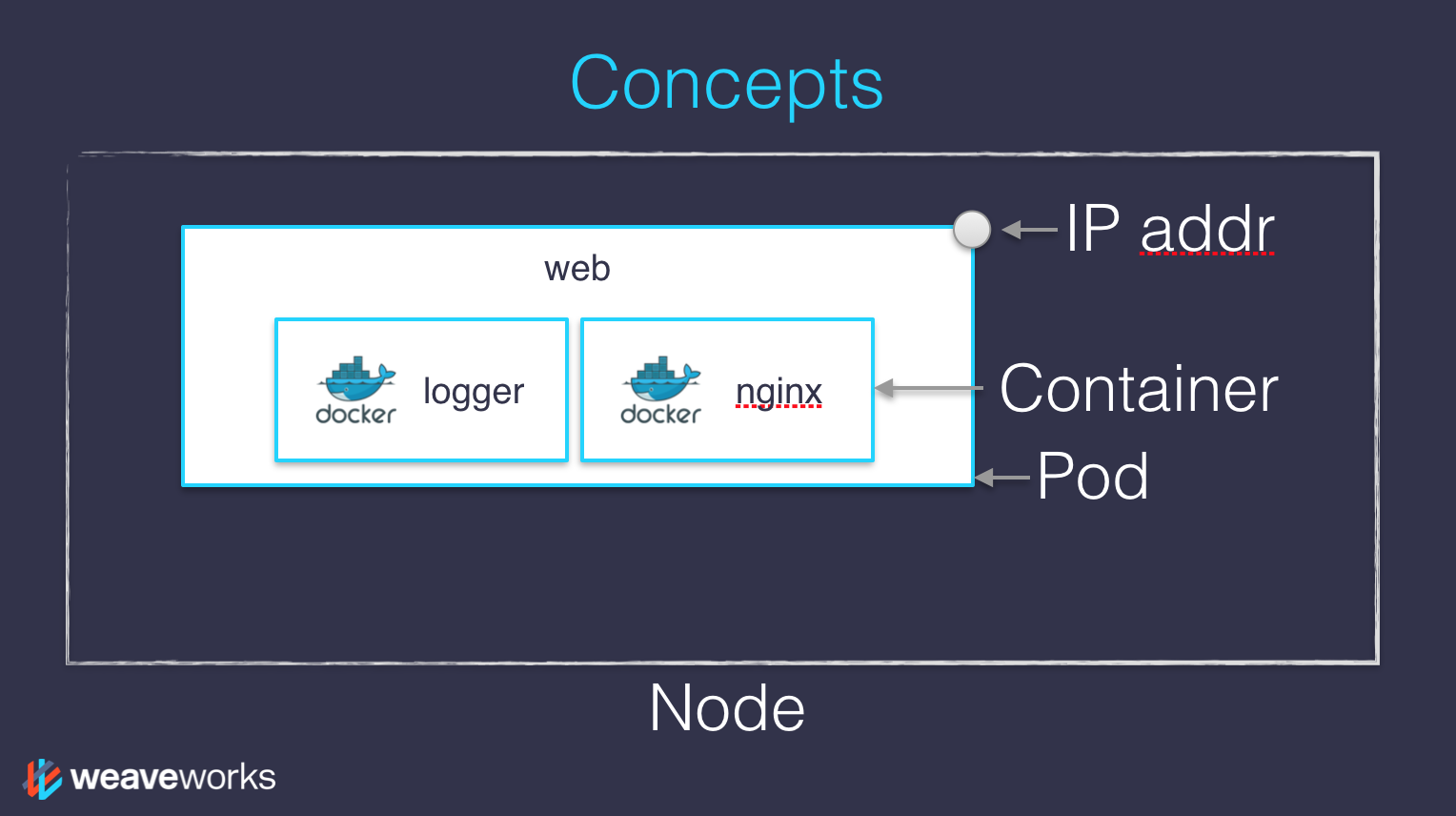 .debug[[custom/concepts-k8s.md](https://git.verleun.org/training/containers.git/tree/main/slides/custom/concepts-k8s.md)] --- ## Scaling - How would we scale the pod shown on the previous slide? - **Do** create additional pods - each pod can be on a different node - each pod will have its own IP address - **Do not** add more NGINX containers in the pod - all the NGINX containers would be on the same node - they would all have the same IP address <br/>(resulting in `Address alreading in use` errors) .debug[[custom/concepts-k8s.md](https://git.verleun.org/training/containers.git/tree/main/slides/custom/concepts-k8s.md)] --- ## Together or separate - Should we put e.g. a web application server and a cache together? <br/> ("cache" being something like e.g. Memcached or Redis) - Putting them **in the same pod** means: - they have to be scaled together - they can communicate very efficiently over `localhost` - Putting them **in different pods** means: - they can be scaled separately - they must communicate over remote IP addresses <br/>(incurring more latency, lower performance) - Both scenarios can make sense, depending on our goals .debug[[custom/concepts-k8s.md](https://git.verleun.org/training/containers.git/tree/main/slides/custom/concepts-k8s.md)] --- ## Credits - The first diagram is courtesy of Lucas Käldström, in [this presentation](https://speakerdeck.com/luxas/kubeadm-cluster-creation-internals-from-self-hosting-to-upgradability-and-ha) - it's one of the best Kubernetes architecture diagrams available! - The second diagram is courtesy of Weave Works - a *pod* can have multiple containers working together - IP addresses are associated with *pods*, not with individual containers Both diagrams used with permission. ??? :EN:- Kubernetes concepts :FR:- Kubernetes en théorie .debug[[custom/concepts-k8s.md](https://git.verleun.org/training/containers.git/tree/main/slides/custom/concepts-k8s.md)] --- class: pic .interstitial[] --- name: toc-declarative-vs-imperative class: title Declarative vs imperative .nav[ [Previous part](#toc-kubernetes-concepts) | [Back to table of contents](#toc-part-2) | [Next part](#toc-first-contact-with-kubectl) ] .debug[(automatically generated title slide)] --- # Declarative vs imperative - Our container orchestrator puts a very strong emphasis on being *declarative* - Declarative: *I would like a cup of tea.* - Imperative: *Boil some water. Pour it in a teapot. Add tea leaves. Steep for a while. Serve in a cup.* -- - Declarative seems simpler at first ... -- - ... As long as you know how to brew tea .debug[[shared/declarative.md](https://git.verleun.org/training/containers.git/tree/main/slides/shared/declarative.md)] --- ## Declarative vs imperative - What declarative would really be: *I want a cup of tea, obtained by pouring an infusion¹ of tea leaves in a cup.* -- *¹An infusion is obtained by letting the object steep a few minutes in hot² water.* -- *²Hot liquid is obtained by pouring it in an appropriate container³ and setting it on a stove.* -- *³Ah, finally, containers! Something we know about. Let's get to work, shall we?* -- .footnote[Did you know there was an [ISO standard](https://en.wikipedia.org/wiki/ISO_3103) specifying how to brew tea?] .debug[[shared/declarative.md](https://git.verleun.org/training/containers.git/tree/main/slides/shared/declarative.md)] --- ## Declarative vs imperative - Imperative systems: - simpler - if a task is interrupted, we have to restart from scratch - Declarative systems: - if a task is interrupted (or if we show up to the party half-way through), we can figure out what's missing and do only what's necessary - we need to be able to *observe* the system - ... and compute a "diff" between *what we have* and *what we want* .debug[[shared/declarative.md](https://git.verleun.org/training/containers.git/tree/main/slides/shared/declarative.md)] --- ## Declarative vs imperative in Kubernetes - With Kubernetes, we cannot say: "run this container" - All we can do is write a *spec* and push it to the API server (by creating a resource like e.g. a Pod or a Deployment) - The API server will validate that spec (and reject it if it's invalid) - Then it will store it in etcd - A *controller* will "notice" that spec and act upon it .debug[[k8s/declarative.md](https://git.verleun.org/training/containers.git/tree/main/slides/k8s/declarative.md)] --- ## Reconciling state - Watch for the `spec` fields in the YAML files later! - The *spec* describes *how we want the thing to be* - Kubernetes will *reconcile* the current state with the spec <br/>(technically, this is done by a number of *controllers*) - When we want to change some resource, we update the *spec* - Kubernetes will then *converge* that resource ??? :EN:- Declarative vs imperative models :FR:- Modèles déclaratifs et impératifs .debug[[k8s/declarative.md](https://git.verleun.org/training/containers.git/tree/main/slides/k8s/declarative.md)] --- ## 19,000 words They say, "a picture is worth one thousand words." The following 19 slides show what really happens when we run: ```bash kubectl create deployment web --image=nginx ``` .debug[[k8s/deploymentslideshow.md](https://git.verleun.org/training/containers.git/tree/main/slides/k8s/deploymentslideshow.md)] --- class: pic 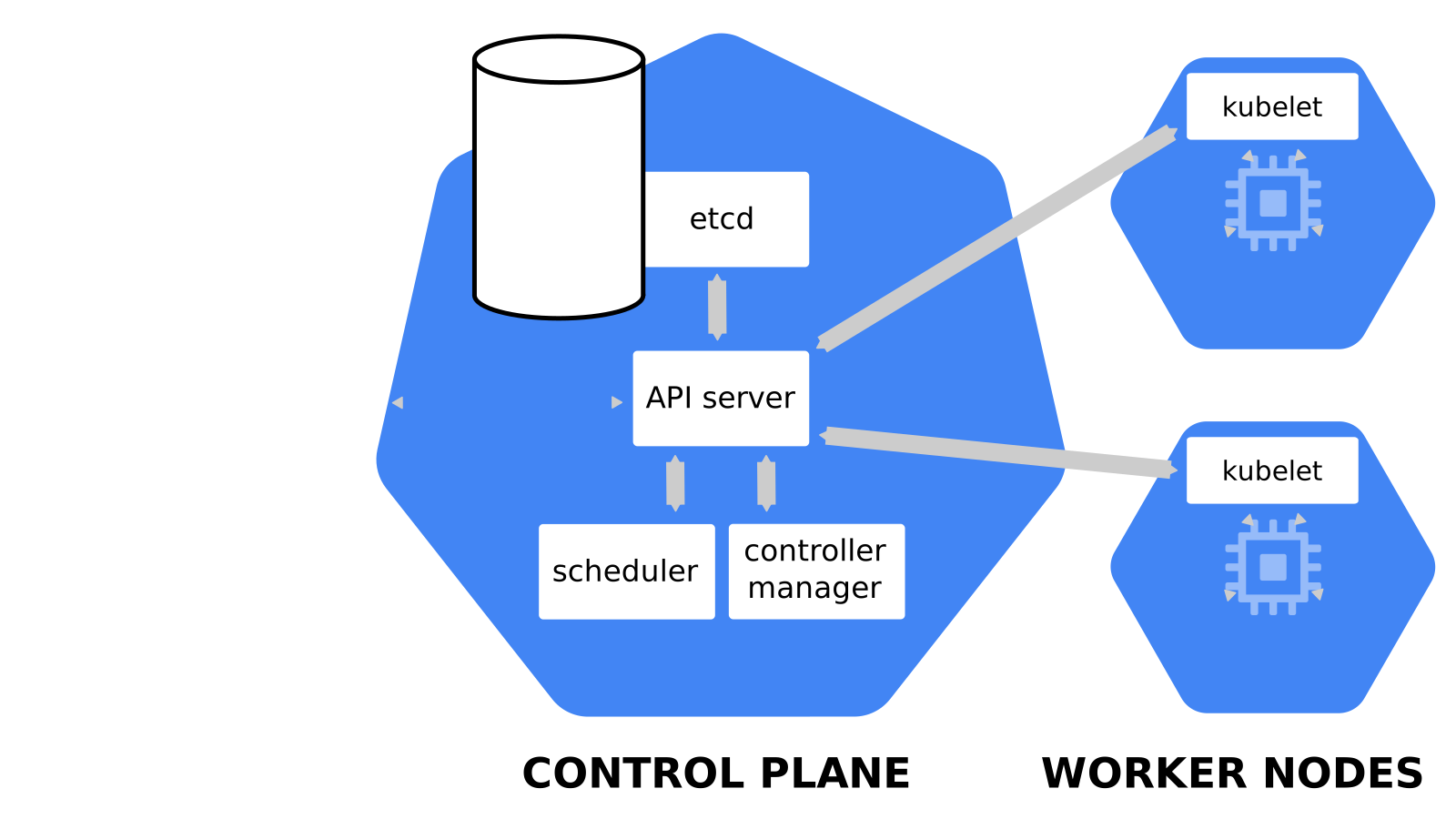 .debug[[k8s/deploymentslideshow.md](https://git.verleun.org/training/containers.git/tree/main/slides/k8s/deploymentslideshow.md)] --- class: pic 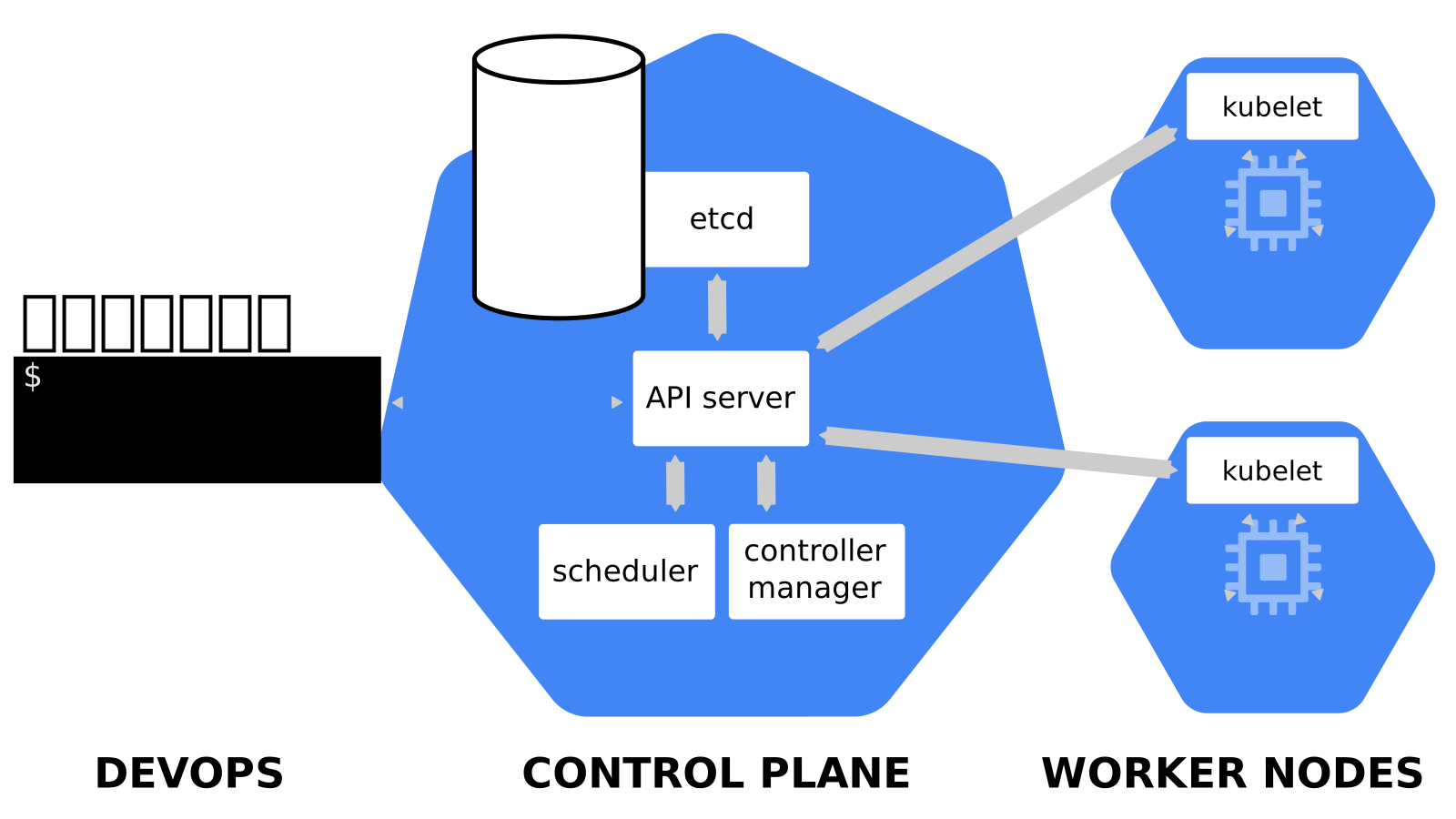 .debug[[k8s/deploymentslideshow.md](https://git.verleun.org/training/containers.git/tree/main/slides/k8s/deploymentslideshow.md)] --- class: pic 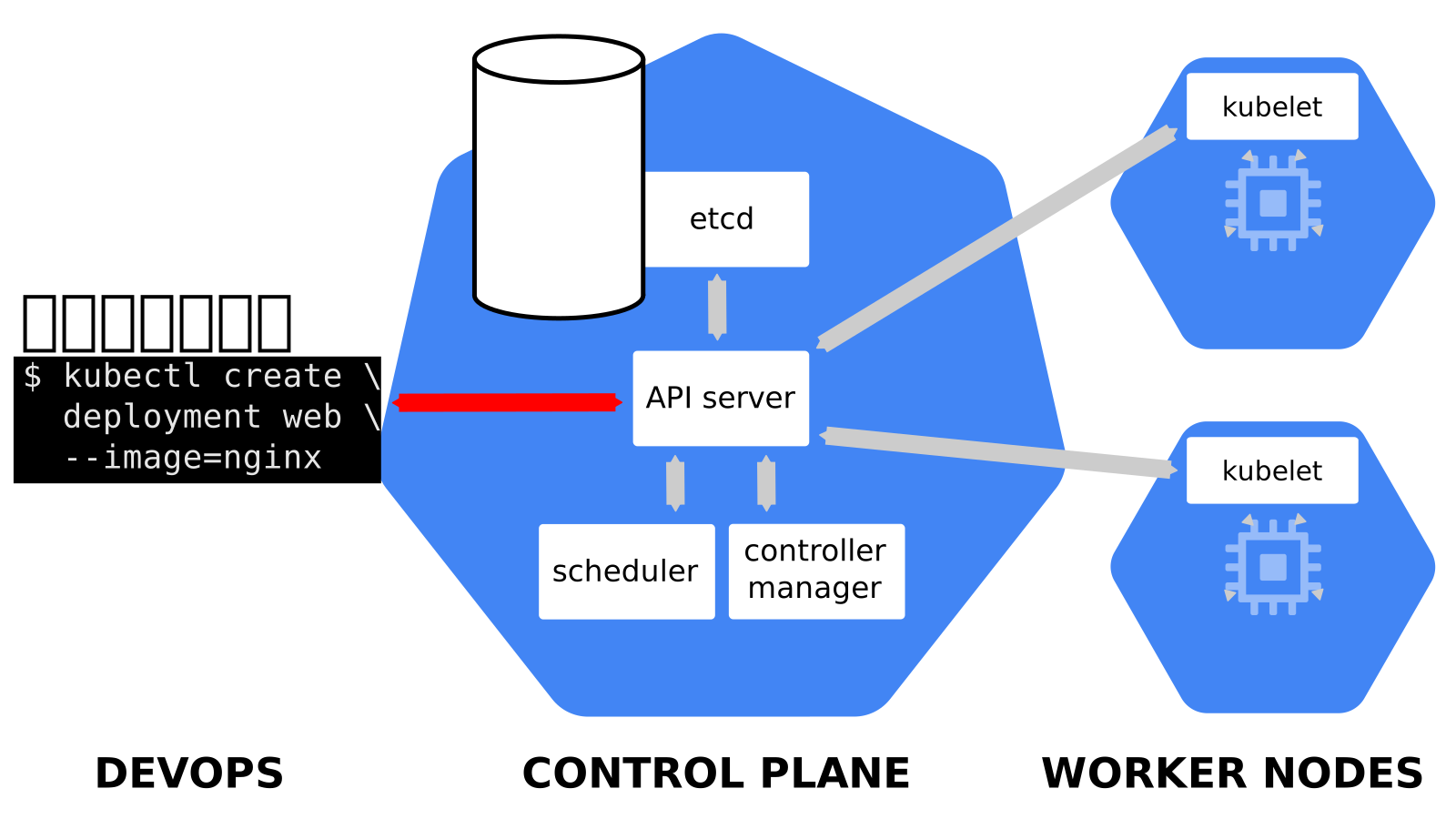 .debug[[k8s/deploymentslideshow.md](https://git.verleun.org/training/containers.git/tree/main/slides/k8s/deploymentslideshow.md)] --- class: pic 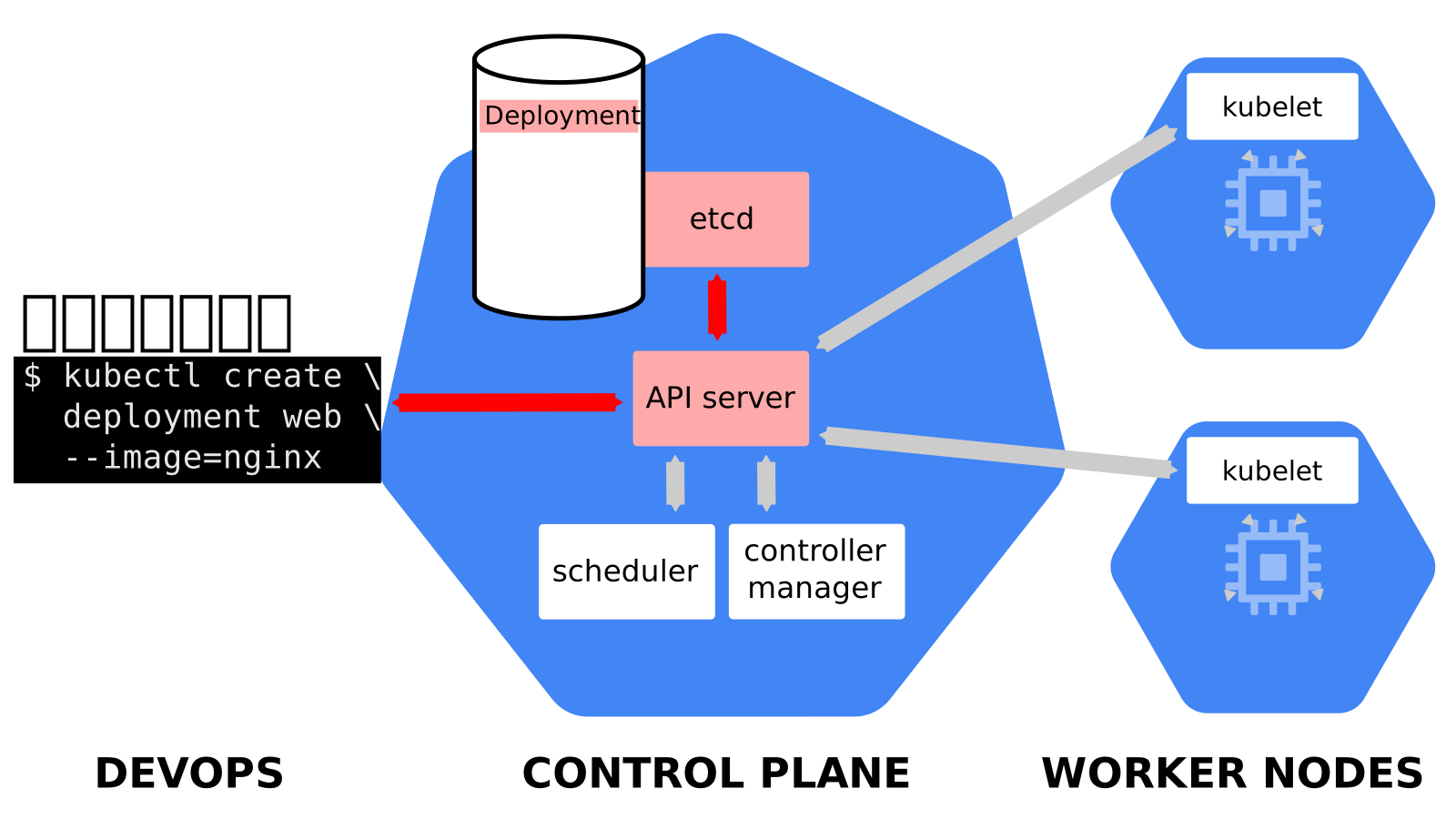 .debug[[k8s/deploymentslideshow.md](https://git.verleun.org/training/containers.git/tree/main/slides/k8s/deploymentslideshow.md)] --- class: pic 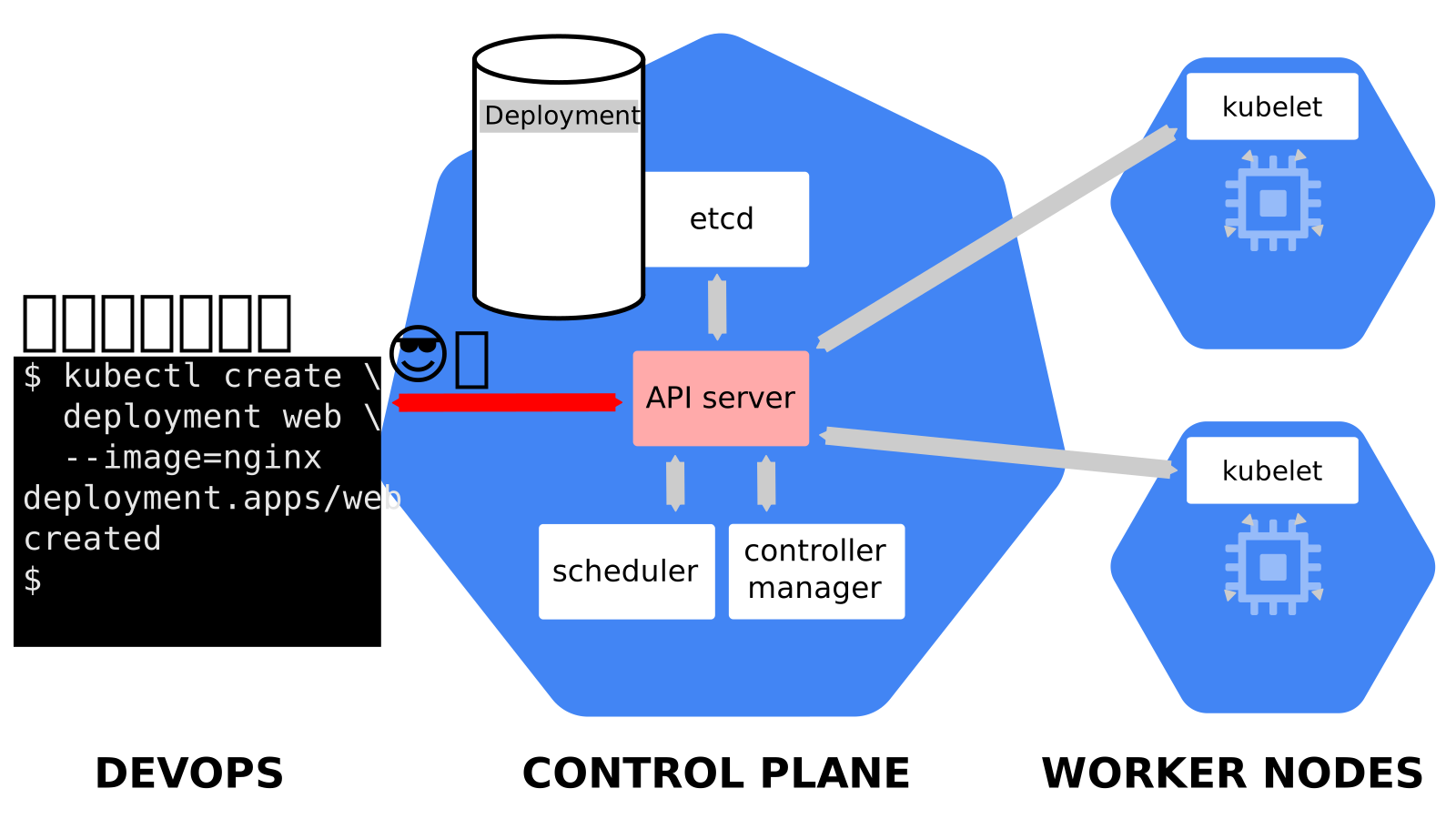 .debug[[k8s/deploymentslideshow.md](https://git.verleun.org/training/containers.git/tree/main/slides/k8s/deploymentslideshow.md)] --- class: pic 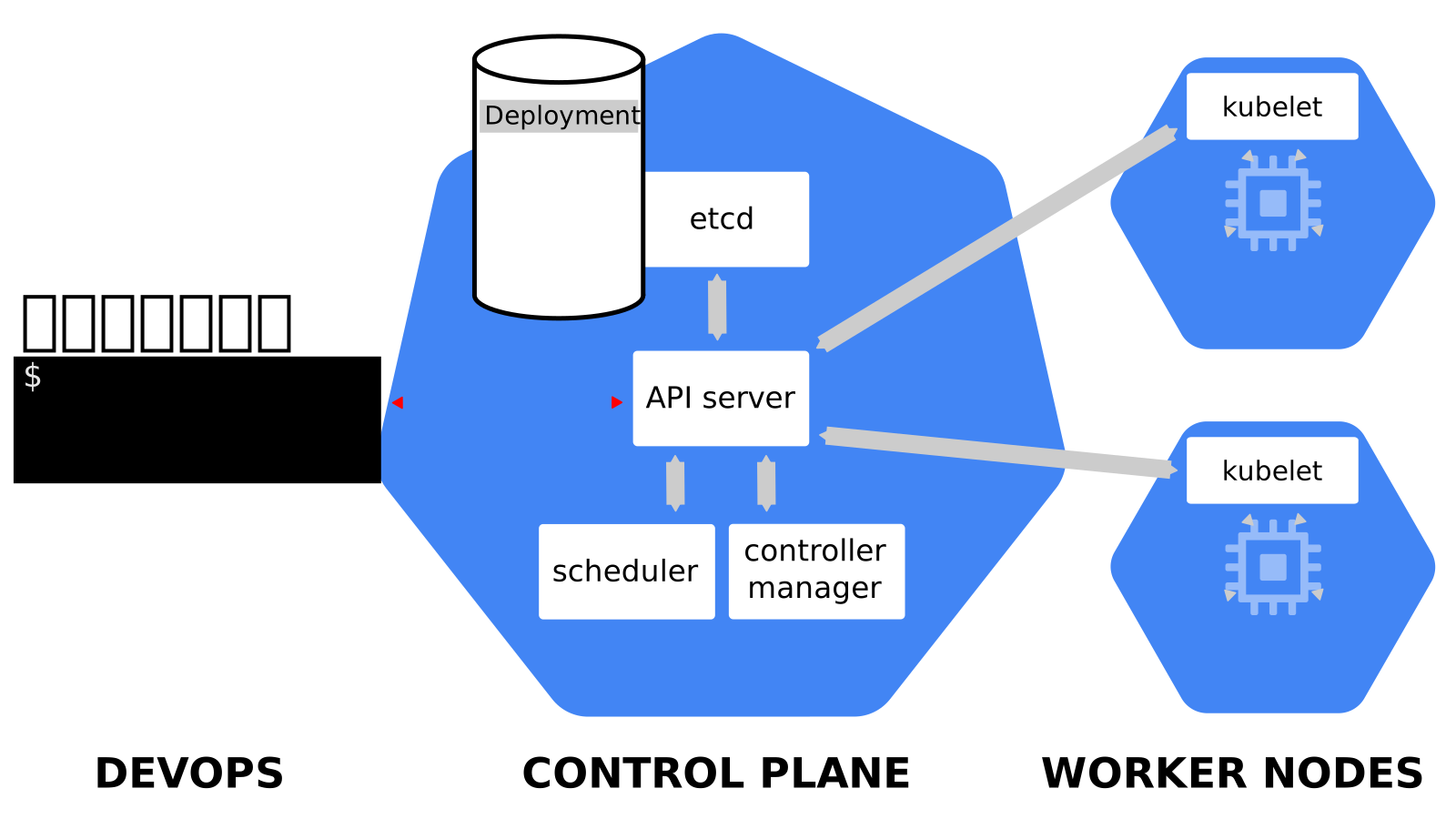 .debug[[k8s/deploymentslideshow.md](https://git.verleun.org/training/containers.git/tree/main/slides/k8s/deploymentslideshow.md)] --- class: pic 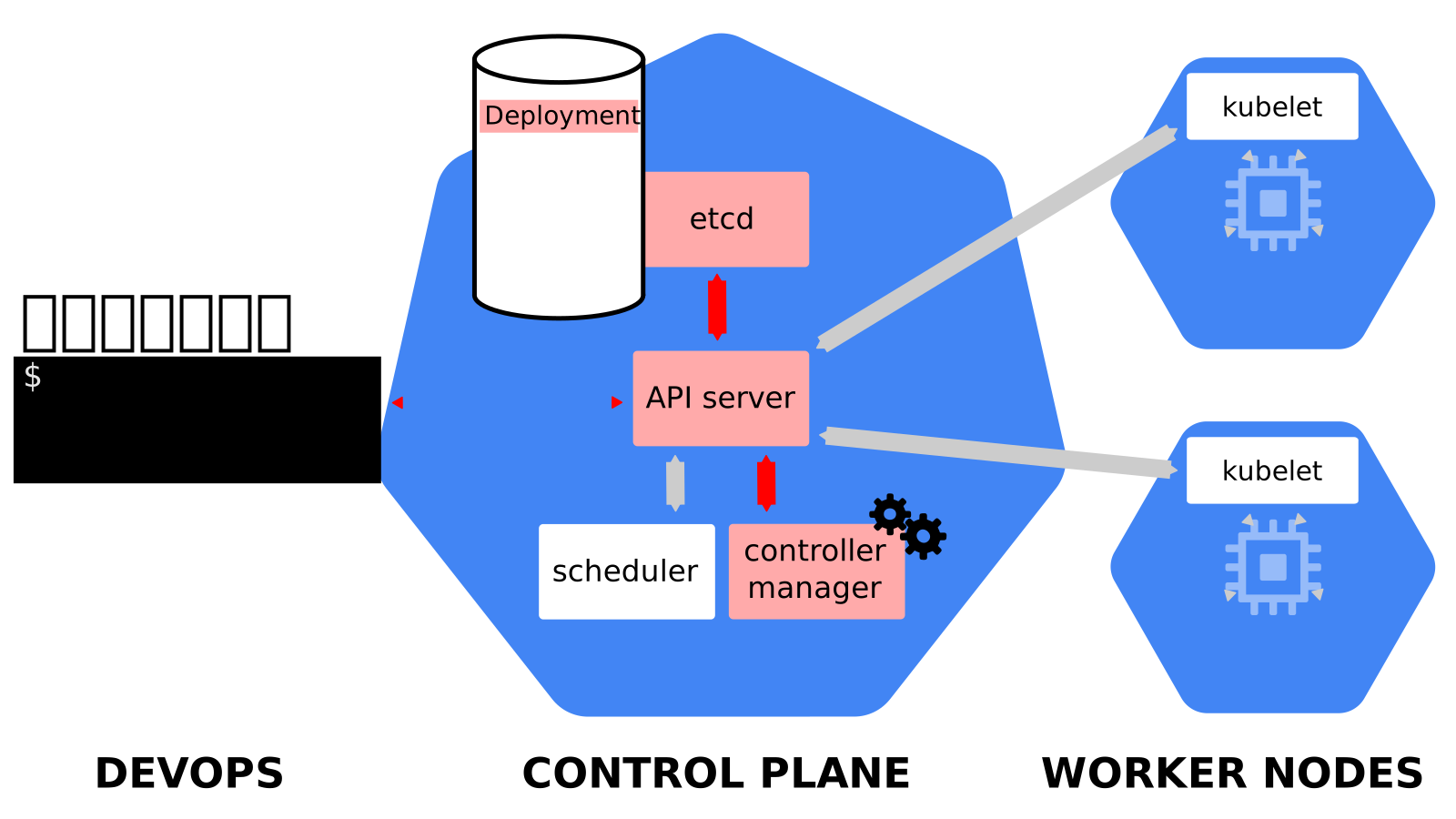 .debug[[k8s/deploymentslideshow.md](https://git.verleun.org/training/containers.git/tree/main/slides/k8s/deploymentslideshow.md)] --- class: pic  .debug[[k8s/deploymentslideshow.md](https://git.verleun.org/training/containers.git/tree/main/slides/k8s/deploymentslideshow.md)] --- class: pic  .debug[[k8s/deploymentslideshow.md](https://git.verleun.org/training/containers.git/tree/main/slides/k8s/deploymentslideshow.md)] --- class: pic  .debug[[k8s/deploymentslideshow.md](https://git.verleun.org/training/containers.git/tree/main/slides/k8s/deploymentslideshow.md)] --- class: pic  .debug[[k8s/deploymentslideshow.md](https://git.verleun.org/training/containers.git/tree/main/slides/k8s/deploymentslideshow.md)] --- class: pic  .debug[[k8s/deploymentslideshow.md](https://git.verleun.org/training/containers.git/tree/main/slides/k8s/deploymentslideshow.md)] --- class: pic  .debug[[k8s/deploymentslideshow.md](https://git.verleun.org/training/containers.git/tree/main/slides/k8s/deploymentslideshow.md)] --- class: pic  .debug[[k8s/deploymentslideshow.md](https://git.verleun.org/training/containers.git/tree/main/slides/k8s/deploymentslideshow.md)] --- class: pic  .debug[[k8s/deploymentslideshow.md](https://git.verleun.org/training/containers.git/tree/main/slides/k8s/deploymentslideshow.md)] --- class: pic  .debug[[k8s/deploymentslideshow.md](https://git.verleun.org/training/containers.git/tree/main/slides/k8s/deploymentslideshow.md)] --- class: pic  .debug[[k8s/deploymentslideshow.md](https://git.verleun.org/training/containers.git/tree/main/slides/k8s/deploymentslideshow.md)] --- class: pic  .debug[[k8s/deploymentslideshow.md](https://git.verleun.org/training/containers.git/tree/main/slides/k8s/deploymentslideshow.md)] --- class: pic  .debug[[k8s/deploymentslideshow.md](https://git.verleun.org/training/containers.git/tree/main/slides/k8s/deploymentslideshow.md)] --- class: pic .interstitial[] --- name: toc-first-contact-with-kubectl class: title First contact with `kubectl` .nav[ [Previous part](#toc-declarative-vs-imperative) | [Back to table of contents](#toc-part-2) | [Next part](#toc-running-our-first-containers-on-kubernetes) ] .debug[(automatically generated title slide)] --- # First contact with `kubectl` - `kubectl` is (almost) the only tool we'll need to talk to Kubernetes - It is a rich CLI tool around the Kubernetes API (Everything you can do with `kubectl`, you can do directly with the API) - On our machines, there is a `~/.kube/config` file with: - the Kubernetes API address - the path to our TLS certificates used to authenticate - You can also use the `--kubeconfig` flag to pass a config file - Or directly `--server`, `--user`, etc. - `kubectl` can be pronounced "Cube C T L", "Cube cuttle", "Cube cuddle"... .debug[[k8s/kubectlget.md](https://git.verleun.org/training/containers.git/tree/main/slides/k8s/kubectlget.md)] --- class: extra-details ## `kubectl` is the new SSH - We often start managing servers with SSH (installing packages, troubleshooting ...) - At scale, it becomes tedious, repetitive, error-prone - Instead, we use config management, central logging, etc. - In many cases, we still need SSH: - as the underlying access method (e.g. Ansible) - to debug tricky scenarios - to inspect and poke at things .debug[[k8s/kubectlget.md](https://git.verleun.org/training/containers.git/tree/main/slides/k8s/kubectlget.md)] --- class: extra-details ## The parallel with `kubectl` - We often start managing Kubernetes clusters with `kubectl` (deploying applications, troubleshooting ...) - At scale (with many applications or clusters), it becomes tedious, repetitive, error-prone - Instead, we use automated pipelines, observability tooling, etc. - In many cases, we still need `kubectl`: - to debug tricky scenarios - to inspect and poke at things - The Kubernetes API is always the underlying access method .debug[[k8s/kubectlget.md](https://git.verleun.org/training/containers.git/tree/main/slides/k8s/kubectlget.md)] --- ## `kubectl get` - Let's look at our `Node` resources with `kubectl get`! .lab[ - Look at the composition of our cluster: ```bash kubectl get node ``` - These commands are equivalent: ```bash kubectl get no kubectl get node kubectl get nodes ``` ] .debug[[k8s/kubectlget.md](https://git.verleun.org/training/containers.git/tree/main/slides/k8s/kubectlget.md)] --- ## Obtaining machine-readable output - `kubectl get` can output JSON, YAML, or be directly formatted .lab[ - Give us more info about the nodes: ```bash kubectl get nodes -o wide ``` - Let's have some YAML: ```bash kubectl get no -o yaml ``` See that `kind: List` at the end? It's the type of our result! ] .debug[[k8s/kubectlget.md](https://git.verleun.org/training/containers.git/tree/main/slides/k8s/kubectlget.md)] --- ## (Ab)using `kubectl` and `jq` - It's super easy to build custom reports .lab[ - Show the capacity of all our nodes as a stream of JSON objects: ```bash kubectl get nodes -o json | jq ".items[] | {name:.metadata.name} + .status.capacity" ``` ] .debug[[k8s/kubectlget.md](https://git.verleun.org/training/containers.git/tree/main/slides/k8s/kubectlget.md)] --- class: extra-details ## Exploring types and definitions - We can list all available resource types by running `kubectl api-resources` <br/> (In Kubernetes 1.10 and prior, this command used to be `kubectl get`) - We can view the definition for a resource type with: ```bash kubectl explain type ``` - We can view the definition of a field in a resource, for instance: ```bash kubectl explain node.spec ``` - Or get the full definition of all fields and sub-fields: ```bash kubectl explain node --recursive ``` .debug[[k8s/kubectlget.md](https://git.verleun.org/training/containers.git/tree/main/slides/k8s/kubectlget.md)] --- class: extra-details ## Introspection vs. documentation - We can access the same information by reading the [API documentation](https://kubernetes.io/docs/reference/#api-reference) - The API documentation is usually easier to read, but: - it won't show custom types (like Custom Resource Definitions) - we need to make sure that we look at the correct version - `kubectl api-resources` and `kubectl explain` perform *introspection* (they communicate with the API server and obtain the exact type definitions) .debug[[k8s/kubectlget.md](https://git.verleun.org/training/containers.git/tree/main/slides/k8s/kubectlget.md)] --- ## Type names - The most common resource names have three forms: - singular (e.g. `node`, `service`, `deployment`) - plural (e.g. `nodes`, `services`, `deployments`) - short (e.g. `no`, `svc`, `deploy`) - Some resources do not have a short name - `Endpoints` only have a plural form (because even a single `Endpoints` resource is actually a list of endpoints) .debug[[k8s/kubectlget.md](https://git.verleun.org/training/containers.git/tree/main/slides/k8s/kubectlget.md)] --- ## Viewing details - We can use `kubectl get -o yaml` to see all available details - However, YAML output is often simultaneously too much and not enough - For instance, `kubectl get node node1 -o yaml` is: - too much information (e.g.: list of images available on this node) - not enough information (e.g.: doesn't show pods running on this node) - difficult to read for a human operator - For a comprehensive overview, we can use `kubectl describe` instead .debug[[k8s/kubectlget.md](https://git.verleun.org/training/containers.git/tree/main/slides/k8s/kubectlget.md)] --- ## `kubectl describe` - `kubectl describe` needs a resource type and (optionally) a resource name - It is possible to provide a resource name *prefix* (all matching objects will be displayed) - `kubectl describe` will retrieve some extra information about the resource .lab[ - Look at the information available for `node1` with one of the following commands: ```bash kubectl describe node/node1 kubectl describe node node1 ``` ] (We should notice a bunch of control plane pods.) .debug[[k8s/kubectlget.md](https://git.verleun.org/training/containers.git/tree/main/slides/k8s/kubectlget.md)] --- ## Listing running containers - Containers are manipulated through *pods* - A pod is a group of containers: - running together (on the same node) - sharing resources (RAM, CPU; but also network, volumes) .lab[ - List pods on our cluster: ```bash kubectl get pods ``` ] -- *Where are the pods that we saw just a moment earlier?!?* .debug[[k8s/kubectlget.md](https://git.verleun.org/training/containers.git/tree/main/slides/k8s/kubectlget.md)] --- ## Namespaces - Namespaces allow us to segregate resources .lab[ - List the namespaces on our cluster with one of these commands: ```bash kubectl get namespaces kubectl get namespace kubectl get ns ``` ] -- *You know what ... This `kube-system` thing looks suspicious.* *In fact, I'm pretty sure it showed up earlier, when we did:* `kubectl describe node node1` .debug[[k8s/kubectlget.md](https://git.verleun.org/training/containers.git/tree/main/slides/k8s/kubectlget.md)] --- ## Accessing namespaces - By default, `kubectl` uses the `default` namespace - We can see resources in all namespaces with `--all-namespaces` .lab[ - List the pods in all namespaces: ```bash kubectl get pods --all-namespaces ``` - Since Kubernetes 1.14, we can also use `-A` as a shorter version: ```bash kubectl get pods -A ``` ] *Here are our system pods!* .debug[[k8s/kubectlget.md](https://git.verleun.org/training/containers.git/tree/main/slides/k8s/kubectlget.md)] --- ## What are all these control plane pods? - `etcd` is our etcd server - `kube-apiserver` is the API server - `kube-controller-manager` and `kube-scheduler` are other control plane components - `coredns` provides DNS-based service discovery ([replacing kube-dns as of 1.11](https://kubernetes.io/blog/2018/07/10/coredns-ga-for-kubernetes-cluster-dns/)) - `kube-proxy` is the (per-node) component managing port mappings and such - `weave` is the (per-node) component managing the network overlay - the `READY` column indicates the number of containers in each pod (1 for most pods, but `weave` has 2, for instance) .debug[[k8s/kubectlget.md](https://git.verleun.org/training/containers.git/tree/main/slides/k8s/kubectlget.md)] --- ## Scoping another namespace - We can also look at a different namespace (other than `default`) .lab[ - List only the pods in the `kube-system` namespace: ```bash kubectl get pods --namespace=kube-system kubectl get pods -n kube-system ``` ] .debug[[k8s/kubectlget.md](https://git.verleun.org/training/containers.git/tree/main/slides/k8s/kubectlget.md)] --- ## Namespaces and other `kubectl` commands - We can use `-n`/`--namespace` with almost every `kubectl` command - Example: - `kubectl create --namespace=X` to create something in namespace X - We can use `-A`/`--all-namespaces` with most commands that manipulate multiple objects - Examples: - `kubectl delete` can delete resources across multiple namespaces - `kubectl label` can add/remove/update labels across multiple namespaces .debug[[k8s/kubectlget.md](https://git.verleun.org/training/containers.git/tree/main/slides/k8s/kubectlget.md)] --- class: extra-details ## What about `kube-public`? .lab[ - List the pods in the `kube-public` namespace: ```bash kubectl -n kube-public get pods ``` ] Nothing! `kube-public` is created by kubeadm & [used for security bootstrapping](https://kubernetes.io/blog/2017/01/stronger-foundation-for-creating-and-managing-kubernetes-clusters). .debug[[k8s/kubectlget.md](https://git.verleun.org/training/containers.git/tree/main/slides/k8s/kubectlget.md)] --- class: extra-details ## Exploring `kube-public` - The only interesting object in `kube-public` is a ConfigMap named `cluster-info` .lab[ - List ConfigMap objects: ```bash kubectl -n kube-public get configmaps ``` - Inspect `cluster-info`: ```bash kubectl -n kube-public get configmap cluster-info -o yaml ``` ] Note the `selfLink` URI: `/api/v1/namespaces/kube-public/configmaps/cluster-info` We can use that! .debug[[k8s/kubectlget.md](https://git.verleun.org/training/containers.git/tree/main/slides/k8s/kubectlget.md)] --- class: extra-details ## Accessing `cluster-info` - Earlier, when trying to access the API server, we got a `Forbidden` message - But `cluster-info` is readable by everyone (even without authentication) .lab[ - Retrieve `cluster-info`: ```bash curl -k https://10.96.0.1/api/v1/namespaces/kube-public/configmaps/cluster-info ``` ] - We were able to access `cluster-info` (without auth) - It contains a `kubeconfig` file .debug[[k8s/kubectlget.md](https://git.verleun.org/training/containers.git/tree/main/slides/k8s/kubectlget.md)] --- class: extra-details ## Retrieving `kubeconfig` - We can easily extract the `kubeconfig` file from this ConfigMap .lab[ - Display the content of `kubeconfig`: ```bash curl -sk https://10.96.0.1/api/v1/namespaces/kube-public/configmaps/cluster-info \ | jq -r .data.kubeconfig ``` ] - This file holds the canonical address of the API server, and the public key of the CA - This file *does not* hold client keys or tokens - This is not sensitive information, but allows us to establish trust .debug[[k8s/kubectlget.md](https://git.verleun.org/training/containers.git/tree/main/slides/k8s/kubectlget.md)] --- class: extra-details ## What about `kube-node-lease`? - Starting with Kubernetes 1.14, there is a `kube-node-lease` namespace (or in Kubernetes 1.13 if the NodeLease feature gate is enabled) - That namespace contains one Lease object per node - *Node leases* are a new way to implement node heartbeats (i.e. node regularly pinging the control plane to say "I'm alive!") - For more details, see [Efficient Node Heartbeats KEP] or the [node controller documentation] [Efficient Node Heartbeats KEP]: https://github.com/kubernetes/enhancements/blob/master/keps/sig-node/589-efficient-node-heartbeats/README.md [node controller documentation]: https://kubernetes.io/docs/concepts/architecture/nodes/#node-controller .debug[[k8s/kubectlget.md](https://git.verleun.org/training/containers.git/tree/main/slides/k8s/kubectlget.md)] --- ## Services - A *service* is a stable endpoint to connect to "something" (In the initial proposal, they were called "portals") .lab[ - List the services on our cluster with one of these commands: ```bash kubectl get services kubectl get svc ``` ] -- There is already one service on our cluster: the Kubernetes API itself. .debug[[k8s/kubectlget.md](https://git.verleun.org/training/containers.git/tree/main/slides/k8s/kubectlget.md)] --- ## ClusterIP services - A `ClusterIP` service is internal, available from the cluster only - This is useful for introspection from within containers .lab[ - Try to connect to the API: ```bash curl -k https://`10.96.0.1` ``` - `-k` is used to skip certificate verification - Make sure to replace 10.96.0.1 with the CLUSTER-IP shown by `kubectl get svc` ] The command above should either time out, or show an authentication error. Why? .debug[[k8s/kubectlget.md](https://git.verleun.org/training/containers.git/tree/main/slides/k8s/kubectlget.md)] --- ## Time out - Connections to ClusterIP services only work *from within the cluster* - If we are outside the cluster, the `curl` command will probably time out (Because the IP address, e.g. 10.96.0.1, isn't routed properly outside the cluster) - This is the case with most "real" Kubernetes clusters - To try the connection from within the cluster, we can use [shpod](https://github.com/jpetazzo/shpod) .debug[[k8s/kubectlget.md](https://git.verleun.org/training/containers.git/tree/main/slides/k8s/kubectlget.md)] --- ## Authentication error This is what we should see when connecting from within the cluster: ```json $ curl -k https://10.96.0.1 { "kind": "Status", "apiVersion": "v1", "metadata": { }, "status": "Failure", "message": "forbidden: User \"system:anonymous\" cannot get path \"/\"", "reason": "Forbidden", "details": { }, "code": 403 } ``` .debug[[k8s/kubectlget.md](https://git.verleun.org/training/containers.git/tree/main/slides/k8s/kubectlget.md)] --- ## Explanations - We can see `kind`, `apiVersion`, `metadata` - These are typical of a Kubernetes API reply - Because we *are* talking to the Kubernetes API - The Kubernetes API tells us "Forbidden" (because it requires authentication) - The Kubernetes API is reachable from within the cluster (many apps integrating with Kubernetes will use this) .debug[[k8s/kubectlget.md](https://git.verleun.org/training/containers.git/tree/main/slides/k8s/kubectlget.md)] --- ## DNS integration - Each service also gets a DNS record - The Kubernetes DNS resolver is available *from within pods* (and sometimes, from within nodes, depending on configuration) - Code running in pods can connect to services using their name (e.g. https://kubernetes/...) ??? :EN:- Getting started with kubectl :FR:- Se familiariser avec kubectl .debug[[k8s/kubectlget.md](https://git.verleun.org/training/containers.git/tree/main/slides/k8s/kubectlget.md)] --- class: pic .interstitial[] --- name: toc-running-our-first-containers-on-kubernetes class: title Running our first containers on Kubernetes .nav[ [Previous part](#toc-first-contact-with-kubectl) | [Back to table of contents](#toc-part-3) | [Next part](#toc-labels-and-annotations) ] .debug[(automatically generated title slide)] --- # Running our first containers on Kubernetes - First things first: we cannot run a container -- - We are going to run a pod, and in that pod there will be a single container -- - In that container in the pod, we are going to run a simple `ping` command .debug[[k8s/kubectl-run.md](https://git.verleun.org/training/containers.git/tree/main/slides/k8s/kubectl-run.md)] --- class: extra-details ## If you're running Kubernetes 1.17 (or older)... - This material assumes that you're running a recent version of Kubernetes (at least 1.19) <!-- ##VERSION## --> - You can check your version number with `kubectl version` (look at the server part) - In Kubernetes 1.17 and older, `kubectl run` creates a Deployment - If you're running such an old version: - it's obsolete and no longer maintained - Kubernetes 1.17 is [EOL since January 2021][nonactive] - **upgrade NOW!** [nonactive]: https://kubernetes.io/releases/patch-releases/#non-active-branch-history .debug[[k8s/kubectl-run.md](https://git.verleun.org/training/containers.git/tree/main/slides/k8s/kubectl-run.md)] --- ## Starting a simple pod with `kubectl run` - `kubectl run` is convenient to start a single pod - We need to specify at least a *name* and the image we want to use - Optionally, we can specify the command to run in the pod .lab[ - Let's ping the address of `localhost`, the loopback interface: ```bash kubectl run pingpong --image alpine ping 127.0.0.1 ``` <!-- ```hide kubectl wait pod --selector=run=pingpong --for condition=ready``` --> ] The output tells us that a Pod was created: ``` pod/pingpong created ``` .debug[[k8s/kubectl-run.md](https://git.verleun.org/training/containers.git/tree/main/slides/k8s/kubectl-run.md)] --- ## Viewing container output - Let's use the `kubectl logs` command - It takes a Pod name as argument - Unless specified otherwise, it will only show logs of the first container in the pod (Good thing there's only one in ours!) .lab[ - View the result of our `ping` command: ```bash kubectl logs pingpong ``` ] .debug[[k8s/kubectl-run.md](https://git.verleun.org/training/containers.git/tree/main/slides/k8s/kubectl-run.md)] --- ## Streaming logs in real time - Just like `docker logs`, `kubectl logs` supports convenient options: - `-f`/`--follow` to stream logs in real time (à la `tail -f`) - `--tail` to indicate how many lines you want to see (from the end) - `--since` to get logs only after a given timestamp .lab[ - View the latest logs of our `ping` command: ```bash kubectl logs pingpong --tail 1 --follow ``` - Stop it with Ctrl-C <!-- ```wait seq=3``` ```keys ^C``` --> ] .debug[[k8s/kubectl-run.md](https://git.verleun.org/training/containers.git/tree/main/slides/k8s/kubectl-run.md)] --- ## Scaling our application - `kubectl` gives us a simple command to scale a workload: `kubectl scale TYPE NAME --replicas=HOWMANY` - Let's try it on our Pod, so that we have more Pods! .lab[ - Try to scale the Pod: ```bash kubectl scale pod pingpong --replicas=3 ``` ] 🤔 We get the following error, what does that mean? ``` Error from server (NotFound): the server could not find the requested resource ``` .debug[[k8s/kubectl-run.md](https://git.verleun.org/training/containers.git/tree/main/slides/k8s/kubectl-run.md)] --- ## Scaling a Pod - We cannot "scale a Pod" (that's not completely true; we could give it more CPU/RAM) - If we want more Pods, we need to create more Pods (i.e. execute `kubectl run` multiple times) - There must be a better way! (spoiler alert: yes, there is a better way!) .debug[[k8s/kubectl-run.md](https://git.verleun.org/training/containers.git/tree/main/slides/k8s/kubectl-run.md)] --- class: extra-details ## `NotFound` - What's the meaning of that error? ``` Error from server (NotFound): the server could not find the requested resource ``` - When we execute `kubectl scale THAT-RESOURCE --replicas=THAT-MANY`, <br/> it is like telling Kubernetes: *go to THAT-RESOURCE and set the scaling button to position THAT-MANY* - Pods do not have a "scaling button" - Try to execute the `kubectl scale pod` command with `-v6` - We see a `PATCH` request to `/scale`: that's the "scaling button" (technically it's called a *subresource* of the Pod) .debug[[k8s/kubectl-run.md](https://git.verleun.org/training/containers.git/tree/main/slides/k8s/kubectl-run.md)] --- ## Creating more pods - We are going to create a ReplicaSet (= set of replicas = set of identical pods) - In fact, we will create a Deployment, which itself will create a ReplicaSet - Why so many layers? We'll explain that shortly, don't worry! .debug[[k8s/kubectl-run.md](https://git.verleun.org/training/containers.git/tree/main/slides/k8s/kubectl-run.md)] --- ## Creating a Deployment running `ping` - Let's create a Deployment instead of a single Pod .lab[ - Create the Deployment; pay attention to the `--`: ```bash kubectl create deployment pingpong --image=alpine -- ping 127.0.0.1 ``` ] - The `--` is used to separate: - "options/flags of `kubectl create` - command to run in the container .debug[[k8s/kubectl-run.md](https://git.verleun.org/training/containers.git/tree/main/slides/k8s/kubectl-run.md)] --- ## What has been created? .lab[ <!-- ```hide kubectl wait pod --selector=app=pingpong --for condition=ready ``` --> - Check the resources that were created: ```bash kubectl get all ``` ] Note: `kubectl get all` is a lie. It doesn't show everything. (But it shows a lot of "usual suspects", i.e. commonly used resources.) .debug[[k8s/kubectl-run.md](https://git.verleun.org/training/containers.git/tree/main/slides/k8s/kubectl-run.md)] --- ## There's a lot going on here! ``` NAME READY STATUS RESTARTS AGE pod/pingpong 1/1 Running 0 4m17s pod/pingpong-6ccbc77f68-kmgfn 1/1 Running 0 11s NAME TYPE CLUSTER-IP EXTERNAL-IP PORT(S) AGE service/kubernetes ClusterIP 10.96.0.1 <none> 443/TCP 3h45 NAME READY UP-TO-DATE AVAILABLE AGE deployment.apps/pingpong 1/1 1 1 11s NAME DESIRED CURRENT READY AGE replicaset.apps/pingpong-6ccbc77f68 1 1 1 11s ``` Our new Pod is not named `pingpong`, but `pingpong-xxxxxxxxxxx-yyyyy`. We have a Deployment named `pingpong`, and an extra ReplicaSet, too. What's going on? .debug[[k8s/kubectl-run.md](https://git.verleun.org/training/containers.git/tree/main/slides/k8s/kubectl-run.md)] --- ## From Deployment to Pod We have the following resources: - `deployment.apps/pingpong` This is the Deployment that we just created. - `replicaset.apps/pingpong-xxxxxxxxxx` This is a Replica Set created by this Deployment. - `pod/pingpong-xxxxxxxxxx-yyyyy` This is a *pod* created by the Replica Set. Let's explain what these things are. .debug[[k8s/kubectl-run.md](https://git.verleun.org/training/containers.git/tree/main/slides/k8s/kubectl-run.md)] --- ## Pod - Can have one or multiple containers - Runs on a single node (Pod cannot "straddle" multiple nodes) - Pods cannot be moved (e.g. in case of node outage) - Pods cannot be scaled horizontally (except by manually creating more Pods) .debug[[k8s/kubectl-run.md](https://git.verleun.org/training/containers.git/tree/main/slides/k8s/kubectl-run.md)] --- class: extra-details ## Pod details - A Pod is not a process; it's an environment for containers - it cannot be "restarted" - it cannot "crash" - The containers in a Pod can crash - They may or may not get restarted (depending on Pod's restart policy) - If all containers exit successfully, the Pod ends in "Succeeded" phase - If some containers fail and don't get restarted, the Pod ends in "Failed" phase .debug[[k8s/kubectl-run.md](https://git.verleun.org/training/containers.git/tree/main/slides/k8s/kubectl-run.md)] --- ## Replica Set - Set of identical (replicated) Pods - Defined by a pod template + number of desired replicas - If there are not enough Pods, the Replica Set creates more (e.g. in case of node outage; or simply when scaling up) - If there are too many Pods, the Replica Set deletes some (e.g. if a node was disconnected and comes back; or when scaling down) - We can scale up/down a Replica Set - we update the manifest of the Replica Set - as a consequence, the Replica Set controller creates/deletes Pods .debug[[k8s/kubectl-run.md](https://git.verleun.org/training/containers.git/tree/main/slides/k8s/kubectl-run.md)] --- ## Deployment - Replica Sets control *identical* Pods - Deployments are used to roll out different Pods (different image, command, environment variables, ...) - When we update a Deployment with a new Pod definition: - a new Replica Set is created with the new Pod definition - that new Replica Set is progressively scaled up - meanwhile, the old Replica Set(s) is(are) scaled down - This is a *rolling update*, minimizing application downtime - When we scale up/down a Deployment, it scales up/down its Replica Set .debug[[k8s/kubectl-run.md](https://git.verleun.org/training/containers.git/tree/main/slides/k8s/kubectl-run.md)] --- ## Can we scale now? - Let's try `kubectl scale` again, but on the Deployment! .lab[ - Scale our `pingpong` deployment: ```bash kubectl scale deployment pingpong --replicas 3 ``` - Note that we could also write it like this: ```bash kubectl scale deployment/pingpong --replicas 3 ``` - Check that we now have multiple pods: ```bash kubectl get pods ``` ] .debug[[k8s/kubectl-run.md](https://git.verleun.org/training/containers.git/tree/main/slides/k8s/kubectl-run.md)] --- class: extra-details ## Scaling a Replica Set - What if we scale the Replica Set instead of the Deployment? - The Deployment would notice it right away and scale back to the initial level - The Replica Set makes sure that we have the right numbers of Pods - The Deployment makes sure that the Replica Set has the right size (conceptually, it delegates the management of the Pods to the Replica Set) - This might seem weird (why this extra layer?) but will soon make sense (when we will look at how rolling updates work!) .debug[[k8s/kubectl-run.md](https://git.verleun.org/training/containers.git/tree/main/slides/k8s/kubectl-run.md)] --- ## Checking Deployment logs - `kubectl logs` needs a Pod name - But it can also work with a *type/name* (e.g. `deployment/pingpong`) .lab[ - View the result of our `ping` command: ```bash kubectl logs deploy/pingpong --tail 2 ``` ] - It shows us the logs of the first Pod of the Deployment - We'll see later how to get the logs of *all* the Pods! .debug[[k8s/kubectl-run.md](https://git.verleun.org/training/containers.git/tree/main/slides/k8s/kubectl-run.md)] --- ## Resilience - The *deployment* `pingpong` watches its *replica set* - The *replica set* ensures that the right number of *pods* are running - What happens if pods disappear? .lab[ - In a separate window, watch the list of pods: ```bash watch kubectl get pods ``` <!-- ```wait Every 2.0s``` ```tmux split-pane -v``` --> - Destroy the pod currently shown by `kubectl logs`: ``` kubectl delete pod pingpong-xxxxxxxxxx-yyyyy ``` <!-- ```tmux select-pane -t 0``` ```copy pingpong-[^-]*-.....``` ```tmux last-pane``` ```keys kubectl delete pod ``` ```paste``` ```key ^J``` ```check``` --> ] .debug[[k8s/kubectl-run.md](https://git.verleun.org/training/containers.git/tree/main/slides/k8s/kubectl-run.md)] --- ## What happened? - `kubectl delete pod` terminates the pod gracefully (sending it the TERM signal and waiting for it to shutdown) - As soon as the pod is in "Terminating" state, the Replica Set replaces it - But we can still see the output of the "Terminating" pod in `kubectl logs` - Until 30 seconds later, when the grace period expires - The pod is then killed, and `kubectl logs` exits .debug[[k8s/kubectl-run.md](https://git.verleun.org/training/containers.git/tree/main/slides/k8s/kubectl-run.md)] --- ## Deleting a standalone Pod - What happens if we delete a standalone Pod? (like the first `pingpong` Pod that we created) .lab[ - Delete the Pod: ```bash kubectl delete pod pingpong ``` <!-- ```key ^D``` ```key ^C``` --> ] - No replacement Pod gets created because there is no *controller* watching it - That's why we will rarely use standalone Pods in practice (except for e.g. punctual debugging or executing a short supervised task) ??? :EN:- Running pods and deployments :FR:- Créer un pod et un déploiement .debug[[k8s/kubectl-run.md](https://git.verleun.org/training/containers.git/tree/main/slides/k8s/kubectl-run.md)] --- class: pic .interstitial[] --- name: toc-labels-and-annotations class: title Labels and annotations .nav[ [Previous part](#toc-running-our-first-containers-on-kubernetes) | [Back to table of contents](#toc-part-3) | [Next part](#toc-exposing-containers) ] .debug[(automatically generated title slide)] --- # Labels and annotations - Most Kubernetes resources can have *labels* and *annotations* - Both labels and annotations are arbitrary strings (with some limitations that we'll explain in a minute) - Both labels and annotations can be added, removed, changed, dynamically - This can be done with: - the `kubectl edit` command - the `kubectl label` and `kubectl annotate` - ... many other ways! (`kubectl apply -f`, `kubectl patch`, ...) .debug[[k8s/labels-annotations.md](https://git.verleun.org/training/containers.git/tree/main/slides/k8s/labels-annotations.md)] --- ## Viewing labels and annotations - Let's see what we get when we create a Deployment .lab[ - Create a Deployment: ```bash kubectl create deployment clock --image=jpetazzo/clock ``` - Look at its annotations and labels: ```bash kubectl describe deployment clock ``` ] So, what do we get? .debug[[k8s/labels-annotations.md](https://git.verleun.org/training/containers.git/tree/main/slides/k8s/labels-annotations.md)] --- ## Labels and annotations for our Deployment - We see one label: ``` Labels: app=clock ``` - This is added by `kubectl create deployment` - And one annotation: ``` Annotations: deployment.kubernetes.io/revision: 1 ``` - This is to keep track of successive versions when doing rolling updates .debug[[k8s/labels-annotations.md](https://git.verleun.org/training/containers.git/tree/main/slides/k8s/labels-annotations.md)] --- ## And for the related Pod? - Let's look up the Pod that was created and check it too .lab[ - Find the name of the Pod: ```bash kubectl get pods ``` - Display its information: ```bash kubectl describe pod clock-xxxxxxxxxx-yyyyy ``` ] So, what do we get? .debug[[k8s/labels-annotations.md](https://git.verleun.org/training/containers.git/tree/main/slides/k8s/labels-annotations.md)] --- ## Labels and annotations for our Pod - We see two labels: ``` Labels: app=clock pod-template-hash=xxxxxxxxxx ``` - `app=clock` comes from `kubectl create deployment` too - `pod-template-hash` was assigned by the Replica Set (when we will do rolling updates, each set of Pods will have a different hash) - There are no annotations: ``` Annotations: <none> ``` .debug[[k8s/labels-annotations.md](https://git.verleun.org/training/containers.git/tree/main/slides/k8s/labels-annotations.md)] --- ## Selectors - A *selector* is an expression matching labels - It will restrict a command to the objects matching *at least* all these labels .lab[ - List all the pods with at least `app=clock`: ```bash kubectl get pods --selector=app=clock ``` - List all the pods with a label `app`, regardless of its value: ```bash kubectl get pods --selector=app ``` ] .debug[[k8s/labels-annotations.md](https://git.verleun.org/training/containers.git/tree/main/slides/k8s/labels-annotations.md)] --- ## Settings labels and annotations - The easiest method is to use `kubectl label` and `kubectl annotate` .lab[ - Set a label on the `clock` Deployment: ```bash kubectl label deployment clock color=blue ``` - Check it out: ```bash kubectl describe deployment clock ``` ] .debug[[k8s/labels-annotations.md](https://git.verleun.org/training/containers.git/tree/main/slides/k8s/labels-annotations.md)] --- ## Other ways to view labels - `kubectl get` gives us a couple of useful flags to check labels - `kubectl get --show-labels` shows all labels - `kubectl get -L xyz` shows the value of label `xyz` .lab[ - List all the labels that we have on pods: ```bash kubectl get pods --show-labels ``` - List the value of label `app` on these pods: ```bash kubectl get pods -L app ``` ] .debug[[k8s/labels-annotations.md](https://git.verleun.org/training/containers.git/tree/main/slides/k8s/labels-annotations.md)] --- class: extra-details ## More on selectors - If a selector has multiple labels, it means "match at least these labels" Example: `--selector=app=frontend,release=prod` - `--selector` can be abbreviated as `-l` (for **l**abels) We can also use negative selectors Example: `--selector=app!=clock` - Selectors can be used with most `kubectl` commands Examples: `kubectl delete`, `kubectl label`, ... .debug[[k8s/labels-annotations.md](https://git.verleun.org/training/containers.git/tree/main/slides/k8s/labels-annotations.md)] --- ## Other ways to view labels - We can use the `--show-labels` flag with `kubectl get` .lab[ - Show labels for a bunch of objects: ```bash kubectl get --show-labels po,rs,deploy,svc,no ``` ] .debug[[k8s/labels-annotations.md](https://git.verleun.org/training/containers.git/tree/main/slides/k8s/labels-annotations.md)] --- ## Differences between labels and annotations - The *key* for both labels and annotations: - must start and end with a letter or digit - can also have `.` `-` `_` (but not in first or last position) - can be up to 63 characters, or 253 + `/` + 63 - Label *values* are up to 63 characters, with the same restrictions - Annotations *values* can have arbitrary characters (yes, even binary) - Maximum length isn't defined (dozens of kilobytes is fine, hundreds maybe not so much) ??? :EN:- Labels and annotations :FR:- *Labels* et annotations .debug[[k8s/labels-annotations.md](https://git.verleun.org/training/containers.git/tree/main/slides/k8s/labels-annotations.md)] --- class: pic .interstitial[] --- name: toc-exposing-containers class: title Exposing containers .nav[ [Previous part](#toc-labels-and-annotations) | [Back to table of contents](#toc-part-4) | [Next part](#toc-clone-repo-with-training-material) ] .debug[(automatically generated title slide)] --- # Exposing containers - We can connect to our pods using their IP address - Then we need to figure out a lot of things: - how do we look up the IP address of the pod(s)? - how do we connect from outside the cluster? - how do we load balance traffic? - what if a pod fails? - Kubernetes has a resource type named *Service* - Services address all these questions! .debug[[k8s/kubectlexpose.md](https://git.verleun.org/training/containers.git/tree/main/slides/k8s/kubectlexpose.md)] --- ## Services in a nutshell - Services give us a *stable endpoint* to connect to a pod or a group of pods - An easy way to create a service is to use `kubectl expose` - If we have a deployment named `my-little-deploy`, we can run: `kubectl expose deployment my-little-deploy --port=80` ... and this will create a service with the same name (`my-little-deploy`) - Services are automatically added to an internal DNS zone (in the example above, our code can now connect to http://my-little-deploy/) .debug[[k8s/kubectlexpose.md](https://git.verleun.org/training/containers.git/tree/main/slides/k8s/kubectlexpose.md)] --- ## Advantages of services - We don't need to look up the IP address of the pod(s) (we resolve the IP address of the service using DNS) - There are multiple service types; some of them allow external traffic (e.g. `LoadBalancer` and `NodePort`) - Services provide load balancing (for both internal and external traffic) - Service addresses are independent from pods' addresses (when a pod fails, the service seamlessly sends traffic to its replacement) .debug[[k8s/kubectlexpose.md](https://git.verleun.org/training/containers.git/tree/main/slides/k8s/kubectlexpose.md)] --- ## Many kinds and flavors of service - There are different types of services: `ClusterIP`, `NodePort`, `LoadBalancer`, `ExternalName` - There are also *headless services* - Services can also have optional *external IPs* - There is also another resource type called *Ingress* (specifically for HTTP services) - Wow, that's a lot! Let's start with the basics ... .debug[[k8s/kubectlexpose.md](https://git.verleun.org/training/containers.git/tree/main/slides/k8s/kubectlexpose.md)] --- ## `ClusterIP` - It's the default service type - A virtual IP address is allocated for the service (in an internal, private range; e.g. 10.96.0.0/12) - This IP address is reachable only from within the cluster (nodes and pods) - Our code can connect to the service using the original port number - Perfect for internal communication, within the cluster .debug[[k8s/kubectlexpose.md](https://git.verleun.org/training/containers.git/tree/main/slides/k8s/kubectlexpose.md)] --- class: pic 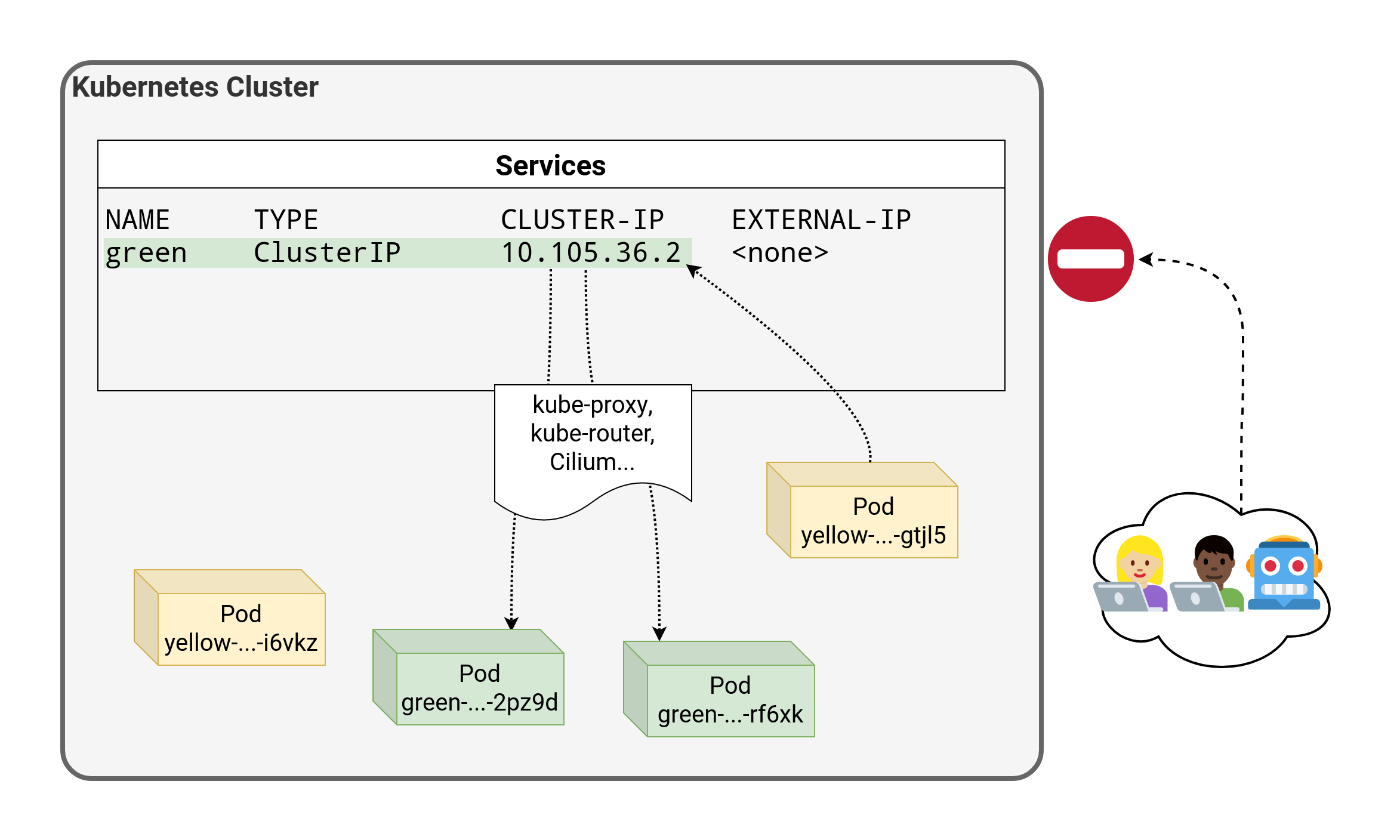 .debug[[k8s/kubectlexpose.md](https://git.verleun.org/training/containers.git/tree/main/slides/k8s/kubectlexpose.md)] --- class: pic 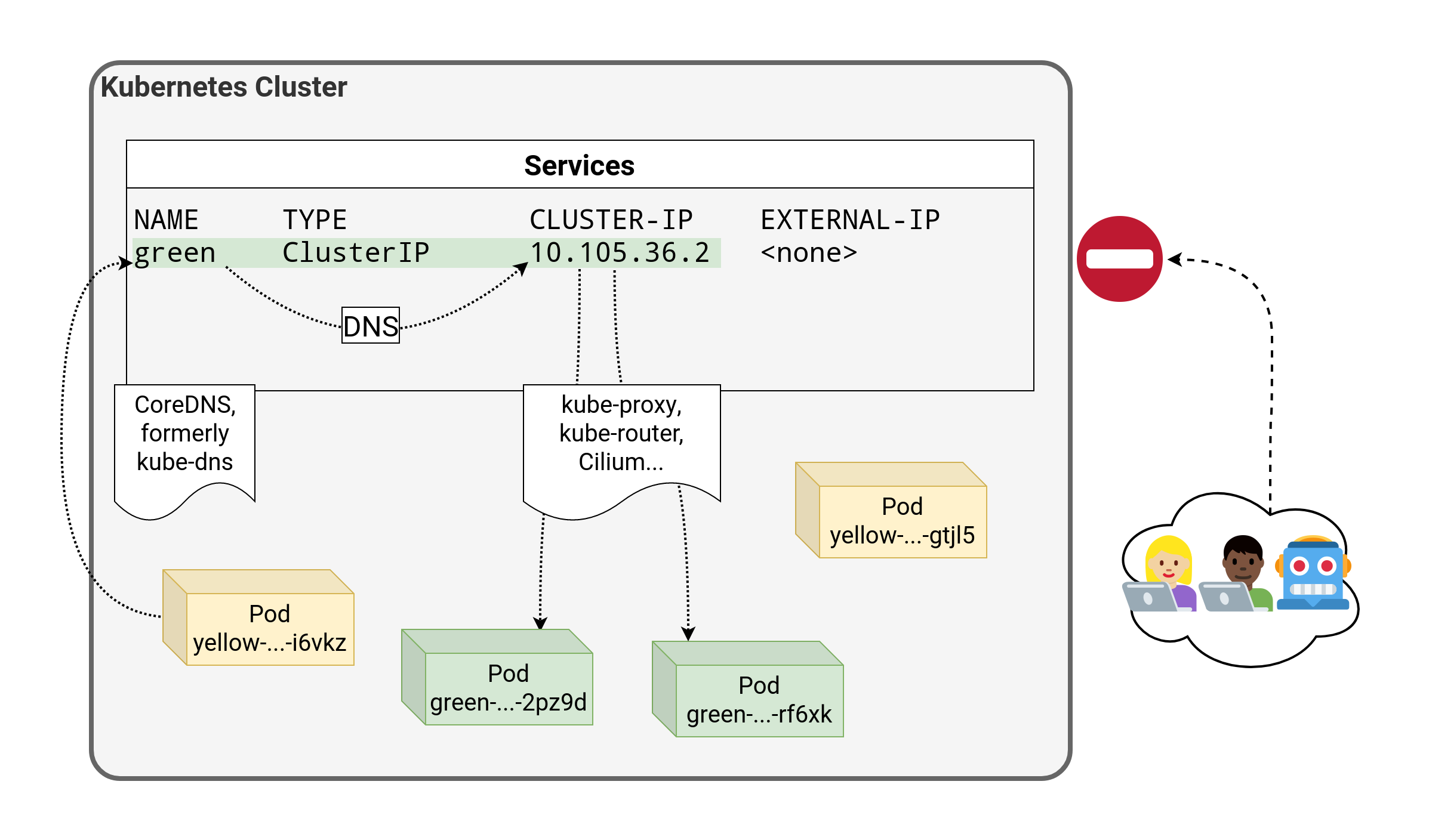 .debug[[k8s/kubectlexpose.md](https://git.verleun.org/training/containers.git/tree/main/slides/k8s/kubectlexpose.md)] --- class: pic  .debug[[k8s/kubectlexpose.md](https://git.verleun.org/training/containers.git/tree/main/slides/k8s/kubectlexpose.md)] --- class: pic 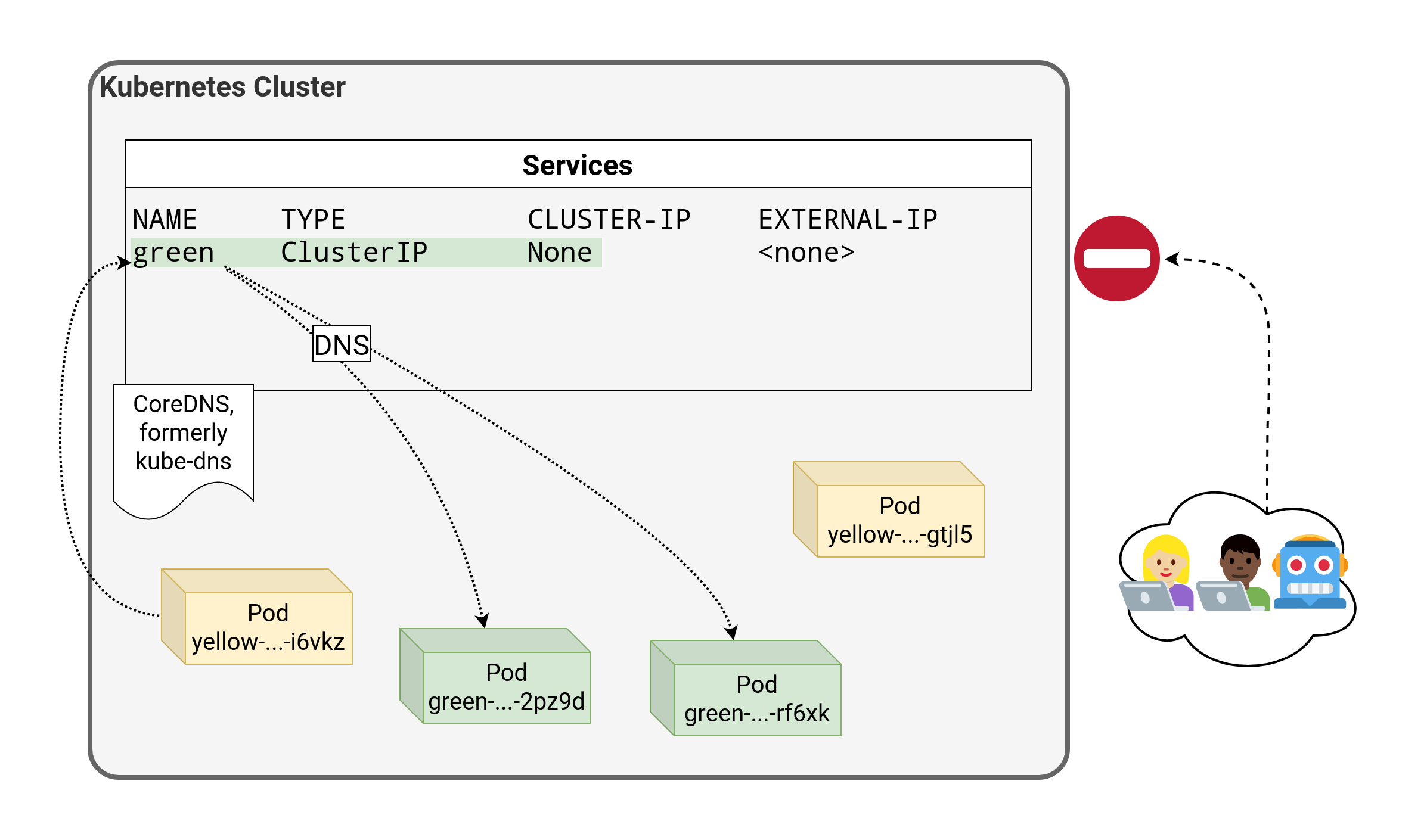 .debug[[k8s/kubectlexpose.md](https://git.verleun.org/training/containers.git/tree/main/slides/k8s/kubectlexpose.md)] --- ## `LoadBalancer` - An external load balancer is allocated for the service (typically a cloud load balancer, e.g. ELB on AWS, GLB on GCE ...) - This is available only when the underlying infrastructure provides some kind of "load balancer as a service" - Each service of that type will typically cost a little bit of money (e.g. a few cents per hour on AWS or GCE) - Ideally, traffic would flow directly from the load balancer to the pods - In practice, it will often flow through a `NodePort` first .debug[[k8s/kubectlexpose.md](https://git.verleun.org/training/containers.git/tree/main/slides/k8s/kubectlexpose.md)] --- class: pic 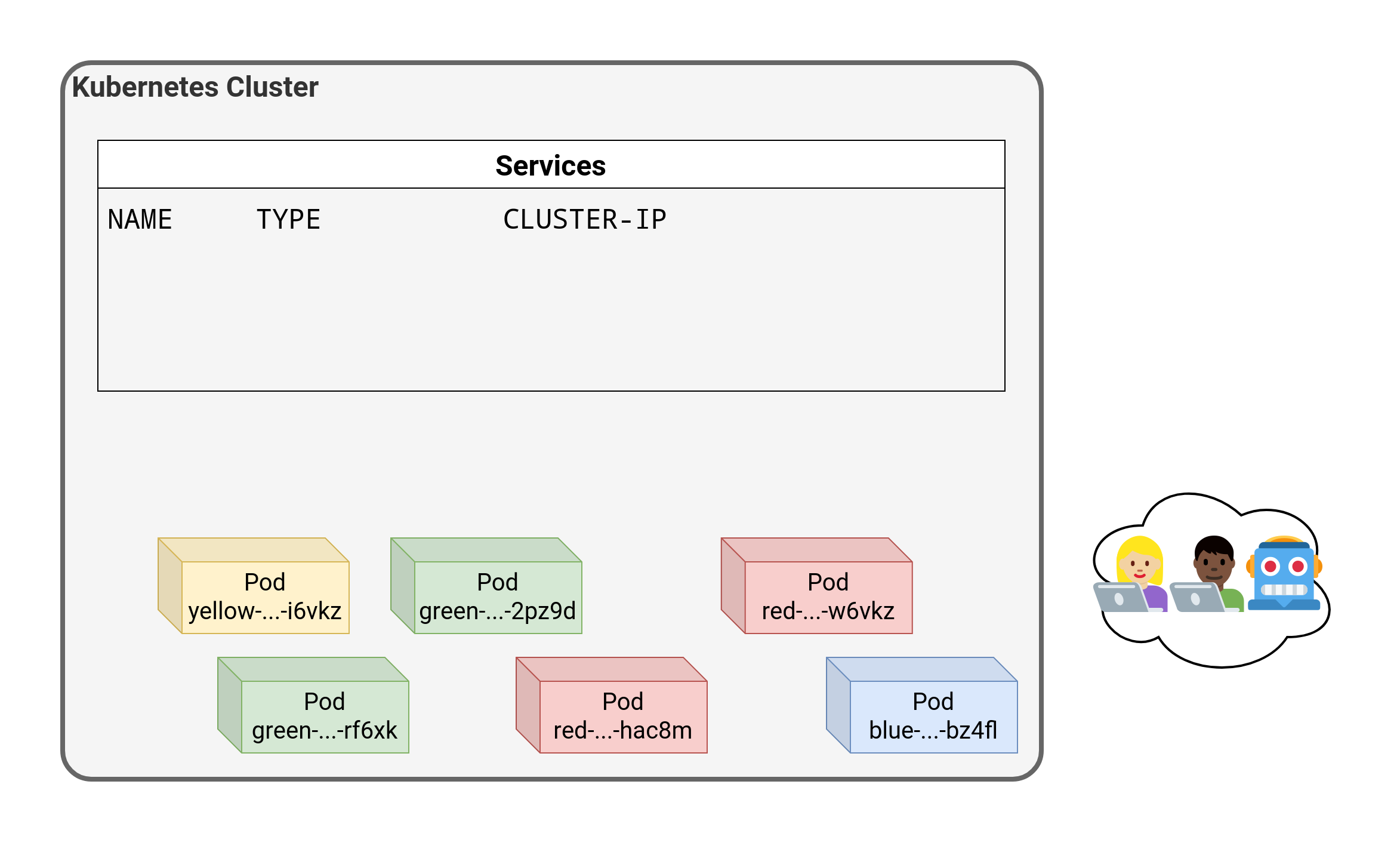 .debug[[k8s/kubectlexpose.md](https://git.verleun.org/training/containers.git/tree/main/slides/k8s/kubectlexpose.md)] --- class: pic  .debug[[k8s/kubectlexpose.md](https://git.verleun.org/training/containers.git/tree/main/slides/k8s/kubectlexpose.md)] --- class: pic 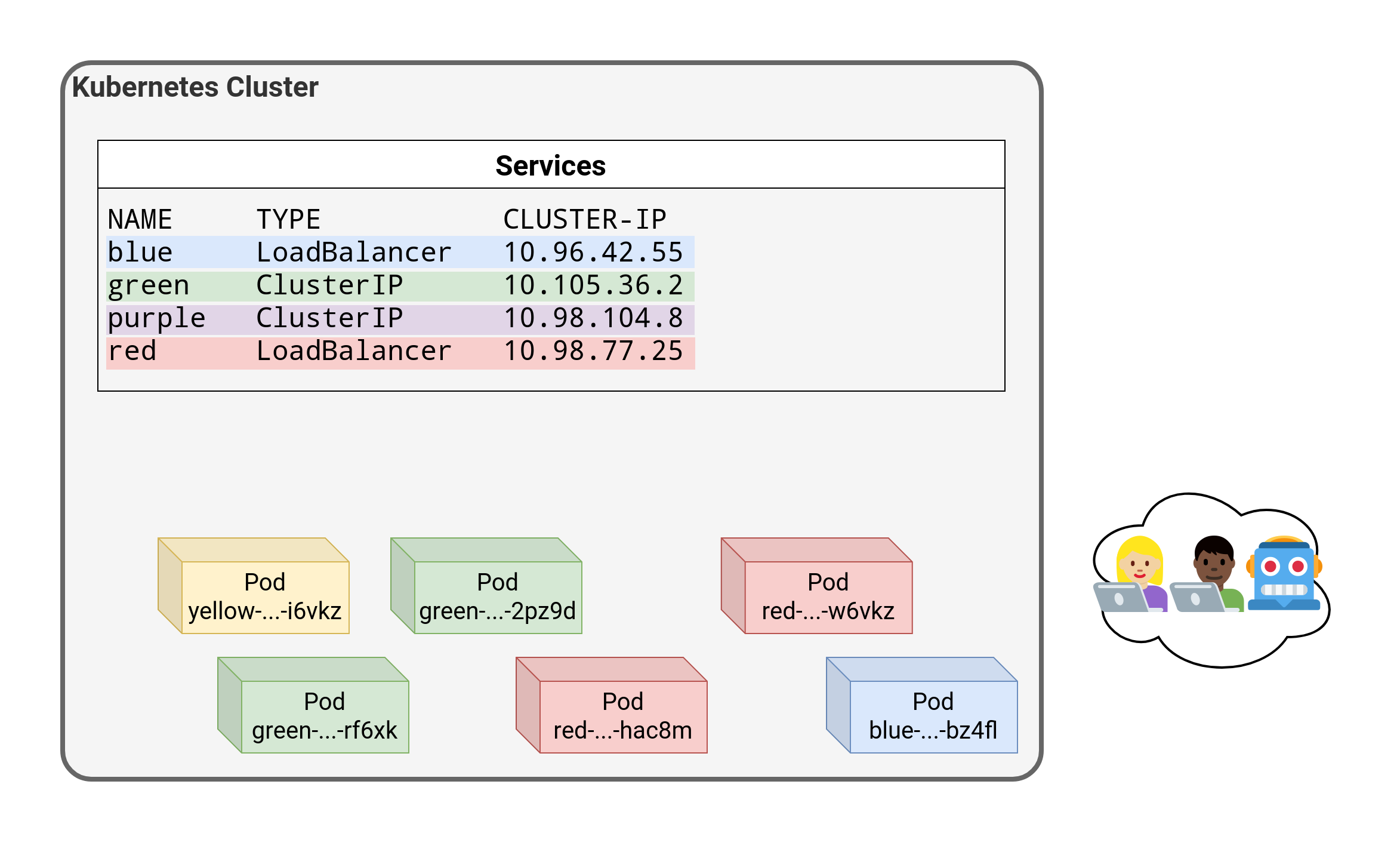 .debug[[k8s/kubectlexpose.md](https://git.verleun.org/training/containers.git/tree/main/slides/k8s/kubectlexpose.md)] --- class: pic 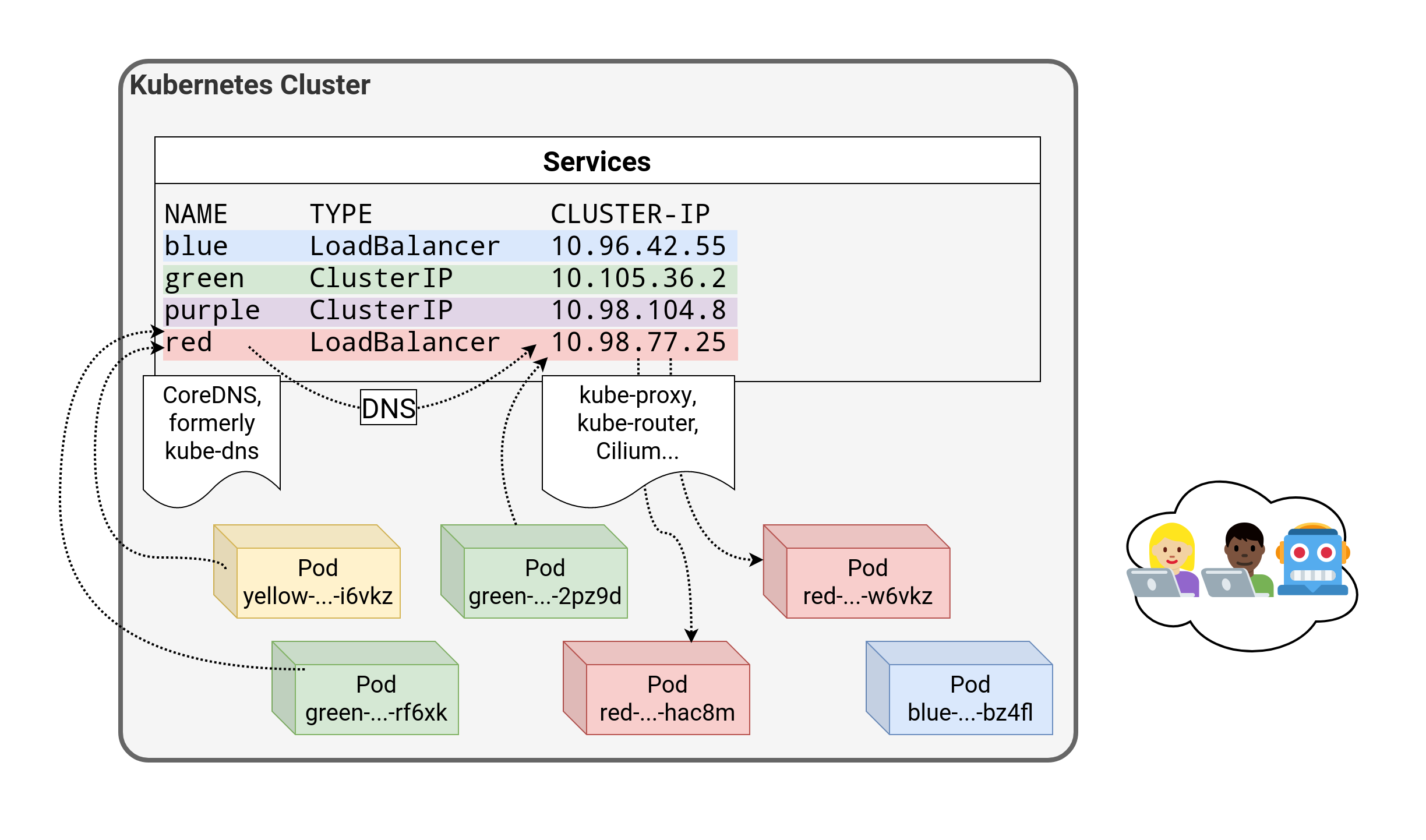 .debug[[k8s/kubectlexpose.md](https://git.verleun.org/training/containers.git/tree/main/slides/k8s/kubectlexpose.md)] --- class: pic 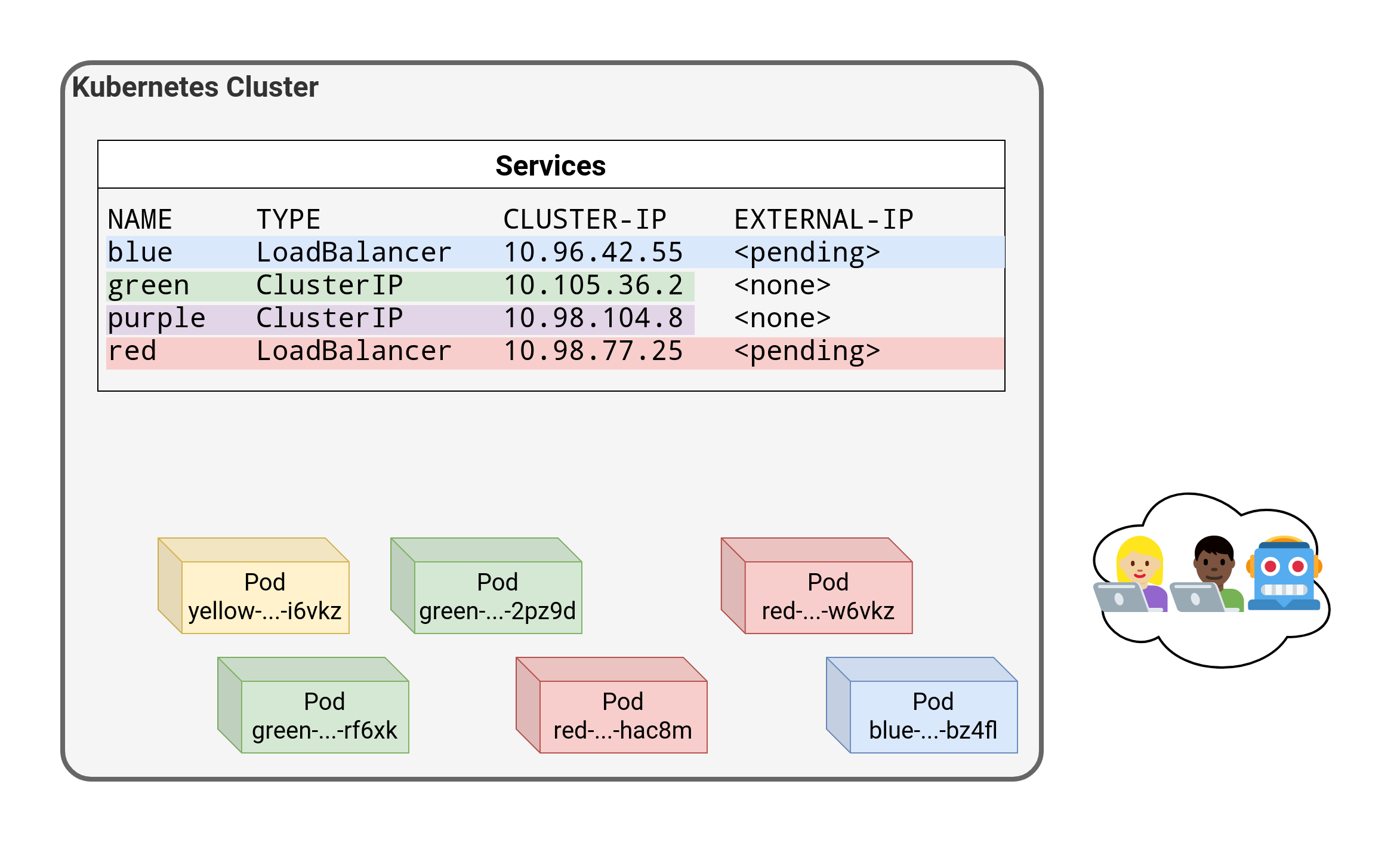 .debug[[k8s/kubectlexpose.md](https://git.verleun.org/training/containers.git/tree/main/slides/k8s/kubectlexpose.md)] --- class: pic 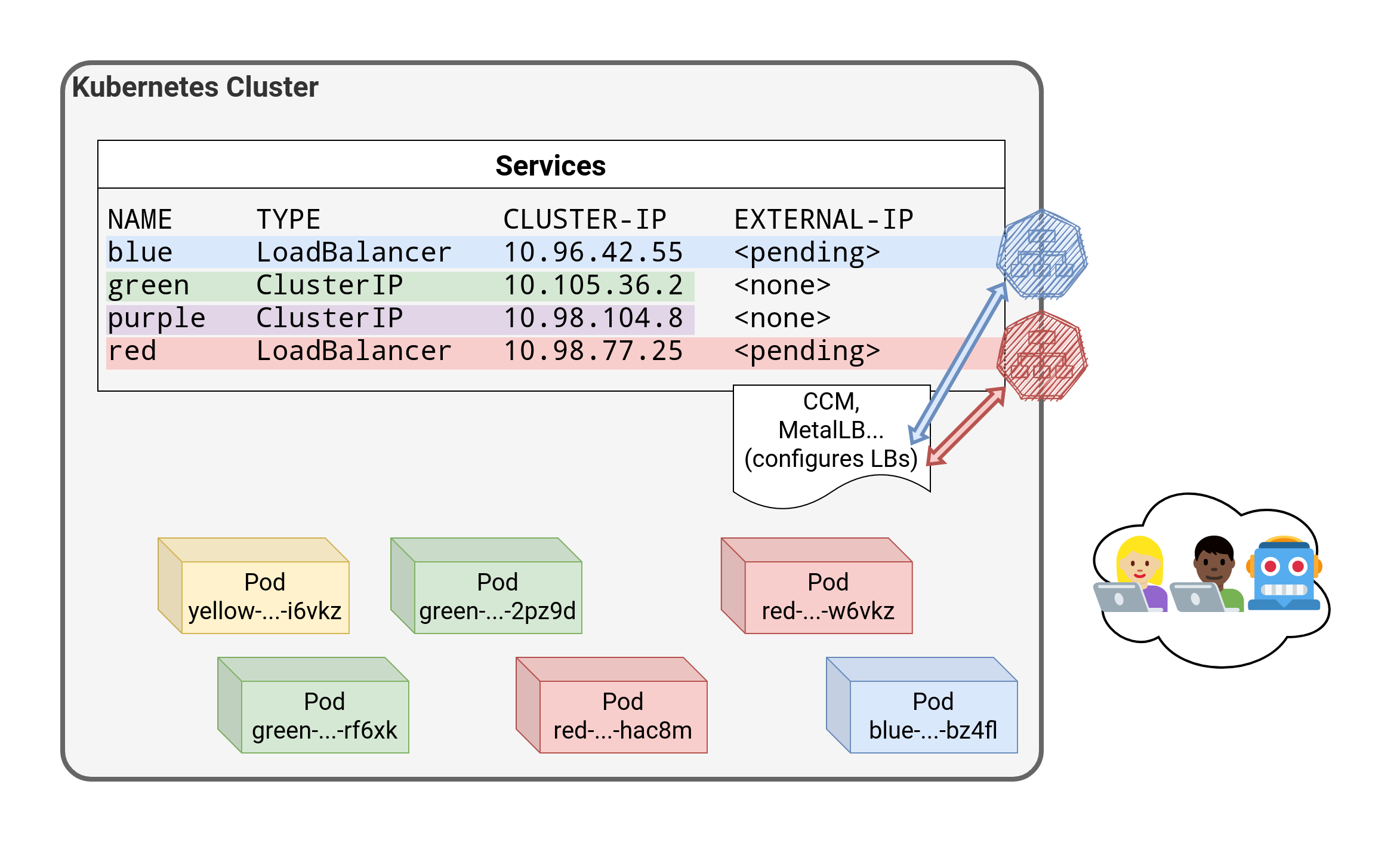 .debug[[k8s/kubectlexpose.md](https://git.verleun.org/training/containers.git/tree/main/slides/k8s/kubectlexpose.md)] --- class: pic  .debug[[k8s/kubectlexpose.md](https://git.verleun.org/training/containers.git/tree/main/slides/k8s/kubectlexpose.md)] --- class: pic  .debug[[k8s/kubectlexpose.md](https://git.verleun.org/training/containers.git/tree/main/slides/k8s/kubectlexpose.md)] --- class: pic  .debug[[k8s/kubectlexpose.md](https://git.verleun.org/training/containers.git/tree/main/slides/k8s/kubectlexpose.md)] --- class: pic  .debug[[k8s/kubectlexpose.md](https://git.verleun.org/training/containers.git/tree/main/slides/k8s/kubectlexpose.md)] --- class: pic  .debug[[k8s/kubectlexpose.md](https://git.verleun.org/training/containers.git/tree/main/slides/k8s/kubectlexpose.md)] --- class: pic  .debug[[k8s/kubectlexpose.md](https://git.verleun.org/training/containers.git/tree/main/slides/k8s/kubectlexpose.md)] --- class: pic  .debug[[k8s/kubectlexpose.md](https://git.verleun.org/training/containers.git/tree/main/slides/k8s/kubectlexpose.md)] --- class: pic  .debug[[k8s/kubectlexpose.md](https://git.verleun.org/training/containers.git/tree/main/slides/k8s/kubectlexpose.md)] --- class: pic  .debug[[k8s/kubectlexpose.md](https://git.verleun.org/training/containers.git/tree/main/slides/k8s/kubectlexpose.md)] --- class: pic 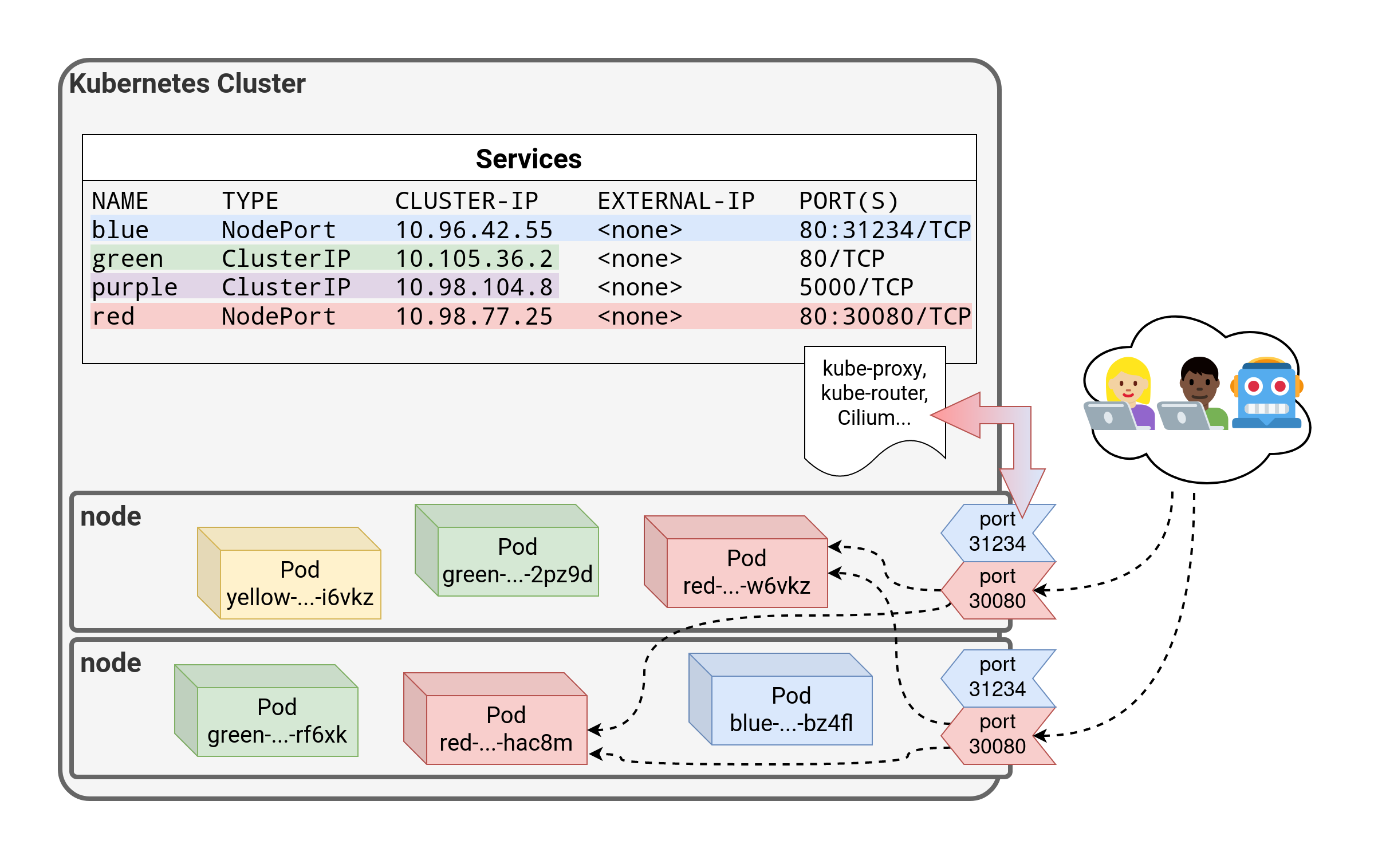 .debug[[k8s/kubectlexpose.md](https://git.verleun.org/training/containers.git/tree/main/slides/k8s/kubectlexpose.md)] --- ## `NodePort` - A port number is allocated for the service (by default, in the 30000-32767 range) - That port is made available *on all our nodes* and anybody can connect to it (we can connect to any node on that port to reach the service) - Our code needs to be changed to connect to that new port number - Under the hood: `kube-proxy` sets up a bunch of `iptables` rules on our nodes - Sometimes, it's the only available option for external traffic (e.g. most clusters deployed with kubeadm or on-premises) .debug[[k8s/kubectlexpose.md](https://git.verleun.org/training/containers.git/tree/main/slides/k8s/kubectlexpose.md)] --- ## Running containers with open ports - Since `ping` doesn't have anything to connect to, we'll have to run something else - We could use the `nginx` official image, but ... ... we wouldn't be able to tell the backends from each other! - We are going to use `jpetazzo/color`, a tiny HTTP server written in Go - `jpetazzo/color` listens on port 80 - It serves a page showing the pod's name (this will be useful when checking load balancing behavior) .debug[[k8s/kubectlexpose.md](https://git.verleun.org/training/containers.git/tree/main/slides/k8s/kubectlexpose.md)] --- ## Creating a deployment for our HTTP server - We will create a deployment with `kubectl create deployment` - Then we will scale it with `kubectl scale` .lab[ - In another window, watch the pods (to see when they are created): ```bash kubectl get pods -w ``` <!-- ```wait NAME``` ```tmux split-pane -h``` --> - Create a deployment for this very lightweight HTTP server: ```bash kubectl create deployment blue --image=jpetazzo/color ``` - Scale it to 10 replicas: ```bash kubectl scale deployment blue --replicas=10 ``` ] .debug[[k8s/kubectlexpose.md](https://git.verleun.org/training/containers.git/tree/main/slides/k8s/kubectlexpose.md)] --- ## Exposing our deployment - We'll create a default `ClusterIP` service .lab[ - Expose the HTTP port of our server: ```bash kubectl expose deployment blue --port=80 ``` - Look up which IP address was allocated: ```bash kubectl get service ``` ] .debug[[k8s/kubectlexpose.md](https://git.verleun.org/training/containers.git/tree/main/slides/k8s/kubectlexpose.md)] --- ## Services are layer 4 constructs - You can assign IP addresses to services, but they are still *layer 4* (i.e. a service is not an IP address; it's an IP address + protocol + port) - This is caused by the current implementation of `kube-proxy` (it relies on mechanisms that don't support layer 3) - As a result: you *have to* indicate the port number for your service (with some exceptions, like `ExternalName` or headless services, covered later) .debug[[k8s/kubectlexpose.md](https://git.verleun.org/training/containers.git/tree/main/slides/k8s/kubectlexpose.md)] --- ## Testing our service - We will now send a few HTTP requests to our pods .lab[ - Let's obtain the IP address that was allocated for our service, *programmatically:* ```bash IP=$(kubectl get svc blue -o go-template --template '{{ .spec.clusterIP }}') ``` <!-- ```hide kubectl wait deploy blue --for condition=available``` ```key ^D``` ```key ^C``` --> - Send a few requests: ```bash curl http://$IP:80/ ``` ] -- Try it a few times! Our requests are load balanced across multiple pods. .debug[[k8s/kubectlexpose.md](https://git.verleun.org/training/containers.git/tree/main/slides/k8s/kubectlexpose.md)] --- class: extra-details ## `ExternalName` - Services of type `ExternalName` are quite different - No load balancer (internal or external) is created - Only a DNS entry gets added to the DNS managed by Kubernetes - That DNS entry will just be a `CNAME` to a provided record Example: ```bash kubectl create service externalname k8s --external-name kubernetes.io ``` *Creates a CNAME `k8s` pointing to `kubernetes.io`* .debug[[k8s/kubectlexpose.md](https://git.verleun.org/training/containers.git/tree/main/slides/k8s/kubectlexpose.md)] --- class: extra-details ## External IPs - We can add an External IP to a service, e.g.: ```bash kubectl expose deploy my-little-deploy --port=80 --external-ip=1.2.3.4 ``` - `1.2.3.4` should be the address of one of our nodes (it could also be a virtual address, service address, or VIP, shared by multiple nodes) - Connections to `1.2.3.4:80` will be sent to our service - External IPs will also show up on services of type `LoadBalancer` (they will be added automatically by the process provisioning the load balancer) .debug[[k8s/kubectlexpose.md](https://git.verleun.org/training/containers.git/tree/main/slides/k8s/kubectlexpose.md)] --- class: extra-details ## Headless services - Sometimes, we want to access our scaled services directly: - if we want to save a tiny little bit of latency (typically less than 1ms) - if we need to connect over arbitrary ports (instead of a few fixed ones) - if we need to communicate over another protocol than UDP or TCP - if we want to decide how to balance the requests client-side - ... - In that case, we can use a "headless service" .debug[[k8s/kubectlexpose.md](https://git.verleun.org/training/containers.git/tree/main/slides/k8s/kubectlexpose.md)] --- class: extra-details ## Creating a headless services - A headless service is obtained by setting the `clusterIP` field to `None` (Either with `--cluster-ip=None`, or by providing a custom YAML) - As a result, the service doesn't have a virtual IP address - Since there is no virtual IP address, there is no load balancer either - CoreDNS will return the pods' IP addresses as multiple `A` records - This gives us an easy way to discover all the replicas for a deployment .debug[[k8s/kubectlexpose.md](https://git.verleun.org/training/containers.git/tree/main/slides/k8s/kubectlexpose.md)] --- class: extra-details ## Services and endpoints - A service has a number of "endpoints" - Each endpoint is a host + port where the service is available - The endpoints are maintained and updated automatically by Kubernetes .lab[ - Check the endpoints that Kubernetes has associated with our `blue` service: ```bash kubectl describe service blue ``` ] In the output, there will be a line starting with `Endpoints:`. That line will list a bunch of addresses in `host:port` format. .debug[[k8s/kubectlexpose.md](https://git.verleun.org/training/containers.git/tree/main/slides/k8s/kubectlexpose.md)] --- class: extra-details ## Viewing endpoint details - When we have many endpoints, our display commands truncate the list ```bash kubectl get endpoints ``` - If we want to see the full list, we can use one of the following commands: ```bash kubectl describe endpoints blue kubectl get endpoints blue -o yaml ``` - These commands will show us a list of IP addresses - These IP addresses should match the addresses of the corresponding pods: ```bash kubectl get pods -l app=blue -o wide ``` .debug[[k8s/kubectlexpose.md](https://git.verleun.org/training/containers.git/tree/main/slides/k8s/kubectlexpose.md)] --- class: extra-details ## `endpoints` not `endpoint` - `endpoints` is the only resource that cannot be singular ```bash $ kubectl get endpoint error: the server doesn't have a resource type "endpoint" ``` - This is because the type itself is plural (unlike every other resource) - There is no `endpoint` object: `type Endpoints struct` - The type doesn't represent a single endpoint, but a list of endpoints .debug[[k8s/kubectlexpose.md](https://git.verleun.org/training/containers.git/tree/main/slides/k8s/kubectlexpose.md)] --- class: extra-details ## The DNS zone - In the `kube-system` namespace, there should be a service named `kube-dns` - This is the internal DNS server that can resolve service names - The default domain name for the service we created is `default.svc.cluster.local` .lab[ - Get the IP address of the internal DNS server: ```bash IP=$(kubectl -n kube-system get svc kube-dns -o jsonpath={.spec.clusterIP}) ``` - Resolve the cluster IP for the `blue` service: ```bash host blue.default.svc.cluster.local $IP ``` ] .debug[[k8s/kubectlexpose.md](https://git.verleun.org/training/containers.git/tree/main/slides/k8s/kubectlexpose.md)] --- class: extra-details ## `Ingress` - Ingresses are another type (kind) of resource - They are specifically for HTTP services (not TCP or UDP) - They can also handle TLS certificates, URL rewriting ... - They require an *Ingress Controller* to function .debug[[k8s/kubectlexpose.md](https://git.verleun.org/training/containers.git/tree/main/slides/k8s/kubectlexpose.md)] --- class: pic 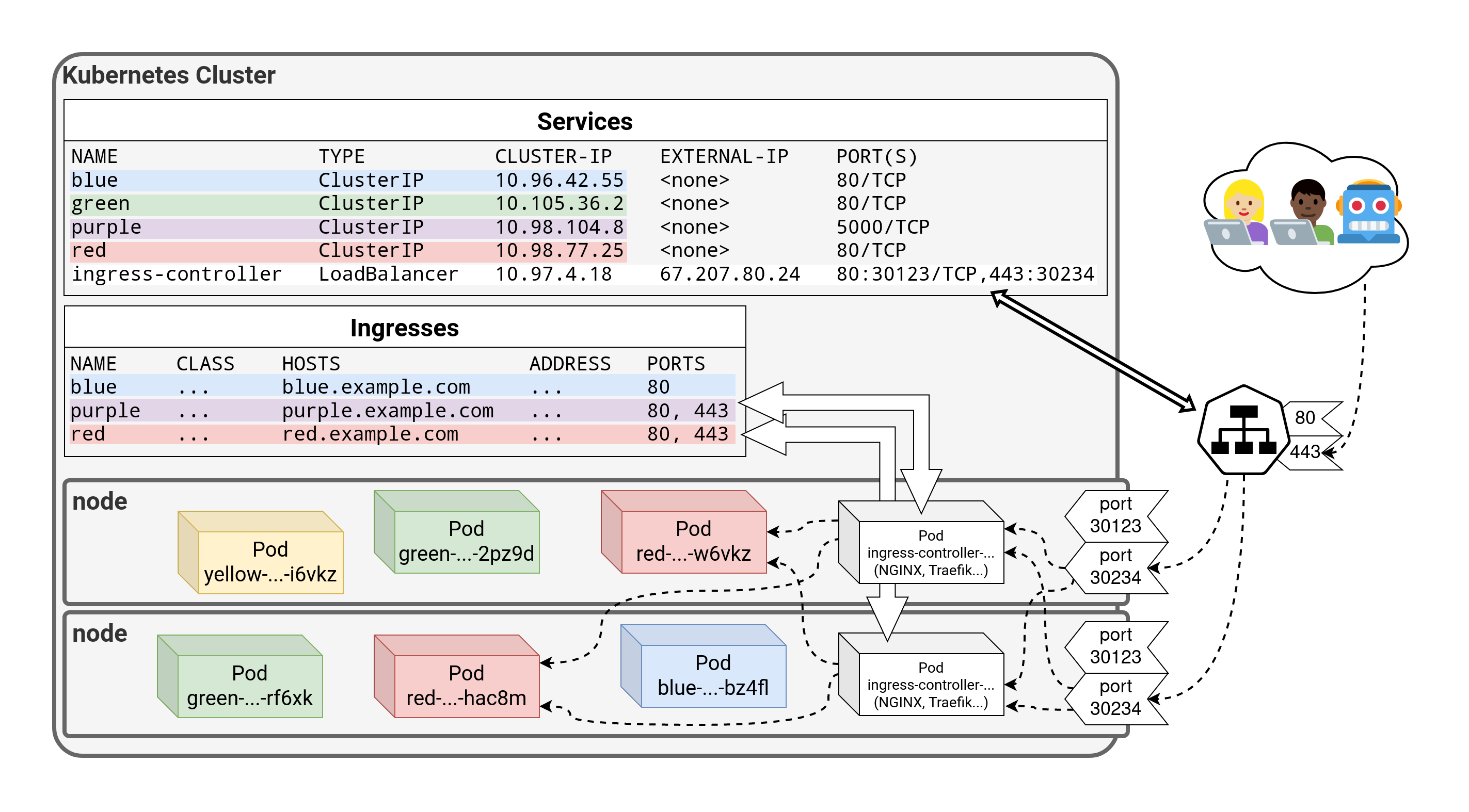 .debug[[k8s/kubectlexpose.md](https://git.verleun.org/training/containers.git/tree/main/slides/k8s/kubectlexpose.md)] --- class: pic 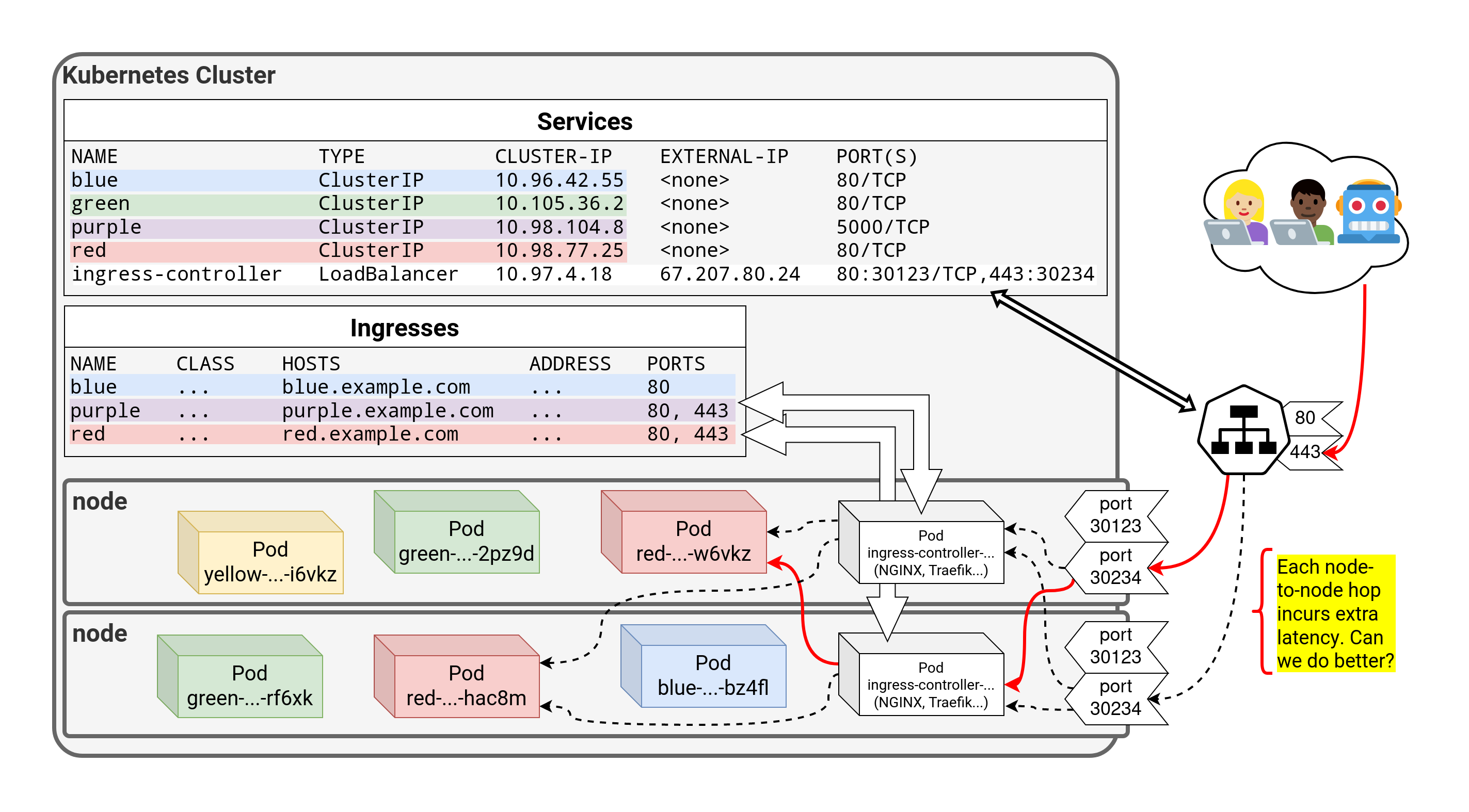 .debug[[k8s/kubectlexpose.md](https://git.verleun.org/training/containers.git/tree/main/slides/k8s/kubectlexpose.md)] --- class: pic 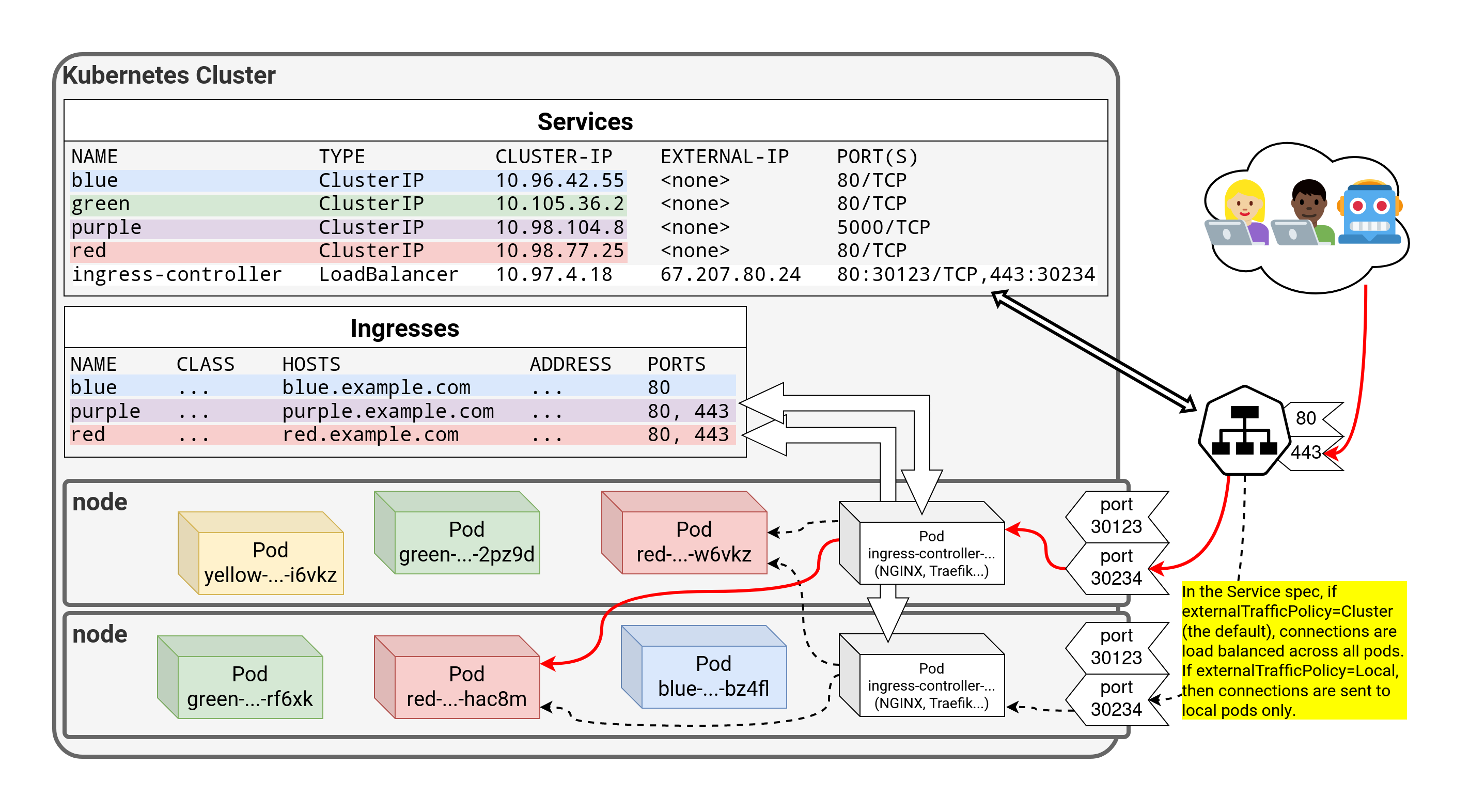 .debug[[k8s/kubectlexpose.md](https://git.verleun.org/training/containers.git/tree/main/slides/k8s/kubectlexpose.md)] --- class: pic 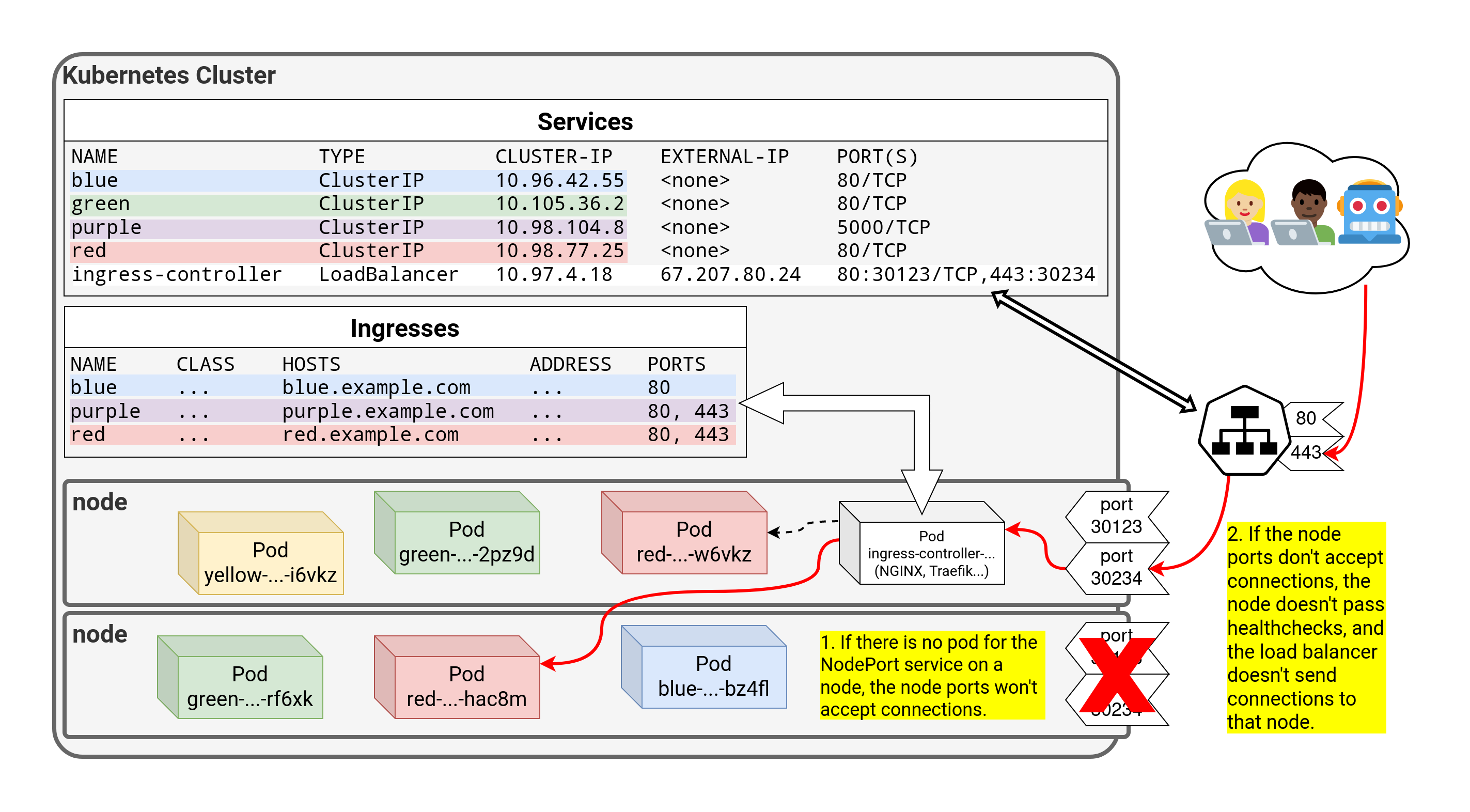 ??? :EN:- Service discovery and load balancing :EN:- Accessing pods through services :EN:- Service types: ClusterIP, NodePort, LoadBalancer :FR:- Exposer un service :FR:- Différents types de services : ClusterIP, NodePort, LoadBalancer :FR:- Utiliser CoreDNS pour la *service discovery* .debug[[k8s/kubectlexpose.md](https://git.verleun.org/training/containers.git/tree/main/slides/k8s/kubectlexpose.md)] --- class: pic .interstitial[] --- name: toc-clone-repo-with-training-material class: title Clone repo with training material .nav[ [Previous part](#toc-exposing-containers) | [Back to table of contents](#toc-part-4) | [Next part](#toc-running-our-application-on-kubernetes) ] .debug[(automatically generated title slide)] --- # Clone repo with training material - To get some experience a github repo is available with example files - Clone one to get things going .lab[ ```bash git clone https://github.com/jpetazzo/container.training.git cd container.training/k8s ``` ] - Do not deploy all these files at once... ;-) .debug[[custom/clone-github-repo.md](https://git.verleun.org/training/containers.git/tree/main/slides/custom/clone-github-repo.md)] --- class: pic .interstitial[] --- name: toc-running-our-application-on-kubernetes class: title Running our application on Kubernetes .nav[ [Previous part](#toc-clone-repo-with-training-material) | [Back to table of contents](#toc-part-4) | [Next part](#toc-deploying-a-sample-application) ] .debug[(automatically generated title slide)] --- # Running our application on Kubernetes - We can now deploy our code (as well as a redis instance) .lab[ - Deploy `redis`: ```bash kubectl create deployment redis --image=redis ``` - Deploy everything else: ```bash kubectl create deployment hasher --image=dockercoins/hasher:v0.1 kubectl create deployment rng --image=dockercoins/rng:v0.1 kubectl create deployment webui --image=dockercoins/webui:v0.1 kubectl create deployment worker --image=dockercoins/worker:v0.1 ``` ] .debug[[k8s/ourapponkube.md](https://git.verleun.org/training/containers.git/tree/main/slides/k8s/ourapponkube.md)] --- class: extra-details ## Deploying other images - If we wanted to deploy images from another registry ... - ... Or with a different tag ... - ... We could use the following snippet: ```bash REGISTRY=dockercoins TAG=v0.1 for SERVICE in hasher rng webui worker; do kubectl create deployment $SERVICE --image=$REGISTRY/$SERVICE:$TAG done ``` .debug[[k8s/ourapponkube.md](https://git.verleun.org/training/containers.git/tree/main/slides/k8s/ourapponkube.md)] --- ## Is this working? - After waiting for the deployment to complete, let's look at the logs! (Hint: use `kubectl get deploy -w` to watch deployment events) .lab[ <!-- ```hide kubectl wait deploy/rng --for condition=available kubectl wait deploy/worker --for condition=available ``` --> - Look at some logs: ```bash kubectl logs deploy/rng kubectl logs deploy/worker ``` ] -- 🤔 `rng` is fine ... But not `worker`. -- 💡 Oh right! We forgot to `expose`. .debug[[k8s/ourapponkube.md](https://git.verleun.org/training/containers.git/tree/main/slides/k8s/ourapponkube.md)] --- ## Connecting containers together - Three deployments need to be reachable by others: `hasher`, `redis`, `rng` - `worker` doesn't need to be exposed - `webui` will be dealt with later .lab[ - Expose each deployment, specifying the right port: ```bash kubectl expose deployment redis --port 6379 kubectl expose deployment rng --port 80 kubectl expose deployment hasher --port 80 ``` ] .debug[[k8s/ourapponkube.md](https://git.verleun.org/training/containers.git/tree/main/slides/k8s/ourapponkube.md)] --- ## Is this working yet? - The `worker` has an infinite loop, that retries 10 seconds after an error .lab[ - Stream the worker's logs: ```bash kubectl logs deploy/worker --follow ``` (Give it about 10 seconds to recover) <!-- ```wait units of work done, updating hash counter``` ```key ^C``` --> ] -- We should now see the `worker`, well, working happily. .debug[[k8s/ourapponkube.md](https://git.verleun.org/training/containers.git/tree/main/slides/k8s/ourapponkube.md)] --- ## Exposing services for external access - Now we would like to access the Web UI - We will expose it with a `NodePort` (just like we did for the registry) .lab[ - Create a `NodePort` service for the Web UI: ```bash kubectl expose deploy/webui --type=NodePort --port=80 ``` - Check the port that was allocated: ```bash kubectl get svc ``` ] .debug[[k8s/ourapponkube.md](https://git.verleun.org/training/containers.git/tree/main/slides/k8s/ourapponkube.md)] --- ## Accessing the web UI - We can now connect to *any node*, on the allocated node port, to view the web UI .lab[ - Open the web UI in your browser (http://node-ip-address:3xxxx/) <!-- ```open http://node1:3xxxx/``` --> ] -- Yes, this may take a little while to update. *(Narrator: it was DNS.)* -- *Alright, we're back to where we started, when we were running on a single node!* ??? :EN:- Running our demo app on Kubernetes :FR:- Faire tourner l'application de démo sur Kubernetes .debug[[k8s/ourapponkube.md](https://git.verleun.org/training/containers.git/tree/main/slides/k8s/ourapponkube.md)] --- class: pic .interstitial[] --- name: toc-deploying-a-sample-application class: title Deploying a sample application .nav[ [Previous part](#toc-running-our-application-on-kubernetes) | [Back to table of contents](#toc-part-4) | [Next part](#toc-scaling-our-demo-app) ] .debug[(automatically generated title slide)] --- # Deploying a sample application - We will connect to our new Kubernetes cluster - We will deploy a sample application, "DockerCoins" - That app features multiple micro-services and a web UI .debug[[k8s/kubercoins.md](https://git.verleun.org/training/containers.git/tree/main/slides/k8s/kubercoins.md)] --- ## Connecting to our Kubernetes cluster - Our cluster has multiple nodes named `node1`, `node2`, etc. - We will do everything from `node1` - We have SSH access to the other nodes, but won't need it (but we can use it for debugging, troubleshooting, etc.) .lab[ - Log into `node1` - Check that all nodes are `Ready`: ```bash kubectl get nodes ``` ] .debug[[k8s/kubercoins.md](https://git.verleun.org/training/containers.git/tree/main/slides/k8s/kubercoins.md)] --- ## Cloning the repository - We will need to clone the training repository - It has the DockerCoins demo app ... - ... as well as these slides, some scripts, more manifests .lab[ - Clone the repository on `node1`: ```bash git clone https://github.com/jpetazzo/container.training ``` ] .debug[[k8s/kubercoins.md](https://git.verleun.org/training/containers.git/tree/main/slides/k8s/kubercoins.md)] --- ## Running the application Without further ado, let's start this application! .lab[ - Apply the manifest for dockercoins: ```bash kubectl apply -f ~/container.training/k8s/dockercoins.yaml ``` ] .debug[[k8s/kubercoins.md](https://git.verleun.org/training/containers.git/tree/main/slides/k8s/kubercoins.md)] --- ## What's this application? -- - It is a DockerCoin miner! 💰🐳📦🚢 -- - No, you can't buy coffee with DockerCoins -- - How DockerCoins works: - generate a few random bytes - hash these bytes - increment a counter (to keep track of speed) - repeat forever! -- - DockerCoins is *not* a cryptocurrency (the only common points are "randomness", "hashing", and "coins" in the name) .debug[[k8s/kubercoins.md](https://git.verleun.org/training/containers.git/tree/main/slides/k8s/kubercoins.md)] --- ## DockerCoins in the microservices era - DockerCoins is made of 5 services: - `rng` = web service generating random bytes - `hasher` = web service computing hash of POSTed data - `worker` = background process calling `rng` and `hasher` - `webui` = web interface to watch progress - `redis` = data store (holds a counter updated by `worker`) - These 5 services are visible in the application's Compose file, [docker-compose.yml]( https://github.com/jpetazzo/container.training/blob/master/dockercoins/docker-compose.yml) .debug[[k8s/kubercoins.md](https://git.verleun.org/training/containers.git/tree/main/slides/k8s/kubercoins.md)] --- ## How DockerCoins works - `worker` invokes web service `rng` to generate random bytes - `worker` invokes web service `hasher` to hash these bytes - `worker` does this in an infinite loop - every second, `worker` updates `redis` to indicate how many loops were done - `webui` queries `redis`, and computes and exposes "hashing speed" in our browser *(See diagram on next slide!)* .debug[[k8s/kubercoins.md](https://git.verleun.org/training/containers.git/tree/main/slides/k8s/kubercoins.md)] --- class: pic  .debug[[k8s/kubercoins.md](https://git.verleun.org/training/containers.git/tree/main/slides/k8s/kubercoins.md)] --- ## Service discovery in container-land How does each service find out the address of the other ones? -- - We do not hard-code IP addresses in the code - We do not hard-code FQDNs in the code, either - We just connect to a service name, and container-magic does the rest (And by container-magic, we mean "a crafty, dynamic, embedded DNS server") .debug[[k8s/kubercoins.md](https://git.verleun.org/training/containers.git/tree/main/slides/k8s/kubercoins.md)] --- ## Example in `worker/worker.py` ```python redis = Redis("`redis`") def get_random_bytes(): r = requests.get("http://`rng`/32") return r.content def hash_bytes(data): r = requests.post("http://`hasher`/", data=data, headers={"Content-Type": "application/octet-stream"}) ``` (Feel free to check the [full source code][dockercoins-worker-code] of the worker!) [dockercoins-worker-code]: https://github.com/jpetazzo/container.training/blob/8279a3bce9398f7c1a53bdd95187c53eda4e6435/dockercoins/worker/worker.py#L17 .debug[[k8s/kubercoins.md](https://git.verleun.org/training/containers.git/tree/main/slides/k8s/kubercoins.md)] --- ## Show me the code! - You can check the GitHub repository with all the materials of this workshop: <br/>https://github.com/jpetazzo/container.training - The application is in the [dockercoins]( https://github.com/jpetazzo/container.training/tree/master/dockercoins) subdirectory - The Compose file ([docker-compose.yml]( https://github.com/jpetazzo/container.training/blob/master/dockercoins/docker-compose.yml)) lists all 5 services - `redis` is using an official image from the Docker Hub - `hasher`, `rng`, `worker`, `webui` are each built from a Dockerfile - Each service's Dockerfile and source code is in its own directory (`hasher` is in the [hasher](https://github.com/jpetazzo/container.training/blob/master/dockercoins/hasher/) directory, `rng` is in the [rng](https://github.com/jpetazzo/container.training/blob/master/dockercoins/rng/) directory, etc.) .debug[[k8s/kubercoins.md](https://git.verleun.org/training/containers.git/tree/main/slides/k8s/kubercoins.md)] --- ## Our application at work - We can check the logs of our application's pods .lab[ - Check the logs of the various components: ```bash kubectl logs deploy/worker kubectl logs deploy/hasher ``` ] .debug[[k8s/kubercoins.md](https://git.verleun.org/training/containers.git/tree/main/slides/k8s/kubercoins.md)] --- ## Connecting to the web UI - "Logs are exciting and fun!" (No-one, ever) - The `webui` container exposes a web dashboard; let's view it .lab[ - Check the NodePort allocated to the web UI: ```bash kubectl get svc webui ``` - Open that in a web browser ] A drawing area should show up, and after a few seconds, a blue graph will appear. ??? :EN:- Deploying a sample app with YAML manifests :FR:- Lancer une application de démo avec du YAML .debug[[k8s/kubercoins.md](https://git.verleun.org/training/containers.git/tree/main/slides/k8s/kubercoins.md)] --- class: pic .interstitial[] --- name: toc-scaling-our-demo-app class: title Scaling our demo app .nav[ [Previous part](#toc-deploying-a-sample-application) | [Back to table of contents](#toc-part-4) | [Next part](#toc-deployment-types) ] .debug[(automatically generated title slide)] --- # Scaling our demo app - Our ultimate goal is to get more DockerCoins (i.e. increase the number of loops per second shown on the web UI) - Let's look at the architecture again:  - The loop is done in the worker; perhaps we could try adding more workers? .debug[[k8s/scalingdockercoins.md](https://git.verleun.org/training/containers.git/tree/main/slides/k8s/scalingdockercoins.md)] --- ## Adding another worker - All we have to do is scale the `worker` Deployment .lab[ - Open a new terminal to keep an eye on our pods: ```bash kubectl get pods -w ``` <!-- ```wait RESTARTS``` ```tmux split-pane -h``` --> - Now, create more `worker` replicas: ```bash kubectl scale deployment worker --replicas=2 ``` ] After a few seconds, the graph in the web UI should show up. .debug[[k8s/scalingdockercoins.md](https://git.verleun.org/training/containers.git/tree/main/slides/k8s/scalingdockercoins.md)] --- ## Adding more workers - If 2 workers give us 2x speed, what about 3 workers? .lab[ - Scale the `worker` Deployment further: ```bash kubectl scale deployment worker --replicas=3 ``` ] The graph in the web UI should go up again. (This is looking great! We're gonna be RICH!) .debug[[k8s/scalingdockercoins.md](https://git.verleun.org/training/containers.git/tree/main/slides/k8s/scalingdockercoins.md)] --- ## Adding even more workers - Let's see if 10 workers give us 10x speed! .lab[ - Scale the `worker` Deployment to a bigger number: ```bash kubectl scale deployment worker --replicas=10 ``` <!-- ```key ^D``` ```key ^C``` --> ] -- The graph will peak at 10 hashes/second. (We can add as many workers as we want: we will never go past 10 hashes/second.) .debug[[k8s/scalingdockercoins.md](https://git.verleun.org/training/containers.git/tree/main/slides/k8s/scalingdockercoins.md)] --- class: extra-details ## Didn't we briefly exceed 10 hashes/second? - It may *look like it*, because the web UI shows instant speed - The instant speed can briefly exceed 10 hashes/second - The average speed cannot - The instant speed can be biased because of how it's computed .debug[[k8s/scalingdockercoins.md](https://git.verleun.org/training/containers.git/tree/main/slides/k8s/scalingdockercoins.md)] --- class: extra-details ## Why instant speed is misleading - The instant speed is computed client-side by the web UI - The web UI checks the hash counter once per second <br/> (and does a classic (h2-h1)/(t2-t1) speed computation) - The counter is updated once per second by the workers - These timings are not exact <br/> (e.g. the web UI check interval is client-side JavaScript) - Sometimes, between two web UI counter measurements, <br/> the workers are able to update the counter *twice* - During that cycle, the instant speed will appear to be much bigger <br/> (but it will be compensated by lower instant speed before and after) .debug[[k8s/scalingdockercoins.md](https://git.verleun.org/training/containers.git/tree/main/slides/k8s/scalingdockercoins.md)] --- ## Why are we stuck at 10 hashes per second? - If this was high-quality, production code, we would have instrumentation (Datadog, Honeycomb, New Relic, statsd, Sumologic, ...) - It's not! - Perhaps we could benchmark our web services? (with tools like `ab`, or even simpler, `httping`) .debug[[k8s/scalingdockercoins.md](https://git.verleun.org/training/containers.git/tree/main/slides/k8s/scalingdockercoins.md)] --- ## Benchmarking our web services - We want to check `hasher` and `rng` - We are going to use `httping` - It's just like `ping`, but using HTTP `GET` requests (it measures how long it takes to perform one `GET` request) - It's used like this: ``` httping [-c count] http://host:port/path ``` - Or even simpler: ``` httping ip.ad.dr.ess ``` - We will use `httping` on the ClusterIP addresses of our services .debug[[k8s/scalingdockercoins.md](https://git.verleun.org/training/containers.git/tree/main/slides/k8s/scalingdockercoins.md)] --- ## Obtaining ClusterIP addresses - We can simply check the output of `kubectl get services` - Or do it programmatically, as in the example below .lab[ - Retrieve the IP addresses: ```bash HASHER=$(kubectl get svc hasher -o go-template={{.spec.clusterIP}}) RNG=$(kubectl get svc rng -o go-template={{.spec.clusterIP}}) ``` ] Now we can access the IP addresses of our services through `$HASHER` and `$RNG`. .debug[[k8s/scalingdockercoins.md](https://git.verleun.org/training/containers.git/tree/main/slides/k8s/scalingdockercoins.md)] --- ## Checking `hasher` and `rng` response times .lab[ - Check the response times for both services: ```bash httping -c 3 $HASHER httping -c 3 $RNG ``` ] - `hasher` is fine (it should take a few milliseconds to reply) - `rng` is not (it should take about 700 milliseconds if there are 10 workers) - Something is wrong with `rng`, but ... what? ??? :EN:- Scaling up our demo app :FR:- *Scale up* de l'application de démo .debug[[k8s/scalingdockercoins.md](https://git.verleun.org/training/containers.git/tree/main/slides/k8s/scalingdockercoins.md)] --- ## Let's draw hasty conclusions - The bottleneck seems to be `rng` - *What if* we don't have enough entropy and can't generate enough random numbers? - We need to scale out the `rng` service on multiple machines! Note: this is a fiction! We have enough entropy. But we need a pretext to scale out. (In fact, the code of `rng` uses `/dev/urandom`, which never runs out of entropy... <br/> ...and is [just as good as `/dev/random`](http://www.slideshare.net/PacSecJP/filippo-plain-simple-reality-of-entropy).) .debug[[shared/hastyconclusions.md](https://git.verleun.org/training/containers.git/tree/main/slides/shared/hastyconclusions.md)] --- class: pic .interstitial[] --- name: toc-deployment-types class: title Deployment types .nav[ [Previous part](#toc-scaling-our-demo-app) | [Back to table of contents](#toc-part-5) | [Next part](#toc-volumes) ] .debug[(automatically generated title slide)] --- # Deployment types - There are many different ways to deploy services - Having an understandig of the differences helps to choose the best one .debug[[custom/deployment-types.md](https://git.verleun.org/training/containers.git/tree/main/slides/custom/deployment-types.md)] --- ## Simple POD - An easy thing to deploy is a Pod - A pod is limited in its ability and therefor often not created manually - (Cron)jobs, deployments, daemonsets and statefulsets all create (and manage!) pods - This allows for better management, scaling etc. (where applicable) .debug[[custom/deployment-types.md](https://git.verleun.org/training/containers.git/tree/main/slides/custom/deployment-types.md)] --- ## Jobs - Are one time executions of a Pod - Often used to perform a one time action - Triggered manually or on a time schedule in which case it is a cron job. - Uses a pod template to create pods .debug[[custom/deployment-types.md](https://git.verleun.org/training/containers.git/tree/main/slides/custom/deployment-types.md)] --- .small[ ```yaml apiVersion: batch/v1 kind: Job metadata: name: pi spec: template: spec: containers: - name: pi image: perl:5.34.0 command: ["perl", "-Mbignum=bpi", "-wle", "print bpi(2000)"] restartPolicy: Never backoffLimit: 4 ``` ] .debug[[custom/deployment-types.md](https://git.verleun.org/training/containers.git/tree/main/slides/custom/deployment-types.md)] --- ## Deployments - The most common deployment types - They create Replica Sets - Are scalable (manually or automatically) - Enablers of rolling updates - Used for rollback scenarios - Use a pod template to create pods (Using resource sets as intermediates) - Share PVC's amongst pods .debug[[custom/deployment-types.md](https://git.verleun.org/training/containers.git/tree/main/slides/custom/deployment-types.md)] --- .small[ ```yaml apiVersion: apps/v1 kind: Deployment metadata: name: nginx-deployment labels: app: nginx spec: replicas: 3 selector: matchLabels: app: nginx template: metadata: labels: app: nginx spec: containers: - name: nginx image: nginx:1.14.2 ports: - containerPort: 80 ``` ] .debug[[custom/deployment-types.md](https://git.verleun.org/training/containers.git/tree/main/slides/custom/deployment-types.md)] --- ## Statefulsets - Less commonly used - Scale like Deployments, but slightly different - Do NOT share PVC's but have individual ones - Differ in update process - Use a pod template to create pods .debug[[custom/deployment-types.md](https://git.verleun.org/training/containers.git/tree/main/slides/custom/deployment-types.md)] --- .small[ ```yaml apiVersion: apps/v1 kind: StatefulSet metadata: name: web spec: selector: matchLabels: app: nginx # has to match .spec.template.metadata.labels serviceName: "nginx" replicas: 3 # by default is 1 template: metadata: labels: app: nginx # has to match .spec.selector.matchLabels spec: terminationGracePeriodSeconds: 10 containers: - name: nginx image: registry.k8s.io/nginx-slim:0.8 ports: - containerPort: 80 name: web volumeMounts: - name: www mountPath: /usr/share/nginx/html volumeClaimTemplates: - metadata: name: www spec: accessModes: [ "ReadWriteOnce" ] storageClassName: "my-storage-class" resources: requests: storage: 1Gi ``` ] .debug[[custom/deployment-types.md](https://git.verleun.org/training/containers.git/tree/main/slides/custom/deployment-types.md)] --- ## Daemonset - Deploy one pod per node - Not more, not less - Each new node automatically get's a pod - Use a pod template to create pods .debug[[custom/deployment-types.md](https://git.verleun.org/training/containers.git/tree/main/slides/custom/deployment-types.md)] --- .small[ ```yaml apiVersion: apps/v1 kind: DaemonSet metadata: name: fluentd-elasticsearch namespace: kube-system labels: k8s-app: fluentd-logging spec: selector: matchLabels: name: fluentd-elasticsearch template: metadata: labels: name: fluentd-elasticsearch spec: containers: - name: fluentd-elasticsearch image: "quay.io/fluentd_elasticsearch/fluentd:v2.5.2" volumeMounts: - name: varlog mountPath: /var/log terminationGracePeriodSeconds: 30 volumes: - name: varlog hostPath: path: /var/log ``` ] .debug[[custom/deployment-types.md](https://git.verleun.org/training/containers.git/tree/main/slides/custom/deployment-types.md)] --- class: pic .interstitial[] --- name: toc-volumes class: title Volumes .nav[ [Previous part](#toc-deployment-types) | [Back to table of contents](#toc-part-5) | [Next part](#toc-accessing-logs-from-the-cli) ] .debug[(automatically generated title slide)] --- # Volumes - Storage is important and requires a careful selection - There are two types of storage: - ephemeral - persistant .debug[[custom/volumes.md](https://git.verleun.org/training/containers.git/tree/main/slides/custom/volumes.md)] --- ## Ephemeral storage - There are several types: - emptyDir: empty at Pod startup, with storage coming locally from the kubelet base directory (usually the root disk) or RAM - configMap, downwardAPI, secret: inject different kinds of Kubernetes data into a Pod - CSI ephemeral volumes: similar to the previous volume kinds, but provided by special CSI drivers which specifically support this feature - generic ephemeral volumes, which can be provided by all storage drivers that also support persistent volumes .debug[[custom/volumes.md](https://git.verleun.org/training/containers.git/tree/main/slides/custom/volumes.md)] --- ## emptyDir .small[ ```yaml apiVersion: v1 kind: Pod metadata: name: test-pd spec: containers: - image: registry.k8s.io/test-webserver name: test-container volumeMounts: - mountPath: /cache name: cache-volume volumes: - name: cache-volume emptyDir: sizeLimit: 500Mi ``` ] .debug[[custom/volumes.md](https://git.verleun.org/training/containers.git/tree/main/slides/custom/volumes.md)] --- ## configMap .small[ ```yaml apiVersion: v1 kind: Pod metadata: name: configmap-pod spec: containers: - name: test image: "busybox:1.28" volumeMounts: - name: config-vol mountPath: /etc/config volumes: - name: config-vol configMap: name: log-config items: - key: log_level path: log_level ``` ] .debug[[custom/volumes.md](https://git.verleun.org/training/containers.git/tree/main/slides/custom/volumes.md)] --- ## secret .small[ ```yaml apiVersion: v1 kind: Pod metadata: name: mypod spec: containers: - name: mypod image: redis volumeMounts: - name: foo mountPath: "/etc/foo" readOnly: true volumes: - name: foo secret: secretName: mysecret optional: true ``` ] .debug[[custom/volumes.md](https://git.verleun.org/training/containers.git/tree/main/slides/custom/volumes.md)] --- ## Persistent Storage - There are several ways to persist data - Use storage directly from Pod - nfs - hostPath - Indirect using a PVC and PV .debug[[custom/volumes.md](https://git.verleun.org/training/containers.git/tree/main/slides/custom/volumes.md)] --- ## nfs example .small[ ```yaml apiVersion: v1 kind: Pod metadata: name: test-pd spec: containers: - image: registry.k8s.io/test-webserver name: test-container volumeMounts: - mountPath: /my-nfs-data name: test-volume volumes: - name: test-volume nfs: server: my-nfs-server.example.com path: /my-nfs-volume readOnly: true ``` ] .debug[[custom/volumes.md](https://git.verleun.org/training/containers.git/tree/main/slides/custom/volumes.md)] --- ## PV's and PVC's - PV's are Persistent Volumes and actually store data - PVC's are Persisten Volume Claims and is a request for storage within a PV - Often PVC's claim storage by indirect reference known as storageClass .debug[[custom/volumes.md](https://git.verleun.org/training/containers.git/tree/main/slides/custom/volumes.md)] --- ## PV and PVC .small[ ```yaml apiVersion: v1 kind: PersistentVolume metadata: name: task-pv-volume labels: type: local spec: storageClassName: manual capacity: storage: 10Gi accessModes: - ReadWriteOnce hostPath: path: "/mnt/data" ``` ] .small[ ```yaml apiVersion: v1 kind: PersistentVolumeClaim metadata: name: task-pv-claim spec: storageClassName: manual accessModes: - ReadWriteOnce resources: requests: storage: 3Gi ``` ] .debug[[custom/volumes.md](https://git.verleun.org/training/containers.git/tree/main/slides/custom/volumes.md)] --- ## Pod using PVC .small[ ```yaml apiVersion: v1 kind: Pod metadata: name: task-pv-pod spec: volumes: - name: task-pv-storage persistentVolumeClaim: claimName: task-pv-claim containers: - name: task-pv-container image: nginx ports: - containerPort: 80 name: "http-server" volumeMounts: - mountPath: "/usr/share/nginx/html" name: task-pv-storage ``` ] .debug[[custom/volumes.md](https://git.verleun.org/training/containers.git/tree/main/slides/custom/volumes.md)] --- ## How does the StorageClass work - It is the driver behind a PV and configures this driver - There are many provisioners which can be used. - They are not all equal - Some can resize, others can not - Some are block devices others are filesystems .debug[[custom/volumes.md](https://git.verleun.org/training/containers.git/tree/main/slides/custom/volumes.md)] --- ## Provisioners - Some provisioners are internal (K3s has removed most of them) - Other requires an external provisioner - [NFS subdir external provisioner](https://github.com/kubernetes-sigs/nfs-subdir-external-provisioner) is used often to have something at least... .debug[[custom/volumes.md](https://git.verleun.org/training/containers.git/tree/main/slides/custom/volumes.md)] --- ## Access Modes - Currently there are 3 access modes - A fourth is in beta in Kubernetes 1.27 - They are know as: RWO - ReadWriteOnce ROX - ReadOnlyMany RWX - ReadWriteMany RWOP - ReadWriteOncePod .debug[[custom/volumes.md](https://git.verleun.org/training/containers.git/tree/main/slides/custom/volumes.md)] --- ## Access Modes and upgrade strategies - RWO mode is useful for statefulsets - The update strategy first stops a pod and then starts a new one - This way there are never two pods writing at the same time - It blocks rolling updates for regular deployments - RWX is needed for rolling updates .debug[[custom/volumes.md](https://git.verleun.org/training/containers.git/tree/main/slides/custom/volumes.md)] --- class: pic .interstitial[] --- name: toc-accessing-logs-from-the-cli class: title Accessing logs from the CLI .nav[ [Previous part](#toc-volumes) | [Back to table of contents](#toc-part-6) | [Next part](#toc-namespaces) ] .debug[(automatically generated title slide)] --- # Accessing logs from the CLI - The `kubectl logs` command has limitations: - it cannot stream logs from multiple pods at a time - when showing logs from multiple pods, it mixes them all together - We are going to see how to do it better .debug[[k8s/logs-cli.md](https://git.verleun.org/training/containers.git/tree/main/slides/k8s/logs-cli.md)] --- ## Doing it manually - We *could* (if we were so inclined) write a program or script that would: - take a selector as an argument - enumerate all pods matching that selector (with `kubectl get -l ...`) - fork one `kubectl logs --follow ...` command per container - annotate the logs (the output of each `kubectl logs ...` process) with their origin - preserve ordering by using `kubectl logs --timestamps ...` and merge the output -- - We *could* do it, but thankfully, others did it for us already! .debug[[k8s/logs-cli.md](https://git.verleun.org/training/containers.git/tree/main/slides/k8s/logs-cli.md)] --- ## Stern [Stern](https://github.com/stern/stern) is an open source project originally by [Wercker](http://www.wercker.com/). From the README: *Stern allows you to tail multiple pods on Kubernetes and multiple containers within the pod. Each result is color coded for quicker debugging.* *The query is a regular expression so the pod name can easily be filtered and you don't need to specify the exact id (for instance omitting the deployment id). If a pod is deleted it gets removed from tail and if a new pod is added it automatically gets tailed.* Exactly what we need! .debug[[k8s/logs-cli.md](https://git.verleun.org/training/containers.git/tree/main/slides/k8s/logs-cli.md)] --- ## Checking if Stern is installed - Run `stern` (without arguments) to check if it's installed: ``` $ stern Tail multiple pods and containers from Kubernetes Usage: stern pod-query [flags] ``` - If it's missing, let's see how to install it .debug[[k8s/logs-cli.md](https://git.verleun.org/training/containers.git/tree/main/slides/k8s/logs-cli.md)] --- ## Installing Stern - Stern is written in Go - Go programs are usually very easy to install (no dependencies, extra libraries to install, etc) - Binary releases are available [on GitHub][stern-releases] - Stern is also available through most package managers (e.g. on macOS, we can `brew install stern` or `sudo port install stern`) [stern-releases]: https://github.com/stern/stern/releases .debug[[k8s/logs-cli.md](https://git.verleun.org/training/containers.git/tree/main/slides/k8s/logs-cli.md)] --- ## Using Stern - There are two ways to specify the pods whose logs we want to see: - `-l` followed by a selector expression (like with many `kubectl` commands) - with a "pod query," i.e. a regex used to match pod names - These two ways can be combined if necessary .lab[ - View the logs for all the pingpong containers: ```bash stern pingpong ``` <!-- ```wait seq=``` ```key ^C``` --> ] .debug[[k8s/logs-cli.md](https://git.verleun.org/training/containers.git/tree/main/slides/k8s/logs-cli.md)] --- ## Stern convenient options - The `--tail N` flag shows the last `N` lines for each container (Instead of showing the logs since the creation of the container) - The `-t` / `--timestamps` flag shows timestamps - The `--all-namespaces` flag is self-explanatory .lab[ - View what's up with the `weave` system containers: ```bash stern --tail 1 --timestamps --all-namespaces weave ``` <!-- ```wait weave-npc``` ```key ^C``` --> ] .debug[[k8s/logs-cli.md](https://git.verleun.org/training/containers.git/tree/main/slides/k8s/logs-cli.md)] --- ## Using Stern with a selector - When specifying a selector, we can omit the value for a label - This will match all objects having that label (regardless of the value) - Everything created with `kubectl run` has a label `run` - Everything created with `kubectl create deployment` has a label `app` - We can use that property to view the logs of all the pods created with `kubectl create deployment` .lab[ - View the logs for all the things started with `kubectl create deployment`: ```bash stern -l app ``` <!-- ```wait seq=``` ```key ^C``` --> ] ??? :EN:- Viewing pod logs from the CLI :FR:- Consulter les logs des pods depuis la CLI .debug[[k8s/logs-cli.md](https://git.verleun.org/training/containers.git/tree/main/slides/k8s/logs-cli.md)] --- class: pic .interstitial[] --- name: toc-namespaces class: title Namespaces .nav[ [Previous part](#toc-accessing-logs-from-the-cli) | [Back to table of contents](#toc-part-6) | [Next part](#toc-next-steps) ] .debug[(automatically generated title slide)] --- # Namespaces - We would like to deploy another copy of DockerCoins on our cluster - We could rename all our deployments and services: hasher → hasher2, redis → redis2, rng → rng2, etc. - That would require updating the code - There has to be a better way! -- - As hinted by the title of this section, we will use *namespaces* .debug[[k8s/namespaces.md](https://git.verleun.org/training/containers.git/tree/main/slides/k8s/namespaces.md)] --- ## Identifying a resource - We cannot have two resources with the same name (or can we...?) -- - We cannot have two resources *of the same kind* with the same name (but it's OK to have an `rng` service, an `rng` deployment, and an `rng` daemon set) -- - We cannot have two resources of the same kind with the same name *in the same namespace* (but it's OK to have e.g. two `rng` services in different namespaces) -- - Except for resources that exist at the *cluster scope* (these do not belong to a namespace) .debug[[k8s/namespaces.md](https://git.verleun.org/training/containers.git/tree/main/slides/k8s/namespaces.md)] --- ## Uniquely identifying a resource - For *namespaced* resources: the tuple *(kind, name, namespace)* needs to be unique - For resources at the *cluster scope*: the tuple *(kind, name)* needs to be unique .lab[ - List resource types again, and check the NAMESPACED column: ```bash kubectl api-resources ``` ] .debug[[k8s/namespaces.md](https://git.verleun.org/training/containers.git/tree/main/slides/k8s/namespaces.md)] --- ## Pre-existing namespaces - If we deploy a cluster with `kubeadm`, we have three or four namespaces: - `default` (for our applications) - `kube-system` (for the control plane) - `kube-public` (contains one ConfigMap for cluster discovery) - `kube-node-lease` (in Kubernetes 1.14 and later; contains Lease objects) - If we deploy differently, we may have different namespaces .debug[[k8s/namespaces.md](https://git.verleun.org/training/containers.git/tree/main/slides/k8s/namespaces.md)] --- ## Creating namespaces - Let's see two identical methods to create a namespace .lab[ - We can use `kubectl create namespace`: ```bash kubectl create namespace blue ``` - Or we can construct a very minimal YAML snippet: ```bash kubectl apply -f- <<EOF apiVersion: v1 kind: Namespace metadata: name: blue EOF ``` ] .debug[[k8s/namespaces.md](https://git.verleun.org/training/containers.git/tree/main/slides/k8s/namespaces.md)] --- ## Using namespaces - We can pass a `-n` or `--namespace` flag to most `kubectl` commands: ```bash kubectl -n blue get svc ``` - We can also change our current *context* - A context is a *(user, cluster, namespace)* tuple - We can manipulate contexts with the `kubectl config` command .debug[[k8s/namespaces.md](https://git.verleun.org/training/containers.git/tree/main/slides/k8s/namespaces.md)] --- ## Viewing existing contexts - On our training environments, at this point, there should be only one context .lab[ - View existing contexts to see the cluster name and the current user: ```bash kubectl config get-contexts ``` ] - The current context (the only one!) is tagged with a `*` - What are NAME, CLUSTER, AUTHINFO, and NAMESPACE? .debug[[k8s/namespaces.md](https://git.verleun.org/training/containers.git/tree/main/slides/k8s/namespaces.md)] --- ## What's in a context - NAME is an arbitrary string to identify the context - CLUSTER is a reference to a cluster (i.e. API endpoint URL, and optional certificate) - AUTHINFO is a reference to the authentication information to use (i.e. a TLS client certificate, token, or otherwise) - NAMESPACE is the namespace (empty string = `default`) .debug[[k8s/namespaces.md](https://git.verleun.org/training/containers.git/tree/main/slides/k8s/namespaces.md)] --- ## Switching contexts - We want to use a different namespace - Solution 1: update the current context *This is appropriate if we need to change just one thing (e.g. namespace or authentication).* - Solution 2: create a new context and switch to it *This is appropriate if we need to change multiple things and switch back and forth.* - Let's go with solution 1! .debug[[k8s/namespaces.md](https://git.verleun.org/training/containers.git/tree/main/slides/k8s/namespaces.md)] --- ## Updating a context - This is done through `kubectl config set-context` - We can update a context by passing its name, or the current context with `--current` .lab[ - Update the current context to use the `blue` namespace: ```bash kubectl config set-context --current --namespace=blue ``` - Check the result: ```bash kubectl config get-contexts ``` ] .debug[[k8s/namespaces.md](https://git.verleun.org/training/containers.git/tree/main/slides/k8s/namespaces.md)] --- ## Using our new namespace - Let's check that we are in our new namespace, then deploy a new copy of Dockercoins .lab[ - Verify that the new context is empty: ```bash kubectl get all ``` ] .debug[[k8s/namespaces.md](https://git.verleun.org/training/containers.git/tree/main/slides/k8s/namespaces.md)] --- ## Deploying DockerCoins with YAML files - The GitHub repository `jpetazzo/kubercoins` contains everything we need! .lab[ - Clone the kubercoins repository: ```bash cd ~ git clone https://github.com/jpetazzo/kubercoins ``` - Create all the DockerCoins resources: ```bash kubectl create -f kubercoins ``` ] If the argument behind `-f` is a directory, all the files in that directory are processed. The subdirectories are *not* processed, unless we also add the `-R` flag. .debug[[k8s/namespaces.md](https://git.verleun.org/training/containers.git/tree/main/slides/k8s/namespaces.md)] --- ## Viewing the deployed app - Let's see if this worked correctly! .lab[ - Retrieve the port number allocated to the `webui` service: ```bash kubectl get svc webui ``` - Point our browser to http://X.X.X.X:3xxxx ] If the graph shows up but stays at zero, give it a minute or two! .debug[[k8s/namespaces.md](https://git.verleun.org/training/containers.git/tree/main/slides/k8s/namespaces.md)] --- ## Namespaces and isolation - Namespaces *do not* provide isolation - A pod in the `green` namespace can communicate with a pod in the `blue` namespace - A pod in the `default` namespace can communicate with a pod in the `kube-system` namespace - CoreDNS uses a different subdomain for each namespace - Example: from any pod in the cluster, you can connect to the Kubernetes API with: `https://kubernetes.default.svc.cluster.local:443/` .debug[[k8s/namespaces.md](https://git.verleun.org/training/containers.git/tree/main/slides/k8s/namespaces.md)] --- ## Isolating pods - Actual isolation is implemented with *network policies* - Network policies are resources (like deployments, services, namespaces...) - Network policies specify which flows are allowed: - between pods - from pods to the outside world - and vice-versa .debug[[k8s/namespaces.md](https://git.verleun.org/training/containers.git/tree/main/slides/k8s/namespaces.md)] --- ## Switch back to the default namespace - Let's make sure that we don't run future exercises and labs in the `blue` namespace .lab[ - Switch back to the original context: ```bash kubectl config set-context --current --namespace= ``` ] Note: we could have used `--namespace=default` for the same result. .debug[[k8s/namespaces.md](https://git.verleun.org/training/containers.git/tree/main/slides/k8s/namespaces.md)] --- ## Switching namespaces more easily - We can also use a little helper tool called `kubens`: ```bash # Switch to namespace foo kubens foo # Switch back to the previous namespace kubens - ``` - On our clusters, `kubens` is called `kns` instead (so that it's even fewer keystrokes to switch namespaces) .debug[[k8s/namespaces.md](https://git.verleun.org/training/containers.git/tree/main/slides/k8s/namespaces.md)] --- ## `kubens` and `kubectx` - With `kubens`, we can switch quickly between namespaces - With `kubectx`, we can switch quickly between contexts - Both tools are simple shell scripts available from https://github.com/ahmetb/kubectx - On our clusters, they are installed as `kns` and `kctx` (for brevity and to avoid completion clashes between `kubectx` and `kubectl`) .debug[[k8s/namespaces.md](https://git.verleun.org/training/containers.git/tree/main/slides/k8s/namespaces.md)] --- ## `kube-ps1` - It's easy to lose track of our current cluster / context / namespace - `kube-ps1` makes it easy to track these, by showing them in our shell prompt - It is installed on our training clusters, and when using [shpod](https://github.com/jpetazzo/shpod) - It gives us a prompt looking like this one: ``` [123.45.67.89] `(kubernetes-admin@kubernetes:default)` docker@node1 ~ ``` (The highlighted part is `context:namespace`, managed by `kube-ps1`) - Highly recommended if you work across multiple contexts or namespaces! .debug[[k8s/namespaces.md](https://git.verleun.org/training/containers.git/tree/main/slides/k8s/namespaces.md)] --- ## Installing `kube-ps1` - It's a simple shell script available from https://github.com/jonmosco/kube-ps1 - It needs to be [installed in our profile/rc files](https://github.com/jonmosco/kube-ps1#installing) (instructions differ depending on platform, shell, etc.) - Once installed, it defines aliases called `kube_ps1`, `kubeon`, `kubeoff` (to selectively enable/disable it when needed) - Pro-tip: install it on your machine during the next break! ??? :EN:- Organizing resources with Namespaces :FR:- Organiser les ressources avec des *namespaces* .debug[[k8s/namespaces.md](https://git.verleun.org/training/containers.git/tree/main/slides/k8s/namespaces.md)] --- class: pic .interstitial[] --- name: toc-next-steps class: title Next steps .nav[ [Previous part](#toc-namespaces) | [Back to table of contents](#toc-part-6) | [Next part](#toc-links-and-resources) ] .debug[(automatically generated title slide)] --- # Next steps *Alright, how do I get started and containerize my apps?* -- Suggested containerization checklist: .checklist[ - write a Dockerfile for one service in one app - write Dockerfiles for the other (buildable) services - write a Compose file for that whole app - make sure that devs are empowered to run the app in containers - set up automated builds of container images from the code repo - set up a CI pipeline using these container images - set up a CD pipeline (for staging/QA) using these images ] And *then* it is time to look at orchestration! .debug[[k8s/whatsnext.md](https://git.verleun.org/training/containers.git/tree/main/slides/k8s/whatsnext.md)] --- ## Options for our first production cluster - Get a managed cluster from a major cloud provider (AKS, EKS, GKE...) (price: $, difficulty: medium) - Hire someone to deploy it for us (price: $$, difficulty: easy) - Do it ourselves (price: $-$$$, difficulty: hard) .debug[[k8s/whatsnext.md](https://git.verleun.org/training/containers.git/tree/main/slides/k8s/whatsnext.md)] --- ## One big cluster vs. multiple small ones - Yes, it is possible to have prod+dev in a single cluster (and implement good isolation and security with RBAC, network policies...) - But it is not a good idea to do that for our first deployment - Start with a production cluster + at least a test cluster - Implement and check RBAC and isolation on the test cluster (e.g. deploy multiple test versions side-by-side) - Make sure that all our devs have usable dev clusters (whether it's a local minikube or a full-blown multi-node cluster) .debug[[k8s/whatsnext.md](https://git.verleun.org/training/containers.git/tree/main/slides/k8s/whatsnext.md)] --- ## Namespaces - Namespaces let you run multiple identical stacks side by side - Two namespaces (e.g. `blue` and `green`) can each have their own `redis` service - Each of the two `redis` services has its own `ClusterIP` - CoreDNS creates two entries, mapping to these two `ClusterIP` addresses: `redis.blue.svc.cluster.local` and `redis.green.svc.cluster.local` - Pods in the `blue` namespace get a *search suffix* of `blue.svc.cluster.local` - As a result, resolving `redis` from a pod in the `blue` namespace yields the "local" `redis` .warning[This does not provide *isolation*! That would be the job of network policies.] .debug[[k8s/whatsnext.md](https://git.verleun.org/training/containers.git/tree/main/slides/k8s/whatsnext.md)] --- ## Relevant sections - [Namespaces](kube-selfpaced.yml.html#toc-namespaces) - [Network Policies](kube-selfpaced.yml.html#toc-network-policies) - [Role-Based Access Control](kube-selfpaced.yml.html#toc-authentication-and-authorization) (covers permissions model, user and service accounts management ...) .debug[[k8s/whatsnext.md](https://git.verleun.org/training/containers.git/tree/main/slides/k8s/whatsnext.md)] --- ## Stateful services (databases etc.) - As a first step, it is wiser to keep stateful services *outside* of the cluster - Exposing them to pods can be done with multiple solutions: - `ExternalName` services <br/> (`redis.blue.svc.cluster.local` will be a `CNAME` record) - `ClusterIP` services with explicit `Endpoints` <br/> (instead of letting Kubernetes generate the endpoints from a selector) - Ambassador services <br/> (application-level proxies that can provide credentials injection and more) .debug[[k8s/whatsnext.md](https://git.verleun.org/training/containers.git/tree/main/slides/k8s/whatsnext.md)] --- ## Stateful services (second take) - If we want to host stateful services on Kubernetes, we can use: - a storage provider - persistent volumes, persistent volume claims - stateful sets - Good questions to ask: - what's the *operational cost* of running this service ourselves? - what do we gain by deploying this stateful service on Kubernetes? - Relevant sections: [Volumes](kube-selfpaced.yml.html#toc-volumes) | [Stateful Sets](kube-selfpaced.yml.html#toc-stateful-sets) | [Persistent Volumes](kube-selfpaced.yml.html#toc-highly-available-persistent-volumes) - Excellent [blog post](http://www.databasesoup.com/2018/07/should-i-run-postgres-on-kubernetes.html) tackling the question: “Should I run Postgres on Kubernetes?” .debug[[k8s/whatsnext.md](https://git.verleun.org/training/containers.git/tree/main/slides/k8s/whatsnext.md)] --- ## HTTP traffic handling - *Services* are layer 4 constructs - HTTP is a layer 7 protocol - It is handled by *ingresses* (a different resource kind) - *Ingresses* allow: - virtual host routing - session stickiness - URI mapping - and much more! - [This section](kube-selfpaced.yml.html#toc-exposing-http-services-with-ingress-resources) shows how to expose multiple HTTP apps using [Træfik](https://docs.traefik.io/user-guide/kubernetes/) .debug[[k8s/whatsnext.md](https://git.verleun.org/training/containers.git/tree/main/slides/k8s/whatsnext.md)] --- ## Logging - Logging is delegated to the container engine - Logs are exposed through the API - Logs are also accessible through local files (`/var/log/containers`) - Log shipping to a central platform is usually done through these files (e.g. with an agent bind-mounting the log directory) - [This section](kube-selfpaced.yml.html#toc-centralized-logging) shows how to do that with [Fluentd](https://docs.fluentd.org/v0.12/articles/kubernetes-fluentd) and the EFK stack .debug[[k8s/whatsnext.md](https://git.verleun.org/training/containers.git/tree/main/slides/k8s/whatsnext.md)] --- ## Metrics - The kubelet embeds [cAdvisor](https://github.com/google/cadvisor), which exposes container metrics (cAdvisor might be separated in the future for more flexibility) - It is a good idea to start with [Prometheus](https://prometheus.io/) (even if you end up using something else) - Starting from Kubernetes 1.8, we can use the [Metrics API](https://kubernetes.io/docs/tasks/debug-application-cluster/core-metrics-pipeline/) - [Heapster](https://github.com/kubernetes/heapster) was a popular add-on (but is being [deprecated](https://github.com/kubernetes/heapster/blob/master/docs/deprecation.md) starting with Kubernetes 1.11) .debug[[k8s/whatsnext.md](https://git.verleun.org/training/containers.git/tree/main/slides/k8s/whatsnext.md)] --- ## Managing the configuration of our applications - Two constructs are particularly useful: secrets and config maps - They allow to expose arbitrary information to our containers - **Avoid** storing configuration in container images (There are some exceptions to that rule, but it's generally a Bad Idea) - **Never** store sensitive information in container images (It's the container equivalent of the password on a post-it note on your screen) - [This section](kube-selfpaced.yml.html#toc-managing-configuration) shows how to manage app config with config maps (among others) .debug[[k8s/whatsnext.md](https://git.verleun.org/training/containers.git/tree/main/slides/k8s/whatsnext.md)] --- ## Managing stack deployments - Applications are made of many resources (Deployments, Services, and much more) - We need to automate the creation / update / management of these resources - There is no "absolute best" tool or method; it depends on: - the size and complexity of our stack(s) - how often we change it (i.e. add/remove components) - the size and skills of our team .debug[[k8s/whatsnext.md](https://git.verleun.org/training/containers.git/tree/main/slides/k8s/whatsnext.md)] --- ## A few tools to manage stacks - Shell scripts invoking `kubectl` - YAML resource manifests committed to a repo - [Kustomize](https://github.com/kubernetes-sigs/kustomize) (YAML manifests + patches applied on top) - [Helm](https://github.com/kubernetes/helm) (YAML manifests + templating engine) - [Spinnaker](https://www.spinnaker.io/) (Netflix' CD platform) - [Brigade](https://brigade.sh/) (event-driven scripting; no YAML) .debug[[k8s/whatsnext.md](https://git.verleun.org/training/containers.git/tree/main/slides/k8s/whatsnext.md)] --- ## Cluster federation --  -- Sorry Star Trek fans, this is not the federation you're looking for! -- (If I add "Your cluster is in another federation" I might get a 3rd fandom wincing!) .debug[[k8s/whatsnext.md](https://git.verleun.org/training/containers.git/tree/main/slides/k8s/whatsnext.md)] --- ## Cluster federation - Kubernetes master operation relies on etcd - etcd uses the [Raft](https://raft.github.io/) protocol - Raft recommends low latency between nodes - What if our cluster spreads to multiple regions? -- - Break it down in local clusters - Regroup them in a *cluster federation* - Synchronize resources across clusters - Discover resources across clusters .debug[[k8s/whatsnext.md](https://git.verleun.org/training/containers.git/tree/main/slides/k8s/whatsnext.md)] --- class: pic .interstitial[] --- name: toc-links-and-resources class: title Links and resources .nav[ [Previous part](#toc-next-steps) | [Back to table of contents](#toc-part-6) | [Next part](#toc-) ] .debug[(automatically generated title slide)] --- # Links and resources - [Microsoft Learn](https://docs.microsoft.com/learn/) - [Azure Kubernetes Service](https://docs.microsoft.com/azure/aks/) - [Cloud Developer Advocates](https://developer.microsoft.com/advocates/) - [Kubernetes Community](https://kubernetes.io/community/) - Slack, Google Groups, meetups - [Local meetups](https://www.meetup.com/) - [devopsdays](https://www.devopsdays.org/) .footnote[These slides (and future updates) are on → http://container.training/] .debug[[k8s/links-bridget.md](https://git.verleun.org/training/containers.git/tree/main/slides/k8s/links-bridget.md)] --- class: title, self-paced Thank you! .debug[[shared/thankyou.md](https://git.verleun.org/training/containers.git/tree/main/slides/shared/thankyou.md)] --- class: title, in-person That's all, folks! <br/> Questions?  .debug[[shared/thankyou.md](https://git.verleun.org/training/containers.git/tree/main/slides/shared/thankyou.md)]