class: title, self-paced Triodos Introduction to<br/>Containers and orchestration<br/>with Kubernetes<br/> <!-- .nav[*Self-paced version*] --> .debug[ ``` ``` These slides have been built from commit: 00d7d7f [shared/title.md](https://git.verleun.org/training/containers.git/tree/main/slides/shared/title.md)] --- class: pic .interstitial[] --- name: toc-introductions class: title Introductions .nav[ [Previous part](#toc-) | [Back to table of contents](#toc-part-1) | [Next part](#toc-docker-ft-overview) ] .debug[(automatically generated title slide)] --- # Introductions - Let's do a quick intro. - I am: - 👨🏽🦲 Marco Verleun, container adept. - Who are you and what do you want to learn? <!-- ⚠️ This slide should be customized by the tutorial instructor(s). --> <!-- - Hello! We are: - 👷🏻♀️ AJ ([@s0ulshake], [EphemeraSearch], [Quantgene]) - 🚁 Alexandre ([@alexbuisine], Enix SAS) - 🐳 Jérôme ([@jpetazzo], Ardan Labs) - 🐳 Jérôme ([@jpetazzo], Enix SAS) - 🐳 Jérôme ([@jpetazzo], Tiny Shell Script LLC) --> <!-- - The training will run for 4 hours, with a 10 minutes break every hour (the middle break will be a bit longer) --> <!-- - The workshop will run from XXX to YYY - There will be a lunch break at ZZZ (And coffee breaks!) --> <!-- - Feel free to interrupt for questions at any time - *Especially when you see full screen container pictures!* - Live feedback, questions, help: --> <!-- - You ~~should~~ must ask questions! Lots of questions! (especially when you see full screen container pictures) - Use to ask questions, get help, etc. --> <!-- [@alexbuisine]: <https://twitter.com/alexbuisine> [EphemeraSearch]: <https://ephemerasearch.com/> [@jpetazzo]: <https://twitter.com/jpetazzo> [@s0ulshake]: <https://twitter.com/s0ulshake> [Quantgene]: <https://www.quantgene.com/> --> .debug[[logistics-v2.md](https://git.verleun.org/training/containers.git/tree/main/slides/logistics-v2.md)] --- ## Exercises - There is a series of exercises - To make the most out of the training, please try the exercises! (it will help to practice and memorize the content of the day) - There are git repo's that you have to clone to download content. More on this later. .debug[[logistics-v2.md](https://git.verleun.org/training/containers.git/tree/main/slides/logistics-v2.md)] --- class: in-person ## Where are we going to run our containers? .debug[[shared/connecting-v2.md](https://git.verleun.org/training/containers.git/tree/main/slides/shared/connecting-v2.md)] --- class: in-person, pic  .debug[[shared/connecting-v2.md](https://git.verleun.org/training/containers.git/tree/main/slides/shared/connecting-v2.md)] --- class: in-person ## You get a cluster of cloud VMs - Each person gets a private cluster of cloud VMs (not shared with anybody else) - They'll remain up for the duration of the workshop - You should have a (virtual) little card with login+password+IP addresses - You can automatically SSH from one VM to another - The nodes have aliases: `node1`, `node2`, etc. .debug[[shared/connecting-v2.md](https://git.verleun.org/training/containers.git/tree/main/slides/shared/connecting-v2.md)] --- class: in-person ## Connecting to our lab environment ### `webssh` - Open http://A.B.C.D:1080 in your browser and you should see a login screen - Enter the username and password and click `connect` - You are now logged in to `node1` of your cluster - Refresh the page if the session times out .debug[[shared/connecting-v2.md](https://git.verleun.org/training/containers.git/tree/main/slides/shared/connecting-v2.md)] --- class: in-person ## Connecting to our lab environment from the CLI .lab[ - Log into the first VM (`node1`) with your SSH client: ```bash ssh `user`@`A.B.C.D` ``` (Replace `user` and `A.B.C.D` with the user and IP address provided to you) <!-- ```bash for N in $(awk '/\Wnode/{print $2}' /etc/hosts); do ssh -o StrictHostKeyChecking=no $N true done ``` ```bash ### FIXME find a way to reset the cluster, maybe? ``` --> ] You should see a prompt looking like this: ```bash [A.B.C.D] (...) user@node1 ~ $ ``` If anything goes wrong — ask for help! .debug[[shared/connecting-v2.md](https://git.verleun.org/training/containers.git/tree/main/slides/shared/connecting-v2.md)] --- class: in-person ## `tailhist` - The shell history of the instructor is available online in real time - Note the IP address of the instructor's virtual machine (A.B.C.D) - Open http://A.B.C.D:1088 in your browser and you should see the history - The history is updated in real time (using a WebSocket connection) - It should be green when the WebSocket is connected (if it turns red, reloading the page should fix it) .debug[[shared/connecting-v2.md](https://git.verleun.org/training/containers.git/tree/main/slides/shared/connecting-v2.md)] --- ## Doing or re-doing the workshop on your own? - Use something like [Play-With-Docker](http://play-with-docker.com/) or [Play-With-Kubernetes](https://training.play-with-kubernetes.com/) Zero setup effort; but environment are short-lived and might have limited resources - Create your own cluster (local or cloud VMs) Small setup effort; small cost; flexible environments - Create a bunch of clusters for you and your friends ([instructions](https://github.com/jpetazzo/container.training/tree/master/prepare-vms)) Bigger setup effort; ideal for group training <!-- ## For a consistent Kubernetes experience ... - If you are using your own Kubernetes cluster, you can use [jpetazzo/shpod](https://github.com/jpetazzo/shpod) - `shpod` provides a shell running in a pod on your own cluster - It comes with many tools pre-installed (helm, stern...) - These tools are used in many demos and exercises in these slides - `shpod` also gives you completion and a fancy prompt - It can also be used as an SSH server if needed --> .debug[[shared/connecting-v2.md](https://git.verleun.org/training/containers.git/tree/main/slides/shared/connecting-v2.md)] --- class: self-paced ## Get your own Docker nodes - If you already have some Docker nodes: great! - If not: let's get some thanks to Play-With-Docker .lab[ - Go to http://www.play-with-docker.com/ - Log in - Create your first node <!-- ```open http://www.play-with-docker.com/``` --> ] You will need a Docker ID to use Play-With-Docker. (Creating a Docker ID is free.) .debug[[shared/connecting-v2.md](https://git.verleun.org/training/containers.git/tree/main/slides/shared/connecting-v2.md)] --- ## We will (mostly) interact with node1 only *These remarks apply only when using multiple nodes, of course.* - Unless instructed, **all commands must be run from the first VM, `node1`** - We will only check out/copy the code on `node1` - During normal operations, we do not need access to the other nodes - If we had to troubleshoot issues, we would use a combination of: - SSH (to access system logs, daemon status...) - Docker API (to check running containers and container engine status) <!-- ## Terminals Once in a while, the instructions will say: <br/>"Open a new terminal." There are multiple ways to do this: - create a new window or tab on your machine, and SSH into the VM; - use screen or tmux on the VM and open a new window from there. You are welcome to use the method that you feel the most comfortable with. --> <!-- ## Tmux cheat sheet [Tmux](https://en.wikipedia.org/wiki/Tmux) is a terminal multiplexer like `screen`. *You don't have to use it or even know about it to follow along. <br/> But some of us like to use it to switch between terminals. <br/> It has been preinstalled on your workshop nodes.* - Ctrl-b c → creates a new window - Ctrl-b n → go to next window - Ctrl-b p → go to previous window - Ctrl-b " → split window top/bottom - Ctrl-b % → split window left/right - Ctrl-b Alt-1 → rearrange windows in columns - Ctrl-b Alt-2 → rearrange windows in rows - Ctrl-b arrows → navigate to other windows - Ctrl-b , → rename window - Ctrl-b d → detach session - tmux attach → re-attach to session --> .debug[[shared/connecting-v2.md](https://git.verleun.org/training/containers.git/tree/main/slides/shared/connecting-v2.md)] --- ## A brief introduction - This was initially written to support in-person, instructor-led workshops and tutorials - These materials are maintained by [Jérôme Petazzoni](https://twitter.com/jpetazzo) and [multiple contributors](https://github.com/jpetazzo/container.training/graphs/contributors) - You can also follow along on your own, at your own pace - We included as much information as possible in these slides - We recommend having a mentor to help you ... - ... Or be comfortable spending some time reading the Docker [documentation](https://docs.docker.com/) ... - ... And looking for answers in the [Docker forums](https://forums.docker.com), [StackOverflow](http://stackoverflow.com/questions/tagged/docker), and other outlets .debug[[containers/intro.md](https://git.verleun.org/training/containers.git/tree/main/slides/containers/intro.md)] --- class: self-paced ## Hands on, you shall practice - Nobody ever became a Jedi by spending their lives reading Wookiepedia - Likewise, it will take more than merely *reading* these slides to make you an expert - These slides include *tons* of demos, exercises, and examples - They assume that you have access to a machine running Docker - If you are attending a workshop or tutorial: <br/>you will be given specific instructions to access a cloud VM - If you are doing this on your own: <br/>we will tell you how to install Docker or access a Docker environment .debug[[containers/intro.md](https://git.verleun.org/training/containers.git/tree/main/slides/containers/intro.md)] --- ## Accessing these slides now - We recommend that you open these slides in your browser: https://training.verleun.org/ - Use arrows to move to next/previous slide (up, down, left, right, page up, page down) - Type a slide number + ENTER to go to that slide - The slide number is also visible in the URL bar (e.g. .../#123 for slide 123) .debug[[shared/about-slides-v2.md](https://git.verleun.org/training/containers.git/tree/main/slides/shared/about-slides-v2.md)] --- ## These slides are open source - You are welcome to use, re-use, share these slides - These slides are written in Markdown - The sources of many slides are available in a public GitHub repository: https://github.com/jpetazzo/container.training .debug[[shared/about-slides-v2.md](https://git.verleun.org/training/containers.git/tree/main/slides/shared/about-slides-v2.md)] --- name: toc-part-1 ## Part 1 - [Introductions](#toc-introductions) .debug[(auto-generated TOC)] --- name: toc-part-2 ## Part 2 - [Docker 30,000ft overview](#toc-docker-ft-overview) - [Our first containers](#toc-our-first-containers) - [Background containers](#toc-background-containers) - [Understanding Docker images](#toc-understanding-docker-images) .debug[(auto-generated TOC)] --- name: toc-part-3 ## Part 3 - [Building images interactively](#toc-building-images-interactively) - [Building Docker images with a Dockerfile](#toc-building-docker-images-with-a-dockerfile) - [`CMD` and `ENTRYPOINT`](#toc-cmd-and-entrypoint) - [Exercise — writing Dockerfiles](#toc-exercise--writing-dockerfiles) .debug[(auto-generated TOC)] --- name: toc-part-4 ## Part 4 - [Container networking basics](#toc-container-networking-basics) - [Local development workflow with Docker](#toc-local-development-workflow-with-docker) - [Compose for development stacks](#toc-compose-for-development-stacks) .debug[(auto-generated TOC)] --- name: toc-part-5 ## Part 5 - [Our sample application](#toc-our-sample-application) - [Links and resources](#toc-links-and-resources) .debug[(auto-generated TOC)] --- name: toc-part-6 ## Part 6 - [Declarative vs imperative](#toc-declarative-vs-imperative) - [Kubernetes network model](#toc-kubernetes-network-model) - [First contact with `kubectl`](#toc-first-contact-with-kubectl) - [Setting up Kubernetes](#toc-setting-up-kubernetes) .debug[(auto-generated TOC)] --- name: toc-part-7 ## Part 7 - [Running our first containers on Kubernetes](#toc-running-our-first-containers-on-kubernetes) - [Revisiting `kubectl logs`](#toc-revisiting-kubectl-logs) - [Exposing containers](#toc-exposing-containers) - [Shipping images with a registry](#toc-shipping-images-with-a-registry) - [Running our application on Kubernetes](#toc-running-our-application-on-kubernetes) .debug[(auto-generated TOC)] --- name: toc-part-8 ## Part 8 - [The Kubernetes dashboard](#toc-the-kubernetes-dashboard) - [Security implications of `kubectl apply`](#toc-security-implications-of-kubectl-apply) - [Scaling our demo app](#toc-scaling-our-demo-app) - [Daemon sets](#toc-daemon-sets) - [Labels and selectors](#toc-labels-and-selectors) - [Rolling updates](#toc-rolling-updates) .debug[(auto-generated TOC)] --- name: toc-part-9 ## Part 9 - [Accessing logs from the CLI](#toc-accessing-logs-from-the-cli) - [Namespaces](#toc-namespaces) - [Managing stacks with Helm](#toc-managing-stacks-with-helm) - [Creating a basic chart](#toc-creating-a-basic-chart) - [Next steps](#toc-next-steps) - [Links and resources](#toc-links-and-resources) .debug[(auto-generated TOC)] .debug[[shared/toc.md](https://git.verleun.org/training/containers.git/tree/main/slides/shared/toc.md)] --- class: pic .interstitial[] --- name: toc-docker-ft-overview class: title Docker 30,000ft overview .nav[ [Previous part](#toc-introductions) | [Back to table of contents](#toc-part-2) | [Next part](#toc-our-first-containers) ] .debug[(automatically generated title slide)] --- # Docker 30,000ft overview In this lesson, we will learn about: * Why containers (non-technical elevator pitch) * Why containers (technical elevator pitch) * How Docker helps us to build, ship, and run * The history of containers We won't actually run Docker or containers in this chapter (yet!). Don't worry, we will get to that fast enough! .debug[[containers/Docker_Overview.md](https://git.verleun.org/training/containers.git/tree/main/slides/containers/Docker_Overview.md)] --- ## Elevator pitch ### (for your manager, your boss...) .debug[[containers/Docker_Overview.md](https://git.verleun.org/training/containers.git/tree/main/slides/containers/Docker_Overview.md)] --- ## OK... Why the buzz around containers? * The software industry has changed * Before: * monolithic applications * long development cycles * single environment * slowly scaling up * Now: * decoupled services * fast, iterative improvements * multiple environments * quickly scaling out .debug[[containers/Docker_Overview.md](https://git.verleun.org/training/containers.git/tree/main/slides/containers/Docker_Overview.md)] --- ## Deployment becomes very complex * Many different stacks: * languages * frameworks * databases * Many different targets: * individual development environments * pre-production, QA, staging... * production: on prem, cloud, hybrid .debug[[containers/Docker_Overview.md](https://git.verleun.org/training/containers.git/tree/main/slides/containers/Docker_Overview.md)] --- class: pic ## The deployment problem  .debug[[containers/Docker_Overview.md](https://git.verleun.org/training/containers.git/tree/main/slides/containers/Docker_Overview.md)] --- class: pic ## The matrix from hell  .debug[[containers/Docker_Overview.md](https://git.verleun.org/training/containers.git/tree/main/slides/containers/Docker_Overview.md)] --- class: pic ## The parallel with the shipping industry  .debug[[containers/Docker_Overview.md](https://git.verleun.org/training/containers.git/tree/main/slides/containers/Docker_Overview.md)] --- class: pic ## Intermodal shipping containers  .debug[[containers/Docker_Overview.md](https://git.verleun.org/training/containers.git/tree/main/slides/containers/Docker_Overview.md)] --- class: pic ## A new shipping ecosystem  .debug[[containers/Docker_Overview.md](https://git.verleun.org/training/containers.git/tree/main/slides/containers/Docker_Overview.md)] --- class: pic ## A shipping container system for applications  .debug[[containers/Docker_Overview.md](https://git.verleun.org/training/containers.git/tree/main/slides/containers/Docker_Overview.md)] --- class: pic ## Eliminate the matrix from hell  .debug[[containers/Docker_Overview.md](https://git.verleun.org/training/containers.git/tree/main/slides/containers/Docker_Overview.md)] --- ## Results * [Dev-to-prod reduced from 9 months to 15 minutes (ING)]( https://www.docker.com/sites/default/files/CS_ING_01.25.2015_1.pdf) * [Continuous integration job time reduced by more than 60% (BBC)]( https://www.docker.com/sites/default/files/CS_BBCNews_01.25.2015_1.pdf) * [Deploy 100 times a day instead of once a week (GILT)]( https://www.docker.com/sites/default/files/CS_Gilt%20Groupe_03.18.2015_0.pdf) * [70% infrastructure consolidation (MetLife)]( https://www.docker.com/customers/metlife-transforms-customer-experience-legacy-and-microservices-mashup) * [60% infrastructure consolidation (Intesa Sanpaolo)]( https://blog.docker.com/2017/11/intesa-sanpaolo-builds-resilient-foundation-banking-docker-enterprise-edition/) * [14x application density; 60% of legacy datacenter migrated in 4 months (GE Appliances)]( https://www.docker.com/customers/ge-uses-docker-enable-self-service-their-developers) * etc. .debug[[containers/Docker_Overview.md](https://git.verleun.org/training/containers.git/tree/main/slides/containers/Docker_Overview.md)] --- ## Elevator pitch ### (for your fellow devs and ops) .debug[[containers/Docker_Overview.md](https://git.verleun.org/training/containers.git/tree/main/slides/containers/Docker_Overview.md)] --- ## Escape dependency hell 1. Write installation instructions into an `INSTALL.txt` file 2. Using this file, write an `install.sh` script that works *for you* 3. Turn this file into a `Dockerfile`, test it on your machine 4. If the Dockerfile builds on your machine, it will build *anywhere* 5. Rejoice as you escape dependency hell and "works on my machine" Never again "worked in dev - ops problem now!" .debug[[containers/Docker_Overview.md](https://git.verleun.org/training/containers.git/tree/main/slides/containers/Docker_Overview.md)] --- ## On-board developers and contributors rapidly 1. Write Dockerfiles for your application components 2. Use pre-made images from the Docker Hub (mysql, redis...) 3. Describe your stack with a Compose file 4. On-board somebody with two commands: ```bash git clone ... docker-compose up ``` With this, you can create development, integration, QA environments in minutes! .debug[[containers/Docker_Overview.md](https://git.verleun.org/training/containers.git/tree/main/slides/containers/Docker_Overview.md)] --- class: extra-details ## Implement reliable CI easily 1. Build test environment with a Dockerfile or Compose file 2. For each test run, stage up a new container or stack 3. Each run is now in a clean environment 4. No pollution from previous tests Way faster and cheaper than creating VMs each time! .debug[[containers/Docker_Overview.md](https://git.verleun.org/training/containers.git/tree/main/slides/containers/Docker_Overview.md)] --- class: extra-details ## Use container images as build artefacts 1. Build your app from Dockerfiles 2. Store the resulting images in a registry 3. Keep them forever (or as long as necessary) 4. Test those images in QA, CI, integration... 5. Run the same images in production 6. Something goes wrong? Rollback to previous image 7. Investigating old regression? Old image has your back! Images contain all the libraries, dependencies, etc. needed to run the app. .debug[[containers/Docker_Overview.md](https://git.verleun.org/training/containers.git/tree/main/slides/containers/Docker_Overview.md)] --- class: extra-details ## Decouple "plumbing" from application logic 1. Write your code to connect to named services ("db", "api"...) 2. Use Compose to start your stack 3. Docker will setup per-container DNS resolver for those names 4. You can now scale, add load balancers, replication ... without changing your code Note: this is not covered in this intro level workshop! .debug[[containers/Docker_Overview.md](https://git.verleun.org/training/containers.git/tree/main/slides/containers/Docker_Overview.md)] --- class: extra-details ## What did Docker bring to the table? ### Docker before/after .debug[[containers/Docker_Overview.md](https://git.verleun.org/training/containers.git/tree/main/slides/containers/Docker_Overview.md)] --- class: extra-details ## Formats and APIs, before Docker * No standardized exchange format. <br/>(No, a rootfs tarball is *not* a format!) * Containers are hard to use for developers. <br/>(Where's the equivalent of `docker run debian`?) * As a result, they are *hidden* from the end users. * No re-usable components, APIs, tools. <br/>(At best: VM abstractions, e.g. libvirt.) Analogy: * Shipping containers are not just steel boxes. * They are steel boxes that are a standard size, with the same hooks and holes. .debug[[containers/Docker_Overview.md](https://git.verleun.org/training/containers.git/tree/main/slides/containers/Docker_Overview.md)] --- class: extra-details ## Formats and APIs, after Docker * Standardize the container format, because containers were not portable. * Make containers easy to use for developers. * Emphasis on re-usable components, APIs, ecosystem of standard tools. * Improvement over ad-hoc, in-house, specific tools. .debug[[containers/Docker_Overview.md](https://git.verleun.org/training/containers.git/tree/main/slides/containers/Docker_Overview.md)] --- class: extra-details ## Shipping, before Docker * Ship packages: deb, rpm, gem, jar, homebrew... * Dependency hell. * "Works on my machine." * Base deployment often done from scratch (debootstrap...) and unreliable. .debug[[containers/Docker_Overview.md](https://git.verleun.org/training/containers.git/tree/main/slides/containers/Docker_Overview.md)] --- class: extra-details ## Shipping, after Docker * Ship container images with all their dependencies. * Images are bigger, but they are broken down into layers. * Only ship layers that have changed. * Save disk, network, memory usage. .debug[[containers/Docker_Overview.md](https://git.verleun.org/training/containers.git/tree/main/slides/containers/Docker_Overview.md)] --- class: extra-details ## Example Layers: * CentOS * JRE * Tomcat * Dependencies * Application JAR * Configuration .debug[[containers/Docker_Overview.md](https://git.verleun.org/training/containers.git/tree/main/slides/containers/Docker_Overview.md)] --- class: extra-details ## Devs vs Ops, before Docker * Drop a tarball (or a commit hash) with instructions. * Dev environment very different from production. * Ops don't always have a dev environment themselves ... * ... and when they do, it can differ from the devs'. * Ops have to sort out differences and make it work ... * ... or bounce it back to devs. * Shipping code causes frictions and delays. .debug[[containers/Docker_Overview.md](https://git.verleun.org/training/containers.git/tree/main/slides/containers/Docker_Overview.md)] --- class: extra-details ## Devs vs Ops, after Docker * Drop a container image or a Compose file. * Ops can always run that container image. * Ops can always run that Compose file. * Ops still have to adapt to prod environment, but at least they have a reference point. * Ops have tools allowing to use the same image in dev and prod. * Devs can be empowered to make releases themselves more easily. .debug[[containers/Docker_Overview.md](https://git.verleun.org/training/containers.git/tree/main/slides/containers/Docker_Overview.md)] --- class: pic .interstitial[] --- name: toc-our-first-containers class: title Our first containers .nav[ [Previous part](#toc-docker-ft-overview) | [Back to table of contents](#toc-part-2) | [Next part](#toc-background-containers) ] .debug[(automatically generated title slide)] --- class: title # Our first containers  .debug[[containers/First_Containers.md](https://git.verleun.org/training/containers.git/tree/main/slides/containers/First_Containers.md)] --- ## Objectives At the end of this lesson, you will have: * Seen Docker in action. * Started your first containers. .debug[[containers/First_Containers.md](https://git.verleun.org/training/containers.git/tree/main/slides/containers/First_Containers.md)] --- ## Hello World In your Docker environment, just run the following command: ```bash $ docker run busybox echo hello world hello world ``` (If your Docker install is brand new, you will also see a few extra lines, corresponding to the download of the `busybox` image.) .debug[[containers/First_Containers.md](https://git.verleun.org/training/containers.git/tree/main/slides/containers/First_Containers.md)] --- ## That was our first container! * We used one of the smallest, simplest images available: `busybox`. * `busybox` is typically used in embedded systems (phones, routers...) * We ran a single process and echo'ed `hello world`. .debug[[containers/First_Containers.md](https://git.verleun.org/training/containers.git/tree/main/slides/containers/First_Containers.md)] --- ## A more useful container Let's run a more exciting container: ```bash $ docker run -it ubuntu root@04c0bb0a6c07:/# ``` * This is a brand new container. * It runs a bare-bones, no-frills `ubuntu` system. * `-it` is shorthand for `-i -t`. * `-i` tells Docker to connect us to the container's stdin. * `-t` tells Docker that we want a pseudo-terminal. .debug[[containers/First_Containers.md](https://git.verleun.org/training/containers.git/tree/main/slides/containers/First_Containers.md)] --- ## Do something in our container Try to run `figlet` in our container. ```bash root@04c0bb0a6c07:/# figlet hello bash: figlet: command not found ``` Alright, we need to install it. .debug[[containers/First_Containers.md](https://git.verleun.org/training/containers.git/tree/main/slides/containers/First_Containers.md)] --- ## Install a package in our container We want `figlet`, so let's install it: ```bash root@04c0bb0a6c07:/# apt-get update ... Fetched 1514 kB in 14s (103 kB/s) Reading package lists... Done root@04c0bb0a6c07:/# apt-get install figlet Reading package lists... Done ... ``` One minute later, `figlet` is installed! .debug[[containers/First_Containers.md](https://git.verleun.org/training/containers.git/tree/main/slides/containers/First_Containers.md)] --- ## Try to run our freshly installed program The `figlet` program takes a message as parameter. ```bash root@04c0bb0a6c07:/# figlet hello _ _ _ | |__ ___| | | ___ | '_ \ / _ \ | |/ _ \ | | | | __/ | | (_) | |_| |_|\___|_|_|\___/ ``` Beautiful! 😍 .debug[[containers/First_Containers.md](https://git.verleun.org/training/containers.git/tree/main/slides/containers/First_Containers.md)] --- class: in-person ## Counting packages in the container Let's check how many packages are installed there. ```bash root@04c0bb0a6c07:/# dpkg -l | wc -l 97 ``` * `dpkg -l` lists the packages installed in our container * `wc -l` counts them How many packages do we have on our host? .debug[[containers/First_Containers.md](https://git.verleun.org/training/containers.git/tree/main/slides/containers/First_Containers.md)] --- class: in-person ## Counting packages on the host Exit the container by logging out of the shell, like you would usually do. (E.g. with `^D` or `exit`) ```bash root@04c0bb0a6c07:/# exit ``` Now, try to: * run `dpkg -l | wc -l`. How many packages are installed? * run `figlet`. Does that work? .debug[[containers/First_Containers.md](https://git.verleun.org/training/containers.git/tree/main/slides/containers/First_Containers.md)] --- class: self-paced ## Comparing the container and the host Exit the container by logging out of the shell, with `^D` or `exit`. Now try to run `figlet`. Does that work? (It shouldn't; except if, by coincidence, you are running on a machine where figlet was installed before.) .debug[[containers/First_Containers.md](https://git.verleun.org/training/containers.git/tree/main/slides/containers/First_Containers.md)] --- ## Host and containers are independent things * We ran an `ubuntu` container on an Linux/Windows/macOS host. * They have different, independent packages. * Installing something on the host doesn't expose it to the container. * And vice-versa. * Even if both the host and the container have the same Linux distro! * We can run *any container* on *any host*. (One exception: Windows containers can only run on Windows hosts; at least for now.) .debug[[containers/First_Containers.md](https://git.verleun.org/training/containers.git/tree/main/slides/containers/First_Containers.md)] --- ## Where's our container? * Our container is now in a *stopped* state. * It still exists on disk, but all compute resources have been freed up. * We will see later how to get back to that container. .debug[[containers/First_Containers.md](https://git.verleun.org/training/containers.git/tree/main/slides/containers/First_Containers.md)] --- ## Starting another container What if we start a new container, and try to run `figlet` again? ```bash $ docker run -it ubuntu root@b13c164401fb:/# figlet bash: figlet: command not found ``` * We started a *brand new container*. * The basic Ubuntu image was used, and `figlet` is not here. .debug[[containers/First_Containers.md](https://git.verleun.org/training/containers.git/tree/main/slides/containers/First_Containers.md)] --- ## Where's my container? * Can we reuse that container that we took time to customize? *We can, but that's not the default workflow with Docker.* * What's the default workflow, then? *Always start with a fresh container.* <br/> *If we need something installed in our container, build a custom image.* * That seems complicated! *We'll see that it's actually pretty easy!* * And what's the point? *This puts a strong emphasis on automation and repeatability. Let's see why ...* .debug[[containers/First_Containers.md](https://git.verleun.org/training/containers.git/tree/main/slides/containers/First_Containers.md)] --- ## Pets vs. Cattle * In the "pets vs. cattle" metaphor, there are two kinds of servers. * Pets: * have distinctive names and unique configurations * when they have an outage, we do everything we can to fix them * Cattle: * have generic names (e.g. with numbers) and generic configuration * configuration is enforced by configuration management, golden images ... * when they have an outage, we can replace them immediately with a new server * What's the connection with Docker and containers? .debug[[containers/First_Containers.md](https://git.verleun.org/training/containers.git/tree/main/slides/containers/First_Containers.md)] --- ## Local development environments * When we use local VMs (with e.g. VirtualBox or VMware), our workflow looks like this: * create VM from base template (Ubuntu, CentOS...) * install packages, set up environment * work on project * when done, shut down VM * next time we need to work on project, restart VM as we left it * if we need to tweak the environment, we do it live * Over time, the VM configuration evolves, diverges. * We don't have a clean, reliable, deterministic way to provision that environment. .debug[[containers/First_Containers.md](https://git.verleun.org/training/containers.git/tree/main/slides/containers/First_Containers.md)] --- ## Local development with Docker * With Docker, the workflow looks like this: * create container image with our dev environment * run container with that image * work on project * when done, shut down container * next time we need to work on project, start a new container * if we need to tweak the environment, we create a new image * We have a clear definition of our environment, and can share it reliably with others. * Let's see in the next chapters how to bake a custom image with `figlet`! ??? :EN:- Running our first container :FR:- Lancer nos premiers conteneurs .debug[[containers/First_Containers.md](https://git.verleun.org/training/containers.git/tree/main/slides/containers/First_Containers.md)] --- class: pic .interstitial[] --- name: toc-background-containers class: title Background containers .nav[ [Previous part](#toc-our-first-containers) | [Back to table of contents](#toc-part-2) | [Next part](#toc-understanding-docker-images) ] .debug[(automatically generated title slide)] --- class: title # Background containers  .debug[[containers/Background_Containers.md](https://git.verleun.org/training/containers.git/tree/main/slides/containers/Background_Containers.md)] --- ## Objectives Our first containers were *interactive*. We will now see how to: * Run a non-interactive container. * Run a container in the background. * List running containers. * Check the logs of a container. * Stop a container. * List stopped containers. .debug[[containers/Background_Containers.md](https://git.verleun.org/training/containers.git/tree/main/slides/containers/Background_Containers.md)] --- ## A non-interactive container We will run a small custom container. This container just displays the time every second. ```bash $ docker run jpetazzo/clock Fri Feb 20 00:28:53 UTC 2015 Fri Feb 20 00:28:54 UTC 2015 Fri Feb 20 00:28:55 UTC 2015 ... ``` * This container will run forever. * To stop it, press `^C`. * Docker has automatically downloaded the image `jpetazzo/clock`. * This image is a user image, created by `jpetazzo`. * We will hear more about user images (and other types of images) later. .debug[[containers/Background_Containers.md](https://git.verleun.org/training/containers.git/tree/main/slides/containers/Background_Containers.md)] --- ## When `^C` doesn't work... Sometimes, `^C` won't be enough. Why? And how can we stop the container in that case? .debug[[containers/Background_Containers.md](https://git.verleun.org/training/containers.git/tree/main/slides/containers/Background_Containers.md)] --- ## What happens when we hit `^C` `SIGINT` gets sent to the container, which means: - `SIGINT` gets sent to PID 1 (default case) - `SIGINT` gets sent to *foreground processes* when running with `-ti` But there is a special case for PID 1: it ignores all signals! - except `SIGKILL` and `SIGSTOP` - except signals handled explicitly TL,DR: there are many circumstances when `^C` won't stop the container. .debug[[containers/Background_Containers.md](https://git.verleun.org/training/containers.git/tree/main/slides/containers/Background_Containers.md)] --- class: extra-details ## Why is PID 1 special? - PID 1 has some extra responsibilities: - it starts (directly or indirectly) every other process - when a process exits, its processes are "reparented" under PID 1 - When PID 1 exits, everything stops: - on a "regular" machine, it causes a kernel panic - in a container, it kills all the processes - We don't want PID 1 to stop accidentally - That's why it has these extra protections .debug[[containers/Background_Containers.md](https://git.verleun.org/training/containers.git/tree/main/slides/containers/Background_Containers.md)] --- ## How to stop these containers, then? - Start another terminal and forget about them (for now!) - We'll shortly learn about `docker kill` .debug[[containers/Background_Containers.md](https://git.verleun.org/training/containers.git/tree/main/slides/containers/Background_Containers.md)] --- ## Run a container in the background Containers can be started in the background, with the `-d` flag (daemon mode): ```bash $ docker run -d jpetazzo/clock 47d677dcfba4277c6cc68fcaa51f932b544cab1a187c853b7d0caf4e8debe5ad ``` * We don't see the output of the container. * But don't worry: Docker collects that output and logs it! * Docker gives us the ID of the container. .debug[[containers/Background_Containers.md](https://git.verleun.org/training/containers.git/tree/main/slides/containers/Background_Containers.md)] --- ## List running containers How can we check that our container is still running? With `docker ps`, just like the UNIX `ps` command, lists running processes. ```bash $ docker ps CONTAINER ID IMAGE ... CREATED STATUS ... 47d677dcfba4 jpetazzo/clock ... 2 minutes ago Up 2 minutes ... ``` Docker tells us: * The (truncated) ID of our container. * The image used to start the container. * That our container has been running (`Up`) for a couple of minutes. * Other information (COMMAND, PORTS, NAMES) that we will explain later. .debug[[containers/Background_Containers.md](https://git.verleun.org/training/containers.git/tree/main/slides/containers/Background_Containers.md)] --- ## Starting more containers Let's start two more containers. ```bash $ docker run -d jpetazzo/clock 57ad9bdfc06bb4407c47220cf59ce21585dce9a1298d7a67488359aeaea8ae2a ``` ```bash $ docker run -d jpetazzo/clock 068cc994ffd0190bbe025ba74e4c0771a5d8f14734af772ddee8dc1aaf20567d ``` Check that `docker ps` correctly reports all 3 containers. .debug[[containers/Background_Containers.md](https://git.verleun.org/training/containers.git/tree/main/slides/containers/Background_Containers.md)] --- ## Viewing only the last container started When many containers are already running, it can be useful to see only the last container that was started. This can be achieved with the `-l` ("Last") flag: ```bash $ docker ps -l CONTAINER ID IMAGE ... CREATED STATUS ... 068cc994ffd0 jpetazzo/clock ... 2 minutes ago Up 2 minutes ... ``` .debug[[containers/Background_Containers.md](https://git.verleun.org/training/containers.git/tree/main/slides/containers/Background_Containers.md)] --- ## View only the IDs of the containers Many Docker commands will work on container IDs: `docker stop`, `docker rm`... If we want to list only the IDs of our containers (without the other columns or the header line), we can use the `-q` ("Quiet", "Quick") flag: ```bash $ docker ps -q 068cc994ffd0 57ad9bdfc06b 47d677dcfba4 ``` .debug[[containers/Background_Containers.md](https://git.verleun.org/training/containers.git/tree/main/slides/containers/Background_Containers.md)] --- ## Combining flags We can combine `-l` and `-q` to see only the ID of the last container started: ```bash $ docker ps -lq 068cc994ffd0 ``` At a first glance, it looks like this would be particularly useful in scripts. However, if we want to start a container and get its ID in a reliable way, it is better to use `docker run -d`, which we will cover in a bit. (Using `docker ps -lq` is prone to race conditions: what happens if someone else, or another program or script, starts another container just before we run `docker ps -lq`?) .debug[[containers/Background_Containers.md](https://git.verleun.org/training/containers.git/tree/main/slides/containers/Background_Containers.md)] --- ## View the logs of a container We told you that Docker was logging the container output. Let's see that now. ```bash $ docker logs 068 Fri Feb 20 00:39:52 UTC 2015 Fri Feb 20 00:39:53 UTC 2015 ... ``` * We specified a *prefix* of the full container ID. * You can, of course, specify the full ID. * The `logs` command will output the *entire* logs of the container. <br/>(Sometimes, that will be too much. Let's see how to address that.) .debug[[containers/Background_Containers.md](https://git.verleun.org/training/containers.git/tree/main/slides/containers/Background_Containers.md)] --- ## View only the tail of the logs To avoid being spammed with eleventy pages of output, we can use the `--tail` option: ```bash $ docker logs --tail 3 068 Fri Feb 20 00:55:35 UTC 2015 Fri Feb 20 00:55:36 UTC 2015 Fri Feb 20 00:55:37 UTC 2015 ``` * The parameter is the number of lines that we want to see. .debug[[containers/Background_Containers.md](https://git.verleun.org/training/containers.git/tree/main/slides/containers/Background_Containers.md)] --- ## Follow the logs in real time Just like with the standard UNIX command `tail -f`, we can follow the logs of our container: ```bash $ docker logs --tail 1 --follow 068 Fri Feb 20 00:57:12 UTC 2015 Fri Feb 20 00:57:13 UTC 2015 ^C ``` * This will display the last line in the log file. * Then, it will continue to display the logs in real time. * Use `^C` to exit. .debug[[containers/Background_Containers.md](https://git.verleun.org/training/containers.git/tree/main/slides/containers/Background_Containers.md)] --- ## Stop our container There are two ways we can terminate our detached container. * Killing it using the `docker kill` command. * Stopping it using the `docker stop` command. The first one stops the container immediately, by using the `KILL` signal. The second one is more graceful. It sends a `TERM` signal, and after 10 seconds, if the container has not stopped, it sends `KILL.` Reminder: the `KILL` signal cannot be intercepted, and will forcibly terminate the container. .debug[[containers/Background_Containers.md](https://git.verleun.org/training/containers.git/tree/main/slides/containers/Background_Containers.md)] --- ## Stopping our containers Let's stop one of those containers: ```bash $ docker stop 47d6 47d6 ``` This will take 10 seconds: * Docker sends the TERM signal; * the container doesn't react to this signal (it's a simple Shell script with no special signal handling); * 10 seconds later, since the container is still running, Docker sends the KILL signal; * this terminates the container. .debug[[containers/Background_Containers.md](https://git.verleun.org/training/containers.git/tree/main/slides/containers/Background_Containers.md)] --- ## Killing the remaining containers Let's be less patient with the two other containers: ```bash $ docker kill 068 57ad 068 57ad ``` The `stop` and `kill` commands can take multiple container IDs. Those containers will be terminated immediately (without the 10-second delay). Let's check that our containers don't show up anymore: ```bash $ docker ps ``` .debug[[containers/Background_Containers.md](https://git.verleun.org/training/containers.git/tree/main/slides/containers/Background_Containers.md)] --- ## List stopped containers We can also see stopped containers, with the `-a` (`--all`) option. ```bash $ docker ps -a CONTAINER ID IMAGE ... CREATED STATUS 068cc994ffd0 jpetazzo/clock ... 21 min. ago Exited (137) 3 min. ago 57ad9bdfc06b jpetazzo/clock ... 21 min. ago Exited (137) 3 min. ago 47d677dcfba4 jpetazzo/clock ... 23 min. ago Exited (137) 3 min. ago 5c1dfd4d81f1 jpetazzo/clock ... 40 min. ago Exited (0) 40 min. ago b13c164401fb ubuntu ... 55 min. ago Exited (130) 53 min. ago ``` ??? :EN:- Foreground and background containers :FR:- Exécution interactive ou en arrière-plan .debug[[containers/Background_Containers.md](https://git.verleun.org/training/containers.git/tree/main/slides/containers/Background_Containers.md)] --- class: pic .interstitial[] --- name: toc-understanding-docker-images class: title Understanding Docker images .nav[ [Previous part](#toc-background-containers) | [Back to table of contents](#toc-part-2) | [Next part](#toc-building-images-interactively) ] .debug[(automatically generated title slide)] --- class: title # Understanding Docker images  .debug[[containers/Initial_Images.md](https://git.verleun.org/training/containers.git/tree/main/slides/containers/Initial_Images.md)] --- ## Objectives In this section, we will explain: * What is an image. * What is a layer. * The various image namespaces. * How to search and download images. * Image tags and when to use them. .debug[[containers/Initial_Images.md](https://git.verleun.org/training/containers.git/tree/main/slides/containers/Initial_Images.md)] --- ## What is an image? * Image = files + metadata * These files form the root filesystem of our container. * The metadata can indicate a number of things, e.g.: * the author of the image * the command to execute in the container when starting it * environment variables to be set * etc. * Images are made of *layers*, conceptually stacked on top of each other. * Each layer can add, change, and remove files and/or metadata. * Images can share layers to optimize disk usage, transfer times, and memory use. .debug[[containers/Initial_Images.md](https://git.verleun.org/training/containers.git/tree/main/slides/containers/Initial_Images.md)] --- ## Example for a Java webapp Each of the following items will correspond to one layer: * CentOS base layer * Packages and configuration files added by our local IT * JRE * Tomcat * Our application's dependencies * Our application code and assets * Our application configuration (Note: app config is generally added by orchestration facilities.) .debug[[containers/Initial_Images.md](https://git.verleun.org/training/containers.git/tree/main/slides/containers/Initial_Images.md)] --- class: pic ## The read-write layer 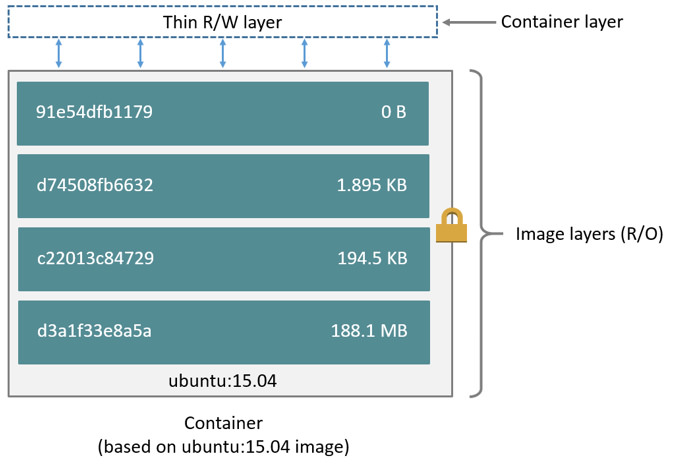 .debug[[containers/Initial_Images.md](https://git.verleun.org/training/containers.git/tree/main/slides/containers/Initial_Images.md)] --- ## Differences between containers and images * An image is a read-only filesystem. * A container is an encapsulated set of processes, running in a read-write copy of that filesystem. * To optimize container boot time, *copy-on-write* is used instead of regular copy. * `docker run` starts a container from a given image. .debug[[containers/Initial_Images.md](https://git.verleun.org/training/containers.git/tree/main/slides/containers/Initial_Images.md)] --- class: pic ## Multiple containers sharing the same image 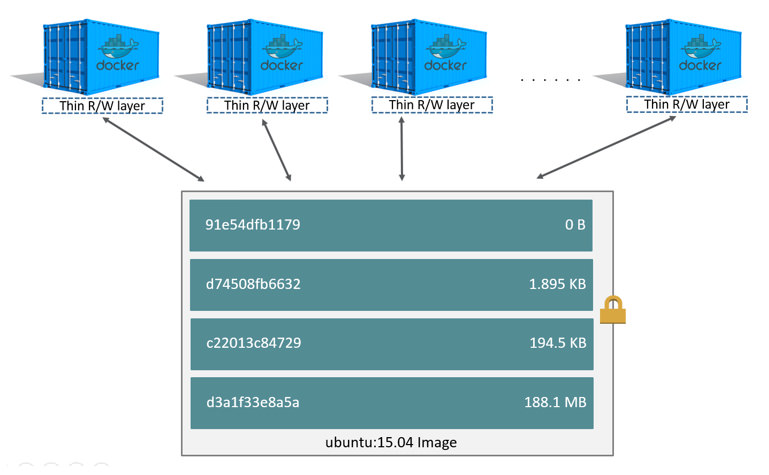 .debug[[containers/Initial_Images.md](https://git.verleun.org/training/containers.git/tree/main/slides/containers/Initial_Images.md)] --- ## Comparison with object-oriented programming * Images are conceptually similar to *classes*. * Layers are conceptually similar to *inheritance*. * Containers are conceptually similar to *instances*. .debug[[containers/Initial_Images.md](https://git.verleun.org/training/containers.git/tree/main/slides/containers/Initial_Images.md)] --- ## Wait a minute... If an image is read-only, how do we change it? * We don't. * We create a new container from that image. * Then we make changes to that container. * When we are satisfied with those changes, we transform them into a new layer. * A new image is created by stacking the new layer on top of the old image. .debug[[containers/Initial_Images.md](https://git.verleun.org/training/containers.git/tree/main/slides/containers/Initial_Images.md)] --- ## A chicken-and-egg problem * The only way to create an image is by "freezing" a container. * The only way to create a container is by instantiating an image. * Help! .debug[[containers/Initial_Images.md](https://git.verleun.org/training/containers.git/tree/main/slides/containers/Initial_Images.md)] --- ## Creating the first images There is a special empty image called `scratch`. * It allows to *build from scratch*. The `docker import` command loads a tarball into Docker. * The imported tarball becomes a standalone image. * That new image has a single layer. Note: you will probably never have to do this yourself. .debug[[containers/Initial_Images.md](https://git.verleun.org/training/containers.git/tree/main/slides/containers/Initial_Images.md)] --- ## Creating other images `docker commit` * Saves all the changes made to a container into a new layer. * Creates a new image (effectively a copy of the container). `docker build` **(used 99% of the time)** * Performs a repeatable build sequence. * This is the preferred method! We will explain both methods in a moment. .debug[[containers/Initial_Images.md](https://git.verleun.org/training/containers.git/tree/main/slides/containers/Initial_Images.md)] --- ## Images namespaces There are three namespaces: * Official images e.g. `ubuntu`, `busybox` ... * User (and organizations) images e.g. `jpetazzo/clock` * Self-hosted images e.g. `registry.example.com:5000/my-private/image` Let's explain each of them. .debug[[containers/Initial_Images.md](https://git.verleun.org/training/containers.git/tree/main/slides/containers/Initial_Images.md)] --- ## Root namespace The root namespace is for official images. They are gated by Docker Inc. They are generally authored and maintained by third parties. Those images include: * Small, "swiss-army-knife" images like busybox. * Distro images to be used as bases for your builds, like ubuntu, fedora... * Ready-to-use components and services, like redis, postgresql... * Over 150 at this point! .debug[[containers/Initial_Images.md](https://git.verleun.org/training/containers.git/tree/main/slides/containers/Initial_Images.md)] --- ## User namespace The user namespace holds images for Docker Hub users and organizations. For example: ```bash jpetazzo/clock ``` The Docker Hub user is: ```bash jpetazzo ``` The image name is: ```bash clock ``` .debug[[containers/Initial_Images.md](https://git.verleun.org/training/containers.git/tree/main/slides/containers/Initial_Images.md)] --- ## Self-hosted namespace This namespace holds images which are not hosted on Docker Hub, but on third party registries. They contain the hostname (or IP address), and optionally the port, of the registry server. For example: ```bash localhost:5000/wordpress ``` * `localhost:5000` is the host and port of the registry * `wordpress` is the name of the image Other examples: ```bash quay.io/coreos/etcd gcr.io/google-containers/hugo ``` .debug[[containers/Initial_Images.md](https://git.verleun.org/training/containers.git/tree/main/slides/containers/Initial_Images.md)] --- ## How do you store and manage images? Images can be stored: * On your Docker host. * In a Docker registry. You can use the Docker client to download (pull) or upload (push) images. To be more accurate: you can use the Docker client to tell a Docker Engine to push and pull images to and from a registry. .debug[[containers/Initial_Images.md](https://git.verleun.org/training/containers.git/tree/main/slides/containers/Initial_Images.md)] --- ## Showing current images Let's look at what images are on our host now. ```bash $ docker images REPOSITORY TAG IMAGE ID CREATED SIZE fedora latest ddd5c9c1d0f2 3 days ago 204.7 MB centos latest d0e7f81ca65c 3 days ago 196.6 MB ubuntu latest 07c86167cdc4 4 days ago 188 MB redis latest 4f5f397d4b7c 5 days ago 177.6 MB postgres latest afe2b5e1859b 5 days ago 264.5 MB alpine latest 70c557e50ed6 5 days ago 4.798 MB debian latest f50f9524513f 6 days ago 125.1 MB busybox latest 3240943c9ea3 2 weeks ago 1.114 MB training/namer latest 902673acc741 9 months ago 289.3 MB jpetazzo/clock latest 12068b93616f 12 months ago 2.433 MB ``` .debug[[containers/Initial_Images.md](https://git.verleun.org/training/containers.git/tree/main/slides/containers/Initial_Images.md)] --- ## Searching for images We cannot list *all* images on a remote registry, but we can search for a specific keyword: ```bash $ docker search marathon NAME DESCRIPTION STARS OFFICIAL AUTOMATED mesosphere/marathon A cluster-wide init and co... 105 [OK] mesoscloud/marathon Marathon 31 [OK] mesosphere/marathon-lb Script to update haproxy b... 22 [OK] tobilg/mongodb-marathon A Docker image to start a ... 4 [OK] ``` * "Stars" indicate the popularity of the image. * "Official" images are those in the root namespace. * "Automated" images are built automatically by the Docker Hub. <br/>(This means that their build recipe is always available.) .debug[[containers/Initial_Images.md](https://git.verleun.org/training/containers.git/tree/main/slides/containers/Initial_Images.md)] --- ## Downloading images There are two ways to download images. * Explicitly, with `docker pull`. * Implicitly, when executing `docker run` and the image is not found locally. .debug[[containers/Initial_Images.md](https://git.verleun.org/training/containers.git/tree/main/slides/containers/Initial_Images.md)] --- ## Pulling an image ```bash $ docker pull debian:jessie Pulling repository debian b164861940b8: Download complete b164861940b8: Pulling image (jessie) from debian d1881793a057: Download complete ``` * As seen previously, images are made up of layers. * Docker has downloaded all the necessary layers. * In this example, `:jessie` indicates which exact version of Debian we would like. It is a *version tag*. .debug[[containers/Initial_Images.md](https://git.verleun.org/training/containers.git/tree/main/slides/containers/Initial_Images.md)] --- ## Image and tags * Images can have tags. * Tags define image versions or variants. * `docker pull ubuntu` will refer to `ubuntu:latest`. * The `:latest` tag is generally updated often. .debug[[containers/Initial_Images.md](https://git.verleun.org/training/containers.git/tree/main/slides/containers/Initial_Images.md)] --- ## When to (not) use tags Don't specify tags: * When doing rapid testing and prototyping. * When experimenting. * When you want the latest version. Do specify tags: * When recording a procedure into a script. * When going to production. * To ensure that the same version will be used everywhere. * To ensure repeatability later. This is similar to what we would do with `pip install`, `npm install`, etc. .debug[[containers/Initial_Images.md](https://git.verleun.org/training/containers.git/tree/main/slides/containers/Initial_Images.md)] --- class: extra-details ## Multi-arch images - An image can support multiple architectures - More precisely, a specific *tag* in a given *repository* can have either: - a single *manifest* referencing an image for a single architecture - a *manifest list* (or *fat manifest*) referencing multiple images - In a *manifest list*, each image is identified by a combination of: - `os` (linux, windows) - `architecture` (amd64, arm, arm64...) - optional fields like `variant` (for arm and arm64), `os.version` (for windows) .debug[[containers/Initial_Images.md](https://git.verleun.org/training/containers.git/tree/main/slides/containers/Initial_Images.md)] --- class: extra-details ## Working with multi-arch images - The Docker Engine will pull "native" images when available (images matching its own os/architecture/variant) - We can ask for a specific image platform with `--platform` - The Docker Engine can run non-native images thanks to QEMU+binfmt (automatically on Docker Desktop; with a bit of setup on Linux) .debug[[containers/Initial_Images.md](https://git.verleun.org/training/containers.git/tree/main/slides/containers/Initial_Images.md)] --- ## Section summary We've learned how to: * Understand images and layers. * Understand Docker image namespacing. * Search and download images. ??? :EN:Building images :EN:- Containers, images, and layers :EN:- Image addresses and tags :EN:- Finding and transferring images :FR:Construire des images :FR:- La différence entre un conteneur et une image :FR:- La notion de *layer* partagé entre images .debug[[containers/Initial_Images.md](https://git.verleun.org/training/containers.git/tree/main/slides/containers/Initial_Images.md)] --- class: pic .interstitial[] --- name: toc-building-images-interactively class: title Building images interactively .nav[ [Previous part](#toc-understanding-docker-images) | [Back to table of contents](#toc-part-3) | [Next part](#toc-building-docker-images-with-a-dockerfile) ] .debug[(automatically generated title slide)] --- # Building images interactively In this section, we will create our first container image. It will be a basic distribution image, but we will pre-install the package `figlet`. We will: * Create a container from a base image. * Install software manually in the container, and turn it into a new image. * Learn about new commands: `docker commit`, `docker tag`, and `docker diff`. .debug[[containers/Building_Images_Interactively.md](https://git.verleun.org/training/containers.git/tree/main/slides/containers/Building_Images_Interactively.md)] --- ## The plan 1. Create a container (with `docker run`) using our base distro of choice. 2. Run a bunch of commands to install and set up our software in the container. 3. (Optionally) review changes in the container with `docker diff`. 4. Turn the container into a new image with `docker commit`. 5. (Optionally) add tags to the image with `docker tag`. .debug[[containers/Building_Images_Interactively.md](https://git.verleun.org/training/containers.git/tree/main/slides/containers/Building_Images_Interactively.md)] --- ## Setting up our container Start an Ubuntu container: ```bash $ docker run -it ubuntu root@<yourContainerId>:#/ ``` Run the command `apt-get update` to refresh the list of packages available to install. Then run the command `apt-get install figlet` to install the program we are interested in. ```bash root@<yourContainerId>:#/ apt-get update && apt-get install figlet .... OUTPUT OF APT-GET COMMANDS .... ``` .debug[[containers/Building_Images_Interactively.md](https://git.verleun.org/training/containers.git/tree/main/slides/containers/Building_Images_Interactively.md)] --- ## Inspect the changes Type `exit` at the container prompt to leave the interactive session. Now let's run `docker diff` to see the difference between the base image and our container. ```bash $ docker diff <yourContainerId> C /root A /root/.bash_history C /tmp C /usr C /usr/bin A /usr/bin/figlet ... ``` .debug[[containers/Building_Images_Interactively.md](https://git.verleun.org/training/containers.git/tree/main/slides/containers/Building_Images_Interactively.md)] --- class: x-extra-details ## Docker tracks filesystem changes As explained before: * An image is read-only. * When we make changes, they happen in a copy of the image. * Docker can show the difference between the image, and its copy. * For performance, Docker uses copy-on-write systems. <br/>(i.e. starting a container based on a big image doesn't incur a huge copy.) .debug[[containers/Building_Images_Interactively.md](https://git.verleun.org/training/containers.git/tree/main/slides/containers/Building_Images_Interactively.md)] --- ## Copy-on-write security benefits * `docker diff` gives us an easy way to audit changes (à la Tripwire) * Containers can also be started in read-only mode (their root filesystem will be read-only, but they can still have read-write data volumes) .debug[[containers/Building_Images_Interactively.md](https://git.verleun.org/training/containers.git/tree/main/slides/containers/Building_Images_Interactively.md)] --- ## Commit our changes into a new image The `docker commit` command will create a new layer with those changes, and a new image using this new layer. ```bash $ docker commit <yourContainerId> <newImageId> ``` The output of the `docker commit` command will be the ID for your newly created image. We can use it as an argument to `docker run`. .debug[[containers/Building_Images_Interactively.md](https://git.verleun.org/training/containers.git/tree/main/slides/containers/Building_Images_Interactively.md)] --- ## Testing our new image Let's run this image: ```bash $ docker run -it <newImageId> root@fcfb62f0bfde:/# figlet hello _ _ _ | |__ ___| | | ___ | '_ \ / _ \ | |/ _ \ | | | | __/ | | (_) | |_| |_|\___|_|_|\___/ ``` It works! 🎉 .debug[[containers/Building_Images_Interactively.md](https://git.verleun.org/training/containers.git/tree/main/slides/containers/Building_Images_Interactively.md)] --- ## Tagging images Referring to an image by its ID is not convenient. Let's tag it instead. We can use the `tag` command: ```bash $ docker tag <newImageId> figlet ``` But we can also specify the tag as an extra argument to `commit`: ```bash $ docker commit <containerId> figlet ``` And then run it using its tag: ```bash $ docker run -it figlet ``` .debug[[containers/Building_Images_Interactively.md](https://git.verleun.org/training/containers.git/tree/main/slides/containers/Building_Images_Interactively.md)] --- ## What's next? Manual process = bad. Automated process = good. In the next chapter, we will learn how to automate the build process by writing a `Dockerfile`. ??? :EN:- Building our first images interactively :FR:- Fabriquer nos premières images à la main .debug[[containers/Building_Images_Interactively.md](https://git.verleun.org/training/containers.git/tree/main/slides/containers/Building_Images_Interactively.md)] --- class: pic .interstitial[] --- name: toc-building-docker-images-with-a-dockerfile class: title Building Docker images with a Dockerfile .nav[ [Previous part](#toc-building-images-interactively) | [Back to table of contents](#toc-part-3) | [Next part](#toc-cmd-and-entrypoint) ] .debug[(automatically generated title slide)] --- class: title # Building Docker images with a Dockerfile 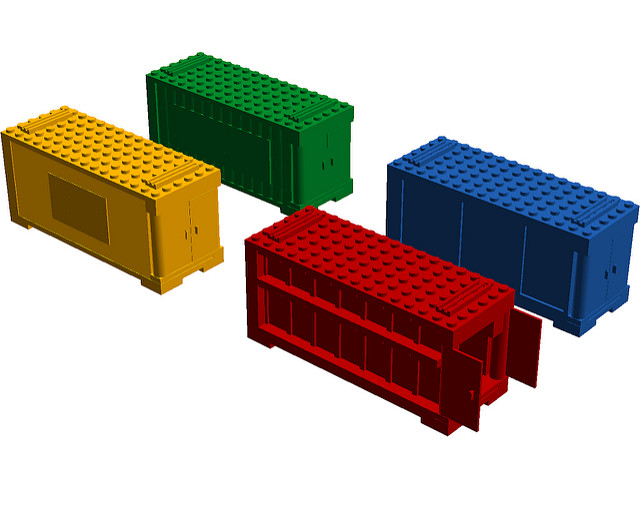 .debug[[containers/Building_Images_With_Dockerfiles.md](https://git.verleun.org/training/containers.git/tree/main/slides/containers/Building_Images_With_Dockerfiles.md)] --- ## Objectives We will build a container image automatically, with a `Dockerfile`. At the end of this lesson, you will be able to: * Write a `Dockerfile`. * Build an image from a `Dockerfile`. .debug[[containers/Building_Images_With_Dockerfiles.md](https://git.verleun.org/training/containers.git/tree/main/slides/containers/Building_Images_With_Dockerfiles.md)] --- ## `Dockerfile` overview * A `Dockerfile` is a build recipe for a Docker image. * It contains a series of instructions telling Docker how an image is constructed. * The `docker build` command builds an image from a `Dockerfile`. .debug[[containers/Building_Images_With_Dockerfiles.md](https://git.verleun.org/training/containers.git/tree/main/slides/containers/Building_Images_With_Dockerfiles.md)] --- ## Writing our first `Dockerfile` Our Dockerfile must be in a **new, empty directory**. 1. Create a directory to hold our `Dockerfile`. ```bash $ mkdir myimage ``` 2. Create a `Dockerfile` inside this directory. ```bash $ cd myimage $ vim Dockerfile ``` Of course, you can use any other editor of your choice. .debug[[containers/Building_Images_With_Dockerfiles.md](https://git.verleun.org/training/containers.git/tree/main/slides/containers/Building_Images_With_Dockerfiles.md)] --- ## Type this into our Dockerfile... ```dockerfile FROM ubuntu RUN apt-get update RUN apt-get install figlet ``` * `FROM` indicates the base image for our build. * Each `RUN` line will be executed by Docker during the build. * Our `RUN` commands **must be non-interactive.** <br/>(No input can be provided to Docker during the build.) * In many cases, we will add the `-y` flag to `apt-get`. .debug[[containers/Building_Images_With_Dockerfiles.md](https://git.verleun.org/training/containers.git/tree/main/slides/containers/Building_Images_With_Dockerfiles.md)] --- ## Build it! Save our file, then execute: ```bash $ docker build -t figlet . ``` * `-t` indicates the tag to apply to the image. * `.` indicates the location of the *build context*. We will talk more about the build context later. To keep things simple for now: this is the directory where our Dockerfile is located. .debug[[containers/Building_Images_With_Dockerfiles.md](https://git.verleun.org/training/containers.git/tree/main/slides/containers/Building_Images_With_Dockerfiles.md)] --- ## What happens when we build the image? It depends if we're using BuildKit or not! If there are lots of blue lines and the first line looks like this: ``` [+] Building 1.8s (4/6) ``` ... then we're using BuildKit. If the output is mostly black-and-white and the first line looks like this: ``` Sending build context to Docker daemon 2.048kB ``` ... then we're using the "classic" or "old-style" builder. .debug[[containers/Building_Images_With_Dockerfiles.md](https://git.verleun.org/training/containers.git/tree/main/slides/containers/Building_Images_With_Dockerfiles.md)] --- ## To BuildKit or Not To BuildKit Classic builder: - copies the whole "build context" to the Docker Engine - linear (processes lines one after the other) - requires a full Docker Engine BuildKit: - only transfers parts of the "build context" when needed - will parallelize operations (when possible) - can run in non-privileged containers (e.g. on Kubernetes) .debug[[containers/Building_Images_With_Dockerfiles.md](https://git.verleun.org/training/containers.git/tree/main/slides/containers/Building_Images_With_Dockerfiles.md)] --- ## With the classic builder The output of `docker build` looks like this: .small[ ```bash docker build -t figlet . Sending build context to Docker daemon 2.048kB Step 1/3 : FROM ubuntu ---> f975c5035748 Step 2/3 : RUN apt-get update ---> Running in e01b294dbffd (...output of the RUN command...) Removing intermediate container e01b294dbffd ---> eb8d9b561b37 Step 3/3 : RUN apt-get install figlet ---> Running in c29230d70f9b (...output of the RUN command...) Removing intermediate container c29230d70f9b ---> 0dfd7a253f21 Successfully built 0dfd7a253f21 Successfully tagged figlet:latest ``` ] * The output of the `RUN` commands has been omitted. * Let's explain what this output means. .debug[[containers/Building_Images_With_Dockerfiles.md](https://git.verleun.org/training/containers.git/tree/main/slides/containers/Building_Images_With_Dockerfiles.md)] --- ## Sending the build context to Docker ```bash Sending build context to Docker daemon 2.048 kB ``` * The build context is the `.` directory given to `docker build`. * It is sent (as an archive) by the Docker client to the Docker daemon. * This allows to use a remote machine to build using local files. * Be careful (or patient) if that directory is big and your link is slow. * You can speed up the process with a [`.dockerignore`](https://docs.docker.com/engine/reference/builder/#dockerignore-file) file * It tells docker to ignore specific files in the directory * Only ignore files that you won't need in the build context! .debug[[containers/Building_Images_With_Dockerfiles.md](https://git.verleun.org/training/containers.git/tree/main/slides/containers/Building_Images_With_Dockerfiles.md)] --- ## Executing each step ```bash Step 2/3 : RUN apt-get update ---> Running in e01b294dbffd (...output of the RUN command...) Removing intermediate container e01b294dbffd ---> eb8d9b561b37 ``` * A container (`e01b294dbffd`) is created from the base image. * The `RUN` command is executed in this container. * The container is committed into an image (`eb8d9b561b37`). * The build container (`e01b294dbffd`) is removed. * The output of this step will be the base image for the next one. .debug[[containers/Building_Images_With_Dockerfiles.md](https://git.verleun.org/training/containers.git/tree/main/slides/containers/Building_Images_With_Dockerfiles.md)] --- ## With BuildKit .small[ ```bash [+] Building 7.9s (7/7) FINISHED => [internal] load build definition from Dockerfile 0.0s => => transferring dockerfile: 98B 0.0s => [internal] load .dockerignore 0.0s => => transferring context: 2B 0.0s => [internal] load metadata for docker.io/library/ubuntu:latest 1.2s => [1/3] FROM docker.io/library/ubuntu@sha256:cf31af331f38d1d7158470e095b132acd126a7180a54f263d386 3.2s => => resolve docker.io/library/ubuntu@sha256:cf31af331f38d1d7158470e095b132acd126a7180a54f263d386 0.0s => => sha256:cf31af331f38d1d7158470e095b132acd126a7180a54f263d386da88eb681d93 1.20kB / 1.20kB 0.0s => => sha256:1de4c5e2d8954bf5fa9855f8b4c9d3c3b97d1d380efe19f60f3e4107a66f5cae 943B / 943B 0.0s => => sha256:6a98cbe39225dadebcaa04e21dbe5900ad604739b07a9fa351dd10a6ebad4c1b 3.31kB / 3.31kB 0.0s => => sha256:80bc30679ac1fd798f3241208c14accd6a364cb8a6224d1127dfb1577d10554f 27.14MB / 27.14MB 2.3s => => sha256:9bf18fab4cfbf479fa9f8409ad47e2702c63241304c2cdd4c33f2a1633c5f85e 850B / 850B 0.5s => => sha256:5979309c983a2adeff352538937475cf961d49c34194fa2aab142effe19ed9c1 189B / 189B 0.4s => => extracting sha256:80bc30679ac1fd798f3241208c14accd6a364cb8a6224d1127dfb1577d10554f 0.7s => => extracting sha256:9bf18fab4cfbf479fa9f8409ad47e2702c63241304c2cdd4c33f2a1633c5f85e 0.0s => => extracting sha256:5979309c983a2adeff352538937475cf961d49c34194fa2aab142effe19ed9c1 0.0s => [2/3] RUN apt-get update 2.5s => [3/3] RUN apt-get install figlet 0.9s => exporting to image 0.1s => => exporting layers 0.1s => => writing image sha256:3b8aee7b444ab775975dfba691a72d8ac24af2756e0a024e056e3858d5a23f7c 0.0s => => naming to docker.io/library/figlet 0.0s ``` ] .debug[[containers/Building_Images_With_Dockerfiles.md](https://git.verleun.org/training/containers.git/tree/main/slides/containers/Building_Images_With_Dockerfiles.md)] --- ## Understanding BuildKit output - BuildKit transfers the Dockerfile and the *build context* (these are the first two `[internal]` stages) - Then it executes the steps defined in the Dockerfile (`[1/3]`, `[2/3]`, `[3/3]`) - Finally, it exports the result of the build (image definition + collection of layers) .debug[[containers/Building_Images_With_Dockerfiles.md](https://git.verleun.org/training/containers.git/tree/main/slides/containers/Building_Images_With_Dockerfiles.md)] --- class: extra-details ## BuildKit plain output - When running BuildKit in e.g. a CI pipeline, its output will be different - We can see the same output format by using `--progress=plain` .debug[[containers/Building_Images_With_Dockerfiles.md](https://git.verleun.org/training/containers.git/tree/main/slides/containers/Building_Images_With_Dockerfiles.md)] --- ## The caching system If you run the same build again, it will be instantaneous. Why? * After each build step, Docker takes a snapshot of the resulting image. * Before executing a step, Docker checks if it has already built the same sequence. * Docker uses the exact strings defined in your Dockerfile, so: * `RUN apt-get install figlet cowsay` <br/> is different from <br/> `RUN apt-get install cowsay figlet` * `RUN apt-get update` is not re-executed when the mirrors are updated You can force a rebuild with `docker build --no-cache ...`. .debug[[containers/Building_Images_With_Dockerfiles.md](https://git.verleun.org/training/containers.git/tree/main/slides/containers/Building_Images_With_Dockerfiles.md)] --- ## Running the image The resulting image is not different from the one produced manually. ```bash $ docker run -ti figlet root@91f3c974c9a1:/# figlet hello _ _ _ | |__ ___| | | ___ | '_ \ / _ \ | |/ _ \ | | | | __/ | | (_) | |_| |_|\___|_|_|\___/ ``` Yay! 🎉 .debug[[containers/Building_Images_With_Dockerfiles.md](https://git.verleun.org/training/containers.git/tree/main/slides/containers/Building_Images_With_Dockerfiles.md)] --- ## Using image and viewing history The `history` command lists all the layers composing an image. For each layer, it shows its creation time, size, and creation command. When an image was built with a Dockerfile, each layer corresponds to a line of the Dockerfile. ```bash $ docker history figlet IMAGE CREATED CREATED BY SIZE f9e8f1642759 About an hour ago /bin/sh -c apt-get install fi 1.627 MB 7257c37726a1 About an hour ago /bin/sh -c apt-get update 21.58 MB 07c86167cdc4 4 days ago /bin/sh -c #(nop) CMD ["/bin 0 B <missing> 4 days ago /bin/sh -c sed -i 's/^#\s*\( 1.895 kB <missing> 4 days ago /bin/sh -c echo '#!/bin/sh' 194.5 kB <missing> 4 days ago /bin/sh -c #(nop) ADD file:b 187.8 MB ``` .debug[[containers/Building_Images_With_Dockerfiles.md](https://git.verleun.org/training/containers.git/tree/main/slides/containers/Building_Images_With_Dockerfiles.md)] --- class: extra-details ## Why `sh -c`? * On UNIX, to start a new program, we need two system calls: - `fork()`, to create a new child process; - `execve()`, to replace the new child process with the program to run. * Conceptually, `execve()` works like this: `execve(program, [list, of, arguments])` * When we run a command, e.g. `ls -l /tmp`, something needs to parse the command. (i.e. split the program and its arguments into a list.) * The shell is usually doing that. (It also takes care of expanding environment variables and special things like `~`.) .debug[[containers/Building_Images_With_Dockerfiles.md](https://git.verleun.org/training/containers.git/tree/main/slides/containers/Building_Images_With_Dockerfiles.md)] --- class: extra-details ## Why `sh -c`? * When we do `RUN ls -l /tmp`, the Docker builder needs to parse the command. * Instead of implementing its own parser, it outsources the job to the shell. * That's why we see `sh -c ls -l /tmp` in that case. * But we can also do the parsing jobs ourselves. * This means passing `RUN` a list of arguments. * This is called the *exec syntax*. .debug[[containers/Building_Images_With_Dockerfiles.md](https://git.verleun.org/training/containers.git/tree/main/slides/containers/Building_Images_With_Dockerfiles.md)] --- ## Shell syntax vs exec syntax Dockerfile commands that execute something can have two forms: * plain string, or *shell syntax*: <br/>`RUN apt-get install figlet` * JSON list, or *exec syntax*: <br/>`RUN ["apt-get", "install", "figlet"]` We are going to change our Dockerfile to see how it affects the resulting image. .debug[[containers/Building_Images_With_Dockerfiles.md](https://git.verleun.org/training/containers.git/tree/main/slides/containers/Building_Images_With_Dockerfiles.md)] --- ## Using exec syntax in our Dockerfile Let's change our Dockerfile as follows! ```dockerfile FROM ubuntu RUN apt-get update RUN ["apt-get", "install", "figlet"] ``` Then build the new Dockerfile. ```bash $ docker build -t figlet . ``` .debug[[containers/Building_Images_With_Dockerfiles.md](https://git.verleun.org/training/containers.git/tree/main/slides/containers/Building_Images_With_Dockerfiles.md)] --- ## History with exec syntax Compare the new history: ```bash $ docker history figlet IMAGE CREATED CREATED BY SIZE 27954bb5faaf 10 seconds ago apt-get install figlet 1.627 MB 7257c37726a1 About an hour ago /bin/sh -c apt-get update 21.58 MB 07c86167cdc4 4 days ago /bin/sh -c #(nop) CMD ["/bin 0 B <missing> 4 days ago /bin/sh -c sed -i 's/^#\s*\( 1.895 kB <missing> 4 days ago /bin/sh -c echo '#!/bin/sh' 194.5 kB <missing> 4 days ago /bin/sh -c #(nop) ADD file:b 187.8 MB ``` * Exec syntax specifies an *exact* command to execute. * Shell syntax specifies a command to be wrapped within `/bin/sh -c "..."`. .debug[[containers/Building_Images_With_Dockerfiles.md](https://git.verleun.org/training/containers.git/tree/main/slides/containers/Building_Images_With_Dockerfiles.md)] --- ## When to use exec syntax and shell syntax * shell syntax: * is easier to write * interpolates environment variables and other shell expressions * creates an extra process (`/bin/sh -c ...`) to parse the string * requires `/bin/sh` to exist in the container * exec syntax: * is harder to write (and read!) * passes all arguments without extra processing * doesn't create an extra process * doesn't require `/bin/sh` to exist in the container .debug[[containers/Building_Images_With_Dockerfiles.md](https://git.verleun.org/training/containers.git/tree/main/slides/containers/Building_Images_With_Dockerfiles.md)] --- ## Pro-tip: the `exec` shell built-in POSIX shells have a built-in command named `exec`. `exec` should be followed by a program and its arguments. From a user perspective: - it looks like the shell exits right away after the command execution, - in fact, the shell exits just *before* command execution; - or rather, the shell gets *replaced* by the command. .debug[[containers/Building_Images_With_Dockerfiles.md](https://git.verleun.org/training/containers.git/tree/main/slides/containers/Building_Images_With_Dockerfiles.md)] --- ## Example using `exec` ```dockerfile CMD exec figlet -f script hello ``` In this example, `sh -c` will still be used, but `figlet` will be PID 1 in the container. The shell gets replaced by `figlet` when `figlet` starts execution. This allows to run processes as PID 1 without using JSON. ??? :EN:- Towards automated, reproducible builds :EN:- Writing our first Dockerfile :FR:- Rendre le processus automatique et reproductible :FR:- Écrire son premier Dockerfile .debug[[containers/Building_Images_With_Dockerfiles.md](https://git.verleun.org/training/containers.git/tree/main/slides/containers/Building_Images_With_Dockerfiles.md)] --- class: pic .interstitial[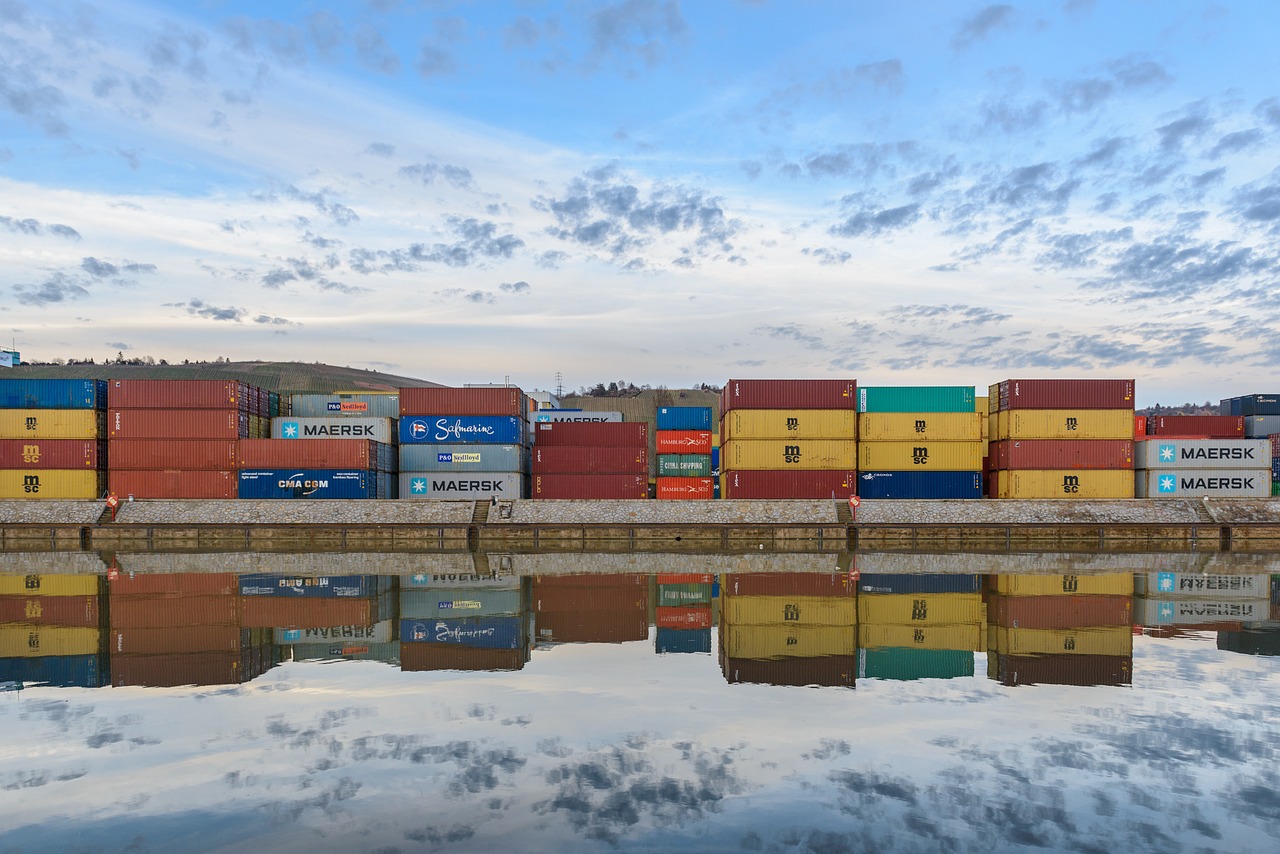] --- name: toc-cmd-and-entrypoint class: title `CMD` and `ENTRYPOINT` .nav[ [Previous part](#toc-building-docker-images-with-a-dockerfile) | [Back to table of contents](#toc-part-3) | [Next part](#toc-exercise--writing-dockerfiles) ] .debug[(automatically generated title slide)] --- class: title # `CMD` and `ENTRYPOINT`  .debug[[containers/Cmd_And_Entrypoint.md](https://git.verleun.org/training/containers.git/tree/main/slides/containers/Cmd_And_Entrypoint.md)] --- ## Objectives In this lesson, we will learn about two important Dockerfile commands: `CMD` and `ENTRYPOINT`. These commands allow us to set the default command to run in a container. .debug[[containers/Cmd_And_Entrypoint.md](https://git.verleun.org/training/containers.git/tree/main/slides/containers/Cmd_And_Entrypoint.md)] --- ## Defining a default command When people run our container, we want to greet them with a nice hello message, and using a custom font. For that, we will execute: ```bash figlet -f script hello ``` * `-f script` tells figlet to use a fancy font. * `hello` is the message that we want it to display. .debug[[containers/Cmd_And_Entrypoint.md](https://git.verleun.org/training/containers.git/tree/main/slides/containers/Cmd_And_Entrypoint.md)] --- ## Adding `CMD` to our Dockerfile Our new Dockerfile will look like this: ```dockerfile FROM ubuntu RUN apt-get update RUN ["apt-get", "install", "figlet"] CMD figlet -f script hello ``` * `CMD` defines a default command to run when none is given. * It can appear at any point in the file. * Each `CMD` will replace and override the previous one. * As a result, while you can have multiple `CMD` lines, it is useless. .debug[[containers/Cmd_And_Entrypoint.md](https://git.verleun.org/training/containers.git/tree/main/slides/containers/Cmd_And_Entrypoint.md)] --- ## Build and test our image Let's build it: ```bash $ docker build -t figlet . ... Successfully built 042dff3b4a8d Successfully tagged figlet:latest ``` And run it: ```bash $ docker run figlet _ _ _ | | | | | | | | _ | | | | __ |/ \ |/ |/ |/ / \_ | |_/|__/|__/|__/\__/ ``` .debug[[containers/Cmd_And_Entrypoint.md](https://git.verleun.org/training/containers.git/tree/main/slides/containers/Cmd_And_Entrypoint.md)] --- ## Overriding `CMD` If we want to get a shell into our container (instead of running `figlet`), we just have to specify a different program to run: ```bash $ docker run -it figlet bash root@7ac86a641116:/# ``` * We specified `bash`. * It replaced the value of `CMD`. .debug[[containers/Cmd_And_Entrypoint.md](https://git.verleun.org/training/containers.git/tree/main/slides/containers/Cmd_And_Entrypoint.md)] --- ## Using `ENTRYPOINT` We want to be able to specify a different message on the command line, while retaining `figlet` and some default parameters. In other words, we would like to be able to do this: ```bash $ docker run figlet salut _ | | , __, | | _|_ / \_/ | |/ | | | \/ \_/|_/|__/ \_/|_/|_/ ``` We will use the `ENTRYPOINT` verb in Dockerfile. .debug[[containers/Cmd_And_Entrypoint.md](https://git.verleun.org/training/containers.git/tree/main/slides/containers/Cmd_And_Entrypoint.md)] --- ## Adding `ENTRYPOINT` to our Dockerfile Our new Dockerfile will look like this: ```dockerfile FROM ubuntu RUN apt-get update RUN ["apt-get", "install", "figlet"] ENTRYPOINT ["figlet", "-f", "script"] ``` * `ENTRYPOINT` defines a base command (and its parameters) for the container. * The command line arguments are appended to those parameters. * Like `CMD`, `ENTRYPOINT` can appear anywhere, and replaces the previous value. Why did we use JSON syntax for our `ENTRYPOINT`? .debug[[containers/Cmd_And_Entrypoint.md](https://git.verleun.org/training/containers.git/tree/main/slides/containers/Cmd_And_Entrypoint.md)] --- ## Implications of JSON vs string syntax * When CMD or ENTRYPOINT use string syntax, they get wrapped in `sh -c`. * To avoid this wrapping, we can use JSON syntax. What if we used `ENTRYPOINT` with string syntax? ```bash $ docker run figlet salut ``` This would run the following command in the `figlet` image: ```bash sh -c "figlet -f script" salut ``` .debug[[containers/Cmd_And_Entrypoint.md](https://git.verleun.org/training/containers.git/tree/main/slides/containers/Cmd_And_Entrypoint.md)] --- ## Build and test our image Let's build it: ```bash $ docker build -t figlet . ... Successfully built 36f588918d73 Successfully tagged figlet:latest ``` And run it: ```bash $ docker run figlet salut _ | | , __, | | _|_ / \_/ | |/ | | | \/ \_/|_/|__/ \_/|_/|_/ ``` .debug[[containers/Cmd_And_Entrypoint.md](https://git.verleun.org/training/containers.git/tree/main/slides/containers/Cmd_And_Entrypoint.md)] --- ## Using `CMD` and `ENTRYPOINT` together What if we want to define a default message for our container? Then we will use `ENTRYPOINT` and `CMD` together. * `ENTRYPOINT` will define the base command for our container. * `CMD` will define the default parameter(s) for this command. * They *both* have to use JSON syntax. .debug[[containers/Cmd_And_Entrypoint.md](https://git.verleun.org/training/containers.git/tree/main/slides/containers/Cmd_And_Entrypoint.md)] --- ## `CMD` and `ENTRYPOINT` together Our new Dockerfile will look like this: ```dockerfile FROM ubuntu RUN apt-get update RUN ["apt-get", "install", "figlet"] ENTRYPOINT ["figlet", "-f", "script"] CMD ["hello world"] ``` * `ENTRYPOINT` defines a base command (and its parameters) for the container. * If we don't specify extra command-line arguments when starting the container, the value of `CMD` is appended. * Otherwise, our extra command-line arguments are used instead of `CMD`. .debug[[containers/Cmd_And_Entrypoint.md](https://git.verleun.org/training/containers.git/tree/main/slides/containers/Cmd_And_Entrypoint.md)] --- ## Build and test our image Let's build it: ```bash $ docker build -t myfiglet . ... Successfully built 6e0b6a048a07 Successfully tagged myfiglet:latest ``` Run it without parameters: ```bash $ docker run myfiglet _ _ _ _ | | | | | | | | | | | _ | | | | __ __ ,_ | | __| |/ \ |/ |/ |/ / \_ | | |_/ \_/ | |/ / | | |_/|__/|__/|__/\__/ \/ \/ \__/ |_/|__/\_/|_/ ``` .debug[[containers/Cmd_And_Entrypoint.md](https://git.verleun.org/training/containers.git/tree/main/slides/containers/Cmd_And_Entrypoint.md)] --- ## Overriding the image default parameters Now let's pass extra arguments to the image. ```bash $ docker run myfiglet hola mundo _ _ | | | | | | | __ | | __, _ _ _ _ _ __| __ |/ \ / \_|/ / | / |/ |/ | | | / |/ | / | / \_ | |_/\__/ |__/\_/|_/ | | |_/ \_/|_/ | |_/\_/|_/\__/ ``` We overrode `CMD` but still used `ENTRYPOINT`. .debug[[containers/Cmd_And_Entrypoint.md](https://git.verleun.org/training/containers.git/tree/main/slides/containers/Cmd_And_Entrypoint.md)] --- ## Overriding `ENTRYPOINT` What if we want to run a shell in our container? We cannot just do `docker run myfiglet bash` because that would just tell figlet to display the word "bash." We use the `--entrypoint` parameter: ```bash $ docker run -it --entrypoint bash myfiglet root@6027e44e2955:/# ``` .debug[[containers/Cmd_And_Entrypoint.md](https://git.verleun.org/training/containers.git/tree/main/slides/containers/Cmd_And_Entrypoint.md)] --- ## `CMD` and `ENTRYPOINT` recap - `docker run myimage` executes `ENTRYPOINT` + `CMD` - `docker run myimage args` executes `ENTRYPOINT` + `args` (overriding `CMD`) - `docker run --entrypoint prog myimage` executes `prog` (overriding both) .small[ | Command | `ENTRYPOINT` | `CMD` | Result |---------------------------------|--------------------|---------|------- | `docker run figlet` | none | none | Use values from base image (`bash`) | `docker run figlet hola` | none | none | Error (executable `hola` not found) | `docker run figlet` | `figlet -f script` | none | `figlet -f script` | `docker run figlet hola` | `figlet -f script` | none | `figlet -f script hola` | `docker run figlet` | none | `figlet -f script` | `figlet -f script` | `docker run figlet hola` | none | `figlet -f script` | Error (executable `hola` not found) | `docker run figlet` | `figlet -f script` | `hello` | `figlet -f script hello` | `docker run figlet hola` | `figlet -f script` | `hello` | `figlet -f script hola` ] .debug[[containers/Cmd_And_Entrypoint.md](https://git.verleun.org/training/containers.git/tree/main/slides/containers/Cmd_And_Entrypoint.md)] --- ## When to use `ENTRYPOINT` vs `CMD` `ENTRYPOINT` is great for "containerized binaries". Example: `docker run consul --help` (Pretend that the `docker run` part isn't there!) `CMD` is great for images with multiple binaries. Example: `docker run busybox ifconfig` (It makes sense to indicate *which* program we want to run!) ??? :EN:- CMD and ENTRYPOINT :FR:- CMD et ENTRYPOINT .debug[[containers/Cmd_And_Entrypoint.md](https://git.verleun.org/training/containers.git/tree/main/slides/containers/Cmd_And_Entrypoint.md)] --- class: pic .interstitial[] --- name: toc-exercise--writing-dockerfiles class: title Exercise — writing Dockerfiles .nav[ [Previous part](#toc-cmd-and-entrypoint) | [Back to table of contents](#toc-part-3) | [Next part](#toc-container-networking-basics) ] .debug[(automatically generated title slide)] --- # Exercise — writing Dockerfiles 1. Check out the code repository: ```bash git clone https://git.verleun.org/training/docker-build-exercise.git ``` 2. Add a `Dockerfile` that will build the image: * Use `python:3.9.9-slim-bullseye` as the base image (`FROM` line) * Expose port 8000 (`EXPOSE`) * Installs files in '/usr/local/app' (`WORKDIR` ) * Execute the command `uvicorn app:api --host 0.0.0.0 --port 8000` 3. Build the image with `docker build -t exercise:1 .` 4. Run the image: `docker run -d -p 8123:8000 exercise:1` .debug[[custom/Exercise_Dockerfile.md](https://git.verleun.org/training/containers.git/tree/main/slides/custom/Exercise_Dockerfile.md)] --- ## Again, with docker-compose (optional) Create a `docker-compose.yml` with the following content: ```yaml version: "3" services: app: build: . ports: - 8123:8000 ``` Start the container: `docker-compose up -d` .debug[[custom/Exercise_Dockerfile.md](https://git.verleun.org/training/containers.git/tree/main/slides/custom/Exercise_Dockerfile.md)] --- class: pic .interstitial[] --- name: toc-container-networking-basics class: title Container networking basics .nav[ [Previous part](#toc-exercise--writing-dockerfiles) | [Back to table of contents](#toc-part-4) | [Next part](#toc-local-development-workflow-with-docker) ] .debug[(automatically generated title slide)] --- class: title # Container networking basics  .debug[[containers/Container_Networking_Basics.md](https://git.verleun.org/training/containers.git/tree/main/slides/containers/Container_Networking_Basics.md)] --- ## Objectives We will now run network services (accepting requests) in containers. At the end of this section, you will be able to: * Run a network service in a container. * Connect to that network service. * Find a container's IP address. .debug[[containers/Container_Networking_Basics.md](https://git.verleun.org/training/containers.git/tree/main/slides/containers/Container_Networking_Basics.md)] --- ## Running a very simple service - We need something small, simple, easy to configure (or, even better, that doesn't require any configuration at all) - Let's use the official NGINX image (named `nginx`) - It runs a static web server listening on port 80 - It serves a default "Welcome to nginx!" page .debug[[containers/Container_Networking_Basics.md](https://git.verleun.org/training/containers.git/tree/main/slides/containers/Container_Networking_Basics.md)] --- ## Running an NGINX server ```bash $ docker run -d -P nginx 66b1ce719198711292c8f34f84a7b68c3876cf9f67015e752b94e189d35a204e ``` - Docker will automatically pull the `nginx` image from the Docker Hub - `-d` / `--detach` tells Docker to run it in the background - `P` / `--publish-all` tells Docker to publish all ports (publish = make them reachable from other computers) - ...OK, how do we connect to our web server now? .debug[[containers/Container_Networking_Basics.md](https://git.verleun.org/training/containers.git/tree/main/slides/containers/Container_Networking_Basics.md)] --- ## Finding our web server port - First, we need to find the *port number* used by Docker (the NGINX container listens on port 80, but this port will be *mapped*) - We can use `docker ps`: ```bash $ docker ps CONTAINER ID IMAGE ... PORTS ... e40ffb406c9e nginx ... 0.0.0.0:`12345`->80/tcp ... ``` - This means: *port 12345 on the Docker host is mapped to port 80 in the container* - Now we need to connect to the Docker host! .debug[[containers/Container_Networking_Basics.md](https://git.verleun.org/training/containers.git/tree/main/slides/containers/Container_Networking_Basics.md)] --- ## Finding the address of the Docker host - When running Docker on your Linux workstation: *use `localhost`, or any IP address of your machine* - When running Docker on a remote Linux server: *use any IP address of the remote machine* - When running Docker Desktop on Mac or Windows: *use `localhost`* - In other scenarios (`docker-machine`, local VM...): *use the IP address of the Docker VM* .debug[[containers/Container_Networking_Basics.md](https://git.verleun.org/training/containers.git/tree/main/slides/containers/Container_Networking_Basics.md)] --- ## Connecting to our web server (GUI) Point your browser to the IP address of your Docker host, on the port shown by `docker ps` for container port 80.  .debug[[containers/Container_Networking_Basics.md](https://git.verleun.org/training/containers.git/tree/main/slides/containers/Container_Networking_Basics.md)] --- ## Connecting to our web server (CLI) You can also use `curl` directly from the Docker host. Make sure to use the right port number if it is different from the example below: ```bash $ curl localhost:12345 <!DOCTYPE html> <html> <head> <title>Welcome to nginx!</title> ... ``` .debug[[containers/Container_Networking_Basics.md](https://git.verleun.org/training/containers.git/tree/main/slides/containers/Container_Networking_Basics.md)] --- ## How does Docker know which port to map? * There is metadata in the image telling "this image has something on port 80". * We can see that metadata with `docker inspect`: ```bash $ docker inspect --format '{{.Config.ExposedPorts}}' nginx map[80/tcp:{}] ``` * This metadata was set in the Dockerfile, with the `EXPOSE` keyword. * We can see that with `docker history`: ```bash $ docker history nginx IMAGE CREATED CREATED BY 7f70b30f2cc6 11 days ago /bin/sh -c #(nop) CMD ["nginx" "-g" "… <missing> 11 days ago /bin/sh -c #(nop) STOPSIGNAL [SIGTERM] <missing> 11 days ago /bin/sh -c #(nop) EXPOSE 80/tcp ``` .debug[[containers/Container_Networking_Basics.md](https://git.verleun.org/training/containers.git/tree/main/slides/containers/Container_Networking_Basics.md)] --- ## Why can't we just connect to port 80? - Our Docker host has only one port 80 - Therefore, we can only have one container at a time on port 80 - Therefore, if multiple containers want port 80, only one can get it - By default, containers *do not* get "their" port number, but a random one (not "random" as "crypto random", but as "it depends on various factors") - We'll see later how to force a port number (including port 80!) .debug[[containers/Container_Networking_Basics.md](https://git.verleun.org/training/containers.git/tree/main/slides/containers/Container_Networking_Basics.md)] --- class: extra-details ## Using multiple IP addresses *Hey, my network-fu is strong, and I have questions...* - Can I publish one container on 127.0.0.2:80, and another on 127.0.0.3:80? - My machine has multiple (public) IP addresses, let's say A.A.A.A and B.B.B.B. <br/> Can I have one container on A.A.A.A:80 and another on B.B.B.B:80? - I have a whole IPV4 subnet, can I allocate it to my containers? - What about IPV6? You can do all these things when running Docker directly on Linux. (On other platforms, *generally not*, but there are some exceptions.) .debug[[containers/Container_Networking_Basics.md](https://git.verleun.org/training/containers.git/tree/main/slides/containers/Container_Networking_Basics.md)] --- ## Finding the web server port in a script Parsing the output of `docker ps` would be painful. There is a command to help us: ```bash $ docker port <containerID> 80 0.0.0.0:12345 ``` .debug[[containers/Container_Networking_Basics.md](https://git.verleun.org/training/containers.git/tree/main/slides/containers/Container_Networking_Basics.md)] --- ## Manual allocation of port numbers If you want to set port numbers yourself, no problem: ```bash $ docker run -d -p 80:80 nginx $ docker run -d -p 8000:80 nginx $ docker run -d -p 8080:80 -p 8888:80 nginx ``` * We are running three NGINX web servers. * The first one is exposed on port 80. * The second one is exposed on port 8000. * The third one is exposed on ports 8080 and 8888. Note: the convention is `port-on-host:port-on-container`. .debug[[containers/Container_Networking_Basics.md](https://git.verleun.org/training/containers.git/tree/main/slides/containers/Container_Networking_Basics.md)] --- ## Plumbing containers into your infrastructure There are many ways to integrate containers in your network. * Start the container, letting Docker allocate a public port for it. <br/>Then retrieve that port number and feed it to your configuration. * Pick a fixed port number in advance, when you generate your configuration. <br/>Then start your container by setting the port numbers manually. * Use an orchestrator like Kubernetes or Swarm. <br/>The orchestrator will provide its own networking facilities. Orchestrators typically provide mechanisms to enable direct container-to-container communication across hosts, and publishing/load balancing for inbound traffic. .debug[[containers/Container_Networking_Basics.md](https://git.verleun.org/training/containers.git/tree/main/slides/containers/Container_Networking_Basics.md)] --- ## Finding the container's IP address We can use the `docker inspect` command to find the IP address of the container. ```bash $ docker inspect --format '{{ .NetworkSettings.IPAddress }}' <yourContainerID> 172.17.0.3 ``` * `docker inspect` is an advanced command, that can retrieve a ton of information about our containers. * Here, we provide it with a format string to extract exactly the private IP address of the container. .debug[[containers/Container_Networking_Basics.md](https://git.verleun.org/training/containers.git/tree/main/slides/containers/Container_Networking_Basics.md)] --- ## Pinging our container Let's try to ping our container *from another container.* ```bash docker run alpine ping `<ipaddress>` PING 172.17.0.X (172.17.0.X): 56 data bytes 64 bytes from 172.17.0.X: seq=0 ttl=64 time=0.106 ms 64 bytes from 172.17.0.X: seq=1 ttl=64 time=0.250 ms 64 bytes from 172.17.0.X: seq=2 ttl=64 time=0.188 ms ``` When running on Linux, we can even ping that IP address directly! (And connect to a container's ports even if they aren't published.) .debug[[containers/Container_Networking_Basics.md](https://git.verleun.org/training/containers.git/tree/main/slides/containers/Container_Networking_Basics.md)] --- ## How often do we use `-p` and `-P` ? - When running a stack of containers, we will often use Compose - Compose will take care of exposing containers (through a `ports:` section in the `docker-compose.yml` file) - It is, however, fairly common to use `docker run -P` for a quick test - Or `docker run -p ...` when an image doesn't `EXPOSE` a port correctly .debug[[containers/Container_Networking_Basics.md](https://git.verleun.org/training/containers.git/tree/main/slides/containers/Container_Networking_Basics.md)] --- ## Section summary We've learned how to: * Expose a network port. * Connect to an application running in a container. * Find a container's IP address. ??? :EN:- Exposing single containers :FR:- Exposer un conteneur isolé .debug[[containers/Container_Networking_Basics.md](https://git.verleun.org/training/containers.git/tree/main/slides/containers/Container_Networking_Basics.md)] --- class: pic .interstitial[] --- name: toc-local-development-workflow-with-docker class: title Local development workflow with Docker .nav[ [Previous part](#toc-container-networking-basics) | [Back to table of contents](#toc-part-4) | [Next part](#toc-compose-for-development-stacks) ] .debug[(automatically generated title slide)] --- class: title # Local development workflow with Docker  .debug[[containers/Local_Development_Workflow.md](https://git.verleun.org/training/containers.git/tree/main/slides/containers/Local_Development_Workflow.md)] --- ## Objectives At the end of this section, you will be able to: * Share code between container and host. * Use a simple local development workflow. .debug[[containers/Local_Development_Workflow.md](https://git.verleun.org/training/containers.git/tree/main/slides/containers/Local_Development_Workflow.md)] --- ## Local development in a container We want to solve the following issues: - "Works on my machine" - "Not the same version" - "Missing dependency" By using Docker containers, we will get a consistent development environment. .debug[[containers/Local_Development_Workflow.md](https://git.verleun.org/training/containers.git/tree/main/slides/containers/Local_Development_Workflow.md)] --- ## Working on the "namer" application * We have to work on some application whose code is at: https://github.com/jpetazzo/namer. * What is it? We don't know yet! * Let's download the code. ```bash $ git clone https://github.com/jpetazzo/namer ``` .debug[[containers/Local_Development_Workflow.md](https://git.verleun.org/training/containers.git/tree/main/slides/containers/Local_Development_Workflow.md)] --- ## Looking at the code ```bash $ cd namer $ ls -1 company_name_generator.rb config.ru docker-compose.yml Dockerfile Gemfile ``` -- Aha, a `Gemfile`! This is Ruby. Probably. We know this. Maybe? .debug[[containers/Local_Development_Workflow.md](https://git.verleun.org/training/containers.git/tree/main/slides/containers/Local_Development_Workflow.md)] --- ## Looking at the `Dockerfile` ```dockerfile FROM ruby COPY . /src WORKDIR /src RUN bundler install CMD ["rackup", "--host", "0.0.0.0"] EXPOSE 9292 ``` * This application is using a base `ruby` image. * The code is copied in `/src`. * Dependencies are installed with `bundler`. * The application is started with `rackup`. * It is listening on port 9292. .debug[[containers/Local_Development_Workflow.md](https://git.verleun.org/training/containers.git/tree/main/slides/containers/Local_Development_Workflow.md)] --- ## Building and running the "namer" application * Let's build the application with the `Dockerfile`! -- ```bash $ docker build -t namer . ``` -- * Then run it. *We need to expose its ports.* -- ```bash $ docker run -dP namer ``` -- * Check on which port the container is listening. -- ```bash $ docker ps -l ``` .debug[[containers/Local_Development_Workflow.md](https://git.verleun.org/training/containers.git/tree/main/slides/containers/Local_Development_Workflow.md)] --- ## Connecting to our application * Point our browser to our Docker node, on the port allocated to the container. -- * Hit "reload" a few times. -- * This is an enterprise-class, carrier-grade, ISO-compliant company name generator! (With 50% more bullshit than the average competition!) (Wait, was that 50% more, or 50% less? *Anyway!*)  .debug[[containers/Local_Development_Workflow.md](https://git.verleun.org/training/containers.git/tree/main/slides/containers/Local_Development_Workflow.md)] --- ## Making changes to the code Option 1: * Edit the code locally * Rebuild the image * Re-run the container Option 2: * Enter the container (with `docker exec`) * Install an editor * Make changes from within the container Option 3: * Use a *bind mount* to share local files with the container * Make changes locally * Changes are reflected in the container .debug[[containers/Local_Development_Workflow.md](https://git.verleun.org/training/containers.git/tree/main/slides/containers/Local_Development_Workflow.md)] --- ## Our first volume We will tell Docker to map the current directory to `/src` in the container. ```bash $ docker run -d -v $(pwd):/src -P namer ``` * `-d`: the container should run in detached mode (in the background). * `-v`: the following host directory should be mounted inside the container. * `-P`: publish all the ports exposed by this image. * `namer` is the name of the image we will run. * We don't specify a command to run because it is already set in the Dockerfile via `CMD`. Note: on Windows, replace `$(pwd)` with `%cd%` (or `${pwd}` if you use PowerShell). .debug[[containers/Local_Development_Workflow.md](https://git.verleun.org/training/containers.git/tree/main/slides/containers/Local_Development_Workflow.md)] --- ## Mounting volumes inside containers The `-v` flag mounts a directory from your host into your Docker container. The flag structure is: ```bash [host-path]:[container-path]:[rw|ro] ``` * `[host-path]` and `[container-path]` are created if they don't exist. * You can control the write status of the volume with the `ro` and `rw` options. * If you don't specify `rw` or `ro`, it will be `rw` by default. .debug[[containers/Local_Development_Workflow.md](https://git.verleun.org/training/containers.git/tree/main/slides/containers/Local_Development_Workflow.md)] --- class: extra-details ## Hold your horses... and your mounts - The `-v /path/on/host:/path/in/container` syntax is the "old" syntax - The modern syntax looks like this: `--mount type=bind,source=/path/on/host,target=/path/in/container` - `--mount` is more explicit, but `-v` is quicker to type - `--mount` supports all mount types; `-v` doesn't support `tmpfs` mounts - `--mount` fails if the path on the host doesn't exist; `-v` creates it With the new syntax, our command becomes: ```bash docker run --mount=type=bind,source=$(pwd),target=/src -dP namer ``` .debug[[containers/Local_Development_Workflow.md](https://git.verleun.org/training/containers.git/tree/main/slides/containers/Local_Development_Workflow.md)] --- ## Testing the development container * Check the port used by our new container. ```bash $ docker ps -l CONTAINER ID IMAGE COMMAND CREATED STATUS PORTS NAMES 045885b68bc5 namer rackup 3 seconds ago Up ... 0.0.0.0:32770->9292/tcp ... ``` * Open the application in your web browser. .debug[[containers/Local_Development_Workflow.md](https://git.verleun.org/training/containers.git/tree/main/slides/containers/Local_Development_Workflow.md)] --- ## Making a change to our application Our customer really doesn't like the color of our text. Let's change it. ```bash $ vi company_name_generator.rb ``` And change ```css color: royalblue; ``` To: ```css color: red; ``` .debug[[containers/Local_Development_Workflow.md](https://git.verleun.org/training/containers.git/tree/main/slides/containers/Local_Development_Workflow.md)] --- ## Viewing our changes * Reload the application in our browser. -- * The color should have changed.  .debug[[containers/Local_Development_Workflow.md](https://git.verleun.org/training/containers.git/tree/main/slides/containers/Local_Development_Workflow.md)] --- ## Understanding volumes - Volumes are *not* copying or synchronizing files between the host and the container - Changes made in the host are immediately visible in the container (and vice versa) - When running on Linux: - volumes and bind mounts correspond to directories on the host - if Docker runs in a Linux VM, these directories are in the Linux VM - When running on Docker Desktop: - volumes correspond to directories in a small Linux VM running Docker - access to bind mounts is translated to host filesystem access <br/> (a bit like a network filesystem) .debug[[containers/Local_Development_Workflow.md](https://git.verleun.org/training/containers.git/tree/main/slides/containers/Local_Development_Workflow.md)] --- class: extra-details ## Docker Desktop caveats - When running Docker natively on Linux, accessing a mount = native I/O - When running Docker Desktop, accessing a bind mount = file access translation - That file access translation has relatively good performance *in general* (watch out, however, for that big `npm install` working on a bind mount!) - There are some corner cases when watching files (with mechanisms like inotify) - Features like "live reload" or programs like `entr` don't always behave properly (due to e.g. file attribute caching, and other interesting details!) .debug[[containers/Local_Development_Workflow.md](https://git.verleun.org/training/containers.git/tree/main/slides/containers/Local_Development_Workflow.md)] --- ## Trash your servers and burn your code *(This is the title of a [2013 blog post][immutable-deployments] by Chad Fowler, where he explains the concept of immutable infrastructure.)* [immutable-deployments]: https://web.archive.org/web/20160305073617/http://chadfowler.com/blog/2013/06/23/immutable-deployments/ -- * Let's majorly mess up our container. (Remove files or whatever.) * Now, how can we fix this? -- * Our old container (with the blue version of the code) is still running. * See on which port it is exposed: ```bash docker ps ``` * Point our browser to it to confirm that it still works fine. .debug[[containers/Local_Development_Workflow.md](https://git.verleun.org/training/containers.git/tree/main/slides/containers/Local_Development_Workflow.md)] --- ## Immutable infrastructure in a nutshell * Instead of *updating* a server, we deploy a new one. * This might be challenging with classical servers, but it's trivial with containers. * In fact, with Docker, the most logical workflow is to build a new image and run it. * If something goes wrong with the new image, we can always restart the old one. * We can even keep both versions running side by side. If this pattern sounds interesting, you might want to read about *blue/green deployment* and *canary deployments*. .debug[[containers/Local_Development_Workflow.md](https://git.verleun.org/training/containers.git/tree/main/slides/containers/Local_Development_Workflow.md)] --- ## Recap of the development workflow 1. Write a Dockerfile to build an image containing our development environment. <br/> (Rails, Django, ... and all the dependencies for our app) 2. Start a container from that image. <br/> Use the `-v` flag to mount our source code inside the container. 3. Edit the source code outside the container, using familiar tools. <br/> (vim, emacs, textmate...) 4. Test the application. <br/> (Some frameworks pick up changes automatically. <br/>Others require you to Ctrl-C + restart after each modification.) 5. Iterate and repeat steps 3 and 4 until satisfied. 6. When done, commit+push source code changes. .debug[[containers/Local_Development_Workflow.md](https://git.verleun.org/training/containers.git/tree/main/slides/containers/Local_Development_Workflow.md)] --- class: extra-details ## Debugging inside the container Docker has a command called `docker exec`. It allows users to run a new process in a container which is already running. If sometimes you find yourself wishing you could SSH into a container: you can use `docker exec` instead. You can get a shell prompt inside an existing container this way, or run an arbitrary process for automation. .debug[[containers/Local_Development_Workflow.md](https://git.verleun.org/training/containers.git/tree/main/slides/containers/Local_Development_Workflow.md)] --- class: extra-details ## `docker exec` example ```bash $ # You can run ruby commands in the area the app is running and more! $ docker exec -it <yourContainerId> bash root@5ca27cf74c2e:/opt/namer# irb irb(main):001:0> [0, 1, 2, 3, 4].map {|x| x ** 2}.compact => [0, 1, 4, 9, 16] irb(main):002:0> exit ``` .debug[[containers/Local_Development_Workflow.md](https://git.verleun.org/training/containers.git/tree/main/slides/containers/Local_Development_Workflow.md)] --- class: extra-details ## Stopping the container Now that we're done let's stop our container. ```bash $ docker stop <yourContainerID> ``` And remove it. ```bash $ docker rm <yourContainerID> ``` .debug[[containers/Local_Development_Workflow.md](https://git.verleun.org/training/containers.git/tree/main/slides/containers/Local_Development_Workflow.md)] --- ## Section summary We've learned how to: * Share code between container and host. * Set our working directory. * Use a simple local development workflow. ??? :EN:Developing with containers :EN:- “Containerize” a development environment :FR:Développer au jour le jour :FR:- « Containeriser » son environnement de développement .debug[[containers/Local_Development_Workflow.md](https://git.verleun.org/training/containers.git/tree/main/slides/containers/Local_Development_Workflow.md)] --- class: pic .interstitial[] --- name: toc-compose-for-development-stacks class: title Compose for development stacks .nav[ [Previous part](#toc-local-development-workflow-with-docker) | [Back to table of contents](#toc-part-4) | [Next part](#toc-our-sample-application) ] .debug[(automatically generated title slide)] --- # Compose for development stacks Dockerfile = great to build *one* container image. What if we have multiple containers? What if some of them require particular `docker run` parameters? How do we connect them all together? ... Compose solves these use-cases (and a few more). .debug[[containers/Compose_For_Dev_Stacks.md](https://git.verleun.org/training/containers.git/tree/main/slides/containers/Compose_For_Dev_Stacks.md)] --- ## Life before Compose Before we had Compose, we would typically write custom scripts to: - build container images, - run containers using these images, - connect the containers together, - rebuild, restart, update these images and containers. .debug[[containers/Compose_For_Dev_Stacks.md](https://git.verleun.org/training/containers.git/tree/main/slides/containers/Compose_For_Dev_Stacks.md)] --- ## Life with Compose Compose enables a simple, powerful onboarding workflow: 1. Checkout our code. 2. Run `docker-compose up`. 3. Our app is up and running! .debug[[containers/Compose_For_Dev_Stacks.md](https://git.verleun.org/training/containers.git/tree/main/slides/containers/Compose_For_Dev_Stacks.md)] --- class: pic  .debug[[containers/Compose_For_Dev_Stacks.md](https://git.verleun.org/training/containers.git/tree/main/slides/containers/Compose_For_Dev_Stacks.md)] --- ## Life after Compose (Or: when do we need something else?) - Compose is *not* an orchestrator - It isn't designed to need to run containers on multiple nodes (it can, however, work with Docker Swarm Mode) - Compose isn't ideal if we want to run containers on Kubernetes - it uses different concepts (Compose services ≠ Kubernetes services) - it needs a Docker Engine (although containerd support might be coming) .debug[[containers/Compose_For_Dev_Stacks.md](https://git.verleun.org/training/containers.git/tree/main/slides/containers/Compose_For_Dev_Stacks.md)] --- ## First rodeo with Compose 1. Write Dockerfiles 2. Describe our stack of containers in a YAML file called `docker-compose.yml` 3. `docker-compose up` (or `docker-compose up -d` to run in the background) 4. Compose pulls and builds the required images, and starts the containers 5. Compose shows the combined logs of all the containers (if running in the background, use `docker-compose logs`) 6. Hit Ctrl-C to stop the whole stack (if running in the background, use `docker-compose stop`) .debug[[containers/Compose_For_Dev_Stacks.md](https://git.verleun.org/training/containers.git/tree/main/slides/containers/Compose_For_Dev_Stacks.md)] --- ## Iterating After making changes to our source code, we can: 1. `docker-compose build` to rebuild container images 2. `docker-compose up` to restart the stack with the new images We can also combine both with `docker-compose up --build` Compose will be smart, and only recreate the containers that have changed. When working with interpreted languages: - don't rebuild each time - leverage a `volumes` section instead .debug[[containers/Compose_For_Dev_Stacks.md](https://git.verleun.org/training/containers.git/tree/main/slides/containers/Compose_For_Dev_Stacks.md)] --- ## Launching Our First Stack with Compose First step: clone the source code for the app we will be working on. ```bash git clone https://github.com/jpetazzo/trainingwheels cd trainingwheels ``` Second step: start the app. ```bash docker-compose up ``` Watch Compose build and run the app. That Compose stack exposes a web server on port 8000; try connecting to it. .debug[[containers/Compose_For_Dev_Stacks.md](https://git.verleun.org/training/containers.git/tree/main/slides/containers/Compose_For_Dev_Stacks.md)] --- ## Launching Our First Stack with Compose We should see a web page like this:  Each time we reload, the counter should increase. .debug[[containers/Compose_For_Dev_Stacks.md](https://git.verleun.org/training/containers.git/tree/main/slides/containers/Compose_For_Dev_Stacks.md)] --- ## Stopping the app When we hit Ctrl-C, Compose tries to gracefully terminate all of the containers. After ten seconds (or if we press `^C` again) it will forcibly kill them. .debug[[containers/Compose_For_Dev_Stacks.md](https://git.verleun.org/training/containers.git/tree/main/slides/containers/Compose_For_Dev_Stacks.md)] --- ## The `docker-compose.yml` file Here is the file used in the demo: .small[ ```yaml version: "3" services: www: build: www ports: - ${PORT-8000}:5000 user: nobody environment: DEBUG: 1 command: python counter.py volumes: - ./www:/src redis: image: redis ``` ] .debug[[containers/Compose_For_Dev_Stacks.md](https://git.verleun.org/training/containers.git/tree/main/slides/containers/Compose_For_Dev_Stacks.md)] --- ## Compose file structure A Compose file has multiple sections: * `version` is mandatory. (Typically use "3".) * `services` is mandatory. Each service corresponds to a container. * `networks` is optional and indicates to which networks containers should be connected. <br/>(By default, containers will be connected on a private, per-compose-file network.) * `volumes` is optional and can define volumes to be used and/or shared by the containers. .debug[[containers/Compose_For_Dev_Stacks.md](https://git.verleun.org/training/containers.git/tree/main/slides/containers/Compose_For_Dev_Stacks.md)] --- ## Compose file versions * Version 1 is legacy and shouldn't be used. (If you see a Compose file without `version` and `services`, it's a legacy v1 file.) * Version 2 added support for networks and volumes. * Version 3 added support for deployment options (scaling, rolling updates, etc). * Typically use `version: "3"`. The [Docker documentation](https://docs.docker.com/compose/compose-file/) has excellent information about the Compose file format if you need to know more about versions. .debug[[containers/Compose_For_Dev_Stacks.md](https://git.verleun.org/training/containers.git/tree/main/slides/containers/Compose_For_Dev_Stacks.md)] --- ## Containers in `docker-compose.yml` Each service in the YAML file must contain either `build`, or `image`. * `build` indicates a path containing a Dockerfile. * `image` indicates an image name (local, or on a registry). * If both are specified, an image will be built from the `build` directory and named `image`. The other parameters are optional. They encode the parameters that you would typically add to `docker run`. Sometimes they have several minor improvements. .debug[[containers/Compose_For_Dev_Stacks.md](https://git.verleun.org/training/containers.git/tree/main/slides/containers/Compose_For_Dev_Stacks.md)] --- ## Container parameters * `command` indicates what to run (like `CMD` in a Dockerfile). * `ports` translates to one (or multiple) `-p` options to map ports. <br/>You can specify local ports (i.e. `x:y` to expose public port `x`). * `volumes` translates to one (or multiple) `-v` options. <br/>You can use relative paths here. For the full list, check: https://docs.docker.com/compose/compose-file/ .debug[[containers/Compose_For_Dev_Stacks.md](https://git.verleun.org/training/containers.git/tree/main/slides/containers/Compose_For_Dev_Stacks.md)] --- ## Environment variables - We can use environment variables in Compose files (like `$THIS` or `${THAT}`) - We can provide default values, e.g. `${PORT-8000}` - Compose will also automatically load the environment file `.env` (it should contain `VAR=value`, one per line) - This is a great way to customize build and run parameters (base image versions to use, build and run secrets, port numbers...) .debug[[containers/Compose_For_Dev_Stacks.md](https://git.verleun.org/training/containers.git/tree/main/slides/containers/Compose_For_Dev_Stacks.md)] --- ## Configuring a Compose stack - Follow [12-factor app configuration principles][12factorconfig] (configure the app through environment variables) - Provide (in the repo) a default environment file suitable for development (no secret or sensitive value) - Copy the default environment file to `.env` and tweak it (or: provide a script to generate `.env` from a template) [12factorconfig]: https://12factor.net/config .debug[[containers/Compose_For_Dev_Stacks.md](https://git.verleun.org/training/containers.git/tree/main/slides/containers/Compose_For_Dev_Stacks.md)] --- ## Running multiple copies of a stack - Copy the stack in two different directories, e.g. `front` and `frontcopy` - Compose prefixes images and containers with the directory name: `front_www`, `front_www_1`, `front_db_1` `frontcopy_www`, `frontcopy_www_1`, `frontcopy_db_1` - Alternatively, use `docker-compose -p frontcopy` (to set the `--project-name` of a stack, which default to the dir name) - Each copy is isolated from the others (runs on a different network) .debug[[containers/Compose_For_Dev_Stacks.md](https://git.verleun.org/training/containers.git/tree/main/slides/containers/Compose_For_Dev_Stacks.md)] --- ## Checking stack status We have `ps`, `docker ps`, and similarly, `docker-compose ps`: ```bash $ docker-compose ps Name Command State Ports ---------------------------------------------------------------------------- trainingwheels_redis_1 /entrypoint.sh red Up 6379/tcp trainingwheels_www_1 python counter.py Up 0.0.0.0:8000->5000/tcp ``` Shows the status of all the containers of our stack. Doesn't show the other containers. .debug[[containers/Compose_For_Dev_Stacks.md](https://git.verleun.org/training/containers.git/tree/main/slides/containers/Compose_For_Dev_Stacks.md)] --- ## Cleaning up (1) If you have started your application in the background with Compose and want to stop it easily, you can use the `kill` command: ```bash $ docker-compose kill ``` Likewise, `docker-compose rm` will let you remove containers (after confirmation): ```bash $ docker-compose rm Going to remove trainingwheels_redis_1, trainingwheels_www_1 Are you sure? [yN] y Removing trainingwheels_redis_1... Removing trainingwheels_www_1... ``` .debug[[containers/Compose_For_Dev_Stacks.md](https://git.verleun.org/training/containers.git/tree/main/slides/containers/Compose_For_Dev_Stacks.md)] --- ## Cleaning up (2) Alternatively, `docker-compose down` will stop and remove containers. It will also remove other resources, like networks that were created for the application. ```bash $ docker-compose down Stopping trainingwheels_www_1 ... done Stopping trainingwheels_redis_1 ... done Removing trainingwheels_www_1 ... done Removing trainingwheels_redis_1 ... done ``` Use `docker-compose down -v` to remove everything including volumes. .debug[[containers/Compose_For_Dev_Stacks.md](https://git.verleun.org/training/containers.git/tree/main/slides/containers/Compose_For_Dev_Stacks.md)] --- ## Special handling of volumes - When an image gets updated, Compose automatically creates a new container - The data in the old container is lost... - ...Except if the container is using a *volume* - Compose will then re-attach that volume to the new container (and data is then retained across database upgrades) - All good database images use volumes (e.g. all official images) .debug[[containers/Compose_For_Dev_Stacks.md](https://git.verleun.org/training/containers.git/tree/main/slides/containers/Compose_For_Dev_Stacks.md)] --- ## Gotchas with volumes - Unfortunately, Docker volumes don't have labels or metadata - Compose tracks volumes thanks to their associated container - If the container is deleted, the volume gets orphaned - Example: `docker-compose down && docker-compose up` - the old volume still exists, detached from its container - a new volume gets created - `docker-compose down -v`/`--volumes` deletes volumes (but **not** `docker-compose down && docker-compose down -v`!) .debug[[containers/Compose_For_Dev_Stacks.md](https://git.verleun.org/training/containers.git/tree/main/slides/containers/Compose_For_Dev_Stacks.md)] --- ## Managing volumes explicitly Option 1: *named volumes* ```yaml services: app: volumes: - data:/some/path volumes: data: ``` - Volume will be named `<project>_data` - It won't be orphaned with `docker-compose down` - It will correctly be removed with `docker-compose down -v` .debug[[containers/Compose_For_Dev_Stacks.md](https://git.verleun.org/training/containers.git/tree/main/slides/containers/Compose_For_Dev_Stacks.md)] --- ## Managing volumes explicitly Option 2: *relative paths* ```yaml services: app: volumes: - ./data:/some/path ``` - Makes it easy to colocate the app and its data (for migration, backups, disk usage accounting...) - Won't be removed by `docker-compose down -v` .debug[[containers/Compose_For_Dev_Stacks.md](https://git.verleun.org/training/containers.git/tree/main/slides/containers/Compose_For_Dev_Stacks.md)] --- ## Managing complex stacks - Compose provides multiple features to manage complex stacks (with many containers) - `-f`/`--file`/`$COMPOSE_FILE` can be a list of Compose files (separated by `:` and merged together) - Services can be assigned to one or more *profiles* - `--profile`/`$COMPOSE_PROFILE` can be a list of comma-separated profiles (see [Using service profiles][profiles] in the Compose documentation) - These variables can be set in `.env` [profiles]: https://docs.docker.com/compose/profiles/ .debug[[containers/Compose_For_Dev_Stacks.md](https://git.verleun.org/training/containers.git/tree/main/slides/containers/Compose_For_Dev_Stacks.md)] --- ## Dependencies - A service can have a `depends_on` section (listing one or more other services) - This is used when bringing up individual services (e.g. `docker-compose up blah` or `docker-compose run foo`) ⚠️ It doesn't make a service "wait" for another one to be up! .debug[[containers/Compose_For_Dev_Stacks.md](https://git.verleun.org/training/containers.git/tree/main/slides/containers/Compose_For_Dev_Stacks.md)] --- class: extra-details ## A bit of history and trivia - Compose was initially named "Fig" - Compose is one of the only components of Docker written in Python (almost everything else is in Go) - In 2020, Docker introduced "Compose CLI": - `docker compose` command to deploy Compose stacks to some clouds - progressively getting feature parity with `docker-compose` - also provides numerous improvements (e.g. leverages BuildKit by default) ??? :EN:- Using compose to describe an environment :EN:- Connecting services together with a *Compose file* :FR:- Utiliser Compose pour décrire son environnement :FR:- Écrire un *Compose file* pour connecter les services entre eux .debug[[containers/Compose_For_Dev_Stacks.md](https://git.verleun.org/training/containers.git/tree/main/slides/containers/Compose_For_Dev_Stacks.md)] --- class: pic .interstitial[] --- name: toc-our-sample-application class: title Our sample application .nav[ [Previous part](#toc-compose-for-development-stacks) | [Back to table of contents](#toc-part-5) | [Next part](#toc-links-and-resources) ] .debug[(automatically generated title slide)] --- # Our sample application - We will clone the GitHub repository onto our `node1` - The repository also contains scripts and tools that we will use through the workshop .lab[ <!-- ```bash cd ~ if [ -d container.training ]; then mv container.training container.training.$RANDOM fi ``` --> - Clone the repository on `node1`: ```bash git clone https://github.com/jpetazzo/container.training ``` ] (You can also fork the repository on GitHub and clone your fork if you prefer that.) .debug[[shared/sampleapp.md](https://git.verleun.org/training/containers.git/tree/main/slides/shared/sampleapp.md)] --- ## Downloading and running the application Let's start this before we look around, as downloading will take a little time... .lab[ - Go to the `dockercoins` directory, in the cloned repository: ```bash cd ~/container.training/dockercoins ``` - Use Compose to build and run all containers: ```bash docker-compose up ``` <!-- ```longwait units of work done``` --> ] Compose tells Docker to build all container images (pulling the corresponding base images), then starts all containers, and displays aggregated logs. .debug[[shared/sampleapp.md](https://git.verleun.org/training/containers.git/tree/main/slides/shared/sampleapp.md)] --- ## What's this application? -- - It is a DockerCoin miner! 💰🐳📦🚢 -- - No, you can't buy coffee with DockerCoin -- - How dockercoins works: - generate a few random bytes - hash these bytes - increment a counter (to keep track of speed) - repeat forever! -- - DockerCoin is *not* a cryptocurrency (the only common points are "randomness," "hashing," and "coins" in the name) .debug[[shared/sampleapp.md](https://git.verleun.org/training/containers.git/tree/main/slides/shared/sampleapp.md)] --- ## DockerCoin in the microservices era - The dockercoins app is made of 5 services: - `rng` = web service generating random bytes - `hasher` = web service computing hash of POSTed data - `worker` = background process calling `rng` and `hasher` - `webui` = web interface to watch progress - `redis` = data store (holds a counter updated by `worker`) - These 5 services are visible in the application's Compose file, [docker-compose.yml]( https://github.com/jpetazzo/container.training/blob/master/dockercoins/docker-compose.yml) .debug[[shared/sampleapp.md](https://git.verleun.org/training/containers.git/tree/main/slides/shared/sampleapp.md)] --- ## How dockercoins works - `worker` invokes web service `rng` to generate random bytes - `worker` invokes web service `hasher` to hash these bytes - `worker` does this in an infinite loop - every second, `worker` updates `redis` to indicate how many loops were done - `webui` queries `redis`, and computes and exposes "hashing speed" in our browser *(See diagram on next slide!)* .debug[[shared/sampleapp.md](https://git.verleun.org/training/containers.git/tree/main/slides/shared/sampleapp.md)] --- class: pic  .debug[[shared/sampleapp.md](https://git.verleun.org/training/containers.git/tree/main/slides/shared/sampleapp.md)] --- ## Service discovery in container-land How does each service find out the address of the other ones? -- - We do not hard-code IP addresses in the code - We do not hard-code FQDNs in the code, either - We just connect to a service name, and container-magic does the rest (And by container-magic, we mean "a crafty, dynamic, embedded DNS server") .debug[[shared/sampleapp.md](https://git.verleun.org/training/containers.git/tree/main/slides/shared/sampleapp.md)] --- ## Example in `worker/worker.py` ```python redis = Redis("`redis`") def get_random_bytes(): r = requests.get("http://`rng`/32") return r.content def hash_bytes(data): r = requests.post("http://`hasher`/", data=data, headers={"Content-Type": "application/octet-stream"}) ``` (Full source code available [here]( https://github.com/jpetazzo/container.training/blob/8279a3bce9398f7c1a53bdd95187c53eda4e6435/dockercoins/worker/worker.py#L17 )) .debug[[shared/sampleapp.md](https://git.verleun.org/training/containers.git/tree/main/slides/shared/sampleapp.md)] --- class: extra-details ## Links, naming, and service discovery - Containers can have network aliases (resolvable through DNS) - Compose file version 2+ makes each container reachable through its service name - Compose file version 1 required "links" sections to accomplish this - Network aliases are automatically namespaced - you can have multiple apps declaring and using a service named `database` - containers in the blue app will resolve `database` to the IP of the blue database - containers in the green app will resolve `database` to the IP of the green database .debug[[shared/sampleapp.md](https://git.verleun.org/training/containers.git/tree/main/slides/shared/sampleapp.md)] --- ## Show me the code! - You can check the GitHub repository with all the materials of this workshop: <br/>https://github.com/jpetazzo/container.training - The application is in the [dockercoins]( https://github.com/jpetazzo/container.training/tree/master/dockercoins) subdirectory - The Compose file ([docker-compose.yml]( https://github.com/jpetazzo/container.training/blob/master/dockercoins/docker-compose.yml)) lists all 5 services - `redis` is using an official image from the Docker Hub - `hasher`, `rng`, `worker`, `webui` are each built from a Dockerfile - Each service's Dockerfile and source code is in its own directory (`hasher` is in the [hasher](https://github.com/jpetazzo/container.training/blob/master/dockercoins/hasher/) directory, `rng` is in the [rng](https://github.com/jpetazzo/container.training/blob/master/dockercoins/rng/) directory, etc.) .debug[[shared/sampleapp.md](https://git.verleun.org/training/containers.git/tree/main/slides/shared/sampleapp.md)] --- class: extra-details ## Compose file format version *This is relevant only if you have used Compose before 2016...* - Compose 1.6 introduced support for a new Compose file format (aka "v2") - Services are no longer at the top level, but under a `services` section - There has to be a `version` key at the top level, with value `"2"` (as a string, not an integer) - Containers are placed on a dedicated network, making links unnecessary - There are other minor differences, but upgrade is easy and straightforward .debug[[shared/sampleapp.md](https://git.verleun.org/training/containers.git/tree/main/slides/shared/sampleapp.md)] --- ## Our application at work - On the left-hand side, the "rainbow strip" shows the container names - On the right-hand side, we see the output of our containers - We can see the `worker` service making requests to `rng` and `hasher` - For `rng` and `hasher`, we see HTTP access logs .debug[[shared/sampleapp.md](https://git.verleun.org/training/containers.git/tree/main/slides/shared/sampleapp.md)] --- ## Connecting to the web UI - "Logs are exciting and fun!" (No-one, ever) - The `webui` container exposes a web dashboard; let's view it .lab[ - With a web browser, connect to `node1` on port 8000 - Remember: the `nodeX` aliases are valid only on the nodes themselves - In your browser, you need to enter the IP address of your node <!-- ```open http://node1:8000``` --> ] A drawing area should show up, and after a few seconds, a blue graph will appear. .debug[[shared/sampleapp.md](https://git.verleun.org/training/containers.git/tree/main/slides/shared/sampleapp.md)] --- class: self-paced, extra-details ## If the graph doesn't load If you just see a `Page not found` error, it might be because your Docker Engine is running on a different machine. This can be the case if: - you are using the Docker Toolbox - you are using a VM (local or remote) created with Docker Machine - you are controlling a remote Docker Engine When you run DockerCoins in development mode, the web UI static files are mapped to the container using a volume. Alas, volumes can only work on a local environment, or when using Docker Desktop for Mac or Windows. How to fix this? Stop the app with `^C`, edit `dockercoins.yml`, comment out the `volumes` section, and try again. .debug[[shared/sampleapp.md](https://git.verleun.org/training/containers.git/tree/main/slides/shared/sampleapp.md)] --- class: extra-details ## Why does the speed seem irregular? - It *looks like* the speed is approximately 4 hashes/second - Or more precisely: 4 hashes/second, with regular dips down to zero - Why? -- class: extra-details - The app actually has a constant, steady speed: 3.33 hashes/second <br/> (which corresponds to 1 hash every 0.3 seconds, for *reasons*) - Yes, and? .debug[[shared/sampleapp.md](https://git.verleun.org/training/containers.git/tree/main/slides/shared/sampleapp.md)] --- class: extra-details ## The reason why this graph is *not awesome* - The worker doesn't update the counter after every loop, but up to once per second - The speed is computed by the browser, checking the counter about once per second - Between two consecutive updates, the counter will increase either by 4, or by 0 - The perceived speed will therefore be 4 - 4 - 4 - 0 - 4 - 4 - 0 etc. - What can we conclude from this? -- class: extra-details - "I'm clearly incapable of writing good frontend code!" 😀 — Jérôme .debug[[shared/sampleapp.md](https://git.verleun.org/training/containers.git/tree/main/slides/shared/sampleapp.md)] --- ## Stopping the application - If we interrupt Compose (with `^C`), it will politely ask the Docker Engine to stop the app - The Docker Engine will send a `TERM` signal to the containers - If the containers do not exit in a timely manner, the Engine sends a `KILL` signal .lab[ - Stop the application by hitting `^C` <!-- ```key ^C``` --> ] -- Some containers exit immediately, others take longer. The containers that do not handle `SIGTERM` end up being killed after a 10s timeout. If we are very impatient, we can hit `^C` a second time! .debug[[shared/sampleapp.md](https://git.verleun.org/training/containers.git/tree/main/slides/shared/sampleapp.md)] --- class: pic .interstitial[] --- name: toc-links-and-resources class: title Links and resources .nav[ [Previous part](#toc-our-sample-application) | [Back to table of contents](#toc-part-9) | [Next part](#toc-declarative-vs-imperative) ] .debug[(automatically generated title slide)] --- class: pic .interstitial[] --- name: toc-links-and-resources class: title Links and resources .nav[ [Previous part](#toc-our-sample-application) | [Back to table of contents](#toc-part-9) | [Next part](#toc-declarative-vs-imperative) ] .debug[(automatically generated title slide)] --- # Links and resources - [Docker Community Slack](https://community.docker.com/registrations/groups/4316) - [Docker Community Forums](https://forums.docker.com/) - [Docker Hub](https://hub.docker.com) - [Docker Blog](https://blog.docker.com/) - [Docker documentation](https://docs.docker.com/) - [Docker on StackOverflow](https://stackoverflow.com/questions/tagged/docker) - [Docker on Twitter](https://twitter.com/docker) - [Play With Docker Hands-On Labs](https://training.play-with-docker.com/) .footnote[These slides (and future updates) are on → https://container.training/] .debug[[containers/links.md](https://git.verleun.org/training/containers.git/tree/main/slides/containers/links.md)] --- ## Clean up - Before moving on, let's remove those containers .lab[ - Tell Compose to remove everything: ```bash docker-compose down ``` ] .debug[[shared/composedown.md](https://git.verleun.org/training/containers.git/tree/main/slides/shared/composedown.md)] --- class: pic .interstitial[] --- name: toc-declarative-vs-imperative class: title Declarative vs imperative .nav[ [Previous part](#toc-links-and-resources) | [Back to table of contents](#toc-part-6) | [Next part](#toc-kubernetes-network-model) ] .debug[(automatically generated title slide)] --- # Declarative vs imperative - Our container orchestrator puts a very strong emphasis on being *declarative* - Declarative: *I would like a cup of tea.* - Imperative: *Boil some water. Pour it in a teapot. Add tea leaves. Steep for a while. Serve in a cup.* -- - Declarative seems simpler at first ... -- - ... As long as you know how to brew tea .debug[[shared/declarative.md](https://git.verleun.org/training/containers.git/tree/main/slides/shared/declarative.md)] --- ## Declarative vs imperative - What declarative would really be: *I want a cup of tea, obtained by pouring an infusion¹ of tea leaves in a cup.* -- *¹An infusion is obtained by letting the object steep a few minutes in hot² water.* -- *²Hot liquid is obtained by pouring it in an appropriate container³ and setting it on a stove.* -- *³Ah, finally, containers! Something we know about. Let's get to work, shall we?* -- .footnote[Did you know there was an [ISO standard](https://en.wikipedia.org/wiki/ISO_3103) specifying how to brew tea?] .debug[[shared/declarative.md](https://git.verleun.org/training/containers.git/tree/main/slides/shared/declarative.md)] --- ## Declarative vs imperative - Imperative systems: - simpler - if a task is interrupted, we have to restart from scratch - Declarative systems: - if a task is interrupted (or if we show up to the party half-way through), we can figure out what's missing and do only what's necessary - we need to be able to *observe* the system - ... and compute a "diff" between *what we have* and *what we want* .debug[[shared/declarative.md](https://git.verleun.org/training/containers.git/tree/main/slides/shared/declarative.md)] --- ## Declarative vs imperative in Kubernetes - With Kubernetes, we cannot say: "run this container" - All we can do is write a *spec* and push it to the API server (by creating a resource like e.g. a Pod or a Deployment) - The API server will validate that spec (and reject it if it's invalid) - Then it will store it in etcd - A *controller* will "notice" that spec and act upon it .debug[[k8s/declarative.md](https://git.verleun.org/training/containers.git/tree/main/slides/k8s/declarative.md)] --- ## Reconciling state - Watch for the `spec` fields in the YAML files later! - The *spec* describes *how we want the thing to be* - Kubernetes will *reconcile* the current state with the spec <br/>(technically, this is done by a number of *controllers*) - When we want to change some resource, we update the *spec* - Kubernetes will then *converge* that resource ??? :EN:- Declarative vs imperative models :FR:- Modèles déclaratifs et impératifs .debug[[k8s/declarative.md](https://git.verleun.org/training/containers.git/tree/main/slides/k8s/declarative.md)] --- class: pic .interstitial[] --- name: toc-kubernetes-network-model class: title Kubernetes network model .nav[ [Previous part](#toc-declarative-vs-imperative) | [Back to table of contents](#toc-part-6) | [Next part](#toc-first-contact-with-kubectl) ] .debug[(automatically generated title slide)] --- # Kubernetes network model - TL,DR: *Our cluster (nodes and pods) is one big flat IP network.* -- - In detail: - all nodes must be able to reach each other, without NAT - all pods must be able to reach each other, without NAT - pods and nodes must be able to reach each other, without NAT - each pod is aware of its IP address (no NAT) - pod IP addresses are assigned by the network implementation - Kubernetes doesn't mandate any particular implementation .debug[[k8s/kubenet.md](https://git.verleun.org/training/containers.git/tree/main/slides/k8s/kubenet.md)] --- ## Kubernetes network model: the good - Everything can reach everything - No address translation - No port translation - No new protocol - The network implementation can decide how to allocate addresses - IP addresses don't have to be "portable" from a node to another (We can use e.g. a subnet per node and use a simple routed topology) - The specification is simple enough to allow many various implementations .debug[[k8s/kubenet.md](https://git.verleun.org/training/containers.git/tree/main/slides/k8s/kubenet.md)] --- ## Kubernetes network model: the less good - Everything can reach everything - if you want security, you need to add network policies - the network implementation that you use needs to support them - There are literally dozens of implementations out there (https://github.com/containernetworking/cni/ lists more than 25 plugins) - Pods have level 3 (IP) connectivity, but *services* are level 4 (TCP or UDP) (Services map to a single UDP or TCP port; no port ranges or arbitrary IP packets) - `kube-proxy` is on the data path when connecting to a pod or container, <br/>and it's not particularly fast (relies on userland proxying or iptables) .debug[[k8s/kubenet.md](https://git.verleun.org/training/containers.git/tree/main/slides/k8s/kubenet.md)] --- ## Kubernetes network model: in practice - The nodes that we are using have been set up to use [Weave](https://github.com/weaveworks/weave) - We don't endorse Weave in a particular way, it just Works For Us - Don't worry about the warning about `kube-proxy` performance - Unless you: - routinely saturate 10G network interfaces - count packet rates in millions per second - run high-traffic VOIP or gaming platforms - do weird things that involve millions of simultaneous connections <br/>(in which case you're already familiar with kernel tuning) - If necessary, there are alternatives to `kube-proxy`; e.g. [`kube-router`](https://www.kube-router.io) .debug[[k8s/kubenet.md](https://git.verleun.org/training/containers.git/tree/main/slides/k8s/kubenet.md)] --- class: extra-details ## The Container Network Interface (CNI) - Most Kubernetes clusters use CNI "plugins" to implement networking - When a pod is created, Kubernetes delegates the network setup to these plugins (it can be a single plugin, or a combination of plugins, each doing one task) - Typically, CNI plugins will: - allocate an IP address (by calling an IPAM plugin) - add a network interface into the pod's network namespace - configure the interface as well as required routes etc. .debug[[k8s/kubenet.md](https://git.verleun.org/training/containers.git/tree/main/slides/k8s/kubenet.md)] --- class: extra-details ## Multiple moving parts - The "pod-to-pod network" or "pod network": - provides communication between pods and nodes - is generally implemented with CNI plugins - The "pod-to-service network": - provides internal communication and load balancing - is generally implemented with kube-proxy (or e.g. kube-router) - Network policies: - provide firewalling and isolation - can be bundled with the "pod network" or provided by another component .debug[[k8s/kubenet.md](https://git.verleun.org/training/containers.git/tree/main/slides/k8s/kubenet.md)] --- class: pic  .debug[[k8s/kubenet.md](https://git.verleun.org/training/containers.git/tree/main/slides/k8s/kubenet.md)] --- class: pic  .debug[[k8s/kubenet.md](https://git.verleun.org/training/containers.git/tree/main/slides/k8s/kubenet.md)] --- class: pic  .debug[[k8s/kubenet.md](https://git.verleun.org/training/containers.git/tree/main/slides/k8s/kubenet.md)] --- class: pic  .debug[[k8s/kubenet.md](https://git.verleun.org/training/containers.git/tree/main/slides/k8s/kubenet.md)] --- class: pic 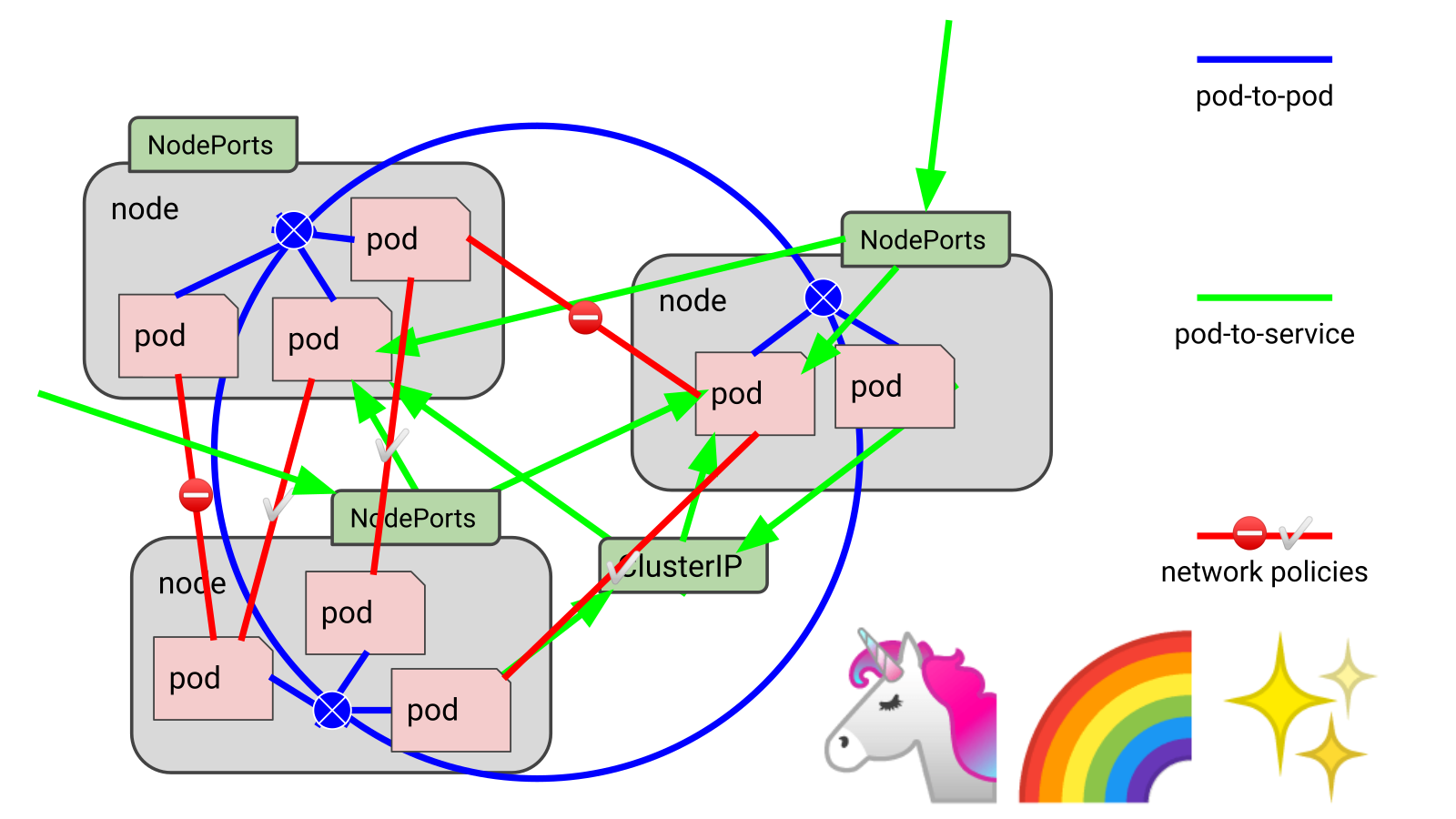 .debug[[k8s/kubenet.md](https://git.verleun.org/training/containers.git/tree/main/slides/k8s/kubenet.md)] --- class: extra-details ## Even more moving parts - Inbound traffic can be handled by multiple components: - something like kube-proxy or kube-router (for NodePort services) - load balancers (ideally, connected to the pod network) - It is possible to use multiple pod networks in parallel (with "meta-plugins" like CNI-Genie or Multus) - Some solutions can fill multiple roles (e.g. kube-router can be set up to provide the pod network and/or network policies and/or replace kube-proxy) ??? :EN:- The Kubernetes network model :FR:- Le modèle réseau de Kubernetes .debug[[k8s/kubenet.md](https://git.verleun.org/training/containers.git/tree/main/slides/k8s/kubenet.md)] --- class: pic .interstitial[] --- name: toc-first-contact-with-kubectl class: title First contact with `kubectl` .nav[ [Previous part](#toc-kubernetes-network-model) | [Back to table of contents](#toc-part-6) | [Next part](#toc-setting-up-kubernetes) ] .debug[(automatically generated title slide)] --- # First contact with `kubectl` - `kubectl` is (almost) the only tool we'll need to talk to Kubernetes - It is a rich CLI tool around the Kubernetes API (Everything you can do with `kubectl`, you can do directly with the API) - On our machines, there is a `~/.kube/config` file with: - the Kubernetes API address - the path to our TLS certificates used to authenticate - You can also use the `--kubeconfig` flag to pass a config file - Or directly `--server`, `--user`, etc. - `kubectl` can be pronounced "Cube C T L", "Cube cuttle", "Cube cuddle"... .debug[[k8s/kubectlget.md](https://git.verleun.org/training/containers.git/tree/main/slides/k8s/kubectlget.md)] --- class: extra-details ## `kubectl` is the new SSH - We often start managing servers with SSH (installing packages, troubleshooting ...) - At scale, it becomes tedious, repetitive, error-prone - Instead, we use config management, central logging, etc. - In many cases, we still need SSH: - as the underlying access method (e.g. Ansible) - to debug tricky scenarios - to inspect and poke at things .debug[[k8s/kubectlget.md](https://git.verleun.org/training/containers.git/tree/main/slides/k8s/kubectlget.md)] --- class: extra-details ## The parallel with `kubectl` - We often start managing Kubernetes clusters with `kubectl` (deploying applications, troubleshooting ...) - At scale (with many applications or clusters), it becomes tedious, repetitive, error-prone - Instead, we use automated pipelines, observability tooling, etc. - In many cases, we still need `kubectl`: - to debug tricky scenarios - to inspect and poke at things - The Kubernetes API is always the underlying access method .debug[[k8s/kubectlget.md](https://git.verleun.org/training/containers.git/tree/main/slides/k8s/kubectlget.md)] --- ## `kubectl get` - Let's look at our `Node` resources with `kubectl get`! .lab[ - Look at the composition of our cluster: ```bash kubectl get node ``` - These commands are equivalent: ```bash kubectl get no kubectl get node kubectl get nodes ``` ] .debug[[k8s/kubectlget.md](https://git.verleun.org/training/containers.git/tree/main/slides/k8s/kubectlget.md)] --- ## Obtaining machine-readable output - `kubectl get` can output JSON, YAML, or be directly formatted .lab[ - Give us more info about the nodes: ```bash kubectl get nodes -o wide ``` - Let's have some YAML: ```bash kubectl get no -o yaml ``` See that `kind: List` at the end? It's the type of our result! ] .debug[[k8s/kubectlget.md](https://git.verleun.org/training/containers.git/tree/main/slides/k8s/kubectlget.md)] --- ## (Ab)using `kubectl` and `jq` - It's super easy to build custom reports .lab[ - Show the capacity of all our nodes as a stream of JSON objects: ```bash kubectl get nodes -o json | jq ".items[] | {name:.metadata.name} + .status.capacity" ``` ] .debug[[k8s/kubectlget.md](https://git.verleun.org/training/containers.git/tree/main/slides/k8s/kubectlget.md)] --- class: extra-details ## Exploring types and definitions - We can list all available resource types by running `kubectl api-resources` <br/> (In Kubernetes 1.10 and prior, this command used to be `kubectl get`) - We can view the definition for a resource type with: ```bash kubectl explain type ``` - We can view the definition of a field in a resource, for instance: ```bash kubectl explain node.spec ``` - Or get the full definition of all fields and sub-fields: ```bash kubectl explain node --recursive ``` .debug[[k8s/kubectlget.md](https://git.verleun.org/training/containers.git/tree/main/slides/k8s/kubectlget.md)] --- class: extra-details ## Introspection vs. documentation - We can access the same information by reading the [API documentation](https://kubernetes.io/docs/reference/#api-reference) - The API documentation is usually easier to read, but: - it won't show custom types (like Custom Resource Definitions) - we need to make sure that we look at the correct version - `kubectl api-resources` and `kubectl explain` perform *introspection* (they communicate with the API server and obtain the exact type definitions) .debug[[k8s/kubectlget.md](https://git.verleun.org/training/containers.git/tree/main/slides/k8s/kubectlget.md)] --- ## Type names - The most common resource names have three forms: - singular (e.g. `node`, `service`, `deployment`) - plural (e.g. `nodes`, `services`, `deployments`) - short (e.g. `no`, `svc`, `deploy`) - Some resources do not have a short name - `Endpoints` only have a plural form (because even a single `Endpoints` resource is actually a list of endpoints) .debug[[k8s/kubectlget.md](https://git.verleun.org/training/containers.git/tree/main/slides/k8s/kubectlget.md)] --- ## Viewing details - We can use `kubectl get -o yaml` to see all available details - However, YAML output is often simultaneously too much and not enough - For instance, `kubectl get node node1 -o yaml` is: - too much information (e.g.: list of images available on this node) - not enough information (e.g.: doesn't show pods running on this node) - difficult to read for a human operator - For a comprehensive overview, we can use `kubectl describe` instead .debug[[k8s/kubectlget.md](https://git.verleun.org/training/containers.git/tree/main/slides/k8s/kubectlget.md)] --- ## `kubectl describe` - `kubectl describe` needs a resource type and (optionally) a resource name - It is possible to provide a resource name *prefix* (all matching objects will be displayed) - `kubectl describe` will retrieve some extra information about the resource .lab[ - Look at the information available for `node1` with one of the following commands: ```bash kubectl describe node/node1 kubectl describe node node1 ``` ] (We should notice a bunch of control plane pods.) .debug[[k8s/kubectlget.md](https://git.verleun.org/training/containers.git/tree/main/slides/k8s/kubectlget.md)] --- ## Listing running containers - Containers are manipulated through *pods* - A pod is a group of containers: - running together (on the same node) - sharing resources (RAM, CPU; but also network, volumes) .lab[ - List pods on our cluster: ```bash kubectl get pods ``` ] -- *Where are the pods that we saw just a moment earlier?!?* .debug[[k8s/kubectlget.md](https://git.verleun.org/training/containers.git/tree/main/slides/k8s/kubectlget.md)] --- ## Namespaces - Namespaces allow us to segregate resources .lab[ - List the namespaces on our cluster with one of these commands: ```bash kubectl get namespaces kubectl get namespace kubectl get ns ``` ] -- *You know what ... This `kube-system` thing looks suspicious.* *In fact, I'm pretty sure it showed up earlier, when we did:* `kubectl describe node node1` .debug[[k8s/kubectlget.md](https://git.verleun.org/training/containers.git/tree/main/slides/k8s/kubectlget.md)] --- ## Accessing namespaces - By default, `kubectl` uses the `default` namespace - We can see resources in all namespaces with `--all-namespaces` .lab[ - List the pods in all namespaces: ```bash kubectl get pods --all-namespaces ``` - Since Kubernetes 1.14, we can also use `-A` as a shorter version: ```bash kubectl get pods -A ``` ] *Here are our system pods!* .debug[[k8s/kubectlget.md](https://git.verleun.org/training/containers.git/tree/main/slides/k8s/kubectlget.md)] --- ## What are all these control plane pods? - `etcd` is our etcd server - `kube-apiserver` is the API server - `kube-controller-manager` and `kube-scheduler` are other control plane components - `coredns` provides DNS-based service discovery ([replacing kube-dns as of 1.11](https://kubernetes.io/blog/2018/07/10/coredns-ga-for-kubernetes-cluster-dns/)) - `kube-proxy` is the (per-node) component managing port mappings and such - `weave` is the (per-node) component managing the network overlay - the `READY` column indicates the number of containers in each pod (1 for most pods, but `weave` has 2, for instance) .debug[[k8s/kubectlget.md](https://git.verleun.org/training/containers.git/tree/main/slides/k8s/kubectlget.md)] --- ## Scoping another namespace - We can also look at a different namespace (other than `default`) .lab[ - List only the pods in the `kube-system` namespace: ```bash kubectl get pods --namespace=kube-system kubectl get pods -n kube-system ``` ] .debug[[k8s/kubectlget.md](https://git.verleun.org/training/containers.git/tree/main/slides/k8s/kubectlget.md)] --- ## Namespaces and other `kubectl` commands - We can use `-n`/`--namespace` with almost every `kubectl` command - Example: - `kubectl create --namespace=X` to create something in namespace X - We can use `-A`/`--all-namespaces` with most commands that manipulate multiple objects - Examples: - `kubectl delete` can delete resources across multiple namespaces - `kubectl label` can add/remove/update labels across multiple namespaces .debug[[k8s/kubectlget.md](https://git.verleun.org/training/containers.git/tree/main/slides/k8s/kubectlget.md)] --- class: extra-details ## What about `kube-public`? .lab[ - List the pods in the `kube-public` namespace: ```bash kubectl -n kube-public get pods ``` ] Nothing! `kube-public` is created by kubeadm & [used for security bootstrapping](https://kubernetes.io/blog/2017/01/stronger-foundation-for-creating-and-managing-kubernetes-clusters). .debug[[k8s/kubectlget.md](https://git.verleun.org/training/containers.git/tree/main/slides/k8s/kubectlget.md)] --- class: extra-details ## Exploring `kube-public` - The only interesting object in `kube-public` is a ConfigMap named `cluster-info` .lab[ - List ConfigMap objects: ```bash kubectl -n kube-public get configmaps ``` - Inspect `cluster-info`: ```bash kubectl -n kube-public get configmap cluster-info -o yaml ``` ] Note the `selfLink` URI: `/api/v1/namespaces/kube-public/configmaps/cluster-info` We can use that! .debug[[k8s/kubectlget.md](https://git.verleun.org/training/containers.git/tree/main/slides/k8s/kubectlget.md)] --- class: extra-details ## Accessing `cluster-info` - Earlier, when trying to access the API server, we got a `Forbidden` message - But `cluster-info` is readable by everyone (even without authentication) .lab[ - Retrieve `cluster-info`: ```bash curl -k https://10.96.0.1/api/v1/namespaces/kube-public/configmaps/cluster-info ``` ] - We were able to access `cluster-info` (without auth) - It contains a `kubeconfig` file .debug[[k8s/kubectlget.md](https://git.verleun.org/training/containers.git/tree/main/slides/k8s/kubectlget.md)] --- class: extra-details ## Retrieving `kubeconfig` - We can easily extract the `kubeconfig` file from this ConfigMap .lab[ - Display the content of `kubeconfig`: ```bash curl -sk https://10.96.0.1/api/v1/namespaces/kube-public/configmaps/cluster-info \ | jq -r .data.kubeconfig ``` ] - This file holds the canonical address of the API server, and the public key of the CA - This file *does not* hold client keys or tokens - This is not sensitive information, but allows us to establish trust .debug[[k8s/kubectlget.md](https://git.verleun.org/training/containers.git/tree/main/slides/k8s/kubectlget.md)] --- class: extra-details ## What about `kube-node-lease`? - Starting with Kubernetes 1.14, there is a `kube-node-lease` namespace (or in Kubernetes 1.13 if the NodeLease feature gate is enabled) - That namespace contains one Lease object per node - *Node leases* are a new way to implement node heartbeats (i.e. node regularly pinging the control plane to say "I'm alive!") - For more details, see [Efficient Node Heartbeats KEP] or the [node controller documentation] [Efficient Node Heartbeats KEP]: https://github.com/kubernetes/enhancements/blob/master/keps/sig-node/589-efficient-node-heartbeats/README.md [node controller documentation]: https://kubernetes.io/docs/concepts/architecture/nodes/#node-controller .debug[[k8s/kubectlget.md](https://git.verleun.org/training/containers.git/tree/main/slides/k8s/kubectlget.md)] --- ## Services - A *service* is a stable endpoint to connect to "something" (In the initial proposal, they were called "portals") .lab[ - List the services on our cluster with one of these commands: ```bash kubectl get services kubectl get svc ``` ] -- There is already one service on our cluster: the Kubernetes API itself. .debug[[k8s/kubectlget.md](https://git.verleun.org/training/containers.git/tree/main/slides/k8s/kubectlget.md)] --- ## ClusterIP services - A `ClusterIP` service is internal, available from the cluster only - This is useful for introspection from within containers .lab[ - Try to connect to the API: ```bash curl -k https://`10.96.0.1` ``` - `-k` is used to skip certificate verification - Make sure to replace 10.96.0.1 with the CLUSTER-IP shown by `kubectl get svc` ] The command above should either time out, or show an authentication error. Why? .debug[[k8s/kubectlget.md](https://git.verleun.org/training/containers.git/tree/main/slides/k8s/kubectlget.md)] --- ## Time out - Connections to ClusterIP services only work *from within the cluster* - If we are outside the cluster, the `curl` command will probably time out (Because the IP address, e.g. 10.96.0.1, isn't routed properly outside the cluster) - This is the case with most "real" Kubernetes clusters - To try the connection from within the cluster, we can use [shpod](https://github.com/jpetazzo/shpod) .debug[[k8s/kubectlget.md](https://git.verleun.org/training/containers.git/tree/main/slides/k8s/kubectlget.md)] --- ## Authentication error This is what we should see when connecting from within the cluster: ```json $ curl -k https://10.96.0.1 { "kind": "Status", "apiVersion": "v1", "metadata": { }, "status": "Failure", "message": "forbidden: User \"system:anonymous\" cannot get path \"/\"", "reason": "Forbidden", "details": { }, "code": 403 } ``` .debug[[k8s/kubectlget.md](https://git.verleun.org/training/containers.git/tree/main/slides/k8s/kubectlget.md)] --- ## Explanations - We can see `kind`, `apiVersion`, `metadata` - These are typical of a Kubernetes API reply - Because we *are* talking to the Kubernetes API - The Kubernetes API tells us "Forbidden" (because it requires authentication) - The Kubernetes API is reachable from within the cluster (many apps integrating with Kubernetes will use this) .debug[[k8s/kubectlget.md](https://git.verleun.org/training/containers.git/tree/main/slides/k8s/kubectlget.md)] --- ## DNS integration - Each service also gets a DNS record - The Kubernetes DNS resolver is available *from within pods* (and sometimes, from within nodes, depending on configuration) - Code running in pods can connect to services using their name (e.g. https://kubernetes/...) ??? :EN:- Getting started with kubectl :FR:- Se familiariser avec kubectl .debug[[k8s/kubectlget.md](https://git.verleun.org/training/containers.git/tree/main/slides/k8s/kubectlget.md)] --- class: pic .interstitial[] --- name: toc-setting-up-kubernetes class: title Setting up Kubernetes .nav[ [Previous part](#toc-first-contact-with-kubectl) | [Back to table of contents](#toc-part-6) | [Next part](#toc-running-our-first-containers-on-kubernetes) ] .debug[(automatically generated title slide)] --- # Setting up Kubernetes - Kubernetes is made of many components that require careful configuration - Secure operation typically requires TLS certificates and a local CA (certificate authority) - Setting up everything manually is possible, but rarely done (except for learning purposes) - Let's do a quick overview of available options! .debug[[k8s/setup-overview.md](https://git.verleun.org/training/containers.git/tree/main/slides/k8s/setup-overview.md)] --- ## Local development - Are you writing code that will eventually run on Kubernetes? - Then it's a good idea to have a development cluster! - Instead of shipping containers images, we can test them on Kubernetes - Extremely useful when authoring or testing Kubernetes-specific objects (ConfigMaps, Secrets, StatefulSets, Jobs, RBAC, etc.) - Extremely convenient to quickly test/check what a particular thing looks like (e.g. what are the fields a Deployment spec?) .debug[[k8s/setup-overview.md](https://git.verleun.org/training/containers.git/tree/main/slides/k8s/setup-overview.md)] --- ## One-node clusters - It's perfectly fine to work with a cluster that has only one node - It simplifies a lot of things: - pod networking doesn't even need CNI plugins, overlay networks, etc. - these clusters can be fully contained (no pun intended) in an easy-to-ship VM or container image - some of the security aspects may be simplified (different threat model) - images can be built directly on the node (we don't need to ship them with a registry) - Examples: Docker Desktop, k3d, KinD, MicroK8s, Minikube (some of these also support clusters with multiple nodes) .debug[[k8s/setup-overview.md](https://git.verleun.org/training/containers.git/tree/main/slides/k8s/setup-overview.md)] --- ## Managed clusters ("Turnkey Solutions") - Many cloud providers and hosting providers offer "managed Kubernetes" - The deployment and maintenance of the *control plane* is entirely managed by the provider (ideally, clusters can be spun up automatically through an API, CLI, or web interface) - Given the complexity of Kubernetes, this approach is *strongly recommended* (at least for your first production clusters) - After working for a while with Kubernetes, you will be better equipped to decide: - whether to operate it yourself or use a managed offering - which offering or which distribution works best for you and your needs .debug[[k8s/setup-overview.md](https://git.verleun.org/training/containers.git/tree/main/slides/k8s/setup-overview.md)] --- ## Node management - Most "Turnkey Solutions" offer fully managed control planes (including control plane upgrades, sometimes done automatically) - However, with most providers, we still need to take care of *nodes* (provisioning, upgrading, scaling the nodes) - Example with Amazon EKS ["managed node groups"](https://docs.aws.amazon.com/eks/latest/userguide/managed-node-groups.html): *...when bugs or issues are reported [...] you're responsible for deploying these patched AMI versions to your managed node groups.* .debug[[k8s/setup-overview.md](https://git.verleun.org/training/containers.git/tree/main/slides/k8s/setup-overview.md)] --- ## Managed clusters differences - Most providers let you pick which Kubernetes version you want - some providers offer up-to-date versions - others lag significantly (sometimes by 2 or 3 minor versions) - Some providers offer multiple networking or storage options - Others will only support one, tied to their infrastructure (changing that is in theory possible, but might be complex or unsupported) - Some providers let you configure or customize the control plane (generally through Kubernetes "feature gates") .debug[[k8s/setup-overview.md](https://git.verleun.org/training/containers.git/tree/main/slides/k8s/setup-overview.md)] --- ## Choosing a provider - Pricing models differ from one provider to another - nodes are generally charged at their usual price - control plane may be free or incur a small nominal fee - Beyond pricing, there are *huge* differences in features between providers - The "major" providers are not always the best ones! - See [this page](https://kubernetes.io/docs/setup/production-environment/turnkey-solutions/) for a list of available providers .debug[[k8s/setup-overview.md](https://git.verleun.org/training/containers.git/tree/main/slides/k8s/setup-overview.md)] --- ## Kubernetes distributions and installers - If you want to run Kubernetes yourselves, there are many options (free, commercial, proprietary, open source ...) - Some of them are installers, while some are complete platforms - Some of them leverage other well-known deployment tools (like Puppet, Terraform ...) - There are too many options to list them all (check [this page](https://kubernetes.io/partners/#conformance) for an overview!) .debug[[k8s/setup-overview.md](https://git.verleun.org/training/containers.git/tree/main/slides/k8s/setup-overview.md)] --- ## kubeadm - kubeadm is a tool part of Kubernetes to facilitate cluster setup - Many other installers and distributions use it (but not all of them) - It can also be used by itself - Excellent starting point to install Kubernetes on your own machines (virtual, physical, it doesn't matter) - It even supports highly available control planes, or "multi-master" (this is more complex, though, because it introduces the need for an API load balancer) .debug[[k8s/setup-overview.md](https://git.verleun.org/training/containers.git/tree/main/slides/k8s/setup-overview.md)] --- ## Manual setup - The resources below are mainly for educational purposes! - [Kubernetes The Hard Way](https://github.com/kelseyhightower/kubernetes-the-hard-way) by Kelsey Hightower - step by step guide to install Kubernetes on Google Cloud - covers certificates, high availability ... - *“Kubernetes The Hard Way is optimized for learning, which means taking the long route to ensure you understand each task required to bootstrap a Kubernetes cluster.”* - [Deep Dive into Kubernetes Internals for Builders and Operators](https://www.youtube.com/watch?v=3KtEAa7_duA) - conference presentation showing step-by-step control plane setup - emphasis on simplicity, not on security and availability .debug[[k8s/setup-overview.md](https://git.verleun.org/training/containers.git/tree/main/slides/k8s/setup-overview.md)] --- ## About our training clusters - How did we set up these Kubernetes clusters that we're using? -- - We used `kubeadm` on freshly installed VM instances running Ubuntu LTS 1. Install Docker 2. Install Kubernetes packages 3. Run `kubeadm init` on the first node (it deploys the control plane on that node) 4. Set up Weave (the overlay network) with a single `kubectl apply` command 5. Run `kubeadm join` on the other nodes (with the token produced by `kubeadm init`) 6. Copy the configuration file generated by `kubeadm init` - Check the [prepare VMs README](https://github.com/jpetazzo/container.training/blob/master/prepare-vms/README.md) for more details .debug[[k8s/setup-overview.md](https://git.verleun.org/training/containers.git/tree/main/slides/k8s/setup-overview.md)] --- ## `kubeadm` "drawbacks" - Doesn't set up Docker or any other container engine (this is by design, to give us choice) - Doesn't set up the overlay network (this is also by design, for the same reasons) - HA control plane requires [some extra steps](https://kubernetes.io/docs/setup/independent/high-availability/) - Note that HA control plane also requires setting up a specific API load balancer (which is beyond the scope of kubeadm) ??? :EN:- Various ways to install Kubernetes :FR:- Survol des techniques d'installation de Kubernetes .debug[[k8s/setup-overview.md](https://git.verleun.org/training/containers.git/tree/main/slides/k8s/setup-overview.md)] --- class: pic .interstitial[] --- name: toc-running-our-first-containers-on-kubernetes class: title Running our first containers on Kubernetes .nav[ [Previous part](#toc-setting-up-kubernetes) | [Back to table of contents](#toc-part-7) | [Next part](#toc-revisiting-kubectl-logs) ] .debug[(automatically generated title slide)] --- # Running our first containers on Kubernetes - First things first: we cannot run a container -- - We are going to run a pod, and in that pod there will be a single container -- - In that container in the pod, we are going to run a simple `ping` command .debug[[k8s/kubectl-run.md](https://git.verleun.org/training/containers.git/tree/main/slides/k8s/kubectl-run.md)] --- class: extra-details ## If you're running Kubernetes 1.17 (or older)... - This material assumes that you're running a recent version of Kubernetes (at least 1.19) <!-- ##VERSION## --> - You can check your version number with `kubectl version` (look at the server part) - In Kubernetes 1.17 and older, `kubectl run` creates a Deployment - If you're running such an old version: - it's obsolete and no longer maintained - Kubernetes 1.17 is [EOL since January 2021][nonactive] - **upgrade NOW!** [nonactive]: https://kubernetes.io/releases/patch-releases/#non-active-branch-history .debug[[k8s/kubectl-run.md](https://git.verleun.org/training/containers.git/tree/main/slides/k8s/kubectl-run.md)] --- ## Starting a simple pod with `kubectl run` - `kubectl run` is convenient to start a single pod - We need to specify at least a *name* and the image we want to use - Optionally, we can specify the command to run in the pod .lab[ - Let's ping the address of `localhost`, the loopback interface: ```bash kubectl run pingpong --image alpine ping 127.0.0.1 ``` <!-- ```hide kubectl wait pod --selector=run=pingpong --for condition=ready``` --> ] The output tells us that a Pod was created: ``` pod/pingpong created ``` .debug[[k8s/kubectl-run.md](https://git.verleun.org/training/containers.git/tree/main/slides/k8s/kubectl-run.md)] --- ## Viewing container output - Let's use the `kubectl logs` command - It takes a Pod name as argument - Unless specified otherwise, it will only show logs of the first container in the pod (Good thing there's only one in ours!) .lab[ - View the result of our `ping` command: ```bash kubectl logs pingpong ``` ] .debug[[k8s/kubectl-run.md](https://git.verleun.org/training/containers.git/tree/main/slides/k8s/kubectl-run.md)] --- ## Streaming logs in real time - Just like `docker logs`, `kubectl logs` supports convenient options: - `-f`/`--follow` to stream logs in real time (à la `tail -f`) - `--tail` to indicate how many lines you want to see (from the end) - `--since` to get logs only after a given timestamp .lab[ - View the latest logs of our `ping` command: ```bash kubectl logs pingpong --tail 1 --follow ``` - Stop it with Ctrl-C <!-- ```wait seq=3``` ```keys ^C``` --> ] .debug[[k8s/kubectl-run.md](https://git.verleun.org/training/containers.git/tree/main/slides/k8s/kubectl-run.md)] --- ## Scaling our application - `kubectl` gives us a simple command to scale a workload: `kubectl scale TYPE NAME --replicas=HOWMANY` - Let's try it on our Pod, so that we have more Pods! .lab[ - Try to scale the Pod: ```bash kubectl scale pod pingpong --replicas=3 ``` ] 🤔 We get the following error, what does that mean? ``` Error from server (NotFound): the server could not find the requested resource ``` .debug[[k8s/kubectl-run.md](https://git.verleun.org/training/containers.git/tree/main/slides/k8s/kubectl-run.md)] --- ## Scaling a Pod - We cannot "scale a Pod" (that's not completely true; we could give it more CPU/RAM) - If we want more Pods, we need to create more Pods (i.e. execute `kubectl run` multiple times) - There must be a better way! (spoiler alert: yes, there is a better way!) .debug[[k8s/kubectl-run.md](https://git.verleun.org/training/containers.git/tree/main/slides/k8s/kubectl-run.md)] --- class: extra-details ## `NotFound` - What's the meaning of that error? ``` Error from server (NotFound): the server could not find the requested resource ``` - When we execute `kubectl scale THAT-RESOURCE --replicas=THAT-MANY`, <br/> it is like telling Kubernetes: *go to THAT-RESOURCE and set the scaling button to position THAT-MANY* - Pods do not have a "scaling button" - Try to execute the `kubectl scale pod` command with `-v6` - We see a `PATCH` request to `/scale`: that's the "scaling button" (technically it's called a *subresource* of the Pod) .debug[[k8s/kubectl-run.md](https://git.verleun.org/training/containers.git/tree/main/slides/k8s/kubectl-run.md)] --- ## Creating more pods - We are going to create a ReplicaSet (= set of replicas = set of identical pods) - In fact, we will create a Deployment, which itself will create a ReplicaSet - Why so many layers? We'll explain that shortly, don't worry! .debug[[k8s/kubectl-run.md](https://git.verleun.org/training/containers.git/tree/main/slides/k8s/kubectl-run.md)] --- ## Creating a Deployment running `ping` - Let's create a Deployment instead of a single Pod .lab[ - Create the Deployment; pay attention to the `--`: ```bash kubectl create deployment pingpong --image=alpine -- ping 127.0.0.1 ``` ] - The `--` is used to separate: - "options/flags of `kubectl create` - command to run in the container .debug[[k8s/kubectl-run.md](https://git.verleun.org/training/containers.git/tree/main/slides/k8s/kubectl-run.md)] --- ## What has been created? .lab[ <!-- ```hide kubectl wait pod --selector=app=pingpong --for condition=ready ``` --> - Check the resources that were created: ```bash kubectl get all ``` ] Note: `kubectl get all` is a lie. It doesn't show everything. (But it shows a lot of "usual suspects", i.e. commonly used resources.) .debug[[k8s/kubectl-run.md](https://git.verleun.org/training/containers.git/tree/main/slides/k8s/kubectl-run.md)] --- ## There's a lot going on here! ``` NAME READY STATUS RESTARTS AGE pod/pingpong 1/1 Running 0 4m17s pod/pingpong-6ccbc77f68-kmgfn 1/1 Running 0 11s NAME TYPE CLUSTER-IP EXTERNAL-IP PORT(S) AGE service/kubernetes ClusterIP 10.96.0.1 <none> 443/TCP 3h45 NAME READY UP-TO-DATE AVAILABLE AGE deployment.apps/pingpong 1/1 1 1 11s NAME DESIRED CURRENT READY AGE replicaset.apps/pingpong-6ccbc77f68 1 1 1 11s ``` Our new Pod is not named `pingpong`, but `pingpong-xxxxxxxxxxx-yyyyy`. We have a Deployment named `pingpong`, and an extra ReplicaSet, too. What's going on? .debug[[k8s/kubectl-run.md](https://git.verleun.org/training/containers.git/tree/main/slides/k8s/kubectl-run.md)] --- ## From Deployment to Pod We have the following resources: - `deployment.apps/pingpong` This is the Deployment that we just created. - `replicaset.apps/pingpong-xxxxxxxxxx` This is a Replica Set created by this Deployment. - `pod/pingpong-xxxxxxxxxx-yyyyy` This is a *pod* created by the Replica Set. Let's explain what these things are. .debug[[k8s/kubectl-run.md](https://git.verleun.org/training/containers.git/tree/main/slides/k8s/kubectl-run.md)] --- ## Pod - Can have one or multiple containers - Runs on a single node (Pod cannot "straddle" multiple nodes) - Pods cannot be moved (e.g. in case of node outage) - Pods cannot be scaled horizontally (except by manually creating more Pods) .debug[[k8s/kubectl-run.md](https://git.verleun.org/training/containers.git/tree/main/slides/k8s/kubectl-run.md)] --- class: extra-details ## Pod details - A Pod is not a process; it's an environment for containers - it cannot be "restarted" - it cannot "crash" - The containers in a Pod can crash - They may or may not get restarted (depending on Pod's restart policy) - If all containers exit successfully, the Pod ends in "Succeeded" phase - If some containers fail and don't get restarted, the Pod ends in "Failed" phase .debug[[k8s/kubectl-run.md](https://git.verleun.org/training/containers.git/tree/main/slides/k8s/kubectl-run.md)] --- ## Replica Set - Set of identical (replicated) Pods - Defined by a pod template + number of desired replicas - If there are not enough Pods, the Replica Set creates more (e.g. in case of node outage; or simply when scaling up) - If there are too many Pods, the Replica Set deletes some (e.g. if a node was disconnected and comes back; or when scaling down) - We can scale up/down a Replica Set - we update the manifest of the Replica Set - as a consequence, the Replica Set controller creates/deletes Pods .debug[[k8s/kubectl-run.md](https://git.verleun.org/training/containers.git/tree/main/slides/k8s/kubectl-run.md)] --- ## Deployment - Replica Sets control *identical* Pods - Deployments are used to roll out different Pods (different image, command, environment variables, ...) - When we update a Deployment with a new Pod definition: - a new Replica Set is created with the new Pod definition - that new Replica Set is progressively scaled up - meanwhile, the old Replica Set(s) is(are) scaled down - This is a *rolling update*, minimizing application downtime - When we scale up/down a Deployment, it scales up/down its Replica Set .debug[[k8s/kubectl-run.md](https://git.verleun.org/training/containers.git/tree/main/slides/k8s/kubectl-run.md)] --- ## Can we scale now? - Let's try `kubectl scale` again, but on the Deployment! .lab[ - Scale our `pingpong` deployment: ```bash kubectl scale deployment pingpong --replicas 3 ``` - Note that we could also write it like this: ```bash kubectl scale deployment/pingpong --replicas 3 ``` - Check that we now have multiple pods: ```bash kubectl get pods ``` ] .debug[[k8s/kubectl-run.md](https://git.verleun.org/training/containers.git/tree/main/slides/k8s/kubectl-run.md)] --- class: extra-details ## Scaling a Replica Set - What if we scale the Replica Set instead of the Deployment? - The Deployment would notice it right away and scale back to the initial level - The Replica Set makes sure that we have the right numbers of Pods - The Deployment makes sure that the Replica Set has the right size (conceptually, it delegates the management of the Pods to the Replica Set) - This might seem weird (why this extra layer?) but will soon make sense (when we will look at how rolling updates work!) .debug[[k8s/kubectl-run.md](https://git.verleun.org/training/containers.git/tree/main/slides/k8s/kubectl-run.md)] --- ## Checking Deployment logs - `kubectl logs` needs a Pod name - But it can also work with a *type/name* (e.g. `deployment/pingpong`) .lab[ - View the result of our `ping` command: ```bash kubectl logs deploy/pingpong --tail 2 ``` ] - It shows us the logs of the first Pod of the Deployment - We'll see later how to get the logs of *all* the Pods! .debug[[k8s/kubectl-run.md](https://git.verleun.org/training/containers.git/tree/main/slides/k8s/kubectl-run.md)] --- ## Resilience - The *deployment* `pingpong` watches its *replica set* - The *replica set* ensures that the right number of *pods* are running - What happens if pods disappear? .lab[ - In a separate window, watch the list of pods: ```bash watch kubectl get pods ``` <!-- ```wait Every 2.0s``` ```tmux split-pane -v``` --> - Destroy the pod currently shown by `kubectl logs`: ``` kubectl delete pod pingpong-xxxxxxxxxx-yyyyy ``` <!-- ```tmux select-pane -t 0``` ```copy pingpong-[^-]*-.....``` ```tmux last-pane``` ```keys kubectl delete pod ``` ```paste``` ```key ^J``` ```check``` --> ] .debug[[k8s/kubectl-run.md](https://git.verleun.org/training/containers.git/tree/main/slides/k8s/kubectl-run.md)] --- ## What happened? - `kubectl delete pod` terminates the pod gracefully (sending it the TERM signal and waiting for it to shutdown) - As soon as the pod is in "Terminating" state, the Replica Set replaces it - But we can still see the output of the "Terminating" pod in `kubectl logs` - Until 30 seconds later, when the grace period expires - The pod is then killed, and `kubectl logs` exits .debug[[k8s/kubectl-run.md](https://git.verleun.org/training/containers.git/tree/main/slides/k8s/kubectl-run.md)] --- ## Deleting a standalone Pod - What happens if we delete a standalone Pod? (like the first `pingpong` Pod that we created) .lab[ - Delete the Pod: ```bash kubectl delete pod pingpong ``` <!-- ```key ^D``` ```key ^C``` --> ] - No replacement Pod gets created because there is no *controller* watching it - That's why we will rarely use standalone Pods in practice (except for e.g. punctual debugging or executing a short supervised task) ??? :EN:- Running pods and deployments :FR:- Créer un pod et un déploiement .debug[[k8s/kubectl-run.md](https://git.verleun.org/training/containers.git/tree/main/slides/k8s/kubectl-run.md)] --- class: pic .interstitial[] --- name: toc-revisiting-kubectl-logs class: title Revisiting `kubectl logs` .nav[ [Previous part](#toc-running-our-first-containers-on-kubernetes) | [Back to table of contents](#toc-part-7) | [Next part](#toc-exposing-containers) ] .debug[(automatically generated title slide)] --- # Revisiting `kubectl logs` - In this section, we assume that we have a Deployment with multiple Pods (e.g. `pingpong` that we scaled to at least 3 pods) - We will highlights some of the limitations of `kubectl logs` .debug[[k8s/kubectl-logs.md](https://git.verleun.org/training/containers.git/tree/main/slides/k8s/kubectl-logs.md)] --- ## Streaming logs of multiple pods - By default, `kubectl logs` shows us the output of a single Pod .lab[ - Try to check the output of the Pods related to a Deployment: ```bash kubectl logs deploy/pingpong --tail 1 --follow ``` <!-- ```wait using pod/pingpong-``` ```keys ^C``` --> ] `kubectl logs` only shows us the logs of one of the Pods. .debug[[k8s/kubectl-logs.md](https://git.verleun.org/training/containers.git/tree/main/slides/k8s/kubectl-logs.md)] --- ## Viewing logs of multiple pods - When we specify a deployment name, only one single pod's logs are shown - We can view the logs of multiple pods by specifying a *selector* - If we check the pods created by the deployment, they all have the label `app=pingpong` (this is just a default label that gets added when using `kubectl create deployment`) .lab[ - View the last line of log from all pods with the `app=pingpong` label: ```bash kubectl logs -l app=pingpong --tail 1 ``` ] .debug[[k8s/kubectl-logs.md](https://git.verleun.org/training/containers.git/tree/main/slides/k8s/kubectl-logs.md)] --- ## Streaming logs of multiple pods - Can we stream the logs of all our `pingpong` pods? .lab[ - Combine `-l` and `-f` flags: ```bash kubectl logs -l app=pingpong --tail 1 -f ``` <!-- ```wait seq=``` ```key ^C``` --> ] *Note: combining `-l` and `-f` is only possible since Kubernetes 1.14!* *Let's try to understand why ...* .debug[[k8s/kubectl-logs.md](https://git.verleun.org/training/containers.git/tree/main/slides/k8s/kubectl-logs.md)] --- class: extra-details ## Streaming logs of many pods - Let's see what happens if we try to stream the logs for more than 5 pods .lab[ - Scale up our deployment: ```bash kubectl scale deployment pingpong --replicas=8 ``` - Stream the logs: ```bash kubectl logs -l app=pingpong --tail 1 -f ``` <!-- ```wait error:``` --> ] We see a message like the following one: ``` error: you are attempting to follow 8 log streams, but maximum allowed concurency is 5, use --max-log-requests to increase the limit ``` .debug[[k8s/kubectl-logs.md](https://git.verleun.org/training/containers.git/tree/main/slides/k8s/kubectl-logs.md)] --- class: extra-details ## Why can't we stream the logs of many pods? - `kubectl` opens one connection to the API server per pod - For each pod, the API server opens one extra connection to the corresponding kubelet - If there are 1000 pods in our deployment, that's 1000 inbound + 1000 outbound connections on the API server - This could easily put a lot of stress on the API server - Prior Kubernetes 1.14, it was decided to *not* allow multiple connections - From Kubernetes 1.14, it is allowed, but limited to 5 connections (this can be changed with `--max-log-requests`) - For more details about the rationale, see [PR #67573](https://github.com/kubernetes/kubernetes/pull/67573) .debug[[k8s/kubectl-logs.md](https://git.verleun.org/training/containers.git/tree/main/slides/k8s/kubectl-logs.md)] --- ## Shortcomings of `kubectl logs` - We don't see which pod sent which log line - If pods are restarted / replaced, the log stream stops - If new pods are added, we don't see their logs - To stream the logs of multiple pods, we need to write a selector - There are external tools to address these shortcomings (e.g.: [Stern](https://github.com/stern/stern)) .debug[[k8s/kubectl-logs.md](https://git.verleun.org/training/containers.git/tree/main/slides/k8s/kubectl-logs.md)] --- class: extra-details ## `kubectl logs -l ... --tail N` - If we run this with Kubernetes 1.12, the last command shows multiple lines - This is a regression when `--tail` is used together with `-l`/`--selector` - It always shows the last 10 lines of output for each container (instead of the number of lines specified on the command line) - The problem was fixed in Kubernetes 1.13 *See [#70554](https://github.com/kubernetes/kubernetes/issues/70554) for details.* ??? :EN:- Viewing logs with "kubectl logs" :FR:- Consulter les logs avec "kubectl logs" .debug[[k8s/kubectl-logs.md](https://git.verleun.org/training/containers.git/tree/main/slides/k8s/kubectl-logs.md)] --- ## 19,000 words They say, "a picture is worth one thousand words." The following 19 slides show what really happens when we run: ```bash kubectl create deployment web --image=nginx ``` .debug[[k8s/deploymentslideshow.md](https://git.verleun.org/training/containers.git/tree/main/slides/k8s/deploymentslideshow.md)] --- class: pic  .debug[[k8s/deploymentslideshow.md](https://git.verleun.org/training/containers.git/tree/main/slides/k8s/deploymentslideshow.md)] --- class: pic  .debug[[k8s/deploymentslideshow.md](https://git.verleun.org/training/containers.git/tree/main/slides/k8s/deploymentslideshow.md)] --- class: pic  .debug[[k8s/deploymentslideshow.md](https://git.verleun.org/training/containers.git/tree/main/slides/k8s/deploymentslideshow.md)] --- class: pic  .debug[[k8s/deploymentslideshow.md](https://git.verleun.org/training/containers.git/tree/main/slides/k8s/deploymentslideshow.md)] --- class: pic  .debug[[k8s/deploymentslideshow.md](https://git.verleun.org/training/containers.git/tree/main/slides/k8s/deploymentslideshow.md)] --- class: pic  .debug[[k8s/deploymentslideshow.md](https://git.verleun.org/training/containers.git/tree/main/slides/k8s/deploymentslideshow.md)] --- class: pic  .debug[[k8s/deploymentslideshow.md](https://git.verleun.org/training/containers.git/tree/main/slides/k8s/deploymentslideshow.md)] --- class: pic  .debug[[k8s/deploymentslideshow.md](https://git.verleun.org/training/containers.git/tree/main/slides/k8s/deploymentslideshow.md)] --- class: pic  .debug[[k8s/deploymentslideshow.md](https://git.verleun.org/training/containers.git/tree/main/slides/k8s/deploymentslideshow.md)] --- class: pic  .debug[[k8s/deploymentslideshow.md](https://git.verleun.org/training/containers.git/tree/main/slides/k8s/deploymentslideshow.md)] --- class: pic  .debug[[k8s/deploymentslideshow.md](https://git.verleun.org/training/containers.git/tree/main/slides/k8s/deploymentslideshow.md)] --- class: pic  .debug[[k8s/deploymentslideshow.md](https://git.verleun.org/training/containers.git/tree/main/slides/k8s/deploymentslideshow.md)] --- class: pic  .debug[[k8s/deploymentslideshow.md](https://git.verleun.org/training/containers.git/tree/main/slides/k8s/deploymentslideshow.md)] --- class: pic  .debug[[k8s/deploymentslideshow.md](https://git.verleun.org/training/containers.git/tree/main/slides/k8s/deploymentslideshow.md)] --- class: pic  .debug[[k8s/deploymentslideshow.md](https://git.verleun.org/training/containers.git/tree/main/slides/k8s/deploymentslideshow.md)] --- class: pic  .debug[[k8s/deploymentslideshow.md](https://git.verleun.org/training/containers.git/tree/main/slides/k8s/deploymentslideshow.md)] --- class: pic  .debug[[k8s/deploymentslideshow.md](https://git.verleun.org/training/containers.git/tree/main/slides/k8s/deploymentslideshow.md)] --- class: pic  .debug[[k8s/deploymentslideshow.md](https://git.verleun.org/training/containers.git/tree/main/slides/k8s/deploymentslideshow.md)] --- class: pic  .debug[[k8s/deploymentslideshow.md](https://git.verleun.org/training/containers.git/tree/main/slides/k8s/deploymentslideshow.md)] --- class: pic .interstitial[] --- name: toc-exposing-containers class: title Exposing containers .nav[ [Previous part](#toc-revisiting-kubectl-logs) | [Back to table of contents](#toc-part-7) | [Next part](#toc-shipping-images-with-a-registry) ] .debug[(automatically generated title slide)] --- # Exposing containers - We can connect to our pods using their IP address - Then we need to figure out a lot of things: - how do we look up the IP address of the pod(s)? - how do we connect from outside the cluster? - how do we load balance traffic? - what if a pod fails? - Kubernetes has a resource type named *Service* - Services address all these questions! .debug[[k8s/kubectlexpose.md](https://git.verleun.org/training/containers.git/tree/main/slides/k8s/kubectlexpose.md)] --- ## Services in a nutshell - Services give us a *stable endpoint* to connect to a pod or a group of pods - An easy way to create a service is to use `kubectl expose` - If we have a deployment named `my-little-deploy`, we can run: `kubectl expose deployment my-little-deploy --port=80` ... and this will create a service with the same name (`my-little-deploy`) - Services are automatically added to an internal DNS zone (in the example above, our code can now connect to http://my-little-deploy/) .debug[[k8s/kubectlexpose.md](https://git.verleun.org/training/containers.git/tree/main/slides/k8s/kubectlexpose.md)] --- ## Advantages of services - We don't need to look up the IP address of the pod(s) (we resolve the IP address of the service using DNS) - There are multiple service types; some of them allow external traffic (e.g. `LoadBalancer` and `NodePort`) - Services provide load balancing (for both internal and external traffic) - Service addresses are independent from pods' addresses (when a pod fails, the service seamlessly sends traffic to its replacement) .debug[[k8s/kubectlexpose.md](https://git.verleun.org/training/containers.git/tree/main/slides/k8s/kubectlexpose.md)] --- ## Many kinds and flavors of service - There are different types of services: `ClusterIP`, `NodePort`, `LoadBalancer`, `ExternalName` - There are also *headless services* - Services can also have optional *external IPs* - There is also another resource type called *Ingress* (specifically for HTTP services) - Wow, that's a lot! Let's start with the basics ... .debug[[k8s/kubectlexpose.md](https://git.verleun.org/training/containers.git/tree/main/slides/k8s/kubectlexpose.md)] --- ## `ClusterIP` - It's the default service type - A virtual IP address is allocated for the service (in an internal, private range; e.g. 10.96.0.0/12) - This IP address is reachable only from within the cluster (nodes and pods) - Our code can connect to the service using the original port number - Perfect for internal communication, within the cluster .debug[[k8s/kubectlexpose.md](https://git.verleun.org/training/containers.git/tree/main/slides/k8s/kubectlexpose.md)] --- class: pic  .debug[[k8s/kubectlexpose.md](https://git.verleun.org/training/containers.git/tree/main/slides/k8s/kubectlexpose.md)] --- class: pic  .debug[[k8s/kubectlexpose.md](https://git.verleun.org/training/containers.git/tree/main/slides/k8s/kubectlexpose.md)] --- class: pic  .debug[[k8s/kubectlexpose.md](https://git.verleun.org/training/containers.git/tree/main/slides/k8s/kubectlexpose.md)] --- class: pic  .debug[[k8s/kubectlexpose.md](https://git.verleun.org/training/containers.git/tree/main/slides/k8s/kubectlexpose.md)] --- ## `LoadBalancer` - An external load balancer is allocated for the service (typically a cloud load balancer, e.g. ELB on AWS, GLB on GCE ...) - This is available only when the underlying infrastructure provides some kind of "load balancer as a service" - Each service of that type will typically cost a little bit of money (e.g. a few cents per hour on AWS or GCE) - Ideally, traffic would flow directly from the load balancer to the pods - In practice, it will often flow through a `NodePort` first .debug[[k8s/kubectlexpose.md](https://git.verleun.org/training/containers.git/tree/main/slides/k8s/kubectlexpose.md)] --- class: pic  .debug[[k8s/kubectlexpose.md](https://git.verleun.org/training/containers.git/tree/main/slides/k8s/kubectlexpose.md)] --- class: pic  .debug[[k8s/kubectlexpose.md](https://git.verleun.org/training/containers.git/tree/main/slides/k8s/kubectlexpose.md)] --- class: pic  .debug[[k8s/kubectlexpose.md](https://git.verleun.org/training/containers.git/tree/main/slides/k8s/kubectlexpose.md)] --- class: pic  .debug[[k8s/kubectlexpose.md](https://git.verleun.org/training/containers.git/tree/main/slides/k8s/kubectlexpose.md)] --- class: pic  .debug[[k8s/kubectlexpose.md](https://git.verleun.org/training/containers.git/tree/main/slides/k8s/kubectlexpose.md)] --- class: pic  .debug[[k8s/kubectlexpose.md](https://git.verleun.org/training/containers.git/tree/main/slides/k8s/kubectlexpose.md)] --- class: pic  .debug[[k8s/kubectlexpose.md](https://git.verleun.org/training/containers.git/tree/main/slides/k8s/kubectlexpose.md)] --- class: pic  .debug[[k8s/kubectlexpose.md](https://git.verleun.org/training/containers.git/tree/main/slides/k8s/kubectlexpose.md)] --- class: pic  .debug[[k8s/kubectlexpose.md](https://git.verleun.org/training/containers.git/tree/main/slides/k8s/kubectlexpose.md)] --- class: pic  .debug[[k8s/kubectlexpose.md](https://git.verleun.org/training/containers.git/tree/main/slides/k8s/kubectlexpose.md)] --- class: pic  .debug[[k8s/kubectlexpose.md](https://git.verleun.org/training/containers.git/tree/main/slides/k8s/kubectlexpose.md)] --- class: pic  .debug[[k8s/kubectlexpose.md](https://git.verleun.org/training/containers.git/tree/main/slides/k8s/kubectlexpose.md)] --- class: pic  .debug[[k8s/kubectlexpose.md](https://git.verleun.org/training/containers.git/tree/main/slides/k8s/kubectlexpose.md)] --- class: pic  .debug[[k8s/kubectlexpose.md](https://git.verleun.org/training/containers.git/tree/main/slides/k8s/kubectlexpose.md)] --- class: pic  .debug[[k8s/kubectlexpose.md](https://git.verleun.org/training/containers.git/tree/main/slides/k8s/kubectlexpose.md)] --- class: pic  .debug[[k8s/kubectlexpose.md](https://git.verleun.org/training/containers.git/tree/main/slides/k8s/kubectlexpose.md)] --- ## `NodePort` - A port number is allocated for the service (by default, in the 30000-32767 range) - That port is made available *on all our nodes* and anybody can connect to it (we can connect to any node on that port to reach the service) - Our code needs to be changed to connect to that new port number - Under the hood: `kube-proxy` sets up a bunch of `iptables` rules on our nodes - Sometimes, it's the only available option for external traffic (e.g. most clusters deployed with kubeadm or on-premises) .debug[[k8s/kubectlexpose.md](https://git.verleun.org/training/containers.git/tree/main/slides/k8s/kubectlexpose.md)] --- ## Running containers with open ports - Since `ping` doesn't have anything to connect to, we'll have to run something else - We could use the `nginx` official image, but ... ... we wouldn't be able to tell the backends from each other! - We are going to use `jpetazzo/color`, a tiny HTTP server written in Go - `jpetazzo/color` listens on port 80 - It serves a page showing the pod's name (this will be useful when checking load balancing behavior) .debug[[k8s/kubectlexpose.md](https://git.verleun.org/training/containers.git/tree/main/slides/k8s/kubectlexpose.md)] --- ## Creating a deployment for our HTTP server - We will create a deployment with `kubectl create deployment` - Then we will scale it with `kubectl scale` .lab[ - In another window, watch the pods (to see when they are created): ```bash kubectl get pods -w ``` <!-- ```wait NAME``` ```tmux split-pane -h``` --> - Create a deployment for this very lightweight HTTP server: ```bash kubectl create deployment blue --image=jpetazzo/color ``` - Scale it to 10 replicas: ```bash kubectl scale deployment blue --replicas=10 ``` ] .debug[[k8s/kubectlexpose.md](https://git.verleun.org/training/containers.git/tree/main/slides/k8s/kubectlexpose.md)] --- ## Exposing our deployment - We'll create a default `ClusterIP` service .lab[ - Expose the HTTP port of our server: ```bash kubectl expose deployment blue --port=80 ``` - Look up which IP address was allocated: ```bash kubectl get service ``` ] .debug[[k8s/kubectlexpose.md](https://git.verleun.org/training/containers.git/tree/main/slides/k8s/kubectlexpose.md)] --- ## Services are layer 4 constructs - You can assign IP addresses to services, but they are still *layer 4* (i.e. a service is not an IP address; it's an IP address + protocol + port) - This is caused by the current implementation of `kube-proxy` (it relies on mechanisms that don't support layer 3) - As a result: you *have to* indicate the port number for your service (with some exceptions, like `ExternalName` or headless services, covered later) .debug[[k8s/kubectlexpose.md](https://git.verleun.org/training/containers.git/tree/main/slides/k8s/kubectlexpose.md)] --- ## Testing our service - We will now send a few HTTP requests to our pods .lab[ - Let's obtain the IP address that was allocated for our service, *programmatically:* ```bash IP=$(kubectl get svc blue -o go-template --template '{{ .spec.clusterIP }}') ``` <!-- ```hide kubectl wait deploy blue --for condition=available``` ```key ^D``` ```key ^C``` --> - Send a few requests: ```bash curl http://$IP:80/ ``` ] -- Try it a few times! Our requests are load balanced across multiple pods. .debug[[k8s/kubectlexpose.md](https://git.verleun.org/training/containers.git/tree/main/slides/k8s/kubectlexpose.md)] --- class: extra-details ## `ExternalName` - Services of type `ExternalName` are quite different - No load balancer (internal or external) is created - Only a DNS entry gets added to the DNS managed by Kubernetes - That DNS entry will just be a `CNAME` to a provided record Example: ```bash kubectl create service externalname k8s --external-name kubernetes.io ``` *Creates a CNAME `k8s` pointing to `kubernetes.io`* .debug[[k8s/kubectlexpose.md](https://git.verleun.org/training/containers.git/tree/main/slides/k8s/kubectlexpose.md)] --- class: extra-details ## External IPs - We can add an External IP to a service, e.g.: ```bash kubectl expose deploy my-little-deploy --port=80 --external-ip=1.2.3.4 ``` - `1.2.3.4` should be the address of one of our nodes (it could also be a virtual address, service address, or VIP, shared by multiple nodes) - Connections to `1.2.3.4:80` will be sent to our service - External IPs will also show up on services of type `LoadBalancer` (they will be added automatically by the process provisioning the load balancer) .debug[[k8s/kubectlexpose.md](https://git.verleun.org/training/containers.git/tree/main/slides/k8s/kubectlexpose.md)] --- class: extra-details ## Headless services - Sometimes, we want to access our scaled services directly: - if we want to save a tiny little bit of latency (typically less than 1ms) - if we need to connect over arbitrary ports (instead of a few fixed ones) - if we need to communicate over another protocol than UDP or TCP - if we want to decide how to balance the requests client-side - ... - In that case, we can use a "headless service" .debug[[k8s/kubectlexpose.md](https://git.verleun.org/training/containers.git/tree/main/slides/k8s/kubectlexpose.md)] --- class: extra-details ## Creating a headless services - A headless service is obtained by setting the `clusterIP` field to `None` (Either with `--cluster-ip=None`, or by providing a custom YAML) - As a result, the service doesn't have a virtual IP address - Since there is no virtual IP address, there is no load balancer either - CoreDNS will return the pods' IP addresses as multiple `A` records - This gives us an easy way to discover all the replicas for a deployment .debug[[k8s/kubectlexpose.md](https://git.verleun.org/training/containers.git/tree/main/slides/k8s/kubectlexpose.md)] --- class: extra-details ## Services and endpoints - A service has a number of "endpoints" - Each endpoint is a host + port where the service is available - The endpoints are maintained and updated automatically by Kubernetes .lab[ - Check the endpoints that Kubernetes has associated with our `blue` service: ```bash kubectl describe service blue ``` ] In the output, there will be a line starting with `Endpoints:`. That line will list a bunch of addresses in `host:port` format. .debug[[k8s/kubectlexpose.md](https://git.verleun.org/training/containers.git/tree/main/slides/k8s/kubectlexpose.md)] --- class: extra-details ## Viewing endpoint details - When we have many endpoints, our display commands truncate the list ```bash kubectl get endpoints ``` - If we want to see the full list, we can use one of the following commands: ```bash kubectl describe endpoints blue kubectl get endpoints blue -o yaml ``` - These commands will show us a list of IP addresses - These IP addresses should match the addresses of the corresponding pods: ```bash kubectl get pods -l app=blue -o wide ``` .debug[[k8s/kubectlexpose.md](https://git.verleun.org/training/containers.git/tree/main/slides/k8s/kubectlexpose.md)] --- class: extra-details ## `endpoints` not `endpoint` - `endpoints` is the only resource that cannot be singular ```bash $ kubectl get endpoint error: the server doesn't have a resource type "endpoint" ``` - This is because the type itself is plural (unlike every other resource) - There is no `endpoint` object: `type Endpoints struct` - The type doesn't represent a single endpoint, but a list of endpoints .debug[[k8s/kubectlexpose.md](https://git.verleun.org/training/containers.git/tree/main/slides/k8s/kubectlexpose.md)] --- class: extra-details ## The DNS zone - In the `kube-system` namespace, there should be a service named `kube-dns` - This is the internal DNS server that can resolve service names - The default domain name for the service we created is `default.svc.cluster.local` .lab[ - Get the IP address of the internal DNS server: ```bash IP=$(kubectl -n kube-system get svc kube-dns -o jsonpath={.spec.clusterIP}) ``` - Resolve the cluster IP for the `blue` service: ```bash host blue.default.svc.cluster.local $IP ``` ] .debug[[k8s/kubectlexpose.md](https://git.verleun.org/training/containers.git/tree/main/slides/k8s/kubectlexpose.md)] --- class: extra-details ## `Ingress` - Ingresses are another type (kind) of resource - They are specifically for HTTP services (not TCP or UDP) - They can also handle TLS certificates, URL rewriting ... - They require an *Ingress Controller* to function .debug[[k8s/kubectlexpose.md](https://git.verleun.org/training/containers.git/tree/main/slides/k8s/kubectlexpose.md)] --- class: pic  .debug[[k8s/kubectlexpose.md](https://git.verleun.org/training/containers.git/tree/main/slides/k8s/kubectlexpose.md)] --- class: pic  .debug[[k8s/kubectlexpose.md](https://git.verleun.org/training/containers.git/tree/main/slides/k8s/kubectlexpose.md)] --- class: pic  .debug[[k8s/kubectlexpose.md](https://git.verleun.org/training/containers.git/tree/main/slides/k8s/kubectlexpose.md)] --- class: pic  ??? :EN:- Service discovery and load balancing :EN:- Accessing pods through services :EN:- Service types: ClusterIP, NodePort, LoadBalancer :FR:- Exposer un service :FR:- Différents types de services : ClusterIP, NodePort, LoadBalancer :FR:- Utiliser CoreDNS pour la *service discovery* .debug[[k8s/kubectlexpose.md](https://git.verleun.org/training/containers.git/tree/main/slides/k8s/kubectlexpose.md)] --- class: pic .interstitial[] --- name: toc-shipping-images-with-a-registry class: title Shipping images with a registry .nav[ [Previous part](#toc-exposing-containers) | [Back to table of contents](#toc-part-7) | [Next part](#toc-running-our-application-on-kubernetes) ] .debug[(automatically generated title slide)] --- # Shipping images with a registry - Initially, our app was running on a single node - We could *build* and *run* in the same place - Therefore, we did not need to *ship* anything - Now that we want to run on a cluster, things are different - The easiest way to ship container images is to use a registry .debug[[k8s/shippingimages.md](https://git.verleun.org/training/containers.git/tree/main/slides/k8s/shippingimages.md)] --- ## How Docker registries work (a reminder) - What happens when we execute `docker run alpine` ? - If the Engine needs to pull the `alpine` image, it expands it into `library/alpine` - `library/alpine` is expanded into `index.docker.io/library/alpine` - The Engine communicates with `index.docker.io` to retrieve `library/alpine:latest` - To use something else than `index.docker.io`, we specify it in the image name - Examples: ```bash docker pull gcr.io/google-containers/alpine-with-bash:1.0 docker build -t registry.mycompany.io:5000/myimage:awesome . docker push registry.mycompany.io:5000/myimage:awesome ``` .debug[[k8s/shippingimages.md](https://git.verleun.org/training/containers.git/tree/main/slides/k8s/shippingimages.md)] --- ## Running DockerCoins on Kubernetes - Create one deployment for each component (hasher, redis, rng, webui, worker) - Expose deployments that need to accept connections (hasher, redis, rng, webui) - For redis, we can use the official redis image - For the 4 others, we need to build images and push them to some registry .debug[[k8s/shippingimages.md](https://git.verleun.org/training/containers.git/tree/main/slides/k8s/shippingimages.md)] --- ## Building and shipping images - There are *many* options! - Manually: - build locally (with `docker build` or otherwise) - push to the registry - Automatically: - build and test locally - when ready, commit and push a code repository - the code repository notifies an automated build system - that system gets the code, builds it, pushes the image to the registry .debug[[k8s/shippingimages.md](https://git.verleun.org/training/containers.git/tree/main/slides/k8s/shippingimages.md)] --- ## Which registry do we want to use? - There are SAAS products like Docker Hub, Quay ... - Each major cloud provider has an option as well (ACR on Azure, ECR on AWS, GCR on Google Cloud...) - There are also commercial products to run our own registry (Docker EE, Quay...) - And open source options, too! - When picking a registry, pay attention to its build system (when it has one) .debug[[k8s/shippingimages.md](https://git.verleun.org/training/containers.git/tree/main/slides/k8s/shippingimages.md)] --- ## Building on the fly - Conceptually, it is possible to build images on the fly from a repository - Example: [ctr.run](https://ctr.run/) (deprecated in August 2020, after being aquired by Datadog) - It did allow something like this: ```bash docker run ctr.run/github.com/jpetazzo/container.training/dockercoins/hasher ``` - No alternative yet (free startup idea, anyone?) ??? :EN:- Shipping images to Kubernetes :FR:- Déployer des images sur notre cluster .debug[[k8s/shippingimages.md](https://git.verleun.org/training/containers.git/tree/main/slides/k8s/shippingimages.md)] --- ## Using images from the Docker Hub - For everyone's convenience, we took care of building DockerCoins images - We pushed these images to the DockerHub, under the [dockercoins](https://hub.docker.com/u/dockercoins) user - These images are *tagged* with a version number, `v0.1` - The full image names are therefore: - `dockercoins/hasher:v0.1` - `dockercoins/rng:v0.1` - `dockercoins/webui:v0.1` - `dockercoins/worker:v0.1` .debug[[k8s/buildshiprun-dockerhub.md](https://git.verleun.org/training/containers.git/tree/main/slides/k8s/buildshiprun-dockerhub.md)] --- class: pic .interstitial[] --- name: toc-running-our-application-on-kubernetes class: title Running our application on Kubernetes .nav[ [Previous part](#toc-shipping-images-with-a-registry) | [Back to table of contents](#toc-part-7) | [Next part](#toc-the-kubernetes-dashboard) ] .debug[(automatically generated title slide)] --- # Running our application on Kubernetes - We can now deploy our code (as well as a redis instance) .lab[ - Deploy `redis`: ```bash kubectl create deployment redis --image=redis ``` - Deploy everything else: ```bash kubectl create deployment hasher --image=dockercoins/hasher:v0.1 kubectl create deployment rng --image=dockercoins/rng:v0.1 kubectl create deployment webui --image=dockercoins/webui:v0.1 kubectl create deployment worker --image=dockercoins/worker:v0.1 ``` ] .debug[[k8s/ourapponkube.md](https://git.verleun.org/training/containers.git/tree/main/slides/k8s/ourapponkube.md)] --- class: extra-details ## Deploying other images - If we wanted to deploy images from another registry ... - ... Or with a different tag ... - ... We could use the following snippet: ```bash REGISTRY=dockercoins TAG=v0.1 for SERVICE in hasher rng webui worker; do kubectl create deployment $SERVICE --image=$REGISTRY/$SERVICE:$TAG done ``` .debug[[k8s/ourapponkube.md](https://git.verleun.org/training/containers.git/tree/main/slides/k8s/ourapponkube.md)] --- ## Is this working? - After waiting for the deployment to complete, let's look at the logs! (Hint: use `kubectl get deploy -w` to watch deployment events) .lab[ <!-- ```hide kubectl wait deploy/rng --for condition=available kubectl wait deploy/worker --for condition=available ``` --> - Look at some logs: ```bash kubectl logs deploy/rng kubectl logs deploy/worker ``` ] -- 🤔 `rng` is fine ... But not `worker`. -- 💡 Oh right! We forgot to `expose`. .debug[[k8s/ourapponkube.md](https://git.verleun.org/training/containers.git/tree/main/slides/k8s/ourapponkube.md)] --- ## Connecting containers together - Three deployments need to be reachable by others: `hasher`, `redis`, `rng` - `worker` doesn't need to be exposed - `webui` will be dealt with later .lab[ - Expose each deployment, specifying the right port: ```bash kubectl expose deployment redis --port 6379 kubectl expose deployment rng --port 80 kubectl expose deployment hasher --port 80 ``` ] .debug[[k8s/ourapponkube.md](https://git.verleun.org/training/containers.git/tree/main/slides/k8s/ourapponkube.md)] --- ## Is this working yet? - The `worker` has an infinite loop, that retries 10 seconds after an error .lab[ - Stream the worker's logs: ```bash kubectl logs deploy/worker --follow ``` (Give it about 10 seconds to recover) <!-- ```wait units of work done, updating hash counter``` ```key ^C``` --> ] -- We should now see the `worker`, well, working happily. .debug[[k8s/ourapponkube.md](https://git.verleun.org/training/containers.git/tree/main/slides/k8s/ourapponkube.md)] --- ## Exposing services for external access - Now we would like to access the Web UI - We will expose it with a `NodePort` (just like we did for the registry) .lab[ - Create a `NodePort` service for the Web UI: ```bash kubectl expose deploy/webui --type=NodePort --port=80 ``` - Check the port that was allocated: ```bash kubectl get svc ``` ] .debug[[k8s/ourapponkube.md](https://git.verleun.org/training/containers.git/tree/main/slides/k8s/ourapponkube.md)] --- ## Accessing the web UI - We can now connect to *any node*, on the allocated node port, to view the web UI .lab[ - Open the web UI in your browser (http://node-ip-address:3xxxx/) <!-- ```open http://node1:3xxxx/``` --> ] -- Yes, this may take a little while to update. *(Narrator: it was DNS.)* -- *Alright, we're back to where we started, when we were running on a single node!* ??? :EN:- Running our demo app on Kubernetes :FR:- Faire tourner l'application de démo sur Kubernetes .debug[[k8s/ourapponkube.md](https://git.verleun.org/training/containers.git/tree/main/slides/k8s/ourapponkube.md)] --- class: pic .interstitial[] --- name: toc-the-kubernetes-dashboard class: title The Kubernetes dashboard .nav[ [Previous part](#toc-running-our-application-on-kubernetes) | [Back to table of contents](#toc-part-8) | [Next part](#toc-security-implications-of-kubectl-apply) ] .debug[(automatically generated title slide)] --- # The Kubernetes dashboard - Kubernetes resources can also be viewed with a web dashboard - Dashboard users need to authenticate (typically with a token) - The dashboard should be exposed over HTTPS (to prevent interception of the aforementioned token) - Ideally, this requires obtaining a proper TLS certificate (for instance, with Let's Encrypt) .debug[[k8s/dashboard.md](https://git.verleun.org/training/containers.git/tree/main/slides/k8s/dashboard.md)] --- ## Three ways to install the dashboard - Our `k8s` directory has no less than three manifests! - `dashboard-recommended.yaml` (purely internal dashboard; user must be created manually) - `dashboard-with-token.yaml` (dashboard exposed with NodePort; creates an admin user for us) - `dashboard-insecure.yaml` aka *YOLO* (dashboard exposed over HTTP; gives root access to anonymous users) .debug[[k8s/dashboard.md](https://git.verleun.org/training/containers.git/tree/main/slides/k8s/dashboard.md)] --- ## `dashboard-insecure.yaml` - This will allow anyone to deploy anything on your cluster (without any authentication whatsoever) - **Do not** use this, except maybe on a local cluster (or a cluster that you will destroy a few minutes later) - On "normal" clusters, use `dashboard-with-token.yaml` instead! .debug[[k8s/dashboard.md](https://git.verleun.org/training/containers.git/tree/main/slides/k8s/dashboard.md)] --- ## What's in the manifest? - The dashboard itself - An HTTP/HTTPS unwrapper (using `socat`) - The guest/admin account .lab[ - Create all the dashboard resources, with the following command: ```bash kubectl apply -f ~/container.training/k8s/dashboard-insecure.yaml ``` ] .debug[[k8s/dashboard.md](https://git.verleun.org/training/containers.git/tree/main/slides/k8s/dashboard.md)] --- ## Connecting to the dashboard .lab[ - Check which port the dashboard is on: ```bash kubectl get svc dashboard ``` ] You'll want the `3xxxx` port. .lab[ - Connect to http://oneofournodes:3xxxx/ <!-- ```open http://node1:3xxxx/``` --> ] The dashboard will then ask you which authentication you want to use. .debug[[k8s/dashboard.md](https://git.verleun.org/training/containers.git/tree/main/slides/k8s/dashboard.md)] --- ## Dashboard authentication - We have three authentication options at this point: - token (associated with a role that has appropriate permissions) - kubeconfig (e.g. using the `~/.kube/config` file from `node1`) - "skip" (use the dashboard "service account") - Let's use "skip": we're logged in! -- .warning[Remember, we just added a backdoor to our Kubernetes cluster!] .debug[[k8s/dashboard.md](https://git.verleun.org/training/containers.git/tree/main/slides/k8s/dashboard.md)] --- ## Closing the backdoor - Seriously, don't leave that thing running! .lab[ - Remove what we just created: ```bash kubectl delete -f ~/container.training/k8s/dashboard-insecure.yaml ``` ] .debug[[k8s/dashboard.md](https://git.verleun.org/training/containers.git/tree/main/slides/k8s/dashboard.md)] --- ## The risks - The steps that we just showed you are *for educational purposes only!* - If you do that on your production cluster, people [can and will abuse it](https://redlock.io/blog/cryptojacking-tesla) - For an in-depth discussion about securing the dashboard, <br/> check [this excellent post on Heptio's blog](https://blog.heptio.com/on-securing-the-kubernetes-dashboard-16b09b1b7aca) .debug[[k8s/dashboard.md](https://git.verleun.org/training/containers.git/tree/main/slides/k8s/dashboard.md)] --- ## `dashboard-with-token.yaml` - This is a less risky way to deploy the dashboard - It's not completely secure, either: - we're using a self-signed certificate - this is subject to eavesdropping attacks - Using `kubectl port-forward` or `kubectl proxy` is even better .debug[[k8s/dashboard.md](https://git.verleun.org/training/containers.git/tree/main/slides/k8s/dashboard.md)] --- ## What's in the manifest? - The dashboard itself (but exposed with a `NodePort`) - A ServiceAccount with `cluster-admin` privileges (named `kubernetes-dashboard:cluster-admin`) .lab[ - Create all the dashboard resources, with the following command: ```bash kubectl apply -f ~/container.training/k8s/dashboard-with-token.yaml ``` ] .debug[[k8s/dashboard.md](https://git.verleun.org/training/containers.git/tree/main/slides/k8s/dashboard.md)] --- ## Obtaining the token - The manifest creates a ServiceAccount - Kubernetes will automatically generate a token for that ServiceAccount .lab[ - Display the token: ```bash kubectl --namespace=kubernetes-dashboard \ describe secret cluster-admin-token ``` ] The token should start with `eyJ...` (it's a JSON Web Token). Note that the secret name will actually be `cluster-admin-token-xxxxx`. <br/> (But `kubectl` prefix matches are great!) .debug[[k8s/dashboard.md](https://git.verleun.org/training/containers.git/tree/main/slides/k8s/dashboard.md)] --- ## Connecting to the dashboard .lab[ - Check which port the dashboard is on: ```bash kubectl get svc --namespace=kubernetes-dashboard ``` ] You'll want the `3xxxx` port. .lab[ - Connect to http://oneofournodes:3xxxx/ <!-- ```open http://node1:3xxxx/``` --> ] The dashboard will then ask you which authentication you want to use. .debug[[k8s/dashboard.md](https://git.verleun.org/training/containers.git/tree/main/slides/k8s/dashboard.md)] --- ## Dashboard authentication - Select "token" authentication - Copy paste the token (starting with `eyJ...`) obtained earlier - We're logged in! .debug[[k8s/dashboard.md](https://git.verleun.org/training/containers.git/tree/main/slides/k8s/dashboard.md)] --- ## Other dashboards - [Kube Web View](https://codeberg.org/hjacobs/kube-web-view) - read-only dashboard - optimized for "troubleshooting and incident response" - see [vision and goals](https://kube-web-view.readthedocs.io/en/latest/vision.html#vision) for details - [Kube Ops View](https://codeberg.org/hjacobs/kube-ops-view) - "provides a common operational picture for multiple Kubernetes clusters" .debug[[k8s/dashboard.md](https://git.verleun.org/training/containers.git/tree/main/slides/k8s/dashboard.md)] --- class: pic .interstitial[] --- name: toc-security-implications-of-kubectl-apply class: title Security implications of `kubectl apply` .nav[ [Previous part](#toc-the-kubernetes-dashboard) | [Back to table of contents](#toc-part-8) | [Next part](#toc-scaling-our-demo-app) ] .debug[(automatically generated title slide)] --- # Security implications of `kubectl apply` - When we do `kubectl apply -f <URL>`, we create arbitrary resources - Resources can be evil; imagine a `deployment` that ... -- - starts bitcoin miners on the whole cluster -- - hides in a non-default namespace -- - bind-mounts our nodes' filesystem -- - inserts SSH keys in the root account (on the node) -- - encrypts our data and ransoms it -- - ☠️☠️☠️ .debug[[k8s/dashboard.md](https://git.verleun.org/training/containers.git/tree/main/slides/k8s/dashboard.md)] --- ## `kubectl apply` is the new `curl | sh` - `curl | sh` is convenient - It's safe if you use HTTPS URLs from trusted sources -- - `kubectl apply -f` is convenient - It's safe if you use HTTPS URLs from trusted sources - Example: the official setup instructions for most pod networks -- - It introduces new failure modes (for instance, if you try to apply YAML from a link that's no longer valid) ??? :EN:- The Kubernetes dashboard :FR:- Le *dashboard* Kubernetes .debug[[k8s/dashboard.md](https://git.verleun.org/training/containers.git/tree/main/slides/k8s/dashboard.md)] --- class: pic .interstitial[] --- name: toc-scaling-our-demo-app class: title Scaling our demo app .nav[ [Previous part](#toc-security-implications-of-kubectl-apply) | [Back to table of contents](#toc-part-8) | [Next part](#toc-daemon-sets) ] .debug[(automatically generated title slide)] --- # Scaling our demo app - Our ultimate goal is to get more DockerCoins (i.e. increase the number of loops per second shown on the web UI) - Let's look at the architecture again:  - The loop is done in the worker; perhaps we could try adding more workers? .debug[[k8s/scalingdockercoins.md](https://git.verleun.org/training/containers.git/tree/main/slides/k8s/scalingdockercoins.md)] --- ## Adding another worker - All we have to do is scale the `worker` Deployment .lab[ - Open a new terminal to keep an eye on our pods: ```bash kubectl get pods -w ``` <!-- ```wait RESTARTS``` ```tmux split-pane -h``` --> - Now, create more `worker` replicas: ```bash kubectl scale deployment worker --replicas=2 ``` ] After a few seconds, the graph in the web UI should show up. .debug[[k8s/scalingdockercoins.md](https://git.verleun.org/training/containers.git/tree/main/slides/k8s/scalingdockercoins.md)] --- ## Adding more workers - If 2 workers give us 2x speed, what about 3 workers? .lab[ - Scale the `worker` Deployment further: ```bash kubectl scale deployment worker --replicas=3 ``` ] The graph in the web UI should go up again. (This is looking great! We're gonna be RICH!) .debug[[k8s/scalingdockercoins.md](https://git.verleun.org/training/containers.git/tree/main/slides/k8s/scalingdockercoins.md)] --- ## Adding even more workers - Let's see if 10 workers give us 10x speed! .lab[ - Scale the `worker` Deployment to a bigger number: ```bash kubectl scale deployment worker --replicas=10 ``` <!-- ```key ^D``` ```key ^C``` --> ] -- The graph will peak at 10 hashes/second. (We can add as many workers as we want: we will never go past 10 hashes/second.) .debug[[k8s/scalingdockercoins.md](https://git.verleun.org/training/containers.git/tree/main/slides/k8s/scalingdockercoins.md)] --- class: extra-details ## Didn't we briefly exceed 10 hashes/second? - It may *look like it*, because the web UI shows instant speed - The instant speed can briefly exceed 10 hashes/second - The average speed cannot - The instant speed can be biased because of how it's computed .debug[[k8s/scalingdockercoins.md](https://git.verleun.org/training/containers.git/tree/main/slides/k8s/scalingdockercoins.md)] --- class: extra-details ## Why instant speed is misleading - The instant speed is computed client-side by the web UI - The web UI checks the hash counter once per second <br/> (and does a classic (h2-h1)/(t2-t1) speed computation) - The counter is updated once per second by the workers - These timings are not exact <br/> (e.g. the web UI check interval is client-side JavaScript) - Sometimes, between two web UI counter measurements, <br/> the workers are able to update the counter *twice* - During that cycle, the instant speed will appear to be much bigger <br/> (but it will be compensated by lower instant speed before and after) .debug[[k8s/scalingdockercoins.md](https://git.verleun.org/training/containers.git/tree/main/slides/k8s/scalingdockercoins.md)] --- ## Why are we stuck at 10 hashes per second? - If this was high-quality, production code, we would have instrumentation (Datadog, Honeycomb, New Relic, statsd, Sumologic, ...) - It's not! - Perhaps we could benchmark our web services? (with tools like `ab`, or even simpler, `httping`) .debug[[k8s/scalingdockercoins.md](https://git.verleun.org/training/containers.git/tree/main/slides/k8s/scalingdockercoins.md)] --- ## Benchmarking our web services - We want to check `hasher` and `rng` - We are going to use `httping` - It's just like `ping`, but using HTTP `GET` requests (it measures how long it takes to perform one `GET` request) - It's used like this: ``` httping [-c count] http://host:port/path ``` - Or even simpler: ``` httping ip.ad.dr.ess ``` - We will use `httping` on the ClusterIP addresses of our services .debug[[k8s/scalingdockercoins.md](https://git.verleun.org/training/containers.git/tree/main/slides/k8s/scalingdockercoins.md)] --- ## Obtaining ClusterIP addresses - We can simply check the output of `kubectl get services` - Or do it programmatically, as in the example below .lab[ - Retrieve the IP addresses: ```bash HASHER=$(kubectl get svc hasher -o go-template={{.spec.clusterIP}}) RNG=$(kubectl get svc rng -o go-template={{.spec.clusterIP}}) ``` ] Now we can access the IP addresses of our services through `$HASHER` and `$RNG`. .debug[[k8s/scalingdockercoins.md](https://git.verleun.org/training/containers.git/tree/main/slides/k8s/scalingdockercoins.md)] --- ## Checking `hasher` and `rng` response times .lab[ - Check the response times for both services: ```bash httping -c 3 $HASHER httping -c 3 $RNG ``` ] - `hasher` is fine (it should take a few milliseconds to reply) - `rng` is not (it should take about 700 milliseconds if there are 10 workers) - Something is wrong with `rng`, but ... what? ??? :EN:- Scaling up our demo app :FR:- *Scale up* de l'application de démo .debug[[k8s/scalingdockercoins.md](https://git.verleun.org/training/containers.git/tree/main/slides/k8s/scalingdockercoins.md)] --- ## Let's draw hasty conclusions - The bottleneck seems to be `rng` - *What if* we don't have enough entropy and can't generate enough random numbers? - We need to scale out the `rng` service on multiple machines! Note: this is a fiction! We have enough entropy. But we need a pretext to scale out. (In fact, the code of `rng` uses `/dev/urandom`, which never runs out of entropy... <br/> ...and is [just as good as `/dev/random`](http://www.slideshare.net/PacSecJP/filippo-plain-simple-reality-of-entropy).) .debug[[shared/hastyconclusions.md](https://git.verleun.org/training/containers.git/tree/main/slides/shared/hastyconclusions.md)] --- class: pic .interstitial[] --- name: toc-daemon-sets class: title Daemon sets .nav[ [Previous part](#toc-scaling-our-demo-app) | [Back to table of contents](#toc-part-8) | [Next part](#toc-labels-and-selectors) ] .debug[(automatically generated title slide)] --- # Daemon sets - We want to scale `rng` in a way that is different from how we scaled `worker` - We want one (and exactly one) instance of `rng` per node - We *do not want* two instances of `rng` on the same node - We will do that with a *daemon set* .debug[[k8s/daemonset.md](https://git.verleun.org/training/containers.git/tree/main/slides/k8s/daemonset.md)] --- ## Why not a deployment? - Can't we just do `kubectl scale deployment rng --replicas=...`? -- - Nothing guarantees that the `rng` containers will be distributed evenly - If we add nodes later, they will not automatically run a copy of `rng` - If we remove (or reboot) a node, one `rng` container will restart elsewhere (and we will end up with two instances `rng` on the same node) - By contrast, a daemon set will start one pod per node and keep it that way (as nodes are added or removed) .debug[[k8s/daemonset.md](https://git.verleun.org/training/containers.git/tree/main/slides/k8s/daemonset.md)] --- ## Daemon sets in practice - Daemon sets are great for cluster-wide, per-node processes: - `kube-proxy` - `weave` (our overlay network) - monitoring agents - hardware management tools (e.g. SCSI/FC HBA agents) - etc. - They can also be restricted to run [only on some nodes](https://kubernetes.io/docs/concepts/workloads/controllers/daemonset/#running-pods-on-only-some-nodes) .debug[[k8s/daemonset.md](https://git.verleun.org/training/containers.git/tree/main/slides/k8s/daemonset.md)] --- ## Creating a daemon set <!-- ##VERSION## --> - Unfortunately, as of Kubernetes 1.19, the CLI cannot create daemon sets -- - More precisely: it doesn't have a subcommand to create a daemon set -- - But any kind of resource can always be created by providing a YAML description: ```bash kubectl apply -f foo.yaml ``` -- - How do we create the YAML file for our daemon set? -- - option 1: [read the docs](https://kubernetes.io/docs/concepts/workloads/controllers/daemonset/#create-a-daemonset) -- - option 2: `vi` our way out of it .debug[[k8s/daemonset.md](https://git.verleun.org/training/containers.git/tree/main/slides/k8s/daemonset.md)] --- ## Creating the YAML file for our daemon set - Let's start with the YAML file for the current `rng` resource .lab[ - Dump the `rng` resource in YAML: ```bash kubectl get deploy/rng -o yaml >rng.yml ``` - Edit `rng.yml` ] .debug[[k8s/daemonset.md](https://git.verleun.org/training/containers.git/tree/main/slides/k8s/daemonset.md)] --- ## "Casting" a resource to another - What if we just changed the `kind` field? (It can't be that easy, right?) .lab[ - Change `kind: Deployment` to `kind: DaemonSet` <!-- ```bash vim rng.yml``` ```wait kind: Deployment``` ```keys /Deployment``` ```key ^J``` ```keys cwDaemonSet``` ```key ^[``` ] ```keys :wq``` ```key ^J``` --> - Save, quit - Try to create our new resource: ```bash kubectl apply -f rng.yml ``` <!-- ```wait error:``` --> ] -- We all knew this couldn't be that easy, right! .debug[[k8s/daemonset.md](https://git.verleun.org/training/containers.git/tree/main/slides/k8s/daemonset.md)] --- ## Understanding the problem - The core of the error is: ``` error validating data: [ValidationError(DaemonSet.spec): unknown field "replicas" in io.k8s.api.extensions.v1beta1.DaemonSetSpec, ... ``` -- - *Obviously,* it doesn't make sense to specify a number of replicas for a daemon set -- - Workaround: fix the YAML - remove the `replicas` field - remove the `strategy` field (which defines the rollout mechanism for a deployment) - remove the `progressDeadlineSeconds` field (also used by the rollout mechanism) - remove the `status: {}` line at the end -- - Or, we could also ... .debug[[k8s/daemonset.md](https://git.verleun.org/training/containers.git/tree/main/slides/k8s/daemonset.md)] --- ## Use the `--force`, Luke - We could also tell Kubernetes to ignore these errors and try anyway - The `--force` flag's actual name is `--validate=false` .lab[ - Try to load our YAML file and ignore errors: ```bash kubectl apply -f rng.yml --validate=false ``` ] -- 🎩✨🐇 -- Wait ... Now, can it be *that* easy? .debug[[k8s/daemonset.md](https://git.verleun.org/training/containers.git/tree/main/slides/k8s/daemonset.md)] --- ## Checking what we've done - Did we transform our `deployment` into a `daemonset`? .lab[ - Look at the resources that we have now: ```bash kubectl get all ``` ] -- We have two resources called `rng`: - the *deployment* that was existing before - the *daemon set* that we just created We also have one too many pods. <br/> (The pod corresponding to the *deployment* still exists.) .debug[[k8s/daemonset.md](https://git.verleun.org/training/containers.git/tree/main/slides/k8s/daemonset.md)] --- ## `deploy/rng` and `ds/rng` - You can have different resource types with the same name (i.e. a *deployment* and a *daemon set* both named `rng`) - We still have the old `rng` *deployment* ``` NAME DESIRED CURRENT UP-TO-DATE AVAILABLE AGE deployment.apps/rng 1 1 1 1 18m ``` - But now we have the new `rng` *daemon set* as well ``` NAME DESIRED CURRENT READY UP-TO-DATE AVAILABLE NODE SELECTOR AGE daemonset.apps/rng 2 2 2 2 2 <none> 9s ``` .debug[[k8s/daemonset.md](https://git.verleun.org/training/containers.git/tree/main/slides/k8s/daemonset.md)] --- ## Too many pods - If we check with `kubectl get pods`, we see: - *one pod* for the deployment (named `rng-xxxxxxxxxx-yyyyy`) - *one pod per node* for the daemon set (named `rng-zzzzz`) ``` NAME READY STATUS RESTARTS AGE rng-54f57d4d49-7pt82 1/1 Running 0 11m rng-b85tm 1/1 Running 0 25s rng-hfbrr 1/1 Running 0 25s [...] ``` -- The daemon set created one pod per node, except on the master node. The master node has [taints](https://kubernetes.io/docs/concepts/configuration/taint-and-toleration/) preventing pods from running there. (To schedule a pod on this node anyway, the pod will require appropriate [tolerations](https://kubernetes.io/docs/concepts/configuration/taint-and-toleration/).) .footnote[(Off by one? We don't run these pods on the node hosting the control plane.)] .debug[[k8s/daemonset.md](https://git.verleun.org/training/containers.git/tree/main/slides/k8s/daemonset.md)] --- ## Is this working? - Look at the web UI -- - The graph should now go above 10 hashes per second! -- - It looks like the newly created pods are serving traffic correctly - How and why did this happen? (We didn't do anything special to add them to the `rng` service load balancer!) .debug[[k8s/daemonset.md](https://git.verleun.org/training/containers.git/tree/main/slides/k8s/daemonset.md)] --- class: pic .interstitial[] --- name: toc-labels-and-selectors class: title Labels and selectors .nav[ [Previous part](#toc-daemon-sets) | [Back to table of contents](#toc-part-8) | [Next part](#toc-rolling-updates) ] .debug[(automatically generated title slide)] --- # Labels and selectors - The `rng` *service* is load balancing requests to a set of pods - That set of pods is defined by the *selector* of the `rng` service .lab[ - Check the *selector* in the `rng` service definition: ```bash kubectl describe service rng ``` ] - The selector is `app=rng` - It means "all the pods having the label `app=rng`" (They can have additional labels as well, that's OK!) .debug[[k8s/daemonset.md](https://git.verleun.org/training/containers.git/tree/main/slides/k8s/daemonset.md)] --- ## Selector evaluation - We can use selectors with many `kubectl` commands - For instance, with `kubectl get`, `kubectl logs`, `kubectl delete` ... and more .lab[ - Get the list of pods matching selector `app=rng`: ```bash kubectl get pods -l app=rng kubectl get pods --selector app=rng ``` ] But ... why do these pods (in particular, the *new* ones) have this `app=rng` label? .debug[[k8s/daemonset.md](https://git.verleun.org/training/containers.git/tree/main/slides/k8s/daemonset.md)] --- ## Where do labels come from? - When we create a deployment with `kubectl create deployment rng`, <br/>this deployment gets the label `app=rng` - The replica sets created by this deployment also get the label `app=rng` - The pods created by these replica sets also get the label `app=rng` - When we created the daemon set from the deployment, we re-used the same spec - Therefore, the pods created by the daemon set get the same labels .footnote[Note: when we use `kubectl run stuff`, the label is `run=stuff` instead.] .debug[[k8s/daemonset.md](https://git.verleun.org/training/containers.git/tree/main/slides/k8s/daemonset.md)] --- ## Updating load balancer configuration - We would like to remove a pod from the load balancer - What would happen if we removed that pod, with `kubectl delete pod ...`? -- It would be re-created immediately (by the replica set or the daemon set) -- - What would happen if we removed the `app=rng` label from that pod? -- It would *also* be re-created immediately -- Why?!? .debug[[k8s/daemonset.md](https://git.verleun.org/training/containers.git/tree/main/slides/k8s/daemonset.md)] --- ## Selectors for replica sets and daemon sets - The "mission" of a replica set is: "Make sure that there is the right number of pods matching this spec!" - The "mission" of a daemon set is: "Make sure that there is a pod matching this spec on each node!" -- - *In fact,* replica sets and daemon sets do not check pod specifications - They merely have a *selector*, and they look for pods matching that selector - Yes, we can fool them by manually creating pods with the "right" labels - Bottom line: if we remove our `app=rng` label ... ... The pod "disappears" for its parent, which re-creates another pod to replace it .debug[[k8s/daemonset.md](https://git.verleun.org/training/containers.git/tree/main/slides/k8s/daemonset.md)] --- class: extra-details ## Isolation of replica sets and daemon sets - Since both the `rng` daemon set and the `rng` replica set use `app=rng` ... ... Why don't they "find" each other's pods? -- - *Replica sets* have a more specific selector, visible with `kubectl describe` (It looks like `app=rng,pod-template-hash=abcd1234`) - *Daemon sets* also have a more specific selector, but it's invisible (It looks like `app=rng,controller-revision-hash=abcd1234`) - As a result, each controller only "sees" the pods it manages .debug[[k8s/daemonset.md](https://git.verleun.org/training/containers.git/tree/main/slides/k8s/daemonset.md)] --- ## Removing a pod from the load balancer - Currently, the `rng` service is defined by the `app=rng` selector - The only way to remove a pod is to remove or change the `app` label - ... But that will cause another pod to be created instead! - What's the solution? -- - We need to change the selector of the `rng` service! - Let's add another label to that selector (e.g. `active=yes`) .debug[[k8s/daemonset.md](https://git.verleun.org/training/containers.git/tree/main/slides/k8s/daemonset.md)] --- ## Selectors with multiple labels - If a selector specifies multiple labels, they are understood as a logical *AND* (in other words: the pods must match all the labels) - We cannot have a logical *OR* (e.g. `app=api AND (release=prod OR release=preprod)`) - We can, however, apply as many extra labels as we want to our pods: - use selector `app=api AND prod-or-preprod=yes` - add `prod-or-preprod=yes` to both sets of pods - We will see later that in other places, we can use more advanced selectors .debug[[k8s/daemonset.md](https://git.verleun.org/training/containers.git/tree/main/slides/k8s/daemonset.md)] --- ## The plan 1. Add the label `active=yes` to all our `rng` pods 2. Update the selector for the `rng` service to also include `active=yes` 3. Toggle traffic to a pod by manually adding/removing the `active` label 4. Profit! *Note: if we swap steps 1 and 2, it will cause a short service disruption, because there will be a period of time during which the service selector won't match any pod. During that time, requests to the service will time out. By doing things in the order above, we guarantee that there won't be any interruption.* .debug[[k8s/daemonset.md](https://git.verleun.org/training/containers.git/tree/main/slides/k8s/daemonset.md)] --- ## Adding labels to pods - We want to add the label `active=yes` to all pods that have `app=rng` - We could edit each pod one by one with `kubectl edit` ... - ... Or we could use `kubectl label` to label them all - `kubectl label` can use selectors itself .lab[ - Add `active=yes` to all pods that have `app=rng`: ```bash kubectl label pods -l app=rng active=yes ``` ] .debug[[k8s/daemonset.md](https://git.verleun.org/training/containers.git/tree/main/slides/k8s/daemonset.md)] --- ## Updating the service selector - We need to edit the service specification - Reminder: in the service definition, we will see `app: rng` in two places - the label of the service itself (we don't need to touch that one) - the selector of the service (that's the one we want to change) .lab[ - Update the service to add `active: yes` to its selector: ```bash kubectl edit service rng ``` <!-- ```wait Please edit the object below``` ```keys /app: rng``` ```key ^J``` ```keys noactive: yes``` ```key ^[``` ] ```keys :wq``` ```key ^J``` --> ] -- ... And then we get *the weirdest error ever.* Why? .debug[[k8s/daemonset.md](https://git.verleun.org/training/containers.git/tree/main/slides/k8s/daemonset.md)] --- ## When the YAML parser is being too smart - YAML parsers try to help us: - `xyz` is the string `"xyz"` - `42` is the integer `42` - `yes` is the boolean value `true` - If we want the string `"42"` or the string `"yes"`, we have to quote them - So we have to use `active: "yes"` .footnote[For a good laugh: if we had used "ja", "oui", "si" ... as the value, it would have worked!] .debug[[k8s/daemonset.md](https://git.verleun.org/training/containers.git/tree/main/slides/k8s/daemonset.md)] --- ## Updating the service selector, take 2 .lab[ - Update the YAML manifest of the service - Add `active: "yes"` to its selector <!-- ```wait Please edit the object below``` ```keys /yes``` ```key ^J``` ```keys cw"yes"``` ```key ^[``` ] ```keys :wq``` ```key ^J``` --> ] This time it should work! If we did everything correctly, the web UI shouldn't show any change. .debug[[k8s/daemonset.md](https://git.verleun.org/training/containers.git/tree/main/slides/k8s/daemonset.md)] --- ## Updating labels - We want to disable the pod that was created by the deployment - All we have to do, is remove the `active` label from that pod - To identify that pod, we can use its name - ... Or rely on the fact that it's the only one with a `pod-template-hash` label - Good to know: - `kubectl label ... foo=` doesn't remove a label (it sets it to an empty string) - to remove label `foo`, use `kubectl label ... foo-` - to change an existing label, we would need to add `--overwrite` .debug[[k8s/daemonset.md](https://git.verleun.org/training/containers.git/tree/main/slides/k8s/daemonset.md)] --- ## Removing a pod from the load balancer .lab[ - In one window, check the logs of that pod: ```bash POD=$(kubectl get pod -l app=rng,pod-template-hash -o name) kubectl logs --tail 1 --follow $POD ``` (We should see a steady stream of HTTP logs) <!-- ```wait HTTP/1.1``` ```tmux split-pane -v``` --> - In another window, remove the label from the pod: ```bash kubectl label pod -l app=rng,pod-template-hash active- ``` (The stream of HTTP logs should stop immediately) <!-- ```key ^D``` ```key ^C``` --> ] There might be a slight change in the web UI (since we removed a bit of capacity from the `rng` service). If we remove more pods, the effect should be more visible. .debug[[k8s/daemonset.md](https://git.verleun.org/training/containers.git/tree/main/slides/k8s/daemonset.md)] --- class: extra-details ## Updating the daemon set - If we scale up our cluster by adding new nodes, the daemon set will create more pods - These pods won't have the `active=yes` label - If we want these pods to have that label, we need to edit the daemon set spec - We can do that with e.g. `kubectl edit daemonset rng` .debug[[k8s/daemonset.md](https://git.verleun.org/training/containers.git/tree/main/slides/k8s/daemonset.md)] --- class: extra-details ## We've put resources in your resources - Reminder: a daemon set is a resource that creates more resources! - There is a difference between: - the label(s) of a resource (in the `metadata` block in the beginning) - the selector of a resource (in the `spec` block) - the label(s) of the resource(s) created by the first resource (in the `template` block) - We would need to update the selector and the template (metadata labels are not mandatory) - The template must match the selector (i.e. the resource will refuse to create resources that it will not select) .debug[[k8s/daemonset.md](https://git.verleun.org/training/containers.git/tree/main/slides/k8s/daemonset.md)] --- ## Labels and debugging - When a pod is misbehaving, we can delete it: another one will be recreated - But we can also change its labels - It will be removed from the load balancer (it won't receive traffic anymore) - Another pod will be recreated immediately - But the problematic pod is still here, and we can inspect and debug it - We can even re-add it to the rotation if necessary (Very useful to troubleshoot intermittent and elusive bugs) .debug[[k8s/daemonset.md](https://git.verleun.org/training/containers.git/tree/main/slides/k8s/daemonset.md)] --- ## Labels and advanced rollout control - Conversely, we can add pods matching a service's selector - These pods will then receive requests and serve traffic - Examples: - one-shot pod with all debug flags enabled, to collect logs - pods created automatically, but added to rotation in a second step <br/> (by setting their label accordingly) - This gives us building blocks for canary and blue/green deployments .debug[[k8s/daemonset.md](https://git.verleun.org/training/containers.git/tree/main/slides/k8s/daemonset.md)] --- class: extra-details ## Advanced label selectors - As indicated earlier, service selectors are limited to a `AND` - But in many other places in the Kubernetes API, we can use complex selectors (e.g. Deployment, ReplicaSet, DaemonSet, NetworkPolicy ...) - These allow extra operations; specifically: - checking for presence (or absence) of a label - checking if a label is (or is not) in a given set - Relevant documentation: [Service spec](https://kubernetes.io/docs/reference/generated/kubernetes-api/v1.19/#servicespec-v1-core), [LabelSelector spec](https://kubernetes.io/docs/reference/generated/kubernetes-api/v1.19/#labelselector-v1-meta), [label selector doc](https://kubernetes.io/docs/concepts/overview/working-with-objects/labels/#label-selectors) .debug[[k8s/daemonset.md](https://git.verleun.org/training/containers.git/tree/main/slides/k8s/daemonset.md)] --- class: extra-details ## Example of advanced selector ```yaml theSelector: matchLabels: app: portal component: api matchExpressions: - key: release operator: In values: [ production, preproduction ] - key: signed-off-by operator: Exists ``` This selector matches pods that meet *all* the indicated conditions. `operator` can be `In`, `NotIn`, `Exists`, `DoesNotExist`. A `nil` selector matches *nothing*, a `{}` selector matches *everything*. <br/> (Because that means "match all pods that meet at least zero condition".) .debug[[k8s/daemonset.md](https://git.verleun.org/training/containers.git/tree/main/slides/k8s/daemonset.md)] --- class: extra-details ## Services and Endpoints - Each Service has a corresponding Endpoints resource (see `kubectl get endpoints` or `kubectl get ep`) - That Endpoints resource is used by various controllers (e.g. `kube-proxy` when setting up `iptables` rules for ClusterIP services) - These Endpoints are populated (and updated) with the Service selector - We can update the Endpoints manually, but our changes will get overwritten - ... Except if the Service selector is empty! .debug[[k8s/daemonset.md](https://git.verleun.org/training/containers.git/tree/main/slides/k8s/daemonset.md)] --- class: extra-details ## Empty Service selector - If a service selector is empty, Endpoints don't get updated automatically (but we can still set them manually) - This lets us create Services pointing to arbitrary destinations (potentially outside the cluster; or things that are not in pods) - Another use-case: the `kubernetes` service in the `default` namespace (its Endpoints are maintained automatically by the API server) ??? :EN:- Scaling with Daemon Sets :FR:- Utilisation de Daemon Sets .debug[[k8s/daemonset.md](https://git.verleun.org/training/containers.git/tree/main/slides/k8s/daemonset.md)] --- class: pic .interstitial[] --- name: toc-rolling-updates class: title Rolling updates .nav[ [Previous part](#toc-labels-and-selectors) | [Back to table of contents](#toc-part-8) | [Next part](#toc-accessing-logs-from-the-cli) ] .debug[(automatically generated title slide)] --- # Rolling updates - How should we update a running application? - Strategy 1: delete old version, then deploy new version (not great, because it obviously provokes downtime!) - Strategy 2: deploy new version, then delete old version (uses a lot of resources; also how do we shift traffic?) - Strategy 3: replace running pods one at a time (sounds interesting; and good news, Kubernetes does it for us!) .debug[[k8s/rollout.md](https://git.verleun.org/training/containers.git/tree/main/slides/k8s/rollout.md)] --- ## Rolling updates - With rolling updates, when a Deployment is updated, it happens progressively - The Deployment controls multiple Replica Sets - Each Replica Set is a group of identical Pods (with the same image, arguments, parameters ...) - During the rolling update, we have at least two Replica Sets: - the "new" set (corresponding to the "target" version) - at least one "old" set - We can have multiple "old" sets (if we start another update before the first one is done) .debug[[k8s/rollout.md](https://git.verleun.org/training/containers.git/tree/main/slides/k8s/rollout.md)] --- ## Update strategy - Two parameters determine the pace of the rollout: `maxUnavailable` and `maxSurge` - They can be specified in absolute number of pods, or percentage of the `replicas` count - At any given time ... - there will always be at least `replicas`-`maxUnavailable` pods available - there will never be more than `replicas`+`maxSurge` pods in total - there will therefore be up to `maxUnavailable`+`maxSurge` pods being updated - We have the possibility of rolling back to the previous version <br/>(if the update fails or is unsatisfactory in any way) .debug[[k8s/rollout.md](https://git.verleun.org/training/containers.git/tree/main/slides/k8s/rollout.md)] --- ## Checking current rollout parameters - Recall how we build custom reports with `kubectl` and `jq`: .lab[ - Show the rollout plan for our deployments: ```bash kubectl get deploy -o json | jq ".items[] | {name:.metadata.name} + .spec.strategy.rollingUpdate" ``` ] .debug[[k8s/rollout.md](https://git.verleun.org/training/containers.git/tree/main/slides/k8s/rollout.md)] --- ## Rolling updates in practice - As of Kubernetes 1.8, we can do rolling updates with: `deployments`, `daemonsets`, `statefulsets` - Editing one of these resources will automatically result in a rolling update - Rolling updates can be monitored with the `kubectl rollout` subcommand .debug[[k8s/rollout.md](https://git.verleun.org/training/containers.git/tree/main/slides/k8s/rollout.md)] --- ## Rolling out the new `worker` service .lab[ - Let's monitor what's going on by opening a few terminals, and run: ```bash kubectl get pods -w kubectl get replicasets -w kubectl get deployments -w ``` <!-- ```wait NAME``` ```key ^C``` --> - Update `worker` either with `kubectl edit`, or by running: ```bash kubectl set image deploy worker worker=dockercoins/worker:v0.2 ``` ] -- That rollout should be pretty quick. What shows in the web UI? .debug[[k8s/rollout.md](https://git.verleun.org/training/containers.git/tree/main/slides/k8s/rollout.md)] --- ## Give it some time - At first, it looks like nothing is happening (the graph remains at the same level) - According to `kubectl get deploy -w`, the `deployment` was updated really quickly - But `kubectl get pods -w` tells a different story - The old `pods` are still here, and they stay in `Terminating` state for a while - Eventually, they are terminated; and then the graph decreases significantly - This delay is due to the fact that our worker doesn't handle signals - Kubernetes sends a "polite" shutdown request to the worker, which ignores it - After a grace period, Kubernetes gets impatient and kills the container (The grace period is 30 seconds, but [can be changed](https://kubernetes.io/docs/concepts/workloads/pods/pod/#termination-of-pods) if needed) .debug[[k8s/rollout.md](https://git.verleun.org/training/containers.git/tree/main/slides/k8s/rollout.md)] --- ## Rolling out something invalid - What happens if we make a mistake? .lab[ - Update `worker` by specifying a non-existent image: ```bash kubectl set image deploy worker worker=dockercoins/worker:v0.3 ``` - Check what's going on: ```bash kubectl rollout status deploy worker ``` <!-- ```wait Waiting for deployment``` ```key ^C``` --> ] -- Our rollout is stuck. However, the app is not dead. (After a minute, it will stabilize to be 20-25% slower.) .debug[[k8s/rollout.md](https://git.verleun.org/training/containers.git/tree/main/slides/k8s/rollout.md)] --- ## What's going on with our rollout? - Why is our app a bit slower? - Because `MaxUnavailable=25%` ... So the rollout terminated 2 replicas out of 10 available - Okay, but why do we see 5 new replicas being rolled out? - Because `MaxSurge=25%` ... So in addition to replacing 2 replicas, the rollout is also starting 3 more - It rounded down the number of MaxUnavailable pods conservatively, <br/> but the total number of pods being rolled out is allowed to be 25+25=50% .debug[[k8s/rollout.md](https://git.verleun.org/training/containers.git/tree/main/slides/k8s/rollout.md)] --- class: extra-details ## The nitty-gritty details - We start with 10 pods running for the `worker` deployment - Current settings: MaxUnavailable=25% and MaxSurge=25% - When we start the rollout: - two replicas are taken down (as per MaxUnavailable=25%) - two others are created (with the new version) to replace them - three others are created (with the new version) per MaxSurge=25%) - Now we have 8 replicas up and running, and 5 being deployed - Our rollout is stuck at this point! .debug[[k8s/rollout.md](https://git.verleun.org/training/containers.git/tree/main/slides/k8s/rollout.md)] --- ## Checking the dashboard during the bad rollout If you didn't deploy the Kubernetes dashboard earlier, just skip this slide. .lab[ - Connect to the dashboard that we deployed earlier - Check that we have failures in Deployments, Pods, and Replica Sets - Can we see the reason for the failure? ] .debug[[k8s/rollout.md](https://git.verleun.org/training/containers.git/tree/main/slides/k8s/rollout.md)] --- ## Recovering from a bad rollout - We could push some `v0.3` image (the pod retry logic will eventually catch it and the rollout will proceed) - Or we could invoke a manual rollback .lab[ <!-- ```key ^C``` --> - Cancel the deployment and wait for the dust to settle: ```bash kubectl rollout undo deploy worker kubectl rollout status deploy worker ``` ] .debug[[k8s/rollout.md](https://git.verleun.org/training/containers.git/tree/main/slides/k8s/rollout.md)] --- ## Rolling back to an older version - We reverted to `v0.2` - But this version still has a performance problem - How can we get back to the previous version? .debug[[k8s/rollout.md](https://git.verleun.org/training/containers.git/tree/main/slides/k8s/rollout.md)] --- ## Multiple "undos" - What happens if we try `kubectl rollout undo` again? .lab[ - Try it: ```bash kubectl rollout undo deployment worker ``` - Check the web UI, the list of pods ... ] 🤔 That didn't work. .debug[[k8s/rollout.md](https://git.verleun.org/training/containers.git/tree/main/slides/k8s/rollout.md)] --- ## Multiple "undos" don't work - If we see successive versions as a stack: - `kubectl rollout undo` doesn't "pop" the last element from the stack - it copies the N-1th element to the top - Multiple "undos" just swap back and forth between the last two versions! .lab[ - Go back to v0.2 again: ```bash kubectl rollout undo deployment worker ``` ] .debug[[k8s/rollout.md](https://git.verleun.org/training/containers.git/tree/main/slides/k8s/rollout.md)] --- ## In this specific scenario - Our version numbers are easy to guess - What if we had used git hashes? - What if we had changed other parameters in the Pod spec? .debug[[k8s/rollout.md](https://git.verleun.org/training/containers.git/tree/main/slides/k8s/rollout.md)] --- ## Listing versions - We can list successive versions of a Deployment with `kubectl rollout history` .lab[ - Look at our successive versions: ```bash kubectl rollout history deployment worker ``` ] We don't see *all* revisions. We might see something like 1, 4, 5. (Depending on how many "undos" we did before.) .debug[[k8s/rollout.md](https://git.verleun.org/training/containers.git/tree/main/slides/k8s/rollout.md)] --- ## Explaining deployment revisions - These revisions correspond to our Replica Sets - This information is stored in the Replica Set annotations .lab[ - Check the annotations for our replica sets: ```bash kubectl describe replicasets -l app=worker | grep -A3 ^Annotations ``` ] .debug[[k8s/rollout.md](https://git.verleun.org/training/containers.git/tree/main/slides/k8s/rollout.md)] --- class: extra-details ## What about the missing revisions? - The missing revisions are stored in another annotation: `deployment.kubernetes.io/revision-history` - These are not shown in `kubectl rollout history` - We could easily reconstruct the full list with a script (if we wanted to!) .debug[[k8s/rollout.md](https://git.verleun.org/training/containers.git/tree/main/slides/k8s/rollout.md)] --- ## Rolling back to an older version - `kubectl rollout undo` can work with a revision number .lab[ - Roll back to the "known good" deployment version: ```bash kubectl rollout undo deployment worker --to-revision=1 ``` - Check the web UI or the list of pods ] .debug[[k8s/rollout.md](https://git.verleun.org/training/containers.git/tree/main/slides/k8s/rollout.md)] --- class: extra-details ## Changing rollout parameters - We want to: - revert to `v0.1` - be conservative on availability (always have desired number of available workers) - go slow on rollout speed (update only one pod at a time) - give some time to our workers to "warm up" before starting more The corresponding changes can be expressed in the following YAML snippet: .small[ ```yaml spec: template: spec: containers: - name: worker image: dockercoins/worker:v0.1 strategy: rollingUpdate: maxUnavailable: 0 maxSurge: 1 minReadySeconds: 10 ``` ] .debug[[k8s/rollout.md](https://git.verleun.org/training/containers.git/tree/main/slides/k8s/rollout.md)] --- class: extra-details ## Applying changes through a YAML patch - We could use `kubectl edit deployment worker` - But we could also use `kubectl patch` with the exact YAML shown before .lab[ .small[ - Apply all our changes and wait for them to take effect: ```bash kubectl patch deployment worker -p " spec: template: spec: containers: - name: worker image: dockercoins/worker:v0.1 strategy: rollingUpdate: maxUnavailable: 0 maxSurge: 1 minReadySeconds: 10 " kubectl rollout status deployment worker kubectl get deploy -o json worker | jq "{name:.metadata.name} + .spec.strategy.rollingUpdate" ``` ] ] ??? :EN:- Rolling updates :EN:- Rolling back a bad deployment :FR:- Mettre à jour un déploiement :FR:- Concept de *rolling update* et *rollback* :FR:- Paramétrer la vitesse de déploiement .debug[[k8s/rollout.md](https://git.verleun.org/training/containers.git/tree/main/slides/k8s/rollout.md)] --- class: pic .interstitial[] --- name: toc-accessing-logs-from-the-cli class: title Accessing logs from the CLI .nav[ [Previous part](#toc-rolling-updates) | [Back to table of contents](#toc-part-9) | [Next part](#toc-namespaces) ] .debug[(automatically generated title slide)] --- # Accessing logs from the CLI - The `kubectl logs` command has limitations: - it cannot stream logs from multiple pods at a time - when showing logs from multiple pods, it mixes them all together - We are going to see how to do it better .debug[[k8s/logs-cli.md](https://git.verleun.org/training/containers.git/tree/main/slides/k8s/logs-cli.md)] --- ## Doing it manually - We *could* (if we were so inclined) write a program or script that would: - take a selector as an argument - enumerate all pods matching that selector (with `kubectl get -l ...`) - fork one `kubectl logs --follow ...` command per container - annotate the logs (the output of each `kubectl logs ...` process) with their origin - preserve ordering by using `kubectl logs --timestamps ...` and merge the output -- - We *could* do it, but thankfully, others did it for us already! .debug[[k8s/logs-cli.md](https://git.verleun.org/training/containers.git/tree/main/slides/k8s/logs-cli.md)] --- ## Stern [Stern](https://github.com/stern/stern) is an open source project originally by [Wercker](http://www.wercker.com/). From the README: *Stern allows you to tail multiple pods on Kubernetes and multiple containers within the pod. Each result is color coded for quicker debugging.* *The query is a regular expression so the pod name can easily be filtered and you don't need to specify the exact id (for instance omitting the deployment id). If a pod is deleted it gets removed from tail and if a new pod is added it automatically gets tailed.* Exactly what we need! .debug[[k8s/logs-cli.md](https://git.verleun.org/training/containers.git/tree/main/slides/k8s/logs-cli.md)] --- ## Checking if Stern is installed - Run `stern` (without arguments) to check if it's installed: ``` $ stern Tail multiple pods and containers from Kubernetes Usage: stern pod-query [flags] ``` - If it's missing, let's see how to install it .debug[[k8s/logs-cli.md](https://git.verleun.org/training/containers.git/tree/main/slides/k8s/logs-cli.md)] --- ## Installing Stern - Stern is written in Go - Go programs are usually very easy to install (no dependencies, extra libraries to install, etc) - Binary releases are available [on GitHub][stern-releases] - Stern is also available through most package managers (e.g. on macOS, we can `brew install stern` or `sudo port install stern`) [stern-releases]: https://github.com/stern/stern/releases .debug[[k8s/logs-cli.md](https://git.verleun.org/training/containers.git/tree/main/slides/k8s/logs-cli.md)] --- ## Using Stern - There are two ways to specify the pods whose logs we want to see: - `-l` followed by a selector expression (like with many `kubectl` commands) - with a "pod query," i.e. a regex used to match pod names - These two ways can be combined if necessary .lab[ - View the logs for all the pingpong containers: ```bash stern pingpong ``` <!-- ```wait seq=``` ```key ^C``` --> ] .debug[[k8s/logs-cli.md](https://git.verleun.org/training/containers.git/tree/main/slides/k8s/logs-cli.md)] --- ## Stern convenient options - The `--tail N` flag shows the last `N` lines for each container (Instead of showing the logs since the creation of the container) - The `-t` / `--timestamps` flag shows timestamps - The `--all-namespaces` flag is self-explanatory .lab[ - View what's up with the `weave` system containers: ```bash stern --tail 1 --timestamps --all-namespaces weave ``` <!-- ```wait weave-npc``` ```key ^C``` --> ] .debug[[k8s/logs-cli.md](https://git.verleun.org/training/containers.git/tree/main/slides/k8s/logs-cli.md)] --- ## Using Stern with a selector - When specifying a selector, we can omit the value for a label - This will match all objects having that label (regardless of the value) - Everything created with `kubectl run` has a label `run` - Everything created with `kubectl create deployment` has a label `app` - We can use that property to view the logs of all the pods created with `kubectl create deployment` .lab[ - View the logs for all the things started with `kubectl create deployment`: ```bash stern -l app ``` <!-- ```wait seq=``` ```key ^C``` --> ] ??? :EN:- Viewing pod logs from the CLI :FR:- Consulter les logs des pods depuis la CLI .debug[[k8s/logs-cli.md](https://git.verleun.org/training/containers.git/tree/main/slides/k8s/logs-cli.md)] --- class: pic .interstitial[] --- name: toc-namespaces class: title Namespaces .nav[ [Previous part](#toc-accessing-logs-from-the-cli) | [Back to table of contents](#toc-part-9) | [Next part](#toc-managing-stacks-with-helm) ] .debug[(automatically generated title slide)] --- # Namespaces - We would like to deploy another copy of DockerCoins on our cluster - We could rename all our deployments and services: hasher → hasher2, redis → redis2, rng → rng2, etc. - That would require updating the code - There has to be a better way! -- - As hinted by the title of this section, we will use *namespaces* .debug[[k8s/namespaces.md](https://git.verleun.org/training/containers.git/tree/main/slides/k8s/namespaces.md)] --- ## Identifying a resource - We cannot have two resources with the same name (or can we...?) -- - We cannot have two resources *of the same kind* with the same name (but it's OK to have an `rng` service, an `rng` deployment, and an `rng` daemon set) -- - We cannot have two resources of the same kind with the same name *in the same namespace* (but it's OK to have e.g. two `rng` services in different namespaces) -- - Except for resources that exist at the *cluster scope* (these do not belong to a namespace) .debug[[k8s/namespaces.md](https://git.verleun.org/training/containers.git/tree/main/slides/k8s/namespaces.md)] --- ## Uniquely identifying a resource - For *namespaced* resources: the tuple *(kind, name, namespace)* needs to be unique - For resources at the *cluster scope*: the tuple *(kind, name)* needs to be unique .lab[ - List resource types again, and check the NAMESPACED column: ```bash kubectl api-resources ``` ] .debug[[k8s/namespaces.md](https://git.verleun.org/training/containers.git/tree/main/slides/k8s/namespaces.md)] --- ## Pre-existing namespaces - If we deploy a cluster with `kubeadm`, we have three or four namespaces: - `default` (for our applications) - `kube-system` (for the control plane) - `kube-public` (contains one ConfigMap for cluster discovery) - `kube-node-lease` (in Kubernetes 1.14 and later; contains Lease objects) - If we deploy differently, we may have different namespaces .debug[[k8s/namespaces.md](https://git.verleun.org/training/containers.git/tree/main/slides/k8s/namespaces.md)] --- ## Creating namespaces - Let's see two identical methods to create a namespace .lab[ - We can use `kubectl create namespace`: ```bash kubectl create namespace blue ``` - Or we can construct a very minimal YAML snippet: ```bash kubectl apply -f- <<EOF apiVersion: v1 kind: Namespace metadata: name: blue EOF ``` ] .debug[[k8s/namespaces.md](https://git.verleun.org/training/containers.git/tree/main/slides/k8s/namespaces.md)] --- ## Using namespaces - We can pass a `-n` or `--namespace` flag to most `kubectl` commands: ```bash kubectl -n blue get svc ``` - We can also change our current *context* - A context is a *(user, cluster, namespace)* tuple - We can manipulate contexts with the `kubectl config` command .debug[[k8s/namespaces.md](https://git.verleun.org/training/containers.git/tree/main/slides/k8s/namespaces.md)] --- ## Viewing existing contexts - On our training environments, at this point, there should be only one context .lab[ - View existing contexts to see the cluster name and the current user: ```bash kubectl config get-contexts ``` ] - The current context (the only one!) is tagged with a `*` - What are NAME, CLUSTER, AUTHINFO, and NAMESPACE? .debug[[k8s/namespaces.md](https://git.verleun.org/training/containers.git/tree/main/slides/k8s/namespaces.md)] --- ## What's in a context - NAME is an arbitrary string to identify the context - CLUSTER is a reference to a cluster (i.e. API endpoint URL, and optional certificate) - AUTHINFO is a reference to the authentication information to use (i.e. a TLS client certificate, token, or otherwise) - NAMESPACE is the namespace (empty string = `default`) .debug[[k8s/namespaces.md](https://git.verleun.org/training/containers.git/tree/main/slides/k8s/namespaces.md)] --- ## Switching contexts - We want to use a different namespace - Solution 1: update the current context *This is appropriate if we need to change just one thing (e.g. namespace or authentication).* - Solution 2: create a new context and switch to it *This is appropriate if we need to change multiple things and switch back and forth.* - Let's go with solution 1! .debug[[k8s/namespaces.md](https://git.verleun.org/training/containers.git/tree/main/slides/k8s/namespaces.md)] --- ## Updating a context - This is done through `kubectl config set-context` - We can update a context by passing its name, or the current context with `--current` .lab[ - Update the current context to use the `blue` namespace: ```bash kubectl config set-context --current --namespace=blue ``` - Check the result: ```bash kubectl config get-contexts ``` ] .debug[[k8s/namespaces.md](https://git.verleun.org/training/containers.git/tree/main/slides/k8s/namespaces.md)] --- ## Using our new namespace - Let's check that we are in our new namespace, then deploy a new copy of Dockercoins .lab[ - Verify that the new context is empty: ```bash kubectl get all ``` ] .debug[[k8s/namespaces.md](https://git.verleun.org/training/containers.git/tree/main/slides/k8s/namespaces.md)] --- ## Deploying DockerCoins with YAML files - The GitHub repository `jpetazzo/kubercoins` contains everything we need! .lab[ - Clone the kubercoins repository: ```bash cd ~ git clone https://github.com/jpetazzo/kubercoins ``` - Create all the DockerCoins resources: ```bash kubectl create -f kubercoins ``` ] If the argument behind `-f` is a directory, all the files in that directory are processed. The subdirectories are *not* processed, unless we also add the `-R` flag. .debug[[k8s/namespaces.md](https://git.verleun.org/training/containers.git/tree/main/slides/k8s/namespaces.md)] --- ## Viewing the deployed app - Let's see if this worked correctly! .lab[ - Retrieve the port number allocated to the `webui` service: ```bash kubectl get svc webui ``` - Point our browser to http://X.X.X.X:3xxxx ] If the graph shows up but stays at zero, give it a minute or two! .debug[[k8s/namespaces.md](https://git.verleun.org/training/containers.git/tree/main/slides/k8s/namespaces.md)] --- ## Namespaces and isolation - Namespaces *do not* provide isolation - A pod in the `green` namespace can communicate with a pod in the `blue` namespace - A pod in the `default` namespace can communicate with a pod in the `kube-system` namespace - CoreDNS uses a different subdomain for each namespace - Example: from any pod in the cluster, you can connect to the Kubernetes API with: `https://kubernetes.default.svc.cluster.local:443/` .debug[[k8s/namespaces.md](https://git.verleun.org/training/containers.git/tree/main/slides/k8s/namespaces.md)] --- ## Isolating pods - Actual isolation is implemented with *network policies* - Network policies are resources (like deployments, services, namespaces...) - Network policies specify which flows are allowed: - between pods - from pods to the outside world - and vice-versa .debug[[k8s/namespaces.md](https://git.verleun.org/training/containers.git/tree/main/slides/k8s/namespaces.md)] --- ## Switch back to the default namespace - Let's make sure that we don't run future exercises and labs in the `blue` namespace .lab[ - Switch back to the original context: ```bash kubectl config set-context --current --namespace= ``` ] Note: we could have used `--namespace=default` for the same result. .debug[[k8s/namespaces.md](https://git.verleun.org/training/containers.git/tree/main/slides/k8s/namespaces.md)] --- ## Switching namespaces more easily - We can also use a little helper tool called `kubens`: ```bash # Switch to namespace foo kubens foo # Switch back to the previous namespace kubens - ``` - On our clusters, `kubens` is called `kns` instead (so that it's even fewer keystrokes to switch namespaces) .debug[[k8s/namespaces.md](https://git.verleun.org/training/containers.git/tree/main/slides/k8s/namespaces.md)] --- ## `kubens` and `kubectx` - With `kubens`, we can switch quickly between namespaces - With `kubectx`, we can switch quickly between contexts - Both tools are simple shell scripts available from https://github.com/ahmetb/kubectx - On our clusters, they are installed as `kns` and `kctx` (for brevity and to avoid completion clashes between `kubectx` and `kubectl`) .debug[[k8s/namespaces.md](https://git.verleun.org/training/containers.git/tree/main/slides/k8s/namespaces.md)] --- ## `kube-ps1` - It's easy to lose track of our current cluster / context / namespace - `kube-ps1` makes it easy to track these, by showing them in our shell prompt - It is installed on our training clusters, and when using [shpod](https://github.com/jpetazzo/shpod) - It gives us a prompt looking like this one: ``` [123.45.67.89] `(kubernetes-admin@kubernetes:default)` docker@node1 ~ ``` (The highlighted part is `context:namespace`, managed by `kube-ps1`) - Highly recommended if you work across multiple contexts or namespaces! .debug[[k8s/namespaces.md](https://git.verleun.org/training/containers.git/tree/main/slides/k8s/namespaces.md)] --- ## Installing `kube-ps1` - It's a simple shell script available from https://github.com/jonmosco/kube-ps1 - It needs to be [installed in our profile/rc files](https://github.com/jonmosco/kube-ps1#installing) (instructions differ depending on platform, shell, etc.) - Once installed, it defines aliases called `kube_ps1`, `kubeon`, `kubeoff` (to selectively enable/disable it when needed) - Pro-tip: install it on your machine during the next break! ??? :EN:- Organizing resources with Namespaces :FR:- Organiser les ressources avec des *namespaces* .debug[[k8s/namespaces.md](https://git.verleun.org/training/containers.git/tree/main/slides/k8s/namespaces.md)] --- class: pic .interstitial[] --- name: toc-managing-stacks-with-helm class: title Managing stacks with Helm .nav[ [Previous part](#toc-namespaces) | [Back to table of contents](#toc-part-9) | [Next part](#toc-creating-a-basic-chart) ] .debug[(automatically generated title slide)] --- # Managing stacks with Helm - Helm is a (kind of!) package manager for Kubernetes - We can use it to: - find existing packages (called "charts") created by other folks - install these packages, configuring them for our particular setup - package our own things (for distribution or for internal use) - manage the lifecycle of these installs (rollback to previous version etc.) - It's a "CNCF graduate project", indicating a certain level of maturity (more on that later) .debug[[k8s/helm-intro.md](https://git.verleun.org/training/containers.git/tree/main/slides/k8s/helm-intro.md)] --- ## From `kubectl run` to YAML - We can create resources with one-line commands (`kubectl run`, `kubectl create deployment`, `kubectl expose`...) - We can also create resources by loading YAML files (with `kubectl apply -f`, `kubectl create -f`...) - There can be multiple resources in a single YAML files (making them convenient to deploy entire stacks) - However, these YAML bundles often need to be customized (e.g.: number of replicas, image version to use, features to enable...) .debug[[k8s/helm-intro.md](https://git.verleun.org/training/containers.git/tree/main/slides/k8s/helm-intro.md)] --- ## Beyond YAML - Very often, after putting together our first `app.yaml`, we end up with: - `app-prod.yaml` - `app-staging.yaml` - `app-dev.yaml` - instructions indicating to users "please tweak this and that in the YAML" - That's where using something like [CUE](https://github.com/cuelang/cue/blob/v0.3.2/doc/tutorial/kubernetes/README.md), [Kustomize](https://kustomize.io/), or [Helm](https://helm.sh/) can help! - Now we can do something like this: ```bash helm install app ... --set this.parameter=that.value ``` .debug[[k8s/helm-intro.md](https://git.verleun.org/training/containers.git/tree/main/slides/k8s/helm-intro.md)] --- ## Other features of Helm - With Helm, we create "charts" - These charts can be used internally or distributed publicly - Public charts can be indexed through the [Artifact Hub](https://artifacthub.io/) - This gives us a way to find and install other folks' charts - Helm also gives us ways to manage the lifecycle of what we install: - keep track of what we have installed - upgrade versions, change parameters, roll back, uninstall - Furthermore, even if it's not "the" standard, it's definitely "a" standard! .debug[[k8s/helm-intro.md](https://git.verleun.org/training/containers.git/tree/main/slides/k8s/helm-intro.md)] --- ## CNCF graduation status - On April 30th 2020, Helm was the 10th project to *graduate* within the CNCF 🎉 (alongside Containerd, Prometheus, and Kubernetes itself) - This is an acknowledgement by the CNCF for projects that *demonstrate thriving adoption, an open governance process, <br/> and a strong commitment to community, sustainability, and inclusivity.* - See [CNCF announcement](https://www.cncf.io/announcement/2020/04/30/cloud-native-computing-foundation-announces-helm-graduation/) and [Helm announcement](https://helm.sh/blog/celebrating-helms-cncf-graduation/) .debug[[k8s/helm-intro.md](https://git.verleun.org/training/containers.git/tree/main/slides/k8s/helm-intro.md)] --- ## Helm concepts - `helm` is a CLI tool - It is used to find, install, upgrade *charts* - A chart is an archive containing templatized YAML bundles - Charts are versioned - Charts can be stored on private or public repositories .debug[[k8s/helm-intro.md](https://git.verleun.org/training/containers.git/tree/main/slides/k8s/helm-intro.md)] --- ## Differences between charts and packages - A package (deb, rpm...) contains binaries, libraries, etc. - A chart contains YAML manifests (the binaries, libraries, etc. are in the images referenced by the chart) - On most distributions, a package can only be installed once (installing another version replaces the installed one) - A chart can be installed multiple times - Each installation is called a *release* - This allows to install e.g. 10 instances of MongoDB (with potentially different versions and configurations) .debug[[k8s/helm-intro.md](https://git.verleun.org/training/containers.git/tree/main/slides/k8s/helm-intro.md)] --- class: extra-details ## Wait a minute ... *But, on my Debian system, I have Python 2 **and** Python 3. <br/> Also, I have multiple versions of the Postgres database engine!* Yes! But they have different package names: - `python2.7`, `python3.8` - `postgresql-10`, `postgresql-11` Good to know: the Postgres package in Debian includes provisions to deploy multiple Postgres servers on the same system, but it's an exception (and it's a lot of work done by the package maintainer, not by the `dpkg` or `apt` tools). .debug[[k8s/helm-intro.md](https://git.verleun.org/training/containers.git/tree/main/slides/k8s/helm-intro.md)] --- ## Helm 2 vs Helm 3 - Helm 3 was released [November 13, 2019](https://helm.sh/blog/helm-3-released/) - Charts remain compatible between Helm 2 and Helm 3 - The CLI is very similar (with minor changes to some commands) - The main difference is that Helm 2 uses `tiller`, a server-side component - Helm 3 doesn't use `tiller` at all, making it simpler (yay!) .debug[[k8s/helm-intro.md](https://git.verleun.org/training/containers.git/tree/main/slides/k8s/helm-intro.md)] --- class: extra-details ## With or without `tiller` - With Helm 3: - the `helm` CLI communicates directly with the Kubernetes API - it creates resources (deployments, services...) with our credentials - With Helm 2: - the `helm` CLI communicates with `tiller`, telling `tiller` what to do - `tiller` then communicates with the Kubernetes API, using its own credentials - This indirect model caused significant permissions headaches (`tiller` required very broad permissions to function) - `tiller` was removed in Helm 3 to simplify the security aspects .debug[[k8s/helm-intro.md](https://git.verleun.org/training/containers.git/tree/main/slides/k8s/helm-intro.md)] --- ## Installing Helm - If the `helm` CLI is not installed in your environment, install it .lab[ - Check if `helm` is installed: ```bash helm ``` - If it's not installed, run the following command: ```bash curl https://raw.githubusercontent.com/kubernetes/helm/master/scripts/get-helm-3 \ | bash ``` ] (To install Helm 2, replace `get-helm-3` with `get`.) .debug[[k8s/helm-intro.md](https://git.verleun.org/training/containers.git/tree/main/slides/k8s/helm-intro.md)] --- class: extra-details ## Only if using Helm 2 ... - We need to install Tiller and give it some permissions - Tiller is composed of a *service* and a *deployment* in the `kube-system` namespace - They can be managed (installed, upgraded...) with the `helm` CLI .lab[ - Deploy Tiller: ```bash helm init ``` ] At the end of the install process, you will see: ``` Happy Helming! ``` .debug[[k8s/helm-intro.md](https://git.verleun.org/training/containers.git/tree/main/slides/k8s/helm-intro.md)] --- class: extra-details ## Only if using Helm 2 ... - Tiller needs permissions to create Kubernetes resources - In a more realistic deployment, you might create per-user or per-team service accounts, roles, and role bindings .lab[ - Grant `cluster-admin` role to `kube-system:default` service account: ```bash kubectl create clusterrolebinding add-on-cluster-admin \ --clusterrole=cluster-admin --serviceaccount=kube-system:default ``` ] (Defining the exact roles and permissions on your cluster requires a deeper knowledge of Kubernetes' RBAC model. The command above is fine for personal and development clusters.) .debug[[k8s/helm-intro.md](https://git.verleun.org/training/containers.git/tree/main/slides/k8s/helm-intro.md)] --- ## Charts and repositories - A *repository* (or repo in short) is a collection of charts - It's just a bunch of files (they can be hosted by a static HTTP server, or on a local directory) - We can add "repos" to Helm, giving them a nickname - The nickname is used when referring to charts on that repo (for instance, if we try to install `hello/world`, that means the chart `world` on the repo `hello`; and that repo `hello` might be something like https://blahblah.hello.io/charts/) .debug[[k8s/helm-intro.md](https://git.verleun.org/training/containers.git/tree/main/slides/k8s/helm-intro.md)] --- class: extra-details ## How to find charts, the old way - Helm 2 came with one pre-configured repo, the "stable" repo (located at https://charts.helm.sh/stable) - Helm 3 doesn't have any pre-configured repo - The "stable" repo mentioned above is now being deprecated - The new approach is to have fully decentralized repos - Repos can be indexed in the Artifact Hub (which supersedes the Helm Hub) .debug[[k8s/helm-intro.md](https://git.verleun.org/training/containers.git/tree/main/slides/k8s/helm-intro.md)] --- ## How to find charts, the new way - Go to the [Artifact Hub](https://artifacthub.io/packages/search?kind=0) (https://artifacthub.io) - Or use `helm search hub ...` from the CLI - Let's try to find a Helm chart for something called "OWASP Juice Shop"! (it is a famous demo app used in security challenges) .debug[[k8s/helm-intro.md](https://git.verleun.org/training/containers.git/tree/main/slides/k8s/helm-intro.md)] --- ## Finding charts from the CLI - We can use `helm search hub <keyword>` .lab[ - Look for the OWASP Juice Shop app: ```bash helm search hub owasp juice ``` - Since the URLs are truncated, try with the YAML output: ```bash helm search hub owasp juice -o yaml ``` ] Then go to → <https://artifacthub.io/packages/helm/securecodebox/juice-shop> .debug[[k8s/helm-intro.md](https://git.verleun.org/training/containers.git/tree/main/slides/k8s/helm-intro.md)] --- ## Finding charts on the web - We can also use the Artifact Hub search feature .lab[ - Go to https://artifacthub.io/ - In the search box on top, enter "owasp juice" - Click on the "juice-shop" result (not "multi-juicer" or "juicy-ctf") ] .debug[[k8s/helm-intro.md](https://git.verleun.org/training/containers.git/tree/main/slides/k8s/helm-intro.md)] --- ## Installing the chart - Click on the "Install" button, it will show instructions .lab[ - First, add the repository for that chart: ```bash helm repo add juice https://charts.securecodebox.io ``` - Then, install the chart: ```bash helm install my-juice-shop juice/juice-shop ``` ] Note: it is also possible to install directly a chart, with `--repo https://...` .debug[[k8s/helm-intro.md](https://git.verleun.org/training/containers.git/tree/main/slides/k8s/helm-intro.md)] --- ## Charts and releases - "Installing a chart" means creating a *release* - In the previous example, the release was named "my-juice-shop" - We can also use `--generate-name` to ask Helm to generate a name for us .lab[ - List the releases: ```bash helm list ``` - Check that we have a `my-juice-shop-...` Pod up and running: ```bash kubectl get pods ``` ] .debug[[k8s/helm-intro.md](https://git.verleun.org/training/containers.git/tree/main/slides/k8s/helm-intro.md)] --- class: extra-details ## Searching and installing with Helm 2 - Helm 2 doesn't have support for the Helm Hub - The `helm search` command only takes a search string argument (e.g. `helm search juice-shop`) - With Helm 2, the name is optional: `helm install juice/juice-shop` will automatically generate a name `helm install --name my-juice-shop juice/juice-shop` will specify a name .debug[[k8s/helm-intro.md](https://git.verleun.org/training/containers.git/tree/main/slides/k8s/helm-intro.md)] --- ## Viewing resources of a release - This specific chart labels all its resources with a `release` label - We can use a selector to see these resources .lab[ - List all the resources created by this release: ```bash kubectl get all --selector=app.kubernetes.io/instance=my-juice-shop ``` ] Note: this label wasn't added automatically by Helm. <br/> It is defined in that chart. In other words, not all charts will provide this label. .debug[[k8s/helm-intro.md](https://git.verleun.org/training/containers.git/tree/main/slides/k8s/helm-intro.md)] --- ## Configuring a release - By default, `juice/juice-shop` creates a service of type `ClusterIP` - We would like to change that to a `NodePort` - We could use `kubectl edit service my-juice-shop`, but ... ... our changes would get overwritten next time we update that chart! - Instead, we are going to *set a value* - Values are parameters that the chart can use to change its behavior - Values have default values - Each chart is free to define its own values and their defaults .debug[[k8s/helm-intro.md](https://git.verleun.org/training/containers.git/tree/main/slides/k8s/helm-intro.md)] --- ## Checking possible values - We can inspect a chart with `helm show` or `helm inspect` .lab[ - Look at the README for the app: ```bash helm show readme juice/juice-shop ``` - Look at the values and their defaults: ```bash helm show values juice/juice-shop ``` ] The `values` may or may not have useful comments. The `readme` may or may not have (accurate) explanations for the values. (If we're unlucky, there won't be any indication about how to use the values!) .debug[[k8s/helm-intro.md](https://git.verleun.org/training/containers.git/tree/main/slides/k8s/helm-intro.md)] --- ## Setting values - Values can be set when installing a chart, or when upgrading it - We are going to update `my-juice-shop` to change the type of the service .lab[ - Update `my-juice-shop`: ```bash helm upgrade my-juice-shop juice/juice-shop \ --set service.type=NodePort ``` ] Note that we have to specify the chart that we use (`juice/my-juice-shop`), even if we just want to update some values. We can set multiple values. If we want to set many values, we can use `-f`/`--values` and pass a YAML file with all the values. All unspecified values will take the default values defined in the chart. .debug[[k8s/helm-intro.md](https://git.verleun.org/training/containers.git/tree/main/slides/k8s/helm-intro.md)] --- ## Connecting to the Juice Shop - Let's check the app that we just installed .lab[ - Check the node port allocated to the service: ```bash kubectl get service my-juice-shop PORT=$(kubectl get service my-juice-shop -o jsonpath={..nodePort}) ``` - Connect to it: ```bash curl localhost:$PORT/ ``` ] ??? :EN:- Helm concepts :EN:- Installing software with Helm :EN:- Helm 2, Helm 3, and the Helm Hub :FR:- Fonctionnement général de Helm :FR:- Installer des composants via Helm :FR:- Helm 2, Helm 3, et le *Helm Hub* :T: Getting started with Helm and its concepts :Q: Which comparison is the most adequate? :A: Helm is a firewall, charts are access lists :A: ✔️Helm is a package manager, charts are packages :A: Helm is an artefact repository, charts are artefacts :A: Helm is a CI/CD platform, charts are CI/CD pipelines :Q: What's required to distribute a Helm chart? :A: A Helm commercial license :A: A Docker registry :A: An account on the Helm Hub :A: ✔️An HTTP server .debug[[k8s/helm-intro.md](https://git.verleun.org/training/containers.git/tree/main/slides/k8s/helm-intro.md)] --- class: pic .interstitial[] --- name: toc-creating-a-basic-chart class: title Creating a basic chart .nav[ [Previous part](#toc-managing-stacks-with-helm) | [Back to table of contents](#toc-part-9) | [Next part](#toc-next-steps) ] .debug[(automatically generated title slide)] --- # Creating a basic chart - We are going to show a way to create a *very simplified* chart - In a real chart, *lots of things* would be templatized (Resource names, service types, number of replicas...) .lab[ - Create a sample chart: ```bash helm create dockercoins ``` - Move away the sample templates and create an empty template directory: ```bash mv dockercoins/templates dockercoins/default-templates mkdir dockercoins/templates ``` ] .debug[[k8s/helm-create-basic-chart.md](https://git.verleun.org/training/containers.git/tree/main/slides/k8s/helm-create-basic-chart.md)] --- ## Adding the manifests of our app - There is a convenient `dockercoins.yml` in the repo .lab[ - Copy the YAML file to the `templates` subdirectory in the chart: ```bash cp ~/container.training/k8s/dockercoins.yaml dockercoins/templates ``` ] - Note: it is probably easier to have multiple YAML files (rather than a single, big file with all the manifests) - But that works too! .debug[[k8s/helm-create-basic-chart.md](https://git.verleun.org/training/containers.git/tree/main/slides/k8s/helm-create-basic-chart.md)] --- ## Testing our Helm chart - Our Helm chart is now ready (as surprising as it might seem!) .lab[ - Let's try to install the chart: ``` helm install helmcoins dockercoins ``` (`helmcoins` is the name of the release; `dockercoins` is the local path of the chart) ] -- - If the application is already deployed, this will fail: ``` Error: rendered manifests contain a resource that already exists. Unable to continue with install: existing resource conflict: kind: Service, namespace: default, name: hasher ``` .debug[[k8s/helm-create-basic-chart.md](https://git.verleun.org/training/containers.git/tree/main/slides/k8s/helm-create-basic-chart.md)] --- ## Switching to another namespace - If there is already a copy of dockercoins in the current namespace: - we can switch with `kubens` or `kubectl config set-context` - we can also tell Helm to use a different namespace .lab[ - Create a new namespace: ```bash kubectl create namespace helmcoins ``` - Deploy our chart in that namespace: ```bash helm install helmcoins dockercoins --namespace=helmcoins ``` ] .debug[[k8s/helm-create-basic-chart.md](https://git.verleun.org/training/containers.git/tree/main/slides/k8s/helm-create-basic-chart.md)] --- ## Helm releases are namespaced - Let's try to see the release that we just deployed .lab[ - List Helm releases: ```bash helm list ``` ] Our release doesn't show up! We have to specify its namespace (or switch to that namespace). .debug[[k8s/helm-create-basic-chart.md](https://git.verleun.org/training/containers.git/tree/main/slides/k8s/helm-create-basic-chart.md)] --- ## Specifying the namespace - Try again, with the correct namespace .lab[ - List Helm releases in `helmcoins`: ```bash helm list --namespace=helmcoins ``` ] .debug[[k8s/helm-create-basic-chart.md](https://git.verleun.org/training/containers.git/tree/main/slides/k8s/helm-create-basic-chart.md)] --- ## Checking our new copy of DockerCoins - We can check the worker logs, or the web UI .lab[ - Retrieve the NodePort number of the web UI: ```bash kubectl get service webui --namespace=helmcoins ``` - Open it in a web browser - Look at the worker logs: ```bash kubectl logs deploy/worker --tail=10 --follow --namespace=helmcoins ``` ] Note: it might take a minute or two for the worker to start. .debug[[k8s/helm-create-basic-chart.md](https://git.verleun.org/training/containers.git/tree/main/slides/k8s/helm-create-basic-chart.md)] --- ## Discussion, shortcomings - Helm (and Kubernetes) best practices recommend to add a number of annotations (e.g. `app.kubernetes.io/name`, `helm.sh/chart`, `app.kubernetes.io/instance` ...) - Our basic chart doesn't have any of these - Our basic chart doesn't use any template tag - Does it make sense to use Helm in that case? - *Yes,* because Helm will: - track the resources created by the chart - save successive revisions, allowing us to rollback [Helm docs](https://helm.sh/docs/topics/chart_best_practices/labels/) and [Kubernetes docs](https://kubernetes.io/docs/concepts/overview/working-with-objects/common-labels/) have details about recommended annotations and labels. .debug[[k8s/helm-create-basic-chart.md](https://git.verleun.org/training/containers.git/tree/main/slides/k8s/helm-create-basic-chart.md)] --- ## Cleaning up - Let's remove that chart before moving on .lab[ - Delete the release (don't forget to specify the namespace): ```bash helm delete helmcoins --namespace=helmcoins ``` ] .debug[[k8s/helm-create-basic-chart.md](https://git.verleun.org/training/containers.git/tree/main/slides/k8s/helm-create-basic-chart.md)] --- ## Tips when writing charts - It is not necessary to `helm install`/`upgrade` to test a chart - If we just want to look at the generated YAML, use `helm template`: ```bash helm template ./my-chart helm template release-name ./my-chart ``` - Of course, we can use `--set` and `--values` too - Note that this won't fully validate the YAML! (e.g. if there is `apiVersion: klingon` it won't complain) - This can be used when trying things out .debug[[k8s/helm-create-basic-chart.md](https://git.verleun.org/training/containers.git/tree/main/slides/k8s/helm-create-basic-chart.md)] --- ## Exploring the templating system Try to put something like this in a file in the `templates` directory: ```yaml hello: {{ .Values.service.port }} comment: {{/* something completely.invalid !!! */}} type: {{ .Values.service | typeOf | printf }} ### print complex value {{ .Values.service | toYaml }} ### indent it indented: {{ .Values.service | toYaml | indent 2 }} ``` Then run `helm template`. The result is not a valid YAML manifest, but this is a great debugging tool! ??? :EN:- Writing a basic Helm chart for the whole app :FR:- Écriture d'un *chart* Helm simplifié .debug[[k8s/helm-create-basic-chart.md](https://git.verleun.org/training/containers.git/tree/main/slides/k8s/helm-create-basic-chart.md)] --- class: pic .interstitial[] --- name: toc-next-steps class: title Next steps .nav[ [Previous part](#toc-creating-a-basic-chart) | [Back to table of contents](#toc-part-9) | [Next part](#toc-links-and-resources) ] .debug[(automatically generated title slide)] --- # Next steps *Alright, how do I get started and containerize my apps?* -- Suggested containerization checklist: .checklist[ - write a Dockerfile for one service in one app - write Dockerfiles for the other (buildable) services - write a Compose file for that whole app - make sure that devs are empowered to run the app in containers - set up automated builds of container images from the code repo - set up a CI pipeline using these container images - set up a CD pipeline (for staging/QA) using these images ] And *then* it is time to look at orchestration! .debug[[k8s/whatsnext.md](https://git.verleun.org/training/containers.git/tree/main/slides/k8s/whatsnext.md)] --- ## Options for our first production cluster - Get a managed cluster from a major cloud provider (AKS, EKS, GKE...) (price: $, difficulty: medium) - Hire someone to deploy it for us (price: $$, difficulty: easy) - Do it ourselves (price: $-$$$, difficulty: hard) .debug[[k8s/whatsnext.md](https://git.verleun.org/training/containers.git/tree/main/slides/k8s/whatsnext.md)] --- ## One big cluster vs. multiple small ones - Yes, it is possible to have prod+dev in a single cluster (and implement good isolation and security with RBAC, network policies...) - But it is not a good idea to do that for our first deployment - Start with a production cluster + at least a test cluster - Implement and check RBAC and isolation on the test cluster (e.g. deploy multiple test versions side-by-side) - Make sure that all our devs have usable dev clusters (whether it's a local minikube or a full-blown multi-node cluster) .debug[[k8s/whatsnext.md](https://git.verleun.org/training/containers.git/tree/main/slides/k8s/whatsnext.md)] --- ## Namespaces - Namespaces let you run multiple identical stacks side by side - Two namespaces (e.g. `blue` and `green`) can each have their own `redis` service - Each of the two `redis` services has its own `ClusterIP` - CoreDNS creates two entries, mapping to these two `ClusterIP` addresses: `redis.blue.svc.cluster.local` and `redis.green.svc.cluster.local` - Pods in the `blue` namespace get a *search suffix* of `blue.svc.cluster.local` - As a result, resolving `redis` from a pod in the `blue` namespace yields the "local" `redis` .warning[This does not provide *isolation*! That would be the job of network policies.] .debug[[k8s/whatsnext.md](https://git.verleun.org/training/containers.git/tree/main/slides/k8s/whatsnext.md)] --- ## Relevant sections - [Namespaces](kube-selfpaced.yml.html#toc-namespaces) - [Network Policies](kube-selfpaced.yml.html#toc-network-policies) - [Role-Based Access Control](kube-selfpaced.yml.html#toc-authentication-and-authorization) (covers permissions model, user and service accounts management ...) .debug[[k8s/whatsnext.md](https://git.verleun.org/training/containers.git/tree/main/slides/k8s/whatsnext.md)] --- ## Stateful services (databases etc.) - As a first step, it is wiser to keep stateful services *outside* of the cluster - Exposing them to pods can be done with multiple solutions: - `ExternalName` services <br/> (`redis.blue.svc.cluster.local` will be a `CNAME` record) - `ClusterIP` services with explicit `Endpoints` <br/> (instead of letting Kubernetes generate the endpoints from a selector) - Ambassador services <br/> (application-level proxies that can provide credentials injection and more) .debug[[k8s/whatsnext.md](https://git.verleun.org/training/containers.git/tree/main/slides/k8s/whatsnext.md)] --- ## Stateful services (second take) - If we want to host stateful services on Kubernetes, we can use: - a storage provider - persistent volumes, persistent volume claims - stateful sets - Good questions to ask: - what's the *operational cost* of running this service ourselves? - what do we gain by deploying this stateful service on Kubernetes? - Relevant sections: [Volumes](kube-selfpaced.yml.html#toc-volumes) | [Stateful Sets](kube-selfpaced.yml.html#toc-stateful-sets) | [Persistent Volumes](kube-selfpaced.yml.html#toc-highly-available-persistent-volumes) - Excellent [blog post](http://www.databasesoup.com/2018/07/should-i-run-postgres-on-kubernetes.html) tackling the question: “Should I run Postgres on Kubernetes?” .debug[[k8s/whatsnext.md](https://git.verleun.org/training/containers.git/tree/main/slides/k8s/whatsnext.md)] --- ## HTTP traffic handling - *Services* are layer 4 constructs - HTTP is a layer 7 protocol - It is handled by *ingresses* (a different resource kind) - *Ingresses* allow: - virtual host routing - session stickiness - URI mapping - and much more! - [This section](kube-selfpaced.yml.html#toc-exposing-http-services-with-ingress-resources) shows how to expose multiple HTTP apps using [Træfik](https://docs.traefik.io/user-guide/kubernetes/) .debug[[k8s/whatsnext.md](https://git.verleun.org/training/containers.git/tree/main/slides/k8s/whatsnext.md)] --- ## Logging - Logging is delegated to the container engine - Logs are exposed through the API - Logs are also accessible through local files (`/var/log/containers`) - Log shipping to a central platform is usually done through these files (e.g. with an agent bind-mounting the log directory) - [This section](kube-selfpaced.yml.html#toc-centralized-logging) shows how to do that with [Fluentd](https://docs.fluentd.org/v0.12/articles/kubernetes-fluentd) and the EFK stack .debug[[k8s/whatsnext.md](https://git.verleun.org/training/containers.git/tree/main/slides/k8s/whatsnext.md)] --- ## Metrics - The kubelet embeds [cAdvisor](https://github.com/google/cadvisor), which exposes container metrics (cAdvisor might be separated in the future for more flexibility) - It is a good idea to start with [Prometheus](https://prometheus.io/) (even if you end up using something else) - Starting from Kubernetes 1.8, we can use the [Metrics API](https://kubernetes.io/docs/tasks/debug-application-cluster/core-metrics-pipeline/) - [Heapster](https://github.com/kubernetes/heapster) was a popular add-on (but is being [deprecated](https://github.com/kubernetes/heapster/blob/master/docs/deprecation.md) starting with Kubernetes 1.11) .debug[[k8s/whatsnext.md](https://git.verleun.org/training/containers.git/tree/main/slides/k8s/whatsnext.md)] --- ## Managing the configuration of our applications - Two constructs are particularly useful: secrets and config maps - They allow to expose arbitrary information to our containers - **Avoid** storing configuration in container images (There are some exceptions to that rule, but it's generally a Bad Idea) - **Never** store sensitive information in container images (It's the container equivalent of the password on a post-it note on your screen) - [This section](kube-selfpaced.yml.html#toc-managing-configuration) shows how to manage app config with config maps (among others) .debug[[k8s/whatsnext.md](https://git.verleun.org/training/containers.git/tree/main/slides/k8s/whatsnext.md)] --- ## Managing stack deployments - Applications are made of many resources (Deployments, Services, and much more) - We need to automate the creation / update / management of these resources - There is no "absolute best" tool or method; it depends on: - the size and complexity of our stack(s) - how often we change it (i.e. add/remove components) - the size and skills of our team .debug[[k8s/whatsnext.md](https://git.verleun.org/training/containers.git/tree/main/slides/k8s/whatsnext.md)] --- ## A few tools to manage stacks - Shell scripts invoking `kubectl` - YAML resource manifests committed to a repo - [Kustomize](https://github.com/kubernetes-sigs/kustomize) (YAML manifests + patches applied on top) - [Helm](https://github.com/kubernetes/helm) (YAML manifests + templating engine) - [Spinnaker](https://www.spinnaker.io/) (Netflix' CD platform) - [Brigade](https://brigade.sh/) (event-driven scripting; no YAML) .debug[[k8s/whatsnext.md](https://git.verleun.org/training/containers.git/tree/main/slides/k8s/whatsnext.md)] --- ## Cluster federation --  -- Sorry Star Trek fans, this is not the federation you're looking for! -- (If I add "Your cluster is in another federation" I might get a 3rd fandom wincing!) .debug[[k8s/whatsnext.md](https://git.verleun.org/training/containers.git/tree/main/slides/k8s/whatsnext.md)] --- ## Cluster federation - Kubernetes master operation relies on etcd - etcd uses the [Raft](https://raft.github.io/) protocol - Raft recommends low latency between nodes - What if our cluster spreads to multiple regions? -- - Break it down in local clusters - Regroup them in a *cluster federation* - Synchronize resources across clusters - Discover resources across clusters .debug[[k8s/whatsnext.md](https://git.verleun.org/training/containers.git/tree/main/slides/k8s/whatsnext.md)] --- # Links and resources - [Microsoft Learn](https://docs.microsoft.com/learn/) - [Azure Kubernetes Service](https://docs.microsoft.com/azure/aks/) - [Cloud Developer Advocates](https://developer.microsoft.com/advocates/) - [Kubernetes Community](https://kubernetes.io/community/) - Slack, Google Groups, meetups - [Local meetups](https://www.meetup.com/) - [devopsdays](https://www.devopsdays.org/) .footnote[These slides (and future updates) are on → http://container.training/] .debug[[k8s/links-bridget.md](https://git.verleun.org/training/containers.git/tree/main/slides/k8s/links-bridget.md)] --- class: title, self-paced Thank you! .debug[[shared/thankyou.md](https://git.verleun.org/training/containers.git/tree/main/slides/shared/thankyou.md)] --- class: title, in-person That's all, folks! <br/> Questions?  .debug[[shared/thankyou.md](https://git.verleun.org/training/containers.git/tree/main/slides/shared/thankyou.md)]